
1. Wprowadzenie
This manual provides detailed instructions for the installation, operation, and maintenance of your GIGABYTE B550M DS3H AC R2 motherboard. This micro-ATX motherboard is designed to support AMD Ryzen 5000, 4000, and 3000 series CPUs on the AM4 socket, offering a robust platform for various computing needs. Please read this manual thoroughly before beginning installation to ensure proper setup and functionality.
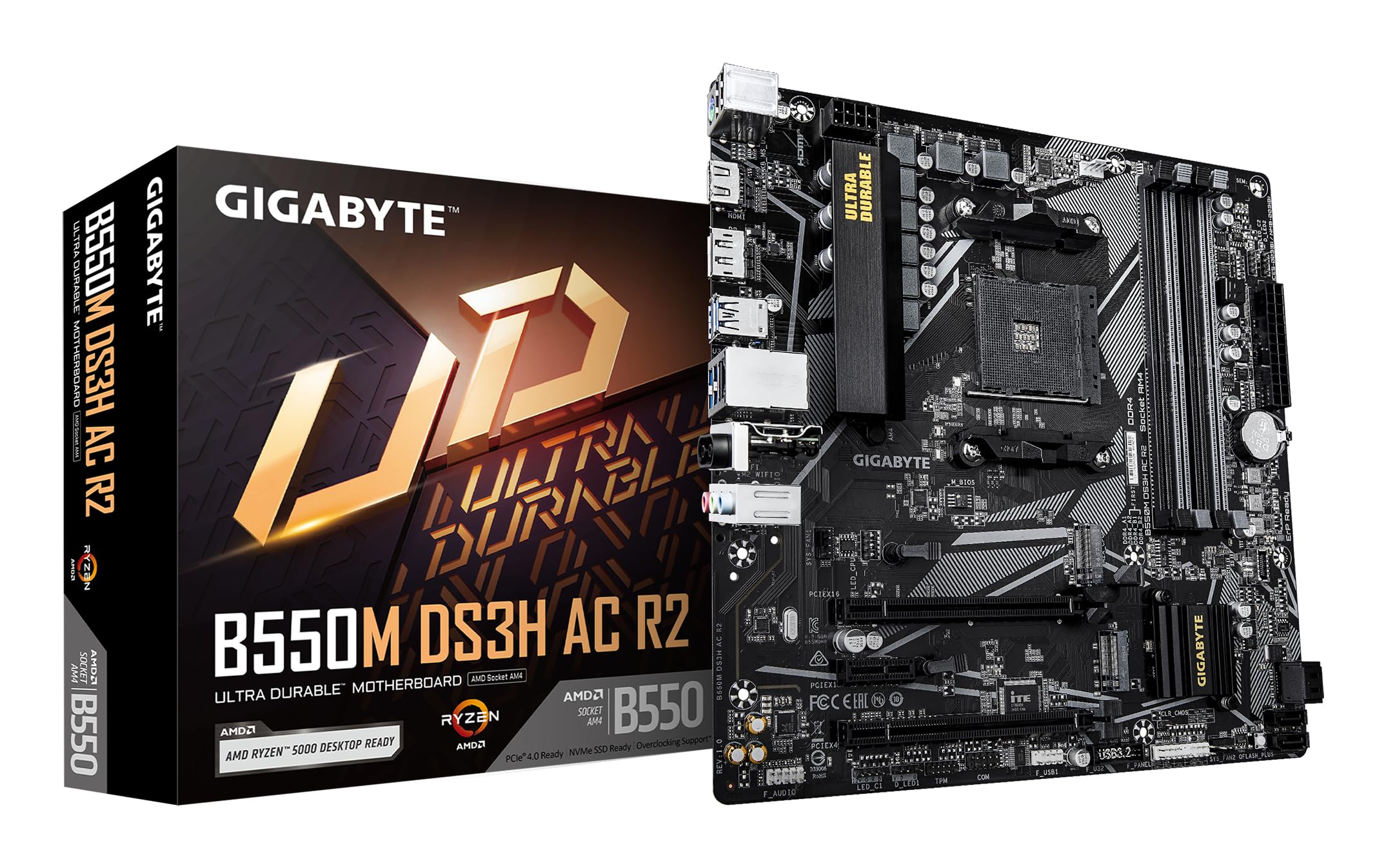
Rysunek 1.1: Widok z góry na dół view of the GIGABYTE B550M DS3H AC R2 Motherboard, showcasing its layout including the CPU socket, DIMM slots, and various connectors.
2. Główne cechy
- Chipset AMD B550: Supports AMD Ryzen 5000, 4000, and 3000 series CPUs with AM4 socket.
- High-Speed DDR4 Memory: Dual-channel support for up to 4733MHz (O.C.) across 4 DIMM slots.
- Advanced Storage Options: Includes one PCIe 4.0 M.2 slot and one PCIe 3.0 M.2 slot, alongside PCIe slots for graphics and expansion.
- Zintegrowana łączność: Features Wi-Fi 5, Bluetooth 5.0, and 1GbE LAN for reliable network connections.
- Flexible Display Outputs: Equipped with HDMI and DisplayPort for multi-monitor configurations.
- Inteligentny system chłodzenia: Smart Fan 6 with multiple temperature sensors ensures efficient thermal management.
- Q-Flash Plus: Allows BIOS updates without the need for CPU, memory, or graphics card installation.
3. Konfiguracja i instalacja
3.1 Instalacja procesora
- Upewnij się, że dźwignia gniazda procesora jest w pozycji otwartej.
- Carefully align the triangular mark on the AMD Ryzen CPU with the mark on the AM4 socket.
- Ostrożnie umieść procesor w gnieździe, nie używając siły.
- Opuść dźwignię, aby zabezpieczyć procesor na miejscu.
- Zainstaluj chłodzenie procesora zgodnie z instrukcją producenta.
3.2 Instalacja pamięci (RAM)
- Otwórz zaciski na obu końcach gniazd DIMM.
- Dopasuj wycięcie na module pamięci DDR4 do wypustki w gnieździe DIMM.
- Insert the memory module firmly until the clips snap into place. For dual-channel operation, refer to the motherboard manual for recommended slot configurations.
3.3 Instalacja urządzenia pamięci masowej
This motherboard supports both M.2 NVMe SSDs and SATA drives.
- Dysk SSD M.2: Locate the M.2 slots (one PCIe 4.0, one PCIe 3.0). Insert the M.2 SSD at an angle and secure it with the provided screw.
- Dyski SATA: Podłącz kable danych SATA z dysków SSD/HDD do portów SATA na płycie głównej. Podłącz kable zasilania z zasilacza do dysków.
3.4 Instalacja karty rozszerzeń
Install your graphics card or other PCIe expansion cards into the appropriate PCIe slots. Ensure they are seated firmly and secured with the case screw.
3.5 Połączenia zasilania
- Podłącz 24-pinowe złącze zasilania ATX zasilacza do płyty głównej.
- Podłącz 8-pinowe złącze zasilania procesora ATX 12V do płyty głównej.
3.6 Rear I/O Panel Overview

Figure 3.1: The rear I/O panel of the GIGABYTE B550M DS3H AC R2 motherboard, showing various ports including USB, HDMI, DisplayPort, LAN, and audio jacks.
The rear I/O panel provides connectivity for external devices. It includes USB 2.0, USB 3.2 Gen 1, HDMI, DisplayPort, 1GbE LAN, Wi-Fi antenna connectors, and audio jacks. Refer to the detailed diagram in the physical manual for specific port identification.
4. Instrukcja obsługi
4.1 Konfiguracja BIOS
The BIOS (Basic Input/Output System) is firmware that initializes hardware during the booting process. To enter BIOS Setup, press the USUNĄĆ key during the Power-On Self-Test (POST). Here you can configure system settings, boot order, and monitor hardware status.
4.2 Q-Flash Plus
Q-Flash Plus umożliwia aktualizację BIOS-u bez instalowania procesora, pamięci ani karty graficznej. Wystarczy pobrać najnowszą wersję BIOS-u. file z GIGABYTE website, zmień jego nazwę na GIGABYTE.bin, zapisz na pendrive i podłącz go do portu USB Q-Flash Plus. Naciśnij przycisk Q-Flash Plus, aby rozpocząć aktualizację.
4.3 Instalacja sterownika
After installing your operating system, install the necessary drivers for the motherboard chipset, audio, LAN, Wi-Fi, and other integrated components. These drivers are typically provided on a support DVD or can be downloaded from the official GIGABYTE webstrona.
5. Konserwacja
5.1 Czyszczenie
Regularly clean your computer's interior to prevent dust buildup, which can lead to overheating and reduced performance. Use compressed air to remove dust from components, especially heatsinks and fans. Ensure the system is powered off and unplugged before cleaning.
5.2 Aktualizacje BIOS-u
Okresowo sprawdzaj GIGABYTE website for BIOS updates. Updates can improve system stability, add support for new hardware, or fix known issues. Follow the instructions provided by GIGABYTE carefully when performing a BIOS update.
5.3 Inteligentny wentylator 6
Utilize the Smart Fan 6 utility in the BIOS or GIGABYTE's software to monitor system temperatures and adjust fan speeds. Proper fan configuration helps maintain optimal operating temperatures and extends component lifespan.
6. Rozwiązywanie Problemów
- System nie uruchamia się: Check all power connections (24-pin ATX, 8-pin CPU), ensure RAM modules are properly seated, and verify the CPU is correctly installed. Try clearing the CMOS.
- Brak wyjścia wyświetlacza: Confirm the graphics card is fully seated in its PCIe slot and connected to power (if required). Ensure your monitor cable is connected to the graphics card, not the motherboard's integrated graphics ports (unless using an APU).
- Problemy z urządzeniami peryferyjnymi: If USB devices or other peripherals are not working, ensure drivers are installed and check BIOS settings for port enablement.
- Niestabilność/awarie systemu: This can be caused by outdated drivers, overheating, or faulty hardware. Update drivers, monitor temperatures, and test components individually if possible.
- Błąd aktualizacji BIOS-u: If a BIOS update fails, use the Q-Flash Plus feature to recover the BIOS.
7. Specyfikacje
| Funkcja | Specyfikacja |
|---|---|
| Marka | GIGABAJT |
| Nazwa modelu | B550M DS3H AC-R2 |
| Gniazdo procesora | Gniazdo AM4 |
| Kompatybilne procesory | Seria AMD Ryzen 3000, Seria AMD Ryzen 4000, Seria AMD Ryzen 5000 |
| Typ chipsetu | Procesor AMD B550 |
| Technologia pamięci RAM | DDR4 |
| Prędkość zegara pamięci | Do 4733 MHz (OC) |
| Dostępne gniazda pamięci | 4 |
| Maksymalny rozmiar pamięci RAM | 128 GB |
| Interfejs karty graficznej | PCI Express 4.0 |
| Total PCIe Ports | 1 (PCIe 4.0 x16 for GPU) + other PCIe slots |
| Gniazda M.2 | 1x PCIe 4.0 M.2, 1x PCIe 3.0 M.2 |
| Total SATA Ports | 4 |
| Łączność bezprzewodowa | Wi-Fi 5, Bluetooth 5.0 |
| Sieć lokalna | Sieć LAN 1 GbE |
| Łączna liczba portów USB | 6 (Rear I/O) + Internal Headers |
| Wyświetl wyjścia | 1x HDMI, 1x DisplayPort |
| Współczynnik kształtu | Mikro ATX |
| Wymiary przedmiotu Dł. x Szer. x Wys. | 24.4L x 24.4W x 3.5H centymetrów |
| Waga przedmiotu | 980 gram |
8. Informacje o gwarancji
The GIGABYTE B550M DS3H AC R2 motherboard comes with a 3-YEAR Manufacturer Warranty. Zachowaj dowód zakupu na wypadek roszczeń gwarancyjnych. Szczegółowe warunki gwarancji znajdziesz w oficjalnej polityce gwarancyjnej GIGABYTE dostępnej na ich stronie. webstrona.
9. Wsparcie i kontakt
Aby uzyskać pomoc techniczną, pobrać sterowniki, zaktualizować BIOS i uzyskać więcej informacji o produkcie, odwiedź oficjalną stronę internetową GIGABYTE website. You can also contact GIGABYTE customer service for assistance.
Dane kontaktowe producenta:
GIGABYTE Technology (India) Pvt. Ltd.
Unit No. 807 & 808, 8th Floor, Naman Midtown B-Wing,
Elphinstone Road, Mumbai – 400013, India
For the most up-to-date contact details and support resources, please refer to the GIGABYTE official webstrona: www.gigabyte.com