
1. Koniec produktuview
The Teslong Two-Way Articulating Borescope is a versatile inspection camera designed for detailed visual examination in hard-to-reach areas. It features a flexible probe with a camera tip that can articulate up to 210° in two directions, providing comprehensive viewing angles. The device connects directly to compatible USB-C mobile devices (iPhone 15/16, USB-C iPads, Android 8.0+ phones with OTG) for real-time viewing and recording via a dedicated app. Equipped with 1.0MP 1080p resolution and 8 adjustable LED lights, it delivers clear imaging in various environments. The 5-foot semi-rigid gooseneck cable offers both flexibility and stability for precise positioning. This tool is suitable for home repair, automotive diagnostics, HVAC, plumbing, and other professional or DIY inspection tasks.
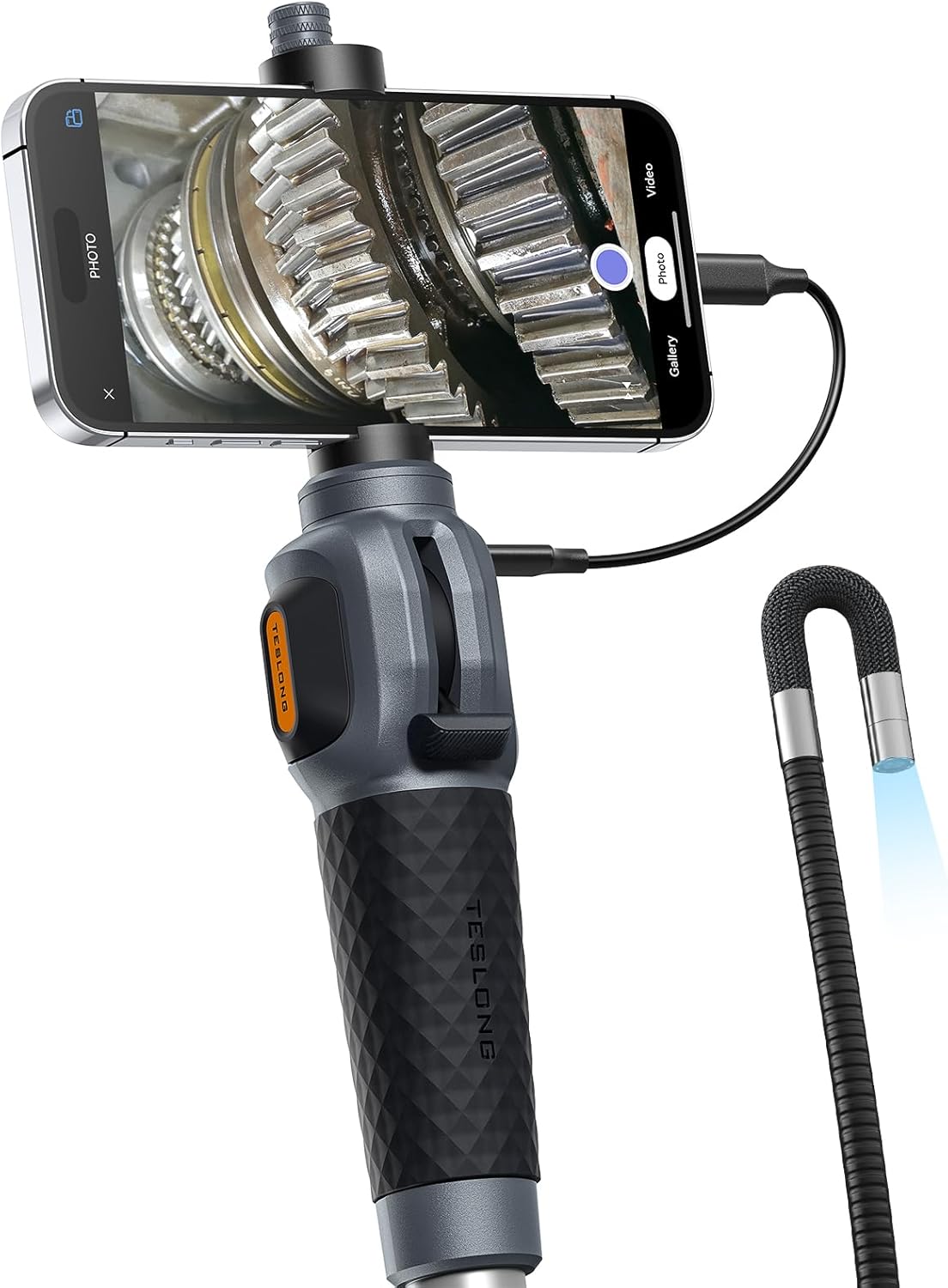
Figure 1: Teslong Two-Way Articulating Borescope connected to a smartphone.
Video 1: Official product demonstration of the Teslong USB-C Two-Way Articulating Borescope with Light, showcasinze względu na jego funkcjonalność i łatwość użytkowania.
2. Przewodnik konfiguracji
2.1 Kompatybilność urządzenia
The Teslong Two-Way Articulating Borescope is designed for direct connection to USB-C mobile devices. Ensure your device meets the following requirements:
- iPhone'a: iPhone 15/16 series and above.
- iPad: USB-C enabled iPad models.
- Android: Android 8.0+ phones with OTG (On-The-Go) functionality enabled.
Important: This device is NOT compatible with Lightning port-based iPhones/iPads, Windows PCs, or MacBooks.

Figure 2: Visual guide to USB-C device compatibility for the borescope.
2.2 Instalacja aplikacji
- Pobierz aplikację: Szukaj "Smart Endoscope" by Grus IoT in your device's app store (App Store for iOS, Google Play Store for Android) or scan the QR code provided in the product packaging.
- Zainstalować: Aby zainstalować aplikację, postępuj zgodnie z instrukcjami wyświetlanymi na ekranie.

Figure 3: Step-by-step guide for app download and initial connection. For direct download, visit gto.so/smart-endoscope.
2.3 Connecting the Borescope
- Zamontuj telefon: Securely place your USB-C compatible smartphone into the adjustable phone holder on the borescope handle.
- Kabel połączeniowy: Use the provided USB-C adapter cable to connect the borescope handle to your smartphone's USB-C port.
- Uruchom aplikację: Open the "Smart Endoscope" app.
- Udziel uprawnień: If prompted, allow the app to access your device's camera and storage. Select "TD300" from the app's device list to establish the connection.

Figure 4: The borescope handle with a smartphone mounted and connected via USB-C, ready for use.
3. Instrukcja obsługi
3.1 Articulating Probe Control
The borescope features a two-way articulating probe that allows for precise navigation and viewing. Use the joystick on the handle to control the direction of the camera tip. The tip can bend up to 210° in two directions, enabling inspection around corners and in confined spaces.

Figure 5: Illustration of the borescope's 2-way articulation capability, allowing the probe tip to bend up to 210 degrees for comprehensive inspection.

Figure 6: The articulating probe navigating within a confined space, demonstrating its flexibility.
3.2 Regulowane oświetlenie
The camera tip is equipped with 8 brightness-adjustable LED lights to illuminate dark inspection areas. To adjust the brightness, long-press the shutter button on the handle. This action cycles through three brightness levels and an off state.

Figure 7: The borescope's camera tip showing the 8 adjustable LED lights and the IP67 waterproof rating.
3.3 Robienie zdjęć i nagrywanie wideo
Once the borescope is connected and the app is running, you can capture high-definition photos and videos directly to your connected smartphone. Press the photo button on the handle to take a still image. Use the video recording function within the app to capture live footage.

Figure 8: User operating the borescope, with the smartphone displaying a clear image from the camera tip.
3.4 Zastosowania
The Teslong borescope is suitable for a variety of inspection tasks:
- Naprawa samochodów: Inspect engine cylinders, fuel tanks, and other vehicle components for wear, damage, or blockages.
- Przegląd klimatyzacji: Examine evaporators, condensers, and ducts for refrigerant leaks or dust buildup.
- Kontrola ściany: Check behind walls for wiring, plumbing, pests, or structural issues without invasive procedures.
- Konserwacja domu: Troubleshoot plumbing clogs, inspect HVAC systems, or locate lost items in inaccessible areas.

Figure 9: Borescope in use for automotive engine inspection.

Figure 10: Borescope in use for air conditioning system inspection.

Figure 11: Borescope in use for inspecting pipes and drainage systems.
4. Konserwacja
4.1 Czyszczenie sondy
The borescope probe is IP67 waterproof, allowing it to be used in wet environments. After use, especially in dirty or oily conditions, gently wipe the camera lens and probe with a soft, damp cloth. Avoid using abrasive cleaners or solvents that could damage the lens or cable material.

Figure 12: The borescope's waterproof camera tip in a wet environment.
4.2 Przechowywanie
Store the borescope in a clean, dry place away from extreme temperatures and direct sunlight. Ensure the probe is coiled loosely to prevent kinking or damage to the internal wiring.
4.3 Akcesoria
The borescope includes useful accessories such as a magnet and a hook, which can be attached to the camera tip for retrieving small metallic objects or navigating obstacles.

Figure 13: The magnet and hook accessories for the borescope, useful for various tasks.
5. Rozwiązywanie Problemów
| Problem | Możliwa przyczyna | Rozwiązanie |
|---|---|---|
| Brak obrazu na ekranie / Urządzenie nie zostało rozpoznane. |
|
|
| Image is dark or unclear. |
|
|
| Artykulacja sondy jest sztywna lub nie reaguje. |
|
|
6. Specyfikacje produktu
| Funkcja | Szczegół |
|---|---|
| Numer modelu | TD300-8.5mm-1.5m |
| Średnica sondy | 8.5 mm (0.33 cali) |
| Długość sondy | 5 stóp (1.5 metrów) |
| Kąt artykulacji | Up to 210° (Two-Way) |
| Rozdzielczość kamery | 1.0 Megapixel (1080p HD) |
| Głębia ostrości | 0.60 - 4.0 cali |
| Oświetlenie | 8 regulowanych świateł LED |
| Stopień wodoodporności | IP67 (sonda) |
| Łączność | Bezpośrednie połączenie USB-C |
| Kompatybilne urządzenia | iPhone 15/16 series, USB-C iPads, Android 8.0+ with OTG |
| Waga przedmiotu | 1.98 funta |
| Kolor | Czarny |
7. Gwarancja i wsparcie
7.1 Informacje o gwarancji
Teslong products are designed for durability and performance. For specific warranty details, please refer to the warranty card included with your product or visit the official Teslong webZachowaj paragon jako dowód zakupu na wypadek ewentualnych roszczeń gwarancyjnych.
7.2 Obsługa klienta
If you encounter any issues or have questions regarding your Teslong Two-Way Articulating Borescope, please contact Teslong customer support. You can find contact information on the official Teslong webna stronie internetowej lub za pośrednictwem sprzedawcy, u którego zakupiłeś produkt.
Aby uzyskać więcej informacji i zasobów, odwiedź stronę Sklep Teslong na Amazonie.