
1. Wprowadzenie
Thank you for choosing the UNITOPSCI 7086W Double Din Car Stereo. This advanced multimedia system is designed to enhance your driving experience with its 6.9-inch IPS touchscreen, wireless Apple CarPlay, Android Auto, Bluetooth 5.2, and a range of connectivity options. This manual provides essential information for installation, operation, and maintenance to ensure optimal performance and safety.

Image 1.1: UNITOPSCI 7086W Double Din Car Stereo and accessories.
2. Informacje dotyczące bezpieczeństwa
- Always consult a professional for installation to prevent damage to the unit or your vehicle.
- Nie używaj urządzenia w sposób rozpraszający Cię podczas jazdy. Zawsze priorytetowo traktuj bezpieczeństwo na drodze.
- Upewnij się, że wszystkie przewody są prawidłowo podłączone, aby uniknąć zwarć i zagrożeń elektrycznych.
- Trzymaj urządzenie z dala od wody i nadmiernej wilgoci.
- Nie próbuj samodzielnie naprawiać urządzenia. Skontaktuj się z wykwalifikowanym personelem serwisowym.
- Używaj wyłącznie wskazanego zasilacza (DC 12V).
3. Zawartość opakowania
Sprawdź, czy w opakowaniu znajdują się wszystkie elementy:
- 1 x Car MP5 Player (UNITOPSCI 7086W)
- 1 x kabel zasilający
- 1 x kabel głośnikowy
- 1 x Mikrofon (MIC)
- 1 x Steering Wheel Control (Battery Not Included)
- 1 x Instrukcja obsługi
- 1 x D-BUS Cable
- 1 x kamera cofania
- 1 x Remote Control (Battery Not Included)
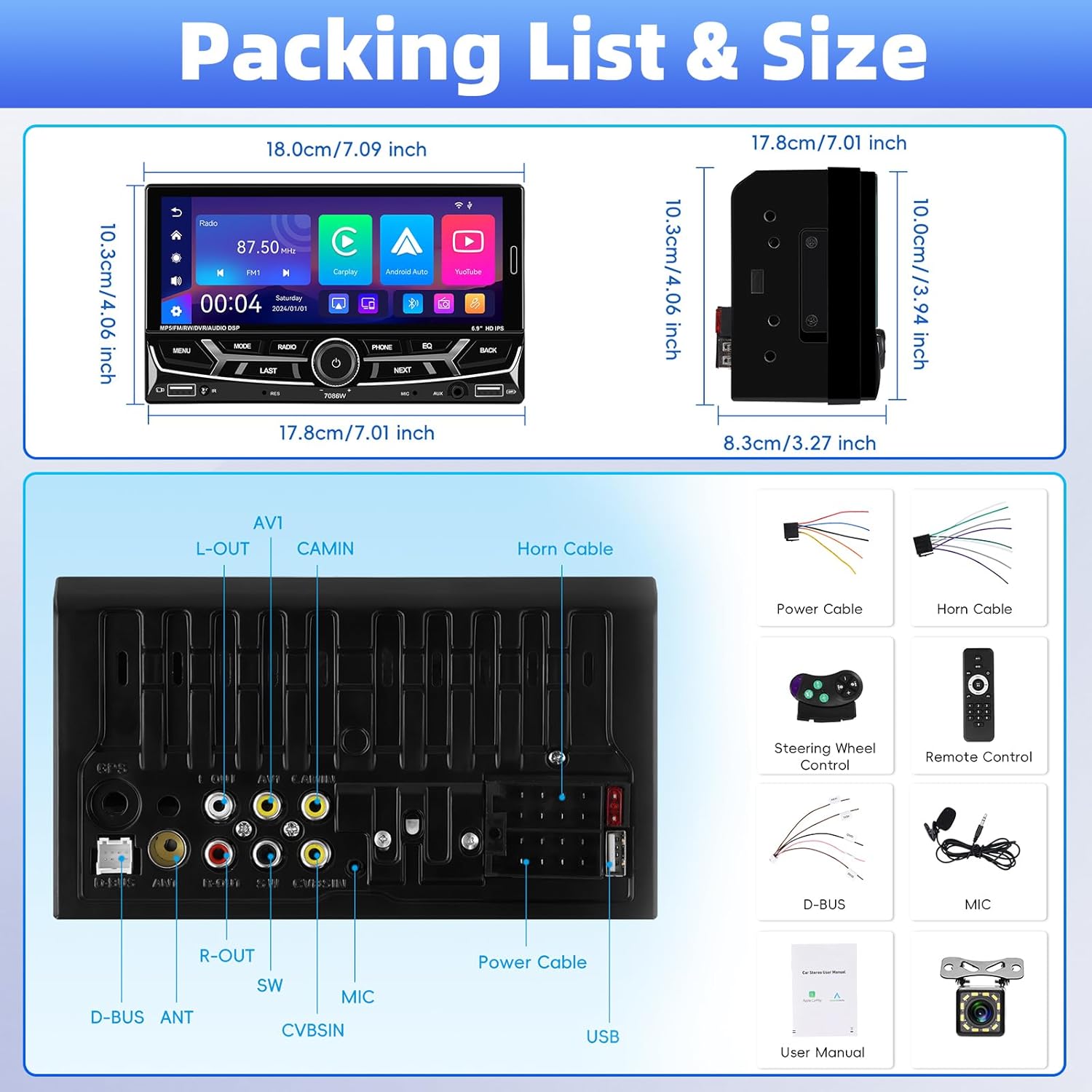
Rysunek 3.1: Szczegółowy view of package contents and wiring diagram.
4. Specyfikacje
| Funkcja | Specyfikacja |
|---|---|
| Model | 7086 W |
| Materiał ekranu | IPS |
| Tomtage | Prąd stały 12 V |
| Układ CPU | 2900 |
| Rozmiar ekranu | 6.9 cali |
| Rozdzielczość ekranu | 1280*480 |
| Link lustrzany | Support (iOS up to 13.4, Android up to 10.1) |
| Pasmo radiowe | FM / AM / RDS |
| Układ radiowy | QN8035 |
| Moc wyjściowa | 45W*4 (Max 180 Watts) |
| Temperatura pracy | -10~60℃ |
| Wersja Bluetooth | 5.2 |
| Kolorowe podświetlenie | Wsparcie (7 kolorów) |
| Wejście odwrotne | AHD720/CVBS |
| Moc Ampukład scalony | TDA7388 |
| Częstotliwość radiowa | FM: 87.5-108MHz, AM: 530-1710KHz |
| Format audio | MP3 / WMA / WAV / APE / FLAC |
| Format wideo | RM/RMVB/AVI/MP4/MKV/3GP |
| Format obrazu | JPG BMP PNG |
| Wymiary produktu | 4.37 x 7 x 4.01 cala |
| Waga przedmiotu | 2.64 funta |
5. Konfiguracja i instalacja
Proper installation is crucial for the performance and safety of your car stereo. It is highly recommended to have the unit installed by a qualified professional.
5.1 połączeń przewodów
Refer to the detailed wiring diagram provided in Image 3.1 (Packing List & Size) and the included user manual for specific connection points. Key connections include:
- Przewód zasilający: Podłącz do źródła zasilania pojazdu (stałe 12 V, dodatkowe 12 V i uziemienie).
- Kabel głośnikowy: Podłącz do głośników w samochodzie. Upewnij się, że polaryzacja jest prawidłowa.
- Backup Camera Input (CVBSIN): Connect the included backup camera for automatic rear view wyświetlacz.
- Mikrofon (MIC): Connect the external microphone for improved hands-free calling.
- Sterowanie z kierownicy (SWC): Connect to your vehicle's steering wheel control wires for integrated control.
- Porty USB: Two USB ports are available for media playback, charging, and DVR input.
- Wejście AUX: Do podłączania zewnętrznych urządzeń audio.
Aby zapobiec zwarciom, należy upewnić się, że wszystkie połączenia są solidne i zaizolowane.
6. Instrukcja obsługi
6.1 Włączanie/wyłączanie zasilania i podstawowe sterowanie
The unit powers on automatically with the vehicle's ignition. Use the physical knob and buttons on the front panel for basic operations like volume control, mode selection, and track skipping.
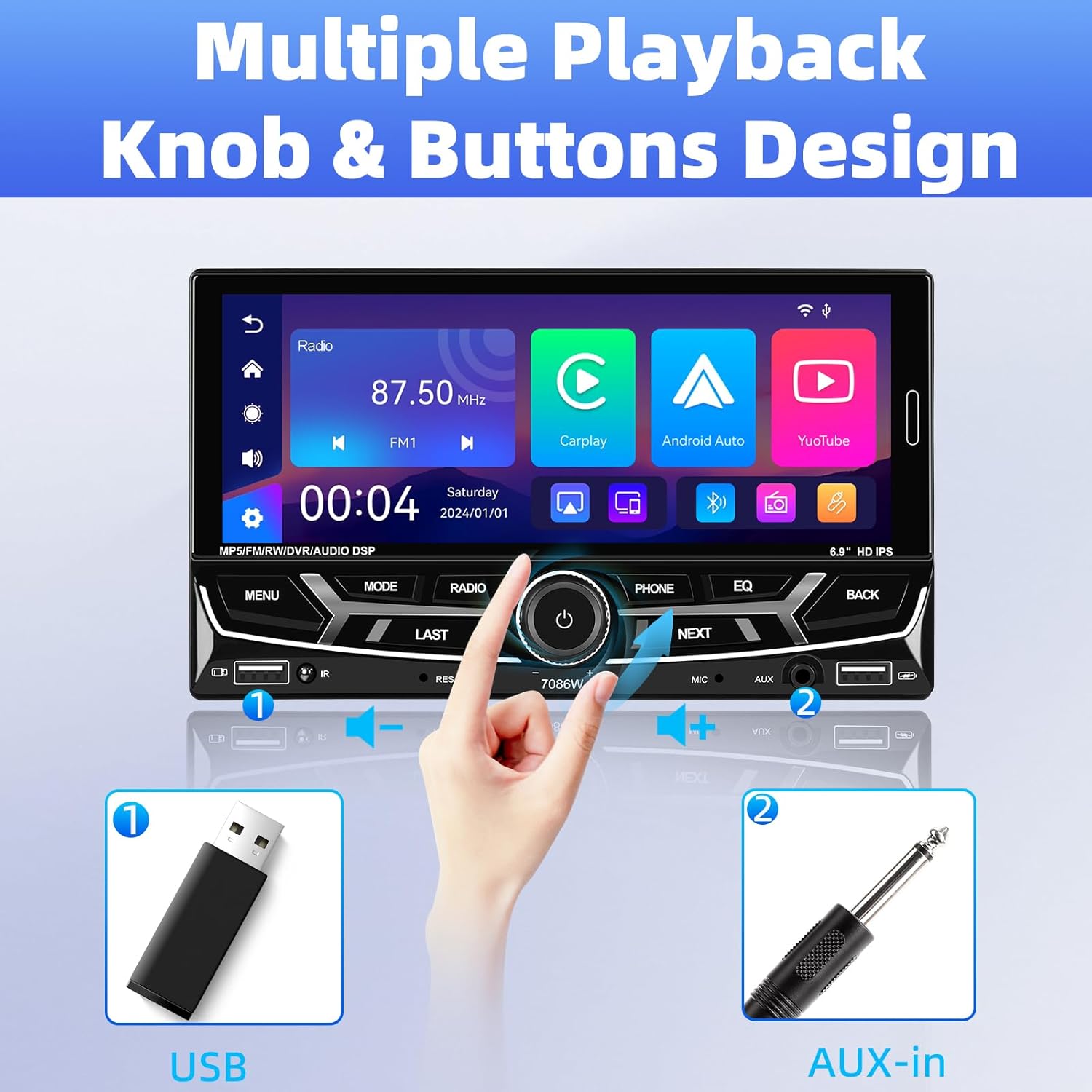
Image 6.1: Front panel controls and connectivity options.
6.2 Bezprzewodowy Apple CarPlay i Android Auto
Connect your smartphone wirelessly via Bluetooth to access Apple CarPlay or Android Auto. This allows you to use navigation, make calls, send messages, and listen to music directly from your phone's interface displayed on the stereo screen.
- Upewnij się, że Bluetooth jest włączony w Twoim smartfonie.
- On the car stereo, navigate to the Bluetooth settings and pair with your phone.
- Once paired, select the CarPlay or Android Auto icon on the stereo's main menu.
- Follow any on-screen prompts on your phone to grant necessary permissions.

Ilustracja 6.2: Bezprzewodowe interfejsy Apple CarPlay i Android Auto.
6.3 Bluetooth 5.2 Hands-free Calling and Audio Streaming
The built-in Bluetooth 5.2 module allows for stable hands-free calling and high-quality audio streaming.
- Łączenie w pary: Go to the Bluetooth menu on the stereo, search for your phone, and pair.
- Połączenia w trybie głośnomówiącym: Once paired, you can dial numbers, answer, or end calls directly from the stereo's touchscreen or via voice commands (e.g., Siri). The external microphone ensures clear communication.
- Strumieniowe przesyłanie dźwięku: Odtwarzaj muzykę z telefonu przez głośniki samochodu za pośrednictwem technologii Bluetooth.

Image 6.3: Bluetooth 5.2 hands-free and audio features.
6.4 Funkcja łącza lustrzanego
The Mirror Link function allows you to display your smartphone's screen directly onto the car stereo. This is compatible with iOS devices up to version 13.4 and Android devices up to version 10.1.
- Connect your smartphone to the stereo via a USB cable.
- Select the 'Mirror Link' option on the stereo.
- Postępuj zgodnie z instrukcjami wyświetlanymi na ekranie, aby nawiązać połączenie.
Radio 6.5 FM/AM/RDS
Access local radio stations with the built-in FM/AM/RDS tuner.
- Strojenie: Za pomocą ekranu dotykowego możesz skanować stacje lub ręcznie dostroić się do określonej częstotliwości.
- Zaprogramowane stacje: Save up to 30 of your favorite stations for quick access.
- RDS (system danych radiowych): Displays station information such as song title or program type where available.
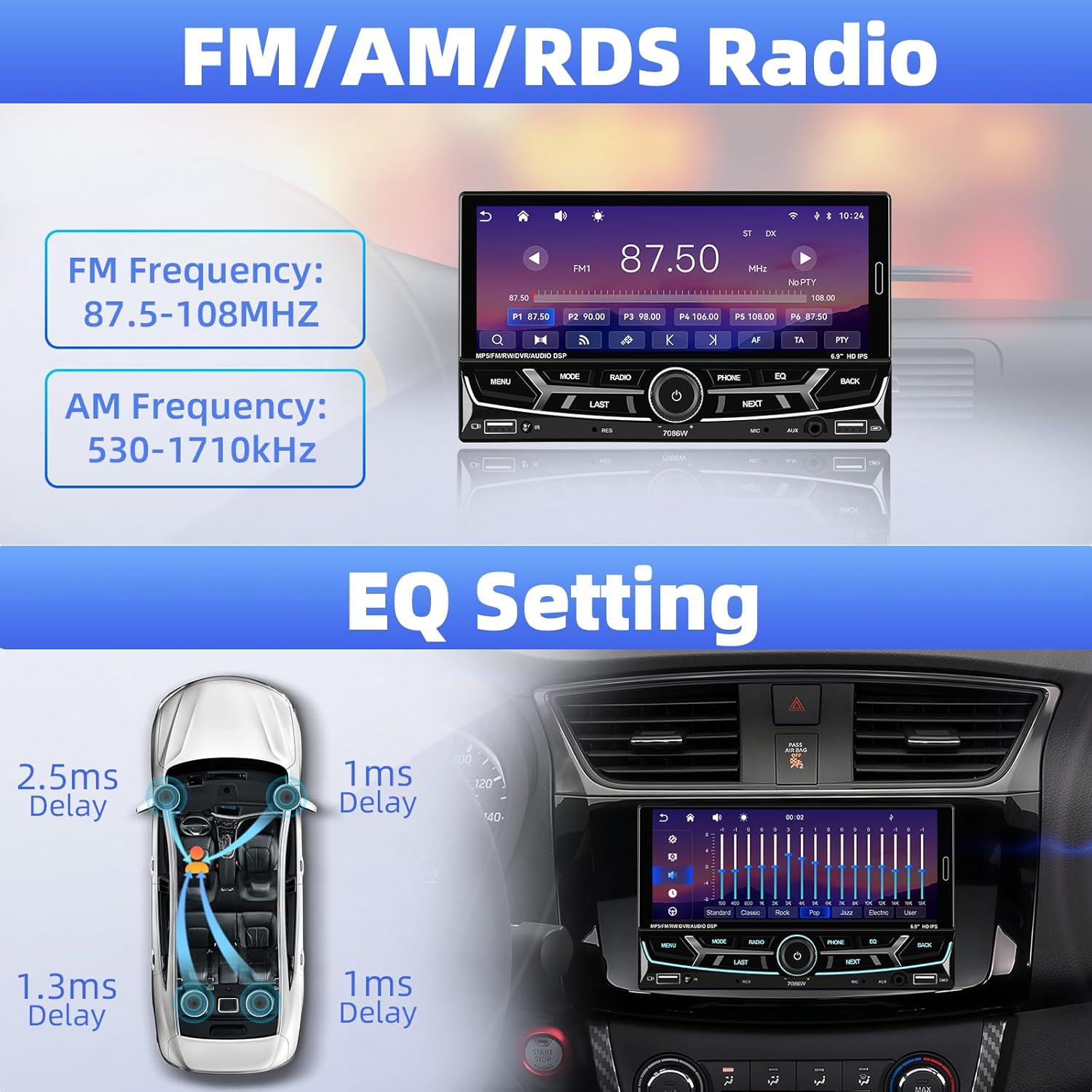
Image 6.4: FM/AM/RDS Radio interface and EQ settings.
6.6 DSP/EQ Audio Setting
Customize your audio experience with the Digital Sound Processor (DSP) and Equalizer (EQ) settings. Choose from preset sound styles like Pop, Rock, Classic, Jazz, or create your own custom profile.
6.7 USB Playback and Charging / Auxiliary Audio Input
- USB: Insert a USB drive into one of the USB ports for media playback (audio/video/pictures) or to charge your devices.
- AUX: Connect external audio devices (e.g., MP3 players) to the 3.5mm AUX input on the front panel.
6.8 Tył View Kamera
When the vehicle is shifted into reverse gear, the stereo automatically displays the feed from the connected backup camera. The included camera features 12 LEDs, a 170° wide angle, and night vision for clear visibility, along with parking guidelines.

Obraz 6.5: Tył view camera display and features.
6.9 Sterowanie z kierownicy (SWC)
If your vehicle supports steering wheel controls, connect the SWC wires to the stereo. This allows you to control functions like volume, track skipping, and mode switching directly from your steering wheel for convenience and safety.
Rysunek 6.6: Funkcjonalność sterowania z kierownicy.
6.10 6.9-Inch IPS Touchscreen and 7-Color Backlight Display
The high-definition IPS touchscreen offers clear visuals and responsive touch control. You can customize the backlight color of the physical buttons to match your vehicle's interior or personal preference, choosing from 7 available colors.

Image 6.7: IPS Touchscreen and 7-color backlight display.
7. Konserwacja
- Czyszczenie ekranu: Delikatnie przetrzyj ekran dotykowy miękką, niepozostawiającą włókien ściereczką. Nie używaj środków czyszczących ani rozpuszczalników o działaniu ściernym.
- Ogólne sprzątanie: Utrzymuj urządzenie w czystości, bez kurzu i zanieczyszczeń. Do czyszczenia zewnętrznej części używaj miękkiej, suchej ściereczki.
- Unikaj ekstremalnych temperatur: Nie wystawiaj urządzenia na długotrwałe, bezpośrednie działanie promieni słonecznych lub ekstremalnie niskie temperatury, ponieważ może to wpłynąć na wydajność i żywotność urządzenia.
8. Rozwiązywanie Problemów
| Problem | Możliwa przyczyna | Rozwiązanie |
|---|---|---|
| Brak zasilania | Nieprawidłowe okablowanie; przepalony bezpiecznik | Sprawdź połączenia kabla zasilającego. W razie potrzeby sprawdź i wymień bezpiecznik. |
| Brak dźwięku | Speaker wires disconnected; Volume too low; Incorrect audio source | Verify speaker connections; Increase volume; Select correct audio input. |
| Bluetooth nie łączy się | Bluetooth off on phone/stereo; Incorrect pairing process | Ensure Bluetooth is active on both devices; Re-attempt pairing process. |
| CarPlay/Android Auto nie uruchamia się | Phone not compatible; Incorrect connection; App issues | Check phone compatibility; Ensure proper Bluetooth connection; Restart phone and stereo. |
| Kamera cofania nie jest wyświetlana | Camera wiring incorrect; Reverse trigger wire not connected | Check camera power and video signal cables; Ensure reverse trigger wire is connected to vehicle's reverse light. |
| Sterowanie z kierownicy nie działa | SWC wires not connected; Incorrect configuration | Verify SWC wiring; Refer to vehicle-specific instructions for SWC setup. |
Jeśli problem nadal występuje, skontaktuj się z obsługą klienta.
9. Gwarancja i wsparcie
UNITOPSCI is committed to providing high-quality products and customer satisfaction.
- Wymiana: Możliwość wymiany w ciągu 24 miesięcy od daty zakupu.
- Zwroty: 60-day no-worry return policy.
- Wsparcie techniczne: Dożywotnie konsultacje posprzedażowe i wsparcie techniczne.
- Czas reakcji: Szybka odpowiedź na zapytania w ciągu 16 godzin.
Jeśli potrzebujesz wsparcia, skontaktuj się z nami pod adresem: UNITOPSCI@126.com


