
1. Wprowadzenie
Welcome to the user manual for your new FLEXISPOT 63x28 Inch Dual Motor Electric Standing Desk. This manual provides essential information for the safe assembly, operation, maintenance, and troubleshooting of your desk. Please read it thoroughly before use and retain it for future reference.
2. Instrukcje bezpieczeństwa
- Przed montażem upewnij się, że wszystkie elementy są kompletne i nieuszkodzone. Nie używaj, jeśli brakuje którejkolwiek części lub jest ona uszkodzona.
- Aby zapobiec obrażeniom, podczas pracy biurka należy trzymać dzieci i zwierzęta z dala od niego.
- Do not place hands or other body parts near moving parts of the desk during height adjustment.
- Ensure the desk is placed on a level surface to prevent tipping.
- Nie przeciążaj biurka. Zapoznaj się ze specyfikacją, aby poznać maksymalny udźwig.
- Keep all electrical cords organized and away from moving parts to prevent damage or entanglement.
- Przed czyszczeniem lub jakąkolwiek konserwacją należy odłączyć biurko od gniazdka elektrycznego.
- Only use the desk for its intended purpose as a workstation.
3. Zawartość opakowania
Sprawdź, czy w przesyłce znajdują się wszystkie elementy wymienione poniżej:
- Desktop Surface (Black)
- Desk Frame (Black, including dual motors and lifting columns)
- Control Panel with Memory Controller
- Zasilacz i kabel
- Sprzęt montażowy (śruby, narzędzia itp.)
- Instrukcja obsługi

Obraz: Ponadview of the FLEXISPOT 63x28 Inch Dual Motor Electric Standing Desk, showing the desktop, frame, and control panel.
4. Instrukcje konfiguracji
4.1 Rozpakowanie
Carefully remove all components from the packaging. Place them on a soft, clean surface to prevent scratches or damage during assembly. Keep all packaging materials until assembly is complete and you are satisfied with the product.
4.2 Montaż ramy
Follow the detailed diagrams provided in the separate assembly guide to connect the lifting columns to the crossbar and attach the footings. Ensure all screws are tightened securely.
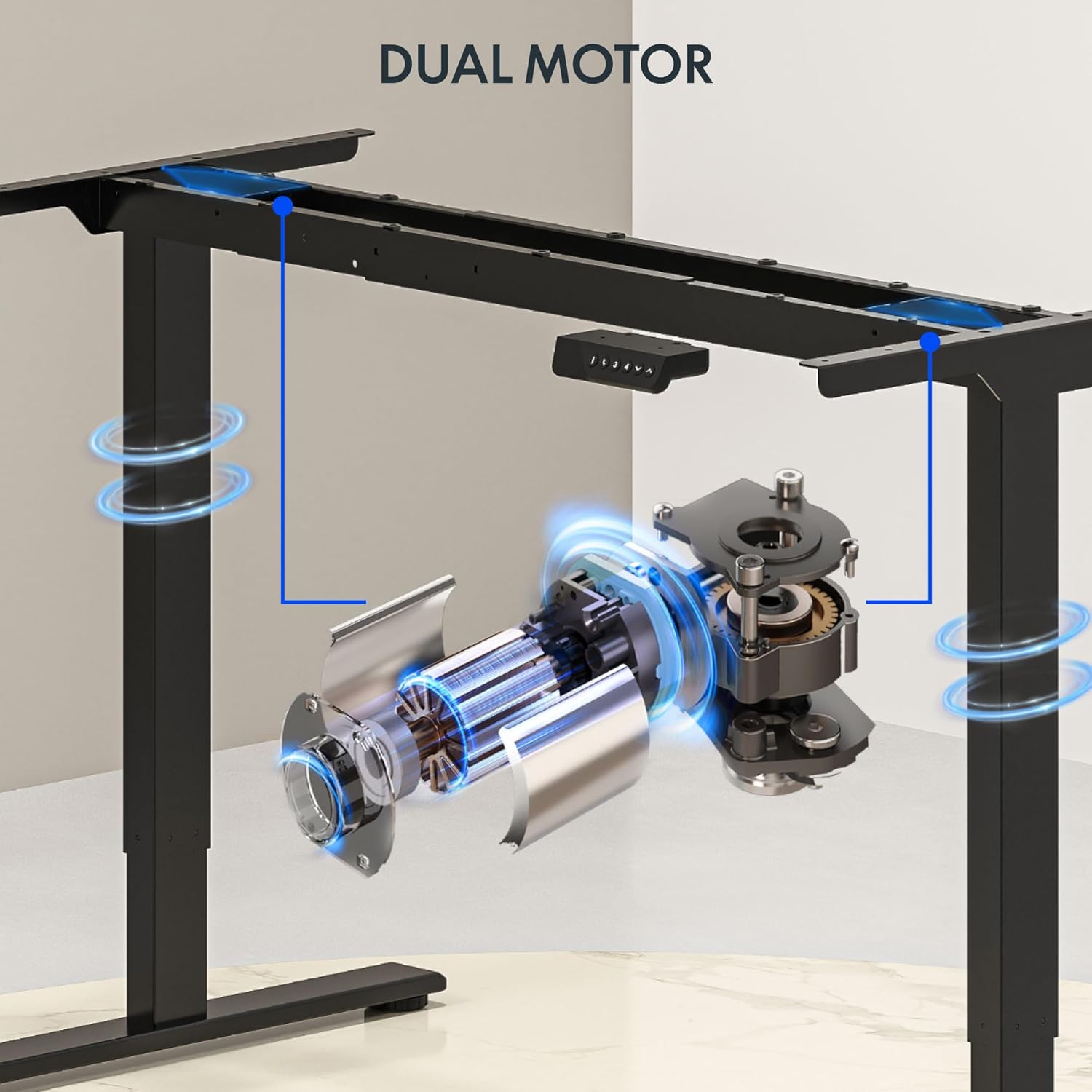
Obraz: Szczegółowy view of the dual motor desk frame, illustrating the motor placement and structural components.
4.3 Attaching the Desktop
Carefully place the desktop upside down on a soft surface. Align the assembled frame with the pre-drilled holes on the desktop. Secure the desktop to the frame using the provided screws. Once secured, carefully flip the desk upright with assistance.
4.4 Podłączanie panelu sterowania i zasilania
Connect the control panel cable to the control box, and then connect the power adapter to the control box. Plug the power cable into a standard electrical outlet. The desk is now ready for initial operation.

Image: Close-up of the desk's control panel, showing the LED display and buttons for height adjustment and memory presets.
Video: Demonstrates the dual-motor strength and smooth operation of the FLEXISPOT standing desk, highlighting its robust design and functionality.
5. Instrukcja obsługi
5.1 Regulacja wysokości
- Naciśnij W górę (∧) przycisk do podnoszenia biurka.
- Naciśnij W dół (∨) przycisk do obniżania biurka.
- Release the button at your desired height. The LED display will show the current height.
5.2 Korzystanie z ustawień pamięci
The control panel features four memory presets (1, 2, 3, 4) to save and recall your preferred sitting and standing heights.
- Dostosuj wysokość biurka do swoich potrzeb za pomocą przycisków Góra/Dół.
- Naciśnij "M" button (or similar memory set button, indicated by 'i' on some models) once. The display will flash.
- Immediately press one of the number buttons (1, 2, 3, or 4) to save the current height to that preset.
- Aby przywołać zapisaną wysokość, wystarczy nacisnąć odpowiedni przycisk numeryczny (1, 2, 3 lub 4). Biurko automatycznie ustawi się w zapisanej pozycji.

Image: Close-up of the memory controller, highlighting the numbered preset buttons and the up/down controls for precise height adjustments.
5.3 System antykolizyjny
The desk is equipped with an anti-collision system. If the desk encounters an obstacle during height adjustment, it will automatically stop and reverse slightly to prevent damage. This feature enhances safety during operation.
6. Konserwacja
- Czyszczenie: Przetrzyj powierzchnię biurka i ramę miękką szmatką.amp szmatką. Unikaj środków czyszczących o działaniu ściernym i silnych środków chemicznych, które mogłyby uszkodzić wykończenie.
- Kontrola: Regularly check all screws and connections to ensure they are tight. Re-tighten if necessary.
- Zarządzanie kablami: Ensure all cables are neatly organized and not pinched or tangled, especially during height adjustments.
- Przewód zasilający: Sprawdź przewód zasilający pod kątem uszkodzeń. W przypadku uszkodzenia, zaprzestań użytkowania i skontaktuj się z obsługą klienta.
7. Rozwiązywanie Problemów
| Problem | Możliwa przyczyna | Rozwiązanie |
|---|---|---|
| Biurko się nie porusza. | Odłączony kabel zasilający; luźny kabel silnika; przeciążenie. | Check power connection; ensure all cables are securely plugged in; reduce weight on desk. |
| Biurko porusza się nierównomiernie lub wydaje nietypowe dźwięki. | Nierównomierne obciążenie, luźne połączenia, przeszkoda. | Distribute weight evenly; check and tighten all screws; remove any obstructions. |
| Ustawienia wysokości nie działają. | Presets not properly set. | Re-program the memory presets following section 5.2. |
| Częste uruchamianie się systemu antykolizyjnego. | Obstacles in the path of movement; sensitivity setting too high. | Clear the area around the desk; consult the full manual for adjusting anti-collision sensitivity if available. |
If you encounter issues not listed here or if the solutions do not resolve the problem, please contact FLEXISPOT customer support.
8. Specyfikacje
| Funkcja | Szczegół |
|---|---|
| Marka | ELASTYCZNI |
| Model | 63x28 Inch Dual Motor Electric Standing Desk |
| Wymiary pulpitu | 63" szer. x 28" gł. |
| Zakres wysokości | od 28.3" do 47.6" |
| Maksymalna nośność | 198 funtów |
| Typ silnika | Podwójny silnik |
| Panel sterowania | Memory Controller with 4 Presets |
| Materiał na biurko | Engineered Wood (Black Top) |
| Materiał ramy | Alloy Steel (Black Frame) |
| Cechy specjalne | Dual Motor, 198 lbs Heavy-Duty Capacity, Memory Controller, 63"x28" Large Desktop |

Image: Diagram illustrating the dimensions of the FLEXISPOT 63x28 Inch Electric Standing Desk, including height range, width, and depth.
9. Gwarancja i wsparcie
9.1 Ograniczona gwarancja
This FLEXISPOT product comes with a limited warranty against defects in materials and workmanship. The specific terms and duration of the warranty may vary. Please refer to the warranty card included in your package or visit the official FLEXISPOT webStrona zawiera szczegółowe informacje o gwarancji.
The warranty typically covers the desk frame, motors, and control panel under normal use conditions. Damage resulting from misuse, accidents, unauthorized modifications, or improper assembly is not covered.
9.2 Obsługa klienta
For technical assistance, warranty claims, or any questions regarding your FLEXISPOT standing desk, please contact our customer support team:
- Webstrona: www.flexispot.com
- E-mail: support@flexispot.com
- Telefon: (Refer to your product packaging or web(strona z regionalnymi numerami kontaktowymi)
Please have your model number (B0F29ZD4DN) and purchase date ready when contacting support.