
1. Koniecview
The GMAIPOP F800 is a high-performance 3-channel dash camera system designed to provide comprehensive surveillance for your vehicle. It simultaneously records 4K Ultra HD footage from the front, 1080P Full HD from the interior, and 1080P Full HD from the rear. Equipped with a STARVIS sensor, HDR technology, and IR night vision, it ensures clear recordings in various lighting conditions. Integrated 5GHz Wi-Fi allows for easy management via the 'Framefox' mobile application. Key features include a 3.16-inch screen, G-Sensor for incident detection, loop recording, and 24-hour parking monitoring (requires separate hardwired kit).
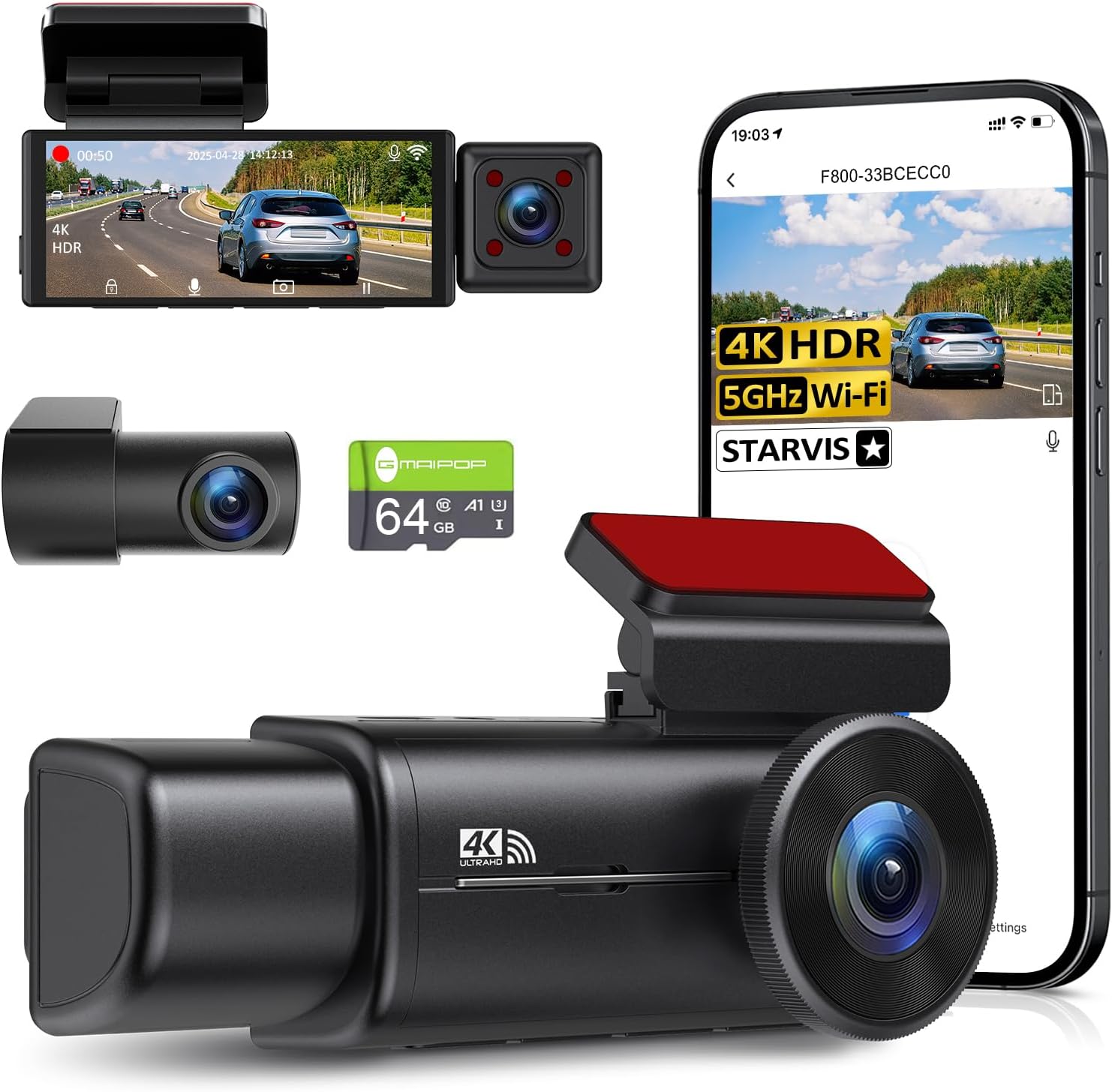
Figure 1.1: GMAIPOP F800 Dash Cam with included accessories and app view.

Figure 1.2: Compact design of the F800 Dash Cam, highlighting its small footprint.
2. Zawartość opakowania
Sprawdź, czy w przesyłce znajdują się wszystkie elementy wymienione poniżej:
- 1 x F800 4K Dash Cam (Front and Inside)
- 1 x 1080P FHD Rear Cam
- 1 x Przyssawka
- 1 x Sticky Mount
- Karta SD 1 x 64GB
- 1 x 19.5-stopowy kabel do tylnej kamery
- 3 x zacisków kablowych
- 1 x Instrukcja obsługi
- 1 x 11.5ft Power Car Charger
- 2 x Electrostatic Film
- 1 x Wire Trim Tool

Figure 2.1: All components included in the F800 Dash Cam package.
3. Konfiguracja i instalacja
3.1 Montaż przedniej kamery samochodowej
- Wyczyść obszar przedniej szyby, na którym zostanie zamontowana kamera samochodowa.
- Apply one of the provided electrostatic films to the cleaned area. This helps protect your windshield and makes removal easier.
- Attach the suction cup mount or sticky mount to the dash cam.
- Secure the dash cam to the electrostatic film on the windshield. Ensure the view is unobstructed and the camera is level.
- Remove the protective film from the camera lenses.
3.2 Instalacja kamery tylnej
- Clean the rear window area where the rear camera will be mounted.
- Apply the second electrostatic film to the cleaned area on the rear window.
- Attach the rear camera to the electrostatic film using its adhesive. The rear camera can rotate 360 degrees for optimal positioning.
3.3 Okablowanie
- Connect the 11.5ft power car charger to the main dash cam unit and plug the other end into your vehicle's 12V power outlet (cigarette lighter).
- Connect the 19.5ft rear camera cable to the main dash cam unit's "AV" hole and to the rear camera.
- Use the provided wire trim tool and cable clips to neatly route and hide the power and rear camera cables along the windshield trim, A-pillar, and headliner to maintain a clean vehicle interior.
Video 3.1: Detailed installation guide for the GMAIPOP F800 4K 3 Channel Dash Cam, demonstrating mounting and wiring procedures.
4. App Installation & Wi-Fi Connection
The GMAIPOP F800 dash cam features built-in 5GHz Wi-Fi for seamless control and file management via the 'Framefox' mobile application.
4.1 Instalacja aplikacji
- Scan the QR code provided in the quick guide or on the product packaging to download the 'Framefox' app from your device's app store (iOS/Android).
- Zainstaluj aplikację na swoim smartfonie.
4.2 Połączenie Wi-Fi
- Sprawdź, czy kamera samochodowa jest włączona.
- On the dash cam, short-press the Pause button to stop recording, then long-press the Wi-Fi icon to activate the dash cam's Wi-Fi hotspot. The Wi-Fi SSID and password will be displayed on the dash cam screen (Default Password: 12345678).
- On your smartphone, go to Wi-Fi settings and connect to the dash cam's Wi-Fi network (e.g., F800TRIO_XXXXXX).
- Open the 'Framefox' app, tap 'Add Camera', and select your dash cam model to establish the connection.
Po połączeniu możesz view żyćtage, adjust settings, and download recordings directly to your phone.

Figure 4.1: Framefox app interface for managing dash cam footagi ustawienia.
Video 4.1: Guide on how to use the 'Framefox' mobile application with the F800 TRIO Dash Cam, including Wi-Fi connection and file kierownictwo.
5. Instrukcja obsługi
5.1 Tryby nagrywania
The F800 records simultaneously from three channels:
- Przednia kamera: 4K Ultra HD (170° wide angle)
- Kamera wewnętrzna: 1080P Full HD (160° wide angle)
- Kamera tylna: 1080P Full HD (160° wide angle)
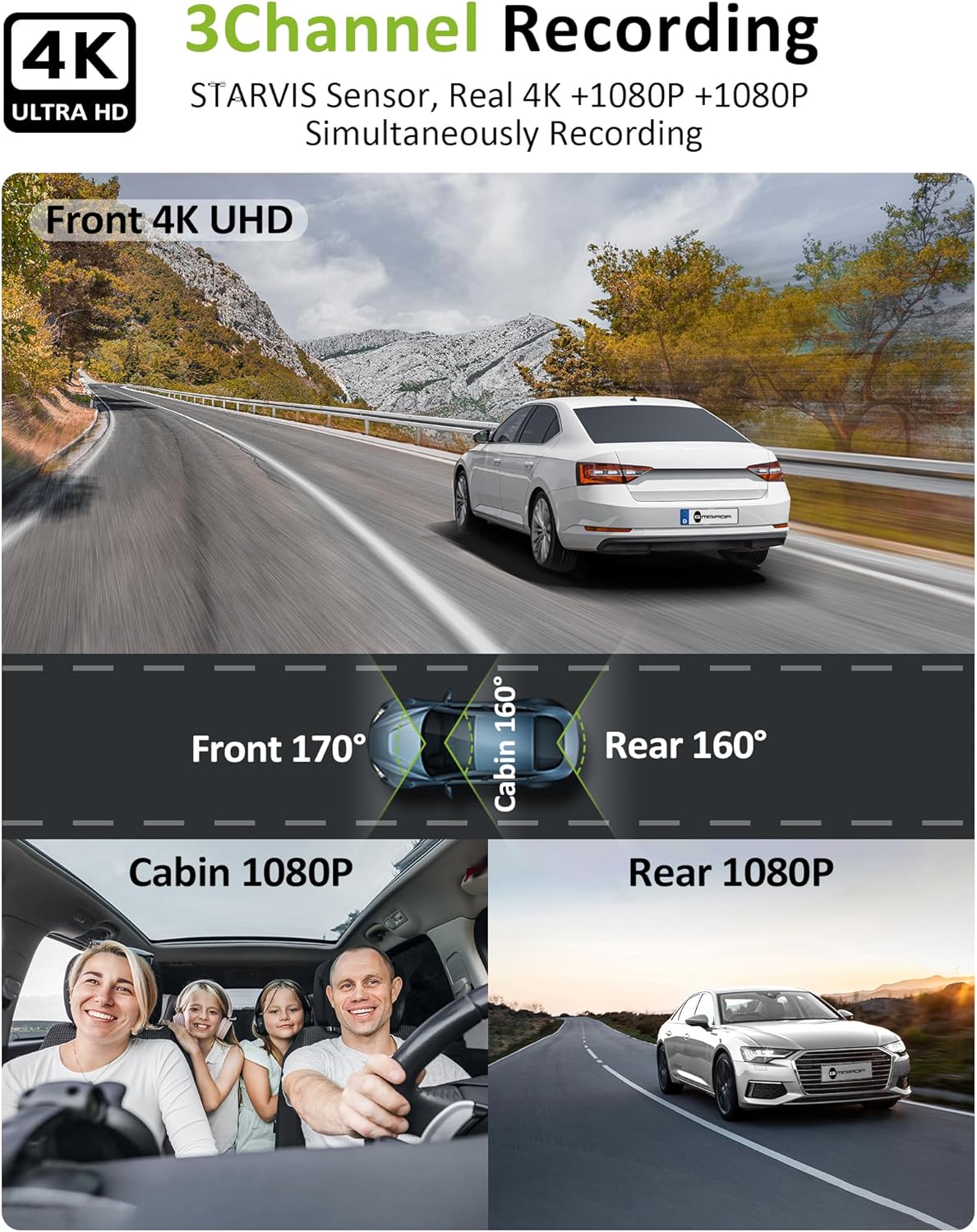
Figure 5.1: Visual representation of the F800's 3-channel recording coverage.
5.2 G-Sensor & Loop Recording
- Czujnik G: Automatically detects sudden impacts or hard braking, locking the current footage to prevent overwriting. The sensitivity can be adjusted (1 to 3 levels).
- Nagrywanie w pętli: Ciągłe nagrywanie poprzez nadpisywanie najstarszych odblokowanych plikówtage when the SD card is full. This ensures continuous recording without manual intervention.

Figure 5.2: G-Sensor and Loop Recording functionality.
5.3 Monitor parkingowy 24-godzinny
The parking monitor feature protects your vehicle even when parked. It detects impacts and automatically records incidents like vandalism or hit-and-runs. Notatka: This feature requires a hardwired kit for continuous power, which is sold separately.
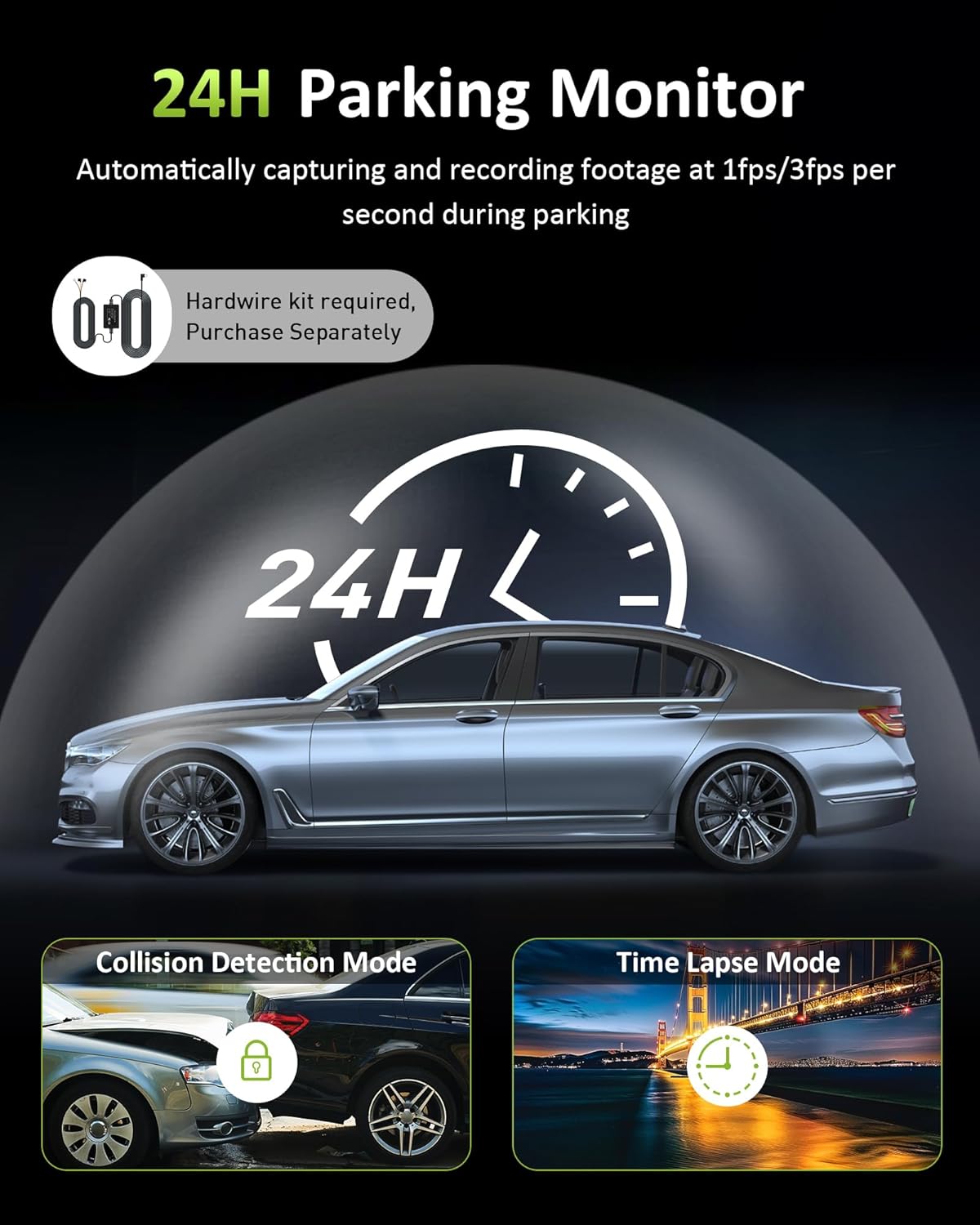
Rysunek 5.3: Tryby monitorowania parkingu 24-godzinnego.
5.4 Widzenie nocne
The F800 incorporates advanced night vision capabilities:
- STARVIS Sensor: Enhances light sensitivity for superior image quality in low-light conditions.
- Technologia HDR: Balances extreme light and dark areas to produce clear, full-color night vision.
- 4 IR Cabin Lights: Provide illumination for clear interior recordings even in total darkness.

Figure 5.4: STARVIS Night Vision technology details.
6. Konserwacja
- Czyste soczewki: Regularly clean the front, interior, and rear camera lenses with a soft, lint-free cloth to ensure clear video quality.
- Zarządzanie kartami SD: Periodically format the SD card (at least once a month) to maintain optimal performance and prevent data corruption. Ensure the SD card is a high-quality Class 10 or U3 card.
- Aktualizacje oprogramowania układowego: Check the official GMAIPOP website or the 'Framefox' app for any available firmware updates to ensure your dash cam has the latest features and bug fixes.
- Temperatura: Unikaj wystawiania kamery samochodowej na działanie ekstremalnych temperatur przez dłuższy czas, ponieważ może to wpłynąć na żywotność baterii i trwałość podzespołów.
7. Rozwiązywanie Problemów
- Q: How to set up 24/7 parking mode on F800 dash cam?
- A: To enable parking monitoring, you'll need a hardwired kit (not included). This prevents battery drain. Szukaj ASIN: B0CC9JXNVD for a compatible hardwire kit.
- Q: Does it come with a USB/USB-C cable?
- A: No, it contains a cigarette lighter end cable. If you have no cigarette lighter, please contact customer support to request a USB/USB-C cable.
- Q: Can we live view when we are not by the car?
- A: No, the live view function requires a SIM card for network access, and this technology is not yet widely available. The dash cam's Wi-Fi is a hub-type Wi-Fi, which can only be used for data transmission and does not provide internet access.
- Q: Will the F800 dash cam record if not connected to Wi-Fi?
- A: Yes, the camera works on its own; no connection is needed. Once it's powered on, it automatically records and saves everything to its built-in storage.
8. Specyfikacje
| Wymiary produktu | 4.5 x 1.5 x 1 cala |
| Waga przedmiotu | 1.12 funta |
| Rozdzielczość przechwytywania wideo | 4K (Front), 1080P (Interior), 1080P (Rear) |
| Technologia łączności | Wi-Fi 5 GHz |
| Cechy specjalne | Automatic Incident Detection, 24-Hour Parking Monitor, Mute function, 3.16" IPS Screen, Loop Recording, STARVIS Sensor, HDR, 4 IR Cabin Lights, Free 64GB Card Included |
| Zawarte komponenty | F800 4K Dash Cam (front and inside), 1080P FHD Rear Cam, Suction cup, Sticky mount, 64GB Card, 19.5ft Rear Camera Cable, 3 Cable Clips, User Manual, 11.5ft Power Car Charger, 2 Electrostatic film, Wire Trim Tool |
| Typ montażu | Windshield Suction Mount & Sticky Mount |
| Metoda kontroli | Aplikacja |
| Baterie | Wymagana 1 bateria litowo-jonowa (w zestawie) |
9. Gwarancja i pomoc techniczna
The GMAIPOP F800 Dash Cam comes with a Gwarancja 12 miesięcy. For any technical assistance, product inquiries, or support needs, please contact GMAIPOP customer service. They provide Wsparcie techniczne 24/7 to ensure a stable and reliable user experience.
You can also register and activate a 1-year warranty to achieve extra replacement/refund service even if the Amazon return period has expired.