
1. Wprowadzenie
Thank you for choosing the JUNJIEUNVO Q16 PRO Wireless Translation Earbuds. These earbuds are designed to provide a versatile audio experience, featuring real-time language translation, high-definition sound, and an open-ear design for comfort. This manual provides essential information for setting up, operating, and maintaining your device.
2. Zawartość opakowania
- JUNJIEUNVO Q16 PRO Wireless Translation Earbuds (Left and Right)
- Etui ładujące z inteligentnym ekranem dotykowym
- Instrukcja obsługi
- Kabel ładujący (USB-C)
3. Koniec produktuview

Rysunek 3.1: JUNJIEUNVO Q16 PRO Wireless Translation Earbuds and Charging Case. This image displays the white and silver earbuds with their unique ear-hook design, alongside the charging case which features a digital display showing time and battery levels.
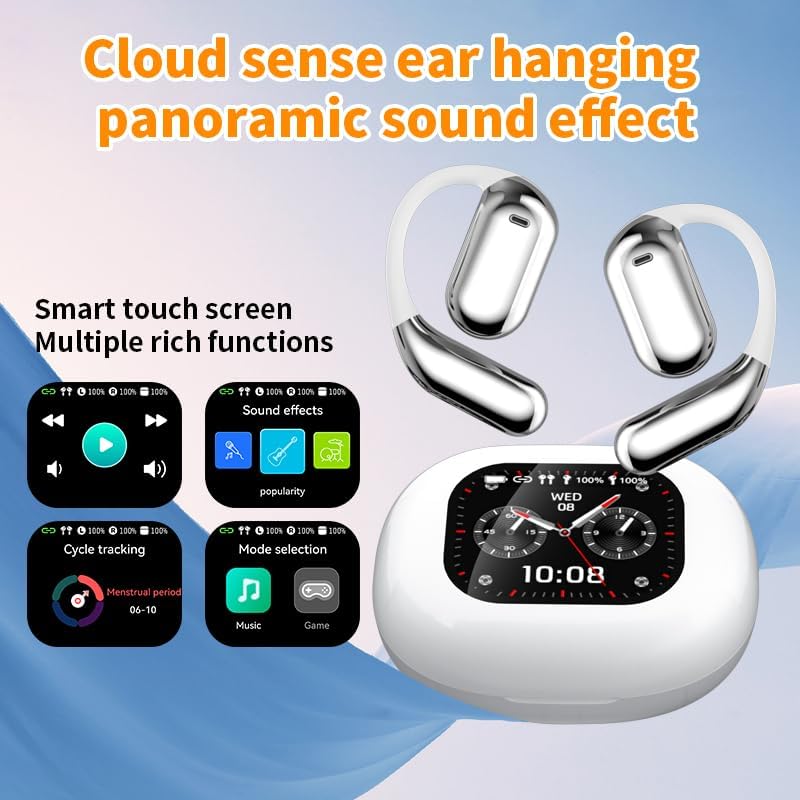
Rysunek 3.2: Smart Touch Screen Functions. This image highlights the charging case's smart touch screen, illustrating various functions such as media playback controls, sound effects, cycle tracking, and mode selection (music/game).

Rysunek 3.3: Environmental Noise Cancellation (ENC). This image depicts a person wearing the earbuds, with an overlay illustrating how the ENC technology reduces ambient noise by up to 99.44%, providing a clearer audio experience.

Rysunek 3.4: Open-Ear Design for Comfort. This image shows a person wearing the earbuds, emphasizing the open-ear design that offers comfort and allows for awareness of external sounds, protecting ear canal health.

Rysunek 3.5: Multiple Sound Adjustment Modes. This image displays the charging case's screen showing "Sound effects" with options for various music genres, indicating the ability to customize audio preferences.

Rysunek 3.6: Extended Battery Life and Rich Functions. This image showcases the earbuds and charging case, highlighting a 40-hour endurance with a 500mAh charging case capacity, along with a mention of multiple functions.

Rysunek 3.7: Earbuds and Charging Case (Open View). A detailed view of both earbuds and the open charging case, showing the internal design and charging contacts.

Rysunek 3.8: Earbuds in Charging Case. This image shows the earbuds securely placed within their charging case, ready for charging or storage.

Rysunek 3.9: Earbuds and Charging Case (Angled View). Another perspective of the earbuds and charging case, emphasizing their sleek design and compact form factor.
4. Konfiguracja
4.1 Ładowanie słuchawek dousznych i etui
Przed pierwszym użyciem należy w pełni naładować słuchawki douszne i etui ładujące.
- Umieść słuchawki w etui ładującym. Upewnij się, że są prawidłowo osadzone w odpowiednich gniazdach (L dla lewego, R dla prawego).
- Connect the charging cable to the USB-C port on the charging case and to a power source.
- Cyfrowy wyświetlacz na etui ładującym pokazuje stan ładowania.
A full charge for the earbuds takes approximately 1.5 hours. The charging case has a 500mAh battery, providing extended use.
4.2 Parowanie z urządzeniem
Słuchawki wykorzystują technologię Bluetooth 5.4, która umożliwia stabilne połączenie do 10 metrów.
- Otwórz etui ładujące. Słuchawki automatycznie przejdą w tryb parowania.
- Włącz Bluetooth na swoim urządzeniu (smartfonie, tablecie itp.).
- Szukaj available Bluetooth devices and select "Q16 PRO" from the list.
- Po nawiązaniu połączenia słuchawki wskażą pomyślne sparowanie, a urządzenie wyświetli komunikat o ich połączeniu.
Słuchawki douszne automatycznie połączą się ponownie z ostatnio sparowanym urządzeniem po wyjęciu z etui, jeśli w urządzeniu włączony jest Bluetooth.
5. Instrukcja obsługi
5.1 Funkcje inteligentnego ekranu dotykowego
The charging case features a smart touch screen for easy control of various functions. Navigate through options by swiping or tapping on the screen.
- Odtwarzanie multimediów: Control music (play, pause, skip tracks) directly from the screen.
- Efekty dźwiękowe: Select from various sound modes.
- Wybór trybu: Switch between music and game modes.
- Śledzenie cyklu: Access additional features if supported by the connected application.
5.2 Sterowanie dotykowe (słuchawki douszne)
The earbuds themselves also feature touch-sensitive areas for basic controls:
- Pojedyncze dotknięcie: Odtwarzaj/wstrzymuj muzykę, odbieraj/kończ połączenia.
- Podwójne dotknięcie (lewo): Poprzedni utwór.
- Podwójne dotknięcie (po prawej): Następny utwór.
- Długie naciśnięcie: Aktywuj asystenta głosowego, odrzuć połączenie.
5.3 Funkcja translacji
The Q16 PRO earbuds support real-time translation for up to 144 languages. This feature typically requires a dedicated application on your connected smartphone.
- Download and install the companion translation application (refer to the app store or product packaging for details).
- Open the application and follow the on-screen instructions to connect your earbuds.
- Select the desired source and target languages within the application.
- Use the earbuds as instructed by the application for real-time translation during conversations or audio playback.
5.4 Sound Adjustment Modes
Customize your audio experience through the charging case's smart touch screen. Available sound modes include:
- Normalna
- Muzyka pop
- Głaz
- Jazz
- Klasyczny
- Ludowy
- Custom (user-defined equalizer settings)
5.5 Stopień wodoodporności IPX5
The earbuds are rated IPX5 waterproof, meaning they are resistant to splashes and sweat. They are suitable for sports and outdoor activities but should not be submerged in water.
6. Konserwacja
- Czyszczenie: Do czyszczenia słuchawek i etui ładującego używaj miękkiej, suchej ściereczki. Unikaj stosowania materiałów ściernych i silnych środków chemicznych.
- Składowanie: Przechowuj słuchawki douszne w etui ładującym, gdy nie są używane, aby je chronić i utrzymywać w stanie naładowania.
- Unikaj ekstremalnych temperatur: Do not expose the device to extreme heat or cold, as this can damage the battery and internal components.
- Narażenie na działanie wody: While IPX5 rated, avoid prolonged exposure to water or high humidity. Ensure the charging port is dry before charging.
7. Rozwiązywanie Problemów
| Problem | Możliwe rozwiązanie |
|---|---|
| Słuchawki douszne nie parują się | Ensure earbuds are charged. Turn off and on Bluetooth on your device. Forget "Q16 PRO" from your device's Bluetooth list and re-pair. |
| Brak dźwięku z jednej słuchawki | Check battery level of both earbuds. Place both earbuds back in the case, close it, then reopen to reset. Re-pair with your device. |
| Etui ładujące nie ładuje się | Ensure the charging cable is securely connected. Try a different USB-C cable and power adapter. |
| Translation function not working | Ensure the companion app is installed and updated. Check app permissions (microphone, internet). Verify a stable internet connection. |
| Słaba jakość dźwięku | Ensure earbuds are clean. Check the distance to your device (within 10m). Avoid obstacles between earbuds and device. |
8. Specyfikacje
| Funkcja | Szczegół |
|---|---|
| Nazwa modelu | YYK-Q16 PRO |
| Wersja Bluetooth | V5.4 + EDR |
| Żeton | Blue Flood |
| Obsługiwane protokoły | AVRCP V1.6, A2DP V1.3, HFP V1.7, Simultaneous LE and BR / EDR |
| Usage/Playback Time | Około 8 godzin (przy 80% głośności) |
| Czas czuwania | 80 godziny |
| Czas ładowania | Około 1.5 godzin |
| Odległość bezprzewodowa | 10 metrów |
| Pojemność baterii słuchawek | 40 mAh (każda słuchawka) |
| Pojemność akumulatora etui ładującego | 500mAh |
| Stopień wodoodporności | IPX5 |
| Waga przedmiotu | 6.4 uncji (łącznie) |
| UPC | 884613749637 |
| Producent | UNVO |
| Kolor | White+Silver |
| Umieszczenie ucha | On Ear (Open-wear design) |
| Współczynnik kształtu | Prawdziwa bezprzewodowość |
9. Gwarancja i wsparcie
For warranty information and customer support, please refer to the documentation included with your purchase or contact the retailer/manufacturer directly. Keep your proof of purchase for any warranty claims.