
Wstęp
Thank you for choosing the Belkin Portable 20,000 mAh Power Bank. This device is designed to provide reliable and fast charging for your mobile devices, featuring an integrated USB-C cable and 30W Power Delivery. Its compact and lightweight design makes it ideal for travel, ensuring your devices stay powered wherever you go. This manual provides essential information on how to set up, operate, maintain, and troubleshoot your power bank.

Image: The Belkin Portable 20,000 mAh Power Bank in blue, showcasinze względu na jego elegancki wygląd.
Główne cechy
- Zintegrowany kabel USB-C: For convenient charging on the go.
- Dostawa mocy 30 W: Enables fast charging for smartphones, tablets, and even some laptops like the MacBook Air.
- Pojemność 20,000 mAh: Provides up to 87 hours of additional battery life for an iPhone 16 Pro, charging 0-50% in approximately 25 minutes.
- Jednoczesne ładowanie: Charge up to three devices concurrently using the integrated USB-C cable, USB-C port, and USB-A port, with a shared output of 30W.
- Wskaźnik LED: Displays the power bank's charging status.
- Ładowanie przelotowe: Charge your devices while the power bank itself is being recharged.
- Lightweight and Travel-Friendly: Weighing less than 395 grams, it meets aviation safety standards for carry-on luggage.
- Zrównoważony projekt: Made from 72% post-consumer recycled materials with 100% plastic-free packaging.
Organizować coś
Pierwsze ładowanie Power Banka
Before first use, fully charge your Belkin Power Bank. Connect the power bank to a wall charger using a compatible USB-C cable (not included for recharging the power bank itself, only the integrated cable is for output). The LED indicators will show the charging progress. A full charge typically takes up to 12 hours.

Image: The power bank connected to a wall outlet for recharging, simultaneously charging a smartphone via its integrated cable. This illustrates pass-through charging.
Instrukcja obsługi
Ładowanie urządzeń
- Korzystanie ze zintegrowanego kabla USB-C: Extend the integrated USB-C cable from the power bank and connect it directly to your USB-C compatible device.
- Korzystanie z portu USB-C: Connect your device's USB-C charging cable to the power bank's USB-C output port.
- Korzystanie z portu USB-A: Podłącz kabel ładujący USB-A swojego urządzenia do portu wyjściowego USB-A powerbanku.

Image: The Belkin power bank connected to an iPhone via its integrated USB-C cable, demonstrating seamless high-speed charging.
Ładowanie wielu urządzeń
The power bank supports charging up to three devices simultaneously with a combined output of 30W. You can use the integrated USB-C cable, the USB-C port, and the USB-A port at the same time.
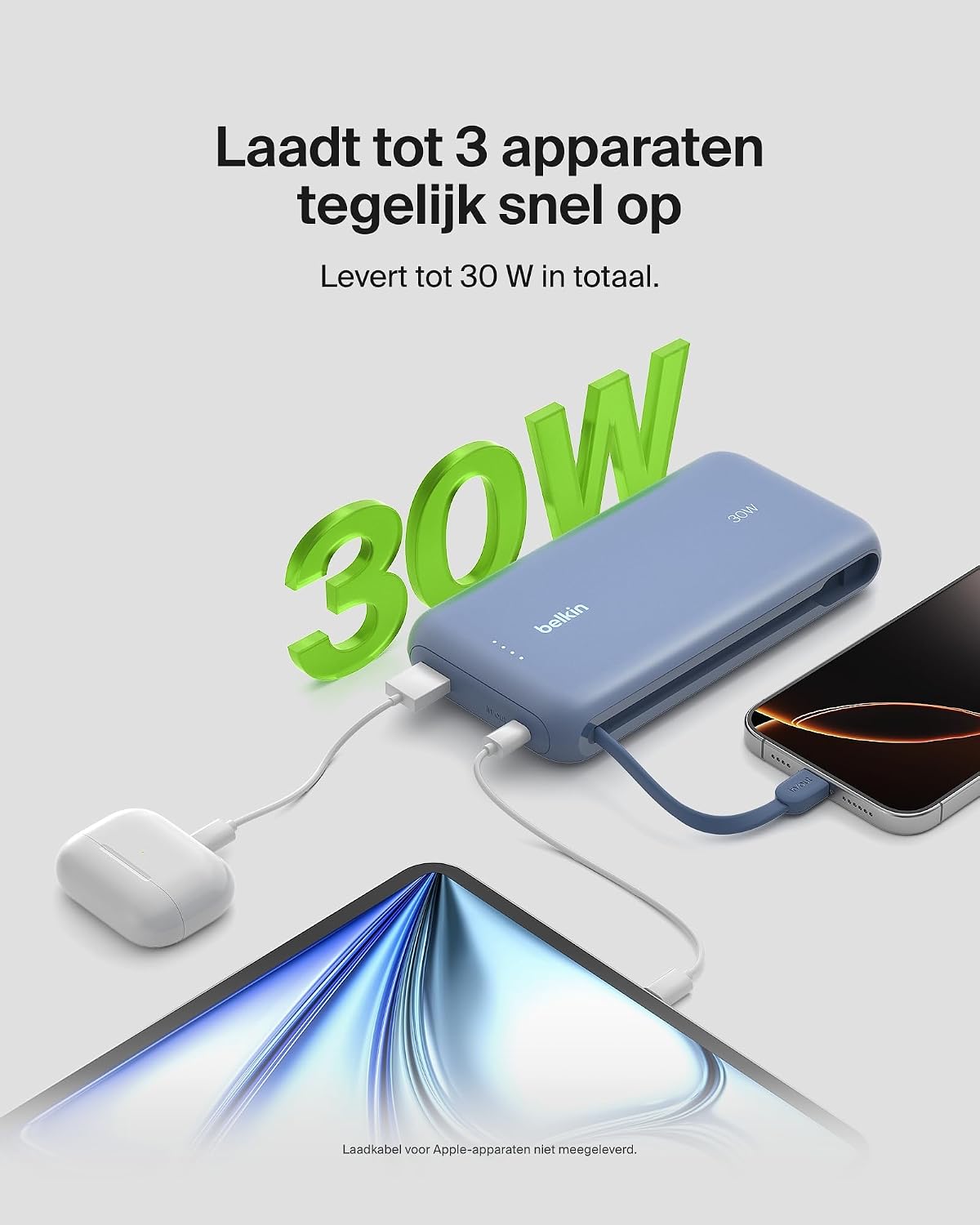
Image: The power bank simultaneously charging a smartphone, a tablet, and wireless earbuds, illustrating its capability to charge up to three devices with a total output of 30W.
Wskaźnik stanu baterii LED
The power bank features LED lights that indicate the remaining battery level and charging status. Refer to the table below for interpretation:
| Status LED | Oznaczający |
|---|---|
| Wszystkie diody LED świecą światłem ciągłym | W pełni naładowany |
| LEDs blinking sequentially | Ładowanie w toku |
| Fewer LEDs solid | Pozostała pojemność baterii |
Konserwacja
- Czyszczenie: Do czyszczenia powerbanku używaj miękkiej, suchej ściereczki. Unikaj stosowania silnych środków chemicznych i materiałów ściernych.
- Składowanie: Przechowuj powerbank w chłodnym i suchym miejscu, z dala od bezpośredniego światła słonecznego i ekstremalnych temperatur.
- Pielęgnacja baterii: To prolong battery life, avoid fully discharging the power bank regularly. Recharge it when the battery level is low.
- Integrated Cable Care: When not in use, ensure the integrated USB-C cable is properly stowed to prevent damage.
Rozwiązywanie problemów
Typowe problemy i rozwiązania
- Urządzenie się nie ładuje:
- Ensure the power bank is charged. Check the LED indicators.
- Sprawdź, czy kabel ładujący jest prawidłowo podłączony do powerbanku i urządzenia.
- Wypróbuj inny kabel ładujący lub port w powerbanku.
- Confirm your device is compatible with the power bank's charging specifications.
- Powolne ładowanie:
- Ensure your device supports fast charging (Power Delivery) to utilize the 30W output.
- If charging multiple devices, the total 30W output is shared, which may result in slower charging for individual devices.
- Check if the cable used supports fast charging.
- Powerbank nie ładuje się:
- Ensure the wall adapter and cable used for recharging the power bank are functional and properly connected.
- Spróbuj użyć innego adaptera ściennego lub kabla.
Belkin SmartProtect Safety Features
The Belkin Power Bank is equipped with SmartProtect technology, which includes multiple safety features to protect your devices and the power bank itself:
- Ochrona przed przeładowaniem
- Zabezpieczenie nadprądowe
- Ochrona przed przejęciem
- Zabezpieczenie przeciwzwarciowe
- Przekroczenie wyjściowetage Ochrona
- Output High/Low Temperature Protection
- Input High/Low Temperature Protection
- Signal Interference Protection
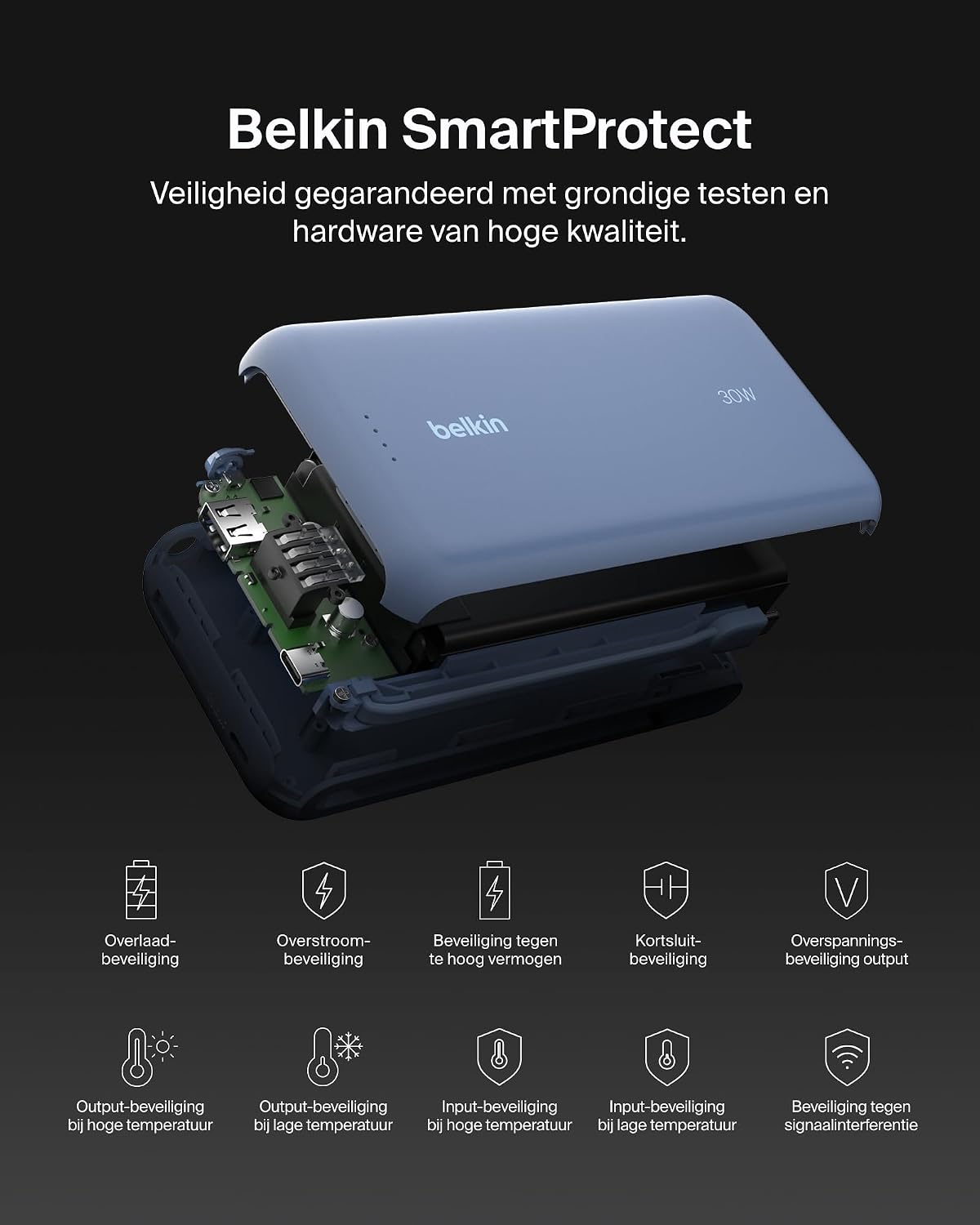
Obraz: Wybuch view of the Belkin Power Bank, highlighting its internal components and the comprehensive Belkin SmartProtect safety features, including protection against overcharge, overcurrent, and short-circuits.
Specyfikacje
| Funkcja | Szczegół |
|---|---|
| Numer modelu | BPB024hqBL |
| Pojemność baterii | 20,000 mAh |
| Moc wyjściowa | Up to 30W Power Delivery (shared) |
| Typ złącza | Integrated USB-C cable, 1x USB-C port, 1x USB-A port |
| Tomtage | 5 wolty |
| Ampwymazać | 3 Amptutaj |
| Czas ładowania (Power Bank) | Około 12 godzin |
| Wymiary produktu | Wymiary 15.4 x 7.62 x 2.51 cm |
| Waga przedmiotu | 395 gramów |
| Skład ogniw baterii | Litowo-jonowy |
| Kompatybilne urządzenia | Apple iPhone 16 series, iPhone 15 series, iPhone 14 series, iPhone 13 series, Samsung Galaxy S22/S23/S24/S25 series, iPad Pro, iPad Air, iPad, iPad Mini, and other USB-C/USB-A compatible devices. |
Gwarancja i wsparcie
Informacje o gwarancji
This Belkin Portable Power Bank comes with a 2-letnia gwarancja producenta. Additionally, it includes a Connected Equipment Warranty, providing peace of mind for your connected devices. Please retain your proof of purchase for warranty claims.
Obsługa klienta
For further assistance, technical support, or warranty inquiries, please visit the official Belkin support weblub skontaktuj się z obsługą klienta. Więcej informacji znajdziesz na stronie www.belkin.com/support.