
ASD A-LFM12D20SRGBW-N-4p
ASD 12 Inch Smart RGBW Flush Mount Ceiling Light Instruction Manual
Marka: ASD | Model: A-LFM12D20SRGBW-N-4p
1. Wprowadzenie
Thank you for choosing the ASD 12 Inch Smart RGBW Flush Mount Ceiling Light. This fixture combines a stylish minimalist design with efficient, versatile lighting solutions. Featuring multicolor RGBW capabilities, smart app control, and remote operation, it offers a wide range of lighting effects for your space. This manual provides essential information for safe installation, effective operation, and proper maintenance of your new lighting fixture.

Figure 1.1: ASD 12 Inch Smart RGBW Flush Mount Ceiling Light with accessories.
2. Informacje dotyczące bezpieczeństwa
Przed instalacją i użyciem należy uważnie przeczytać wszystkie instrukcje. Zachowaj tę instrukcję do wykorzystania w przyszłości.
- Bezpieczeństwo elektryczne: Always turn off power at the circuit breaker before installing, cleaning, or servicing the fixture. Consult a qualified electrician if you are unsure about wiring.
- Tylko do użytku wewnątrz pomieszczeń: This fixture is designed for indoor use in dry and damp locations. Do not expose to direct water spray or immerse in water.
- Tomtage: Upewnij się, że napięcie zasilaniatagodpowiada wymaganiom danego urządzenia (120V).
- Montowanie: Mount the fixture securely to a standard electrical outlet box.
- Obsługiwanie: Należy obchodzić się z urządzeniem ostrożnie, aby uniknąć uszkodzenia podzespołów.
3. Zawartość opakowania
Przed rozpoczęciem instalacji sprawdź, czy wszystkie komponenty są obecne:
- ASD 12 Inch Smart RGBW Flush Mount Ceiling Light Fixture (4 units)
- Zdalne sterowanie
- Sprzęt montażowy (śruby, nakrętki druciane)
- Instrukcja obsługi
4. Specyfikacje
| Funkcja | Szczegół |
|---|---|
| Marka | ASD |
| Nazwa modelu | STRYCH |
| Numer części | A-LFM12D20SRGBW-N-4p |
| Kolor | 12" | Nickel | RGBW |
| Tworzywo | Stal stopowa, akryl |
| Styl | Nowoczesny |
| Wymiary produktu | 11.3" dł. x 11.3" szer. x 3.4" wys. |
| Konkretne zastosowania | Tylko do użytku wewnątrz pomieszczeń |
| Źródło zasilania | Podłączony na stałe |
| Typ źródła światła | PROWADZONY |
| Rodzaj wykończenia | Namalowany |
| Materiał zacieniający | Plastikowy |
| Tomtage | 120 wolty |
| Cotage | 20 watów |
| Typ montażu | Równo mocowanie |
| Średnie życie | 50,000 godzin |
| Cechy specjalne | 1064/1220LM, Remote Control, RGBW, Smart App, CCT Adjustable 2700-6500K |

Rysunek 4.1: Wymiary i najważniejsze cechy produktu.
5. Instalacja
Follow these steps to install your ASD Smart RGBW Flush Mount Ceiling Light:
- Przygotuj się do instalacji: Turn off power at the circuit breaker before starting. Ensure the mounting surface is clean and stable.
- Remove the Lens: Gently remove the lens from the fixture by rotating it clockwise. This will expose the mounting holes and wiring connections.
- Zamontuj oprawę: Attach the fixture's base to the electrical outlet box using the provided screws. Ensure it is securely fastened.
- Połączenia przewodowe: Connect the wires: Black to Black (Live), White to White (Neutral), and Ground to Ground. Secure all connections with wire nuts. Carefully tuck all wires back into the outlet box.
- Załóż soczewkę: Once wiring is complete and secure, attach the lens by aligning it with the fixture and rotating it counter-clockwise until it locks into place.
- Przywróć zasilanie: Włącz ponownie zasilanie za pomocą wyłącznika obwodu.
- Download ASD SMART App: For smart control features, download the "ASD SMART" application from your smartphone's app store. Scan the QR codes below or click the links to download.
Sklep Google Play (Android)
Sklep z aplikacjami Apple (iOS) - Add Fixture to App: Follow the in-app instructions to add your new ceiling light to the ASD SMART app. This typically involves putting the light into pairing mode and connecting it to your Wi-Fi network.

Figure 5.1: Initial installation steps: removing the lens and wiring.
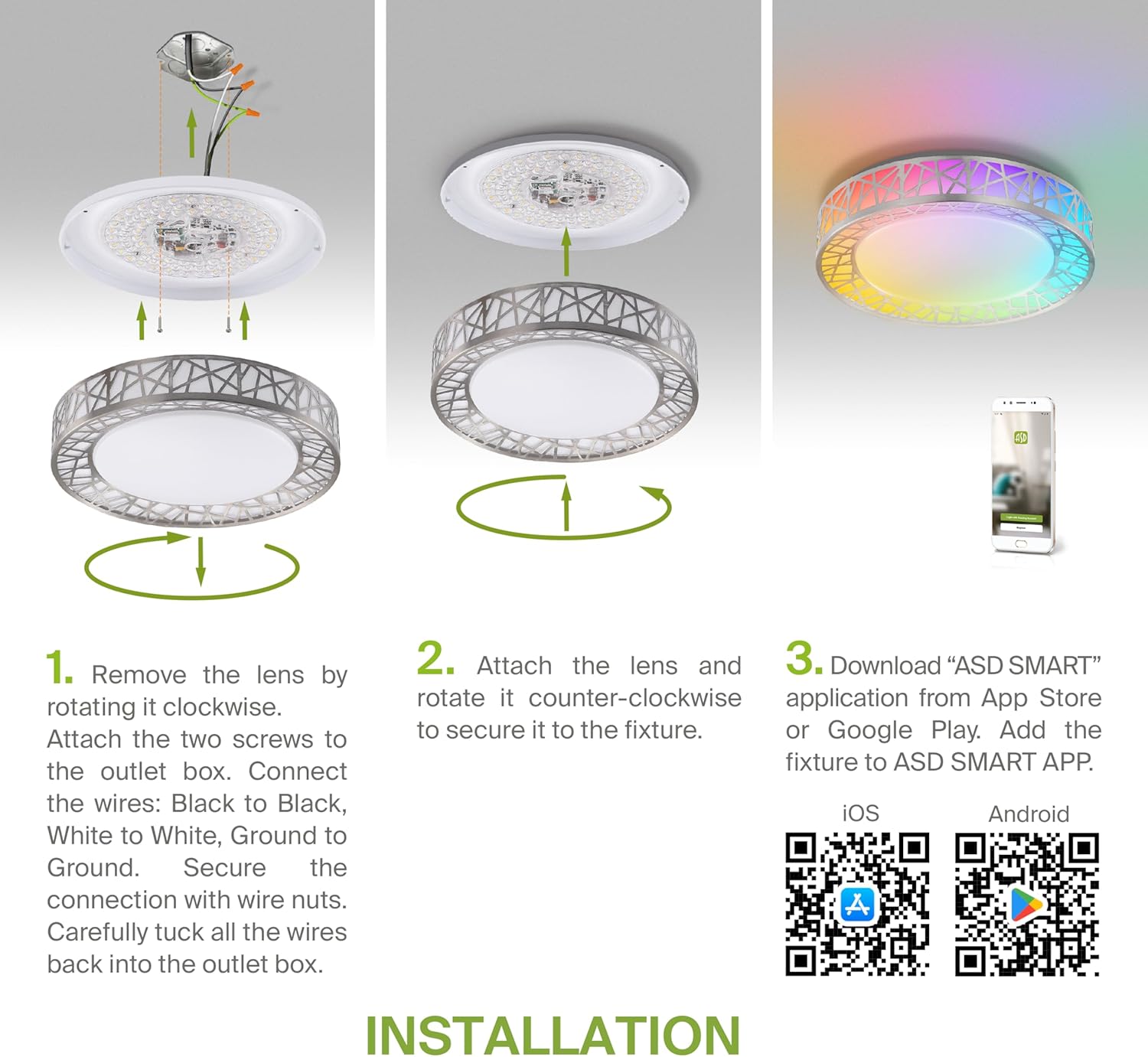
Figure 5.2: Complete installation overview including app download.
6. Instrukcja obsługi
Your ASD Smart RGBW Flush Mount Ceiling Light offers multiple control methods:
6.1 Pilot zdalnego sterowania
Dołączony pilot zdalnego sterowania umożliwia korzystanie z podstawowych funkcji:
- Włącz/Wyłącz: Włącz lub wyłącz światło.
- Ściemnianie: Adjust brightness levels smoothly.
- Korekta CCT: Change color temperature (e.g., from warm white to cool white).
- Wybór kolorów RGB: Cycle through or select specific RGB colors.
6.2 ASD SMART App Control
The ASD SMART app provides full control and advanced features:
- 16.7 milionów kolorów: Choose any color from the full RGBW spectrum.
- Smooth Dimming & CCT: Precisely adjust brightness and color temperature (2700K-6500K).
- Lighting Patterns: Select pre-set or custom lighting scenes and effects.
- Grupowanie: Control multiple fixtures simultaneously.
- Harmonogram: Set timers for lights to turn on/off or change settings automatically.

Figure 6.1: RGBW color capabilities.

Figure 6.2: Control via remote and smart app.

Figure 6.3: Seamless dimming functionality.
6.3 Sterowanie głosowe (Alexa i Asystent Google)
The fixture is compatible with Amazon Alexa and Google Assistant for convenient voice commands:
- Ensure your ASD SMART app is linked to your Alexa or Google Home account.
- Use commands such as "Alexa, turn on the living room light" or "Hey Google, set the bedroom light to blue."

Rysunek 6.4: Zgodność z Alexą i Asystentem Google.
7. Konserwacja
To ensure the longevity and optimal performance of your ceiling light:
- Czyszczenie: Przed czyszczeniem odłącz zasilanie. Przetrzyj urządzenie miękką, suchą ściereczką. Nie używaj środków czyszczących ani rozpuszczalników o działaniu ściernym.
- Wymiana żarówki: This fixture uses integrated LED technology and does not require bulb replacement.
8. Rozwiązywanie Problemów
Jeśli masz problemy z oświetleniem sufitowym, zapoznaj się z poniższymi typowymi problemami i rozwiązaniami:
| Problem | Możliwa przyczyna | Rozwiązanie |
|---|---|---|
| Światło się nie włącza | Brak zasilania, luźne okablowanie, uszkodzony przełącznik | Sprawdź wyłącznik automatyczny. Upewnij się, że wszystkie połączenia przewodów są solidne. Przetestuj przełącznik ścienny. |
| Pilot nie działa | Dead battery, out of range, interference | Replace remote battery. Ensure you are within range. Remove any obstructions. |
| App cannot connect to light | Incorrect Wi-Fi password, light not in pairing mode, 5GHz Wi-Fi network | Verify Wi-Fi password. Reset light to pairing mode (refer to app instructions). Ensure you are on a 2.4GHz Wi-Fi network. |
| Sterowanie głosowe nie odpowiada | App not linked to voice assistant, incorrect device name | Check linking in ASD SMART app and voice assistant app. Verify device name in voice assistant app. |
9. Gwarancja i wsparcie
ASD zapewnia 5-roczna ograniczona gwarancja for this product, guaranteeing top quality and safety. The fixture is ETL certified, ensuring compliance with North American safety standards.
For technical support, warranty claims, or any questions not covered in this manual, please contact ASD customer service. Refer to the product packaging or the official ASD webwitryna do informacji kontaktowych.