
1. Wprowadzenie
This manual provides detailed instructions for the installation, setup, and operation of your ASD 20-Inch Smart RGBW Flush Mount Ceiling Light. This LED lighting fixture combines a modern design with advanced smart features, offering a versatile lighting solution for various indoor spaces. It features RGBW color-changing capabilities, dimming, and control via a remote or a smartphone app, with compatibility for Alexa and Google Assistant.
2. Informacje dotyczące bezpieczeństwa
Przed instalacją i użyciem należy uważnie przeczytać wszystkie instrukcje. Zachowaj tę instrukcję do wykorzystania w przyszłości.
- Bezpieczeństwo elektryczne: Always turn off power at the circuit breaker before installing, servicing, or cleaning the fixture. Consult a qualified electrician if you are unsure about electrical wiring.
- Instalacja: Upewnij się, że powierzchnia montażowa wytrzyma ciężar oprawy. Przestrzegaj wszystkich lokalnych przepisów i rozporządzeń dotyczących instalacji elektrycznych.
- Obsługiwanie: Do not handle the fixture with wet hands. Avoid direct eye exposure to the light source when illuminated.
- Środowisko: Osprzęt ten jest przeznaczony doamp locations but is intended for indoor use only. Do not expose to direct water spray or submersion.
- Czyszczenie: Do czyszczenia używaj miękkiej, suchej ściereczki. Nie używaj silnych środków chemicznych ani ściernych środków czyszczących.
3. Zawartość opakowania
Przed rozpoczęciem instalacji sprawdź, czy wszystkie komponenty są obecne:
- ASD 20-Inch Smart RGBW Flush Mount Ceiling Light Fixture (2 units)
- Pilot zdalnego sterowania (1 szt.)
- Sprzęt montażowy (śruby, nakrętki druciane)
- Instrukcja obsługi
4. Specyfikacje produktu
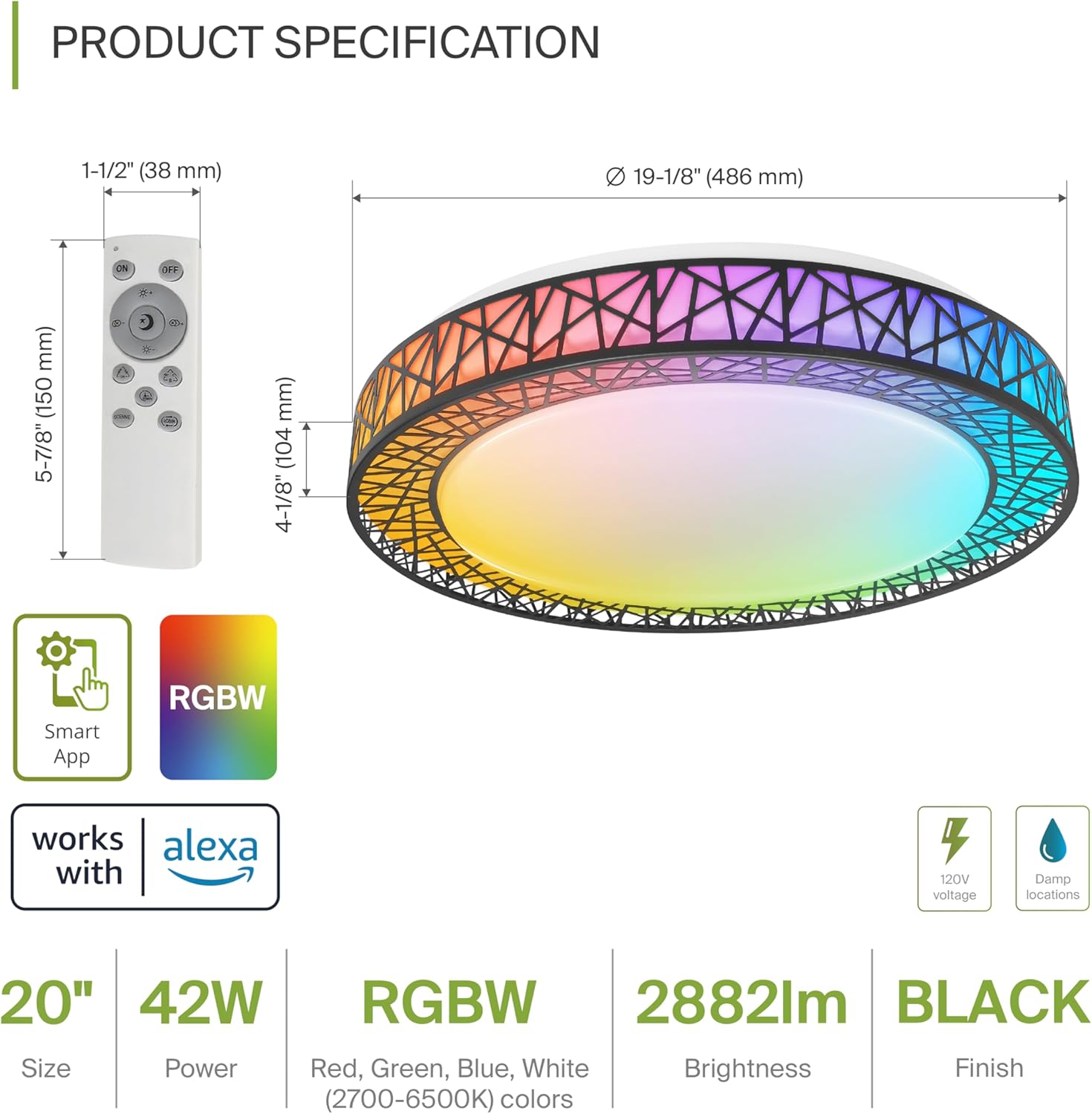
Product Specification Diagram: Dimensions, remote control, and key features.
| Funkcja | Szczegół |
|---|---|
| Marka | ASD |
| Nazwa modelu | STRYCH |
| Numer modelu | A-LFM20D42SRGBW-B-2p |
| Kolor | 20" | Black | RGBW |
| Tworzywo | Acrylic, Alloy Steel |
| Wymiary produktu | 19.1" dł. x 19.1" szer. x 4.1" wys. |
| Źródło zasilania | Podłączony na stałe |
| Cotage | 42 watów |
| Tomtage | 120 wolty |
| Jasność | 2579 lumenów (maks.) |
| Temperatura barwowa | 2700-6500K (regulacja CCT) |
| Cechy specjalne | RGBW, Remote Control, Smart App, Dimmable |
| Metoda kontroli | Remote, Voice (Alexa, Google Assistant) |
| Zastosowanie wewnątrz/na zewnątrz | Wnętrz |
| Poziom wodoodporności | Water Resistant (Damp Locations Rated) |
| Średnie życie | 50,000 godzin |
| Orzecznictwo | Wpisany na listę ETL |
5. Instrukcje instalacji
Before starting, ensure the power is turned off at the circuit breaker.

Installation Diagram: Visual guide for mounting the light fixture.
- Przygotuj oprawę: Remove the lens from the light fixture by rotating it clockwise.
- Zamontuj wspornik: Attach the two screws to the outlet box on your ceiling.
- Połączenia przewodowe: Connect the wires: Black to Black, White to White, and Ground to Ground. Secure these connections with wire nuts.
- Zabezpieczenie osprzętu: Carefully tuck all wires back into the outlet box. Attach the light fixture to the mounting bracket.
- Reattach the Lens: Rotate the lens counter-clockwise to secure it to the fixture.
Po zainstalowaniu należy przywrócić zasilanie za pomocą wyłącznika obwodu.
6. Smart Feature Setup
6.1. ASD SMART App Control
The ASD Smart RGBW Flush Mount Ceiling Light can be controlled via the ASD SMART App on your smartphone (Wi-Fi internet connection required).
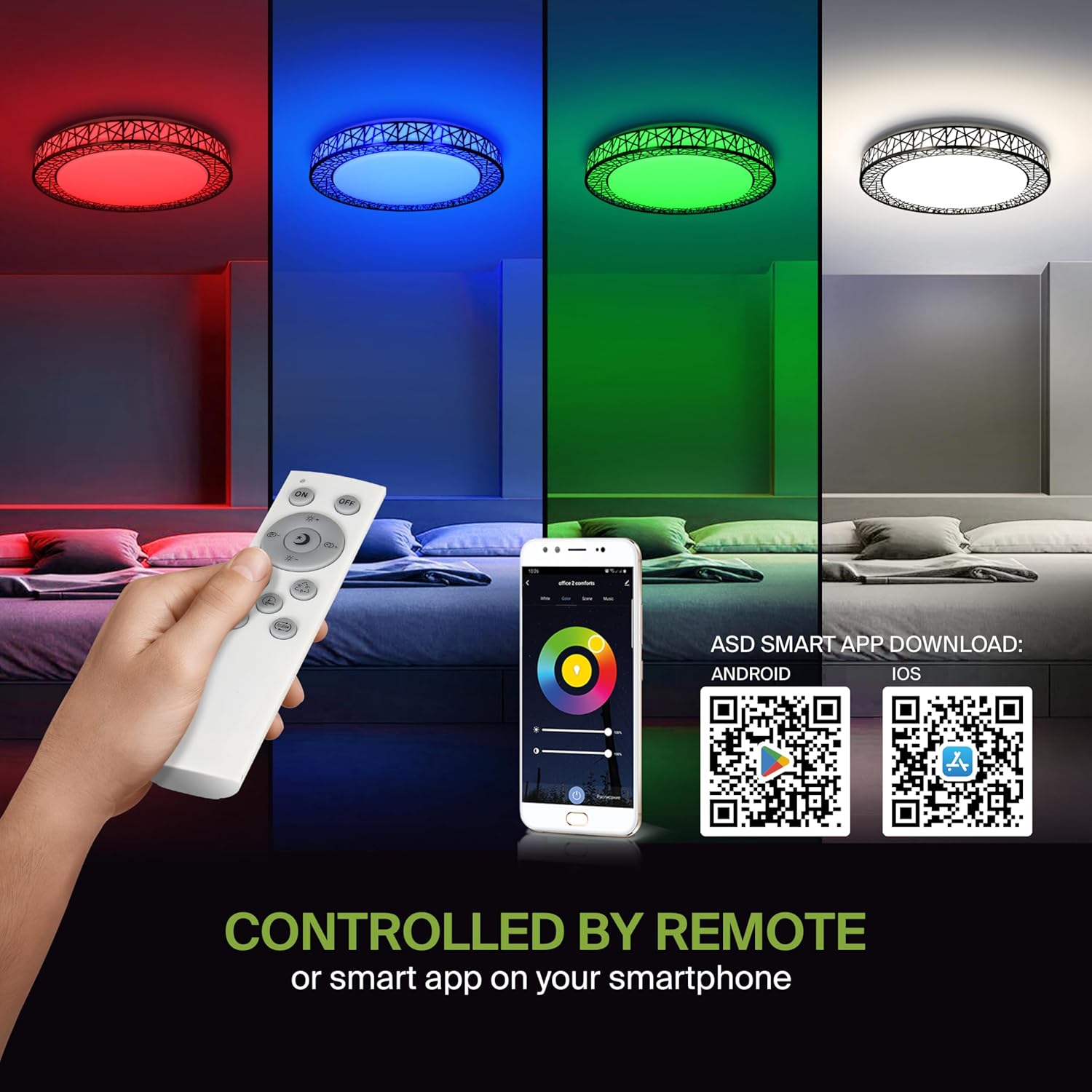
Remote control and ASD SMART App interface with QR codes for download.
- Pobierz aplikację: Scan the QR code provided in the product images or search for "ASD SMART" in the Sklep z aplikacjami Apple (for iOS) or Sklep Google Play (dla Androida).
- Zarejestruj się/Zaloguj: Postępuj zgodnie z instrukcjami w aplikacji, aby utworzyć konto lub się zalogować.
- Dodaj urządzenie: In the app, select the option to add a new device. Follow the pairing instructions to connect your ceiling light to the app via Wi-Fi.
6.2. Sterowanie głosowe (Alexa i Asystent Google)
The fixture is compatible with Amazon Alexa and Google Assistant for convenient voice control.

Zgodność ze sterowaniem głosowym Alexa i Asystentem Google.
- Połącz konto: Open your Alexa or Google Home app. Navigate to the 'Skills' or 'Works with Google' section.
- Szukaj ASD SMART: Szukaj the "ASD SMART" skill/service and enable it.
- Łączyć: Link your ASD SMART account with your Alexa or Google Home account.
- Odkryj urządzenia: Ask Alexa or Google Assistant to discover new devices, or manually initiate device discovery in their respective apps.
7. Instrukcja obsługi
7.1. Obsługa pilota zdalnego sterowania
Use the included remote control to manage your light fixture's functions.
Remote control for easy access to light functions.
- Włączanie/wyłączanie: Naciśnij przycisk zasilania, aby włączyć lub wyłączyć światło.
- Regulacja jasności: Use the brightness buttons to increase or decrease the light intensity (smoothly dimmable).
- Color Selection (RGBW): Press the dedicated color buttons (Red, Green, Blue, White) or use the color wheel/mode buttons to cycle through 16.7 million colors.
- Temperatura barwowa (CCT): Adjust the white light color temperature between 2700K (warm white) and 6500K (cool white).
- Tryby scen: Select pre-programmed lighting patterns or scenes.
7.2. Operacje sterowania aplikacją
The ASD SMART App offers comprehensive control over your light fixture.
- Pełne spektrum kolorów: Access the full 16.7 million RGBW color palette.
- Precise Dimming: Adjust brightness levels with fine control.
- Harmonogram: Set schedules for the light to turn on/off or change modes at specific times.
- Grupowanie: Group multiple ASD smart lights to control them simultaneously.
- Sceny niestandardowe: Twórz i zapisuj własne, niestandardowe sceny świetlne.
7.3. Voice Command Examples
After linking your device to Alexa or Google Assistant, use commands such as:
- "Alexa, turn on the [Light Name]."
- "Hey Google, set [Light Name] to blue."
- "Alexa, dim the [Light Name] to 50%."
- "Hey Google, make the [Light Name] warmer."
8. Konserwacja
To ensure the longevity and optimal performance of your ASD Smart RGBW Flush Mount Ceiling Light, follow these maintenance guidelines:
- Czyszczenie: Przed czyszczeniem upewnij się, że zasilanie urządzenia jest wyłączone. Użyj miękkiej, suchej lub lekko zwilżonej szczoteczki.amp cloth to wipe the surface. Avoid using abrasive cleaners, solvents, or harsh chemicals, as these can damage the finish or electrical components.
- Kontrola: Periodically check the fixture for any signs of damage, loose connections, or wear. If any issues are found, turn off the power and consult a qualified electrician.
- Wymiana żarówki: This fixture uses integrated LED technology and does not require bulb replacement. The LEDs are designed for a long lifespan.
9. Rozwiązywanie Problemów
If you encounter issues with your ASD Smart RGBW Flush Mount Ceiling Light, refer to the following common solutions:
| Problem | Możliwa przyczyna | Rozwiązanie |
|---|---|---|
| Światło się nie włącza | Brak zasilania, luźne okablowanie, uszkodzony przełącznik | Sprawdź wyłącznik automatyczny. Upewnij się, że wszystkie połączenia przewodów są solidne. Przetestuj przełącznik ścienny. |
| Pilot nie działa | Dead batteries, remote out of range, pairing issue | Replace remote batteries. Ensure remote is within operating range. Re-pair the remote with the light (refer to app instructions for pairing). |
| Kontrola aplikacji nie działa | No Wi-Fi connection, incorrect app pairing, outdated app | Verify Wi-Fi connectivity. Ensure the light is correctly paired in the ASD SMART App. Update the app to the latest version. |
| Sterowanie głosowe nie odpowiada | Account not linked, device not discovered, incorrect commands | Ensure ASD SMART account is linked to Alexa/Google Assistant. Redo device discovery. Use correct voice commands. |
| Światło migocze lub nieoczekiwanie przygasa | Unstable power supply, loose wiring, incompatible dimmer (if applicable) | Check power supply stability. Verify wiring. This light is dimmable via remote/app; external dimmers may cause issues. |
10. Informacje o gwarancji
ASD zapewnia 5-roczna ograniczona gwarancja Gwarancja obejmuje wady materiałowe i wykonawcze tego produktu. Niniejsza gwarancja obejmuje wady materiałowe i wykonawcze występujące przy normalnym użytkowaniu. Prosimy zachować dowód zakupu na wypadek roszczeń gwarancyjnych. Szczegółowe warunki gwarancji można znaleźć w oficjalnym dokumencie ASD. webodwiedź witrynę lub skontaktuj się z działem obsługi klienta.
11. Obsługa klienta
If you have any questions, require technical assistance, or need to make a warranty claim, please contact ASD customer support through the following channels:
- Webstrona: Visit the official ASD Lighting webStrona z odpowiedziami na często zadawane pytania i zasobami pomocy.
- E-mail: Refer to your product packaging or the ASD webwitryna zawierająca adresy e-mail obsługi klienta.
- Telefon: Refer to your product packaging or the ASD webstrona z numerami telefonów obsługi klienta.
Please have your model number (A-LFM20D42SRGBW-B-2p) and purchase date ready when contacting support.