
1. Wprowadzenie
This manual provides detailed instructions for the Aokeo AK-58i Low Profile Microphone Boom Arm Stand. Please read this manual thoroughly before installation and use to ensure proper function and longevity of your product. This boom arm is designed to provide stable and flexible microphone positioning for various applications such as gaming, podcasting, recording, and streaming.
2. Zawartość produktu
Sprawdź, czy w Twoim opakowaniu znajdują się wszystkie wymienione poniżej elementy:
- Microphone Stand (Boom Arm) x1
- Biurko Clamp Podstawa x1
- 3/8" to 1/4" Adapter x1
- 3/8" to 5/8" Adapter x1
- Nakrętka x1
- Instrukcja obsługi x1
- Pudełko do pakowania x1
Video: AK-58i Microphone Stand Overview. Ten film przedstawia ogólny przeglądview of the AK-58i microphone stand and its components.
Video: Microphone Boom Arm Unboxing. This video demonstrates the unboxing process and shows what comes in the box.
3. Konfiguracja i instalacja
- Dołącz pulpit klamp: Zabezpiecz biurko klamp base to a sturdy table or desk surface. Ensure the table thickness is less than 7cm (2.75 inches) for proper fit. Tighten the screw firmly to prevent movement.
- Włóż ramię wysięgnika: Insert the main vertical shaft of the boom arm into the hole on the desk clamp base. Use the provided knob to secure it in place.
- Assemble Arm Segments: Connect the two main arm segments by aligning the pins and holes. Tighten the adjustment knobs at each joint to secure the desired position.
- Attach Microphone Adapter: Screw the appropriate adapter (3/8" to 1/4" or 3/8" to 5/8") onto the microphone mounting thread at the end of the boom arm.
- Mount Your Microphone: Carefully screw your microphone or microphone shock mount onto the adapter. Ensure it is securely fastened.
- Zarządzanie kablami: Utilize the integrated cable storage channels along the arm to route and secure your microphone cable, reducing clutter and preventing accidental pulling.

Image: Step-by-step installation guide for the Aokeo AK-58i boom arm, showing how to attach the microphone and secure cables.
Video: Microphone Boom Arm Setup. This video provides a quick and easy guide to installing the microphone boom arm.
4. Obsługa i regulacje
The Aokeo AK-58i boom arm offers extensive flexibility for optimal microphone placement:
- Elastyczne pozycjonowanie: Both main arm segments can rotate 360 degrees, allowing for broad horizontal reach.
- Regulacja pionowa: The arm section holding the microphone can swing up and down 180 degrees, enabling precise vertical positioning.
- Mechanizm blokujący: Each joint features a lock/unlock knob. Turn clockwise to lock the arm in position and counter-clockwise to unlock for adjustment.
- Zarządzanie kablami: Use the integrated cable clips to keep your microphone cable neatly organized along the arm, preventing tangles and maintaining a clean workspace.
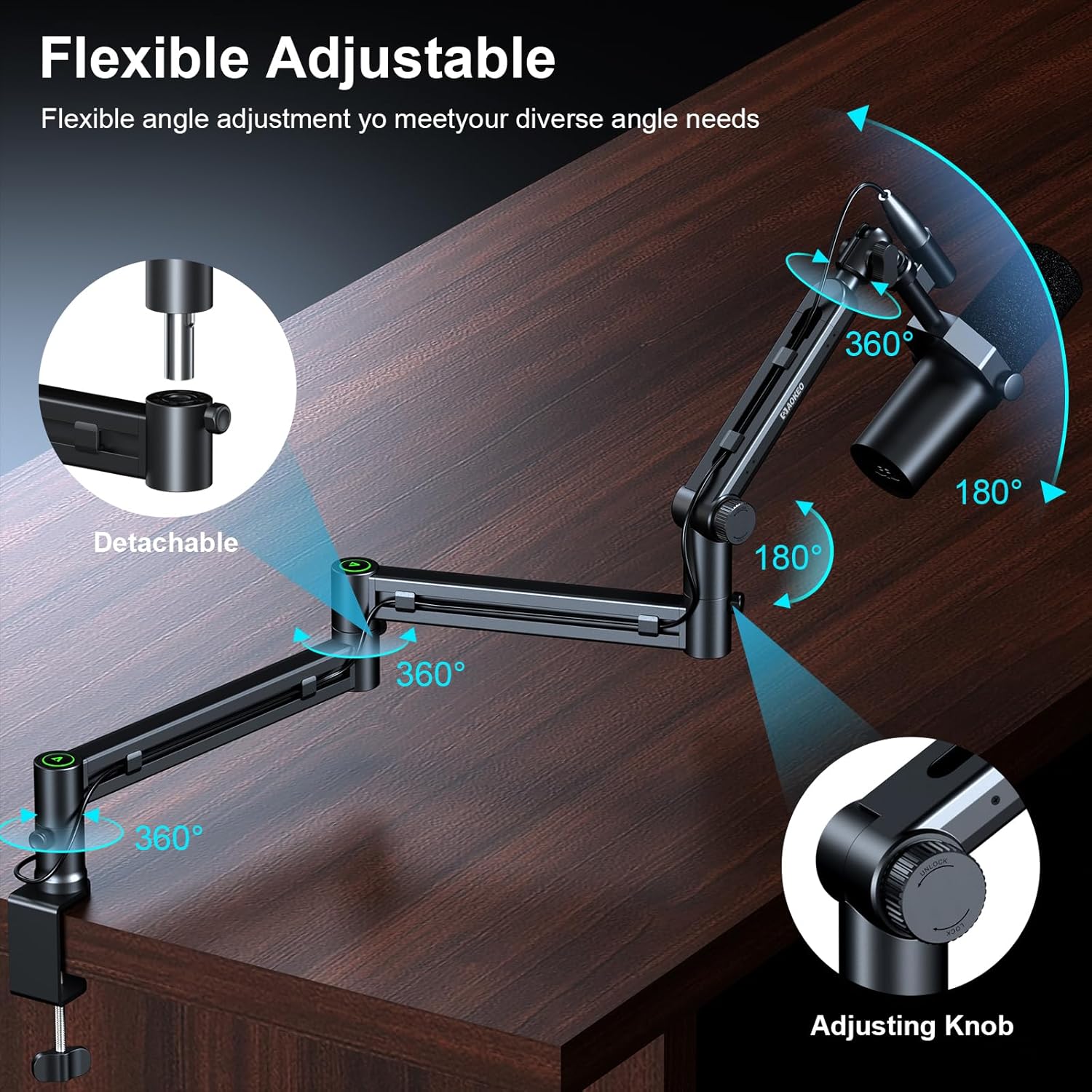
Image: Demonstrates the flexible adjustment capabilities of the Aokeo AK-58i, including 360-degree rotation and 180-degree vertical swing.

Image: Illustrates the integrated cable management system for a tidy desktop setup.
5. Specyfikacje
| Funkcja | Specyfikacja |
|---|---|
| Marka | aokeo |
| Numer modelu | AK-59 |
| Kolor | AK-58i (Black) |
| Tworzywo | Metal |
| Styl | Niski Profile Nastawny |
| Typ bazowy | Flat (Desk Clamp) |
| Maksymalna zalecana waga | 2 kilogramów (4.4 funty) |
| Maksymalna wysokość | 30 centymetrów |
| Mount Thread Sizes | 3/8", 5/8", 1/4" Inches (with included adapters) |
| Compatible Table Thickness | Less than 7cm (2.75 inches) |

Image: Details the load-bearing capacity and key dimensions of the boom arm.

Image: Shows the enhanced desk clamp and its compatibility with various table thicknesses.
6. Konserwacja
To ensure the longevity and optimal performance of your Aokeo AK-58i Microphone Boom Arm Stand, follow these maintenance guidelines:
- Regularne czyszczenie: Wytrzyj ramię iamp with a soft, dry cloth to remove dust and debris. Avoid abrasive cleaners or solvents that could damage the finish.
- Sprawdź szczelność: Periodically inspect all screws and knobs, especially the desk clamp and joint tension knobs, to ensure they remain tight. Re-tighten as necessary to maintain stability.
- Smarowanie: If any joints become stiff over time, a small amount of silicone-based lubricant can be applied to the pivot points. Avoid over-lubricating.
- Zarządzanie kablami: Ensure cables are routed correctly through the cable channels to prevent pinching or excessive strain on the arm or cables.
7. Rozwiązywanie Problemów
If you encounter any issues with your Aokeo AK-58i Microphone Boom Arm Stand, refer to the following common troubleshooting steps:
- Arm Sags or Drifts: Ensure all tension knobs at the joints are tightened sufficiently. The arm's maximum load capacity is 2KG; verify your microphone and accessories do not exceed this weight.
- Stojak jest niestabilny: Check that the desk clamp is securely fastened to a stable surface and fully tightened. Ensure the table thickness is within the compatible range (less than 7cm).
- Microphone Does Not Fit: Confirm you are using the correct adapter (3/8" to 1/4" or 3/8" to 5/8") for your microphone.
- Difficulty Adjusting Arm: Loosen the tension knobs slightly before attempting to reposition the arm. Re-tighten once the desired position is achieved.
8. Gwarancja i wsparcie
This Aokeo AK-58i Microphone Boom Arm Stand comes with a 1-letnia gwarancja. For any questions, technical support, or warranty claims, please contact Aokeo customer service through the retailer where you purchased the product or visit the official Aokeo webstrona.