
1. Wprowadzenie
This manual provides comprehensive instructions for the setup, operation, and maintenance of your HelloBaby HB6363-2 6-inch Video Baby Monitor. This system is designed to offer secure and reliable monitoring of your baby, pets, or elderly family members without requiring a WiFi connection.

The image displays the HelloBaby HB6363-2 baby monitor system, featuring a 6-inch parent unit and two pan-tilt cameras. Arrows indicate the 320° pan and 120° tilt capabilities of the cameras.
2. Co znajduje się w pudełku
Po rozpakowaniu sprawdź, czy wszystkie wymienione poniżej przedmioty znajdują się na miejscu i są w dobrym stanie:
- 1 x Monitor (jednostka rodzicielska)
- 2 x Cameras (Baby Unit)
- 3 x Power Adapters (for Monitor and Cameras)
- 2 x Mounting Screws (for camera installation)
- 1 x Instrukcja obsługi

This image shows all components included in the HelloBaby HB6363-2 package: the parent monitor, two baby cameras, three power adapters, two wall-mounting kits, and the user manual.
Video 1: Unboxing the HB6363-2 Baby Monitor Set. This video demonstrates the unboxing process and highlights the included components: one display unit, two cameras, three chargers, and two mounting kits.
3. Konfiguracja
Follow these steps to set up your HelloBaby monitor system:
- Power on Camera: Connect the camera unit to a power source using one of the provided power adapters. The camera must always be plugged in during operation.
- Pozycja kamery: Place the camera in your desired monitoring location. Ensure it is within 1 meter of the parent unit for initial connection. The camera can be freestanding, wall-mounted, or ceiling-mounted.
- Power on Parent Unit: Connect the parent unit to a power source using a power adapter, or ensure its internal battery is charged.
- Parowanie (jeśli konieczne):
- Open the parent unit menu, navigate to "Camera" and select "OK".
- Select an available camera slot (e.g., Camera 1, Camera 2).
- Press the "PAIR" button located on the back of the camera unit. The monitor should automatically connect to the camera.

This diagram illustrates the three main steps for setting up the HelloBaby monitor: powering on the camera, opening the parent unit and selecting the camera icon, and pressing the PAIR button on the camera for connection.
The system uses 2.4GHz FHSS encrypted technology for secure, non-WiFi transmission, ensuring privacy and preventing hacking risks. The transmission range is up to 1000ft in open environments and 165ft indoors.

This image visually explains the secure and stable transmission of the HelloBaby monitor, highlighting its no-app, no-WiFi, and no-hacking features, along with its 1000ft outdoor and 165ft indoor range using FHSS technology.
4. Instrukcja obsługi
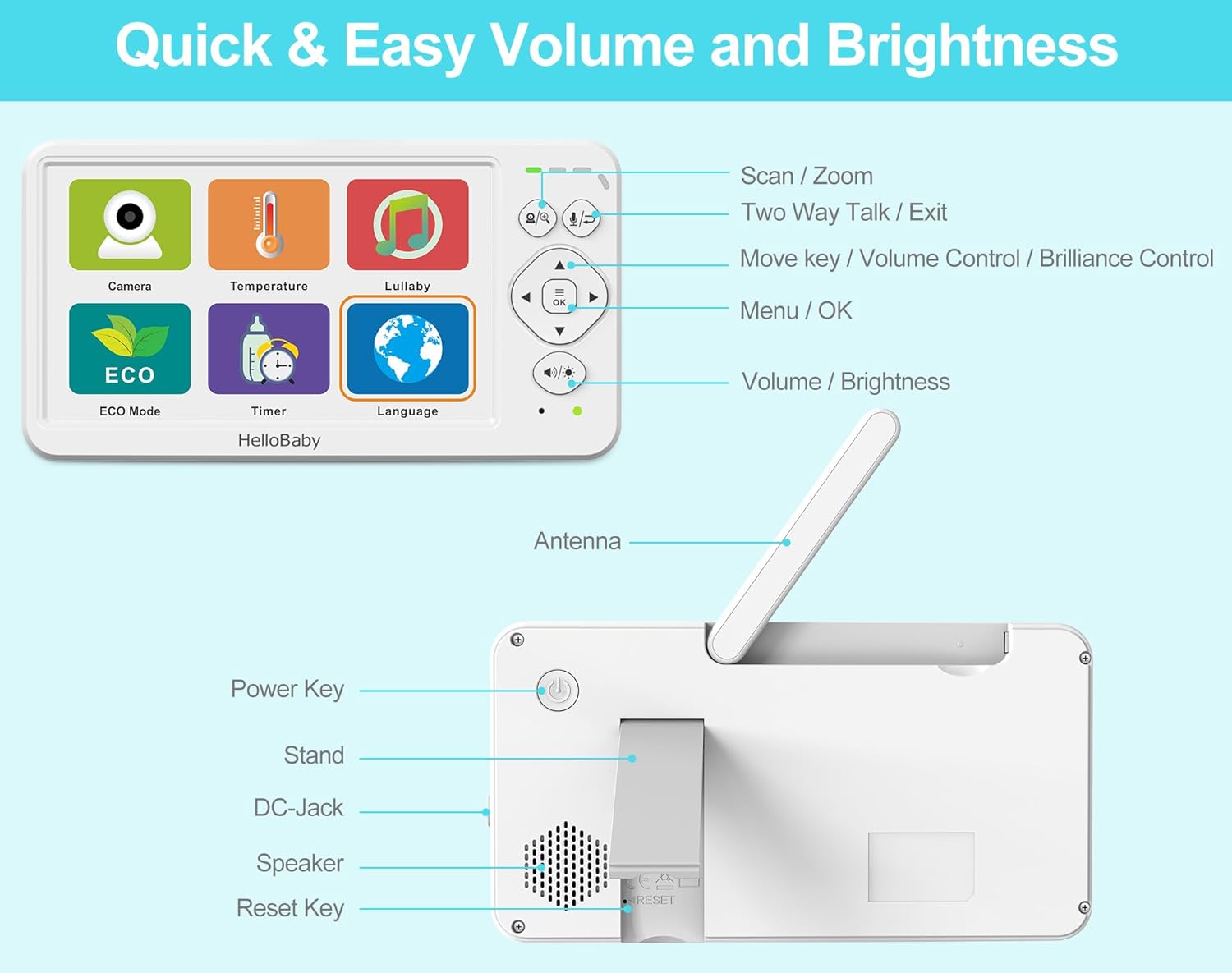
The HelloBaby monitor offers a range of features for comprehensive monitoring. Familiarize yourself with the parent unit controls:

This image labels the various buttons and features on the HelloBaby parent unit, including Scan/Zoom, Two-Way Talk/Exit, Move key/Volume/Brilliance Control, Menu/OK, Volume/Brightness, Antenna, Power Key, Stand, DC-Jack, Speaker, and Reset Key.
4.1 Basic Navigation and Settings
- Use the directional buttons to navigate through menus and control camera pan/tilt/zoom.
- Naciśnij OK przycisk, aby potwierdzić wybór.
- Naciśnij Menu button to access main settings (Camera, Temperature, Lullaby, ECO Mode, Timer, Language).

The image displays the main menu of the HelloBaby monitor, showing icons for Camera, Temperature, Lullaby, ECO Mode, Timer, and Language settings.
4.2 Sterowanie kamerą (panorama, pochylenie, zoom)
- Z koncertu view, use the directional buttons to pan (320° horizontally) and tilt (120° vertically) the camera remotely.
- Press and hold the zoom button (magnifying glass icon) for 2 seconds to activate 2x digital zoom. Press again to resume normal view.

This image illustrates the remote pan and tilt capabilities of the HelloBaby camera, showing arrows indicating 320° horizontal pan and 120° vertical tilt. The monitor displays a live feed of a baby.
4.3 Widzenie nocne
- The camera automatically switches to black and white night vision mode in low light conditions.
- It provides a clear view up to 5 meters in darkness.
The image shows the HelloBaby monitor displaying a baby sleeping in a crib, demonstrating the automatic night vision feature which provides a clear view w warunkach słabego oświetlenia.
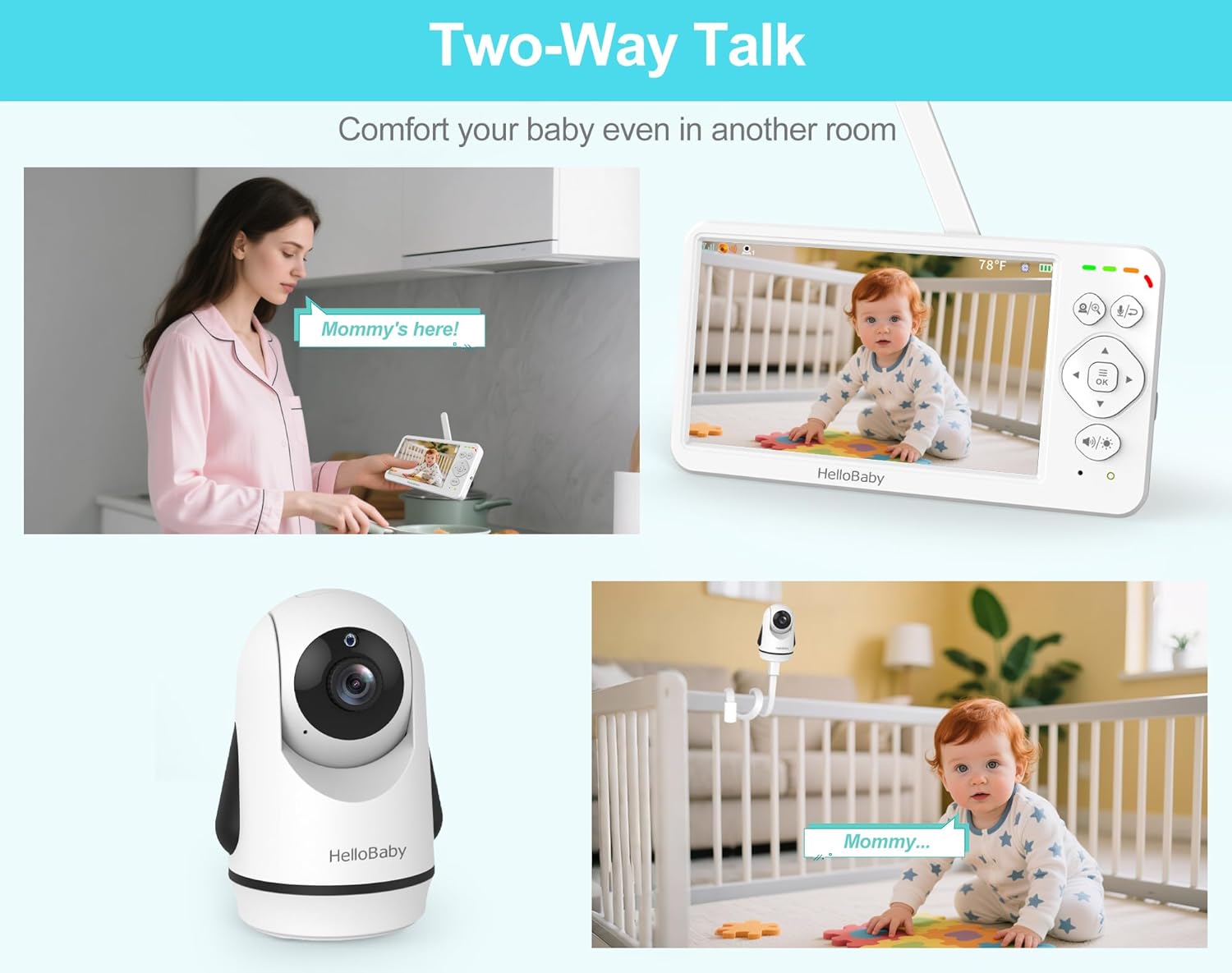
4.4 Rozmowa dwukierunkowa
- Press and hold the microphone button on the parent unit to speak to your baby through the camera's speaker. Release to stop talking.
This image illustrates the two-way talk feature, showing a parent speaking into the monitor and a baby hearing the parent's voice through the camera, allowing for remote communication.
4.5 kołysanki
- Access the "Lullaby" option from the main menu.
- Choose from 8 natural white noise and lullabies. Options include single song playback or 8-song loop playback.

The image shows the monitor's menu for selecting from 8 lullabies and choosing from 150 language options, catering to global families.
Video 2: Multifunctional Monitoring System. This video demonstrates various features of the 6-inch baby monitor, including ECO mode, automatic camera switching, night vision, zoom, two-way talk, and volume/brightness adjustments.
4.6 ECO Mode (Audio Power Saving)
- Activate ECO mode from the main menu to conserve battery life. The screen will turn off when no sound is detected.
- The screen automatically turns on when sound is detected, with three levels of cry detection sensitivity.
- In ECO mode, the 4000mAh battery can last up to 30 hours.

This image illustrates the ECO mode, showing the monitor screen off when quiet and turning on with sound detection. It also highlights the 30-hour battery life in ECO mode versus 18 hours with the screen continuously on.
4.7 Monitorowanie temperatury
- The built-in temperature sensor provides real-time room temperature display on the parent unit.
- Set temperature alerts to be notified if the room temperature goes above or below a comfortable range.

This image shows the monitor displaying the room temperature (70°F) and highlights the camera's temperature sensor, ensuring a comfortable environment for the baby.
4.8 Feeding Reminders
- Set custom feeding reminders from 0.5 to 5 hours using the "Timer" function in the menu.

This image shows a mother feeding her baby, with an overlay indicating the monitor's 0.5-5 hour custom reminder feature for feeding schedules.
4.9 Multi-Camera Expansion
- The system supports up to 4 cameras. Additional cameras are sold separately.
- Switch between cameras manually or use the automatic scan mode to cycle through all connected cameras.

This image displays the monitor showing four simultaneous camera feeds, demonstrating its multi-camera expansion capability for monitoring multiple rooms, children, or pets.
4.10 Wybór języka
- The monitor supports 150 language options. Select your preferred language from the "Language" menu.
5. Konserwacja
- Czyszczenie: Use a soft, dry cloth to clean the monitor and camera units. Avoid using abrasive cleaners or solvents.
- Pielęgnacja baterii: The parent unit has a 4000mAh rechargeable battery. For optimal battery life, avoid fully discharging the battery frequently.
- Składowanie: Jeśli urządzenie będzie przechowywane przez dłuższy czas, należy upewnić się, że akumulator jest częściowo naładowany i przechowywać go w chłodnym, suchym miejscu.
- Wodoodporność: Urządzenie jest nie jest wodoodporny. Keep away from water and moisture.
6. Rozwiązywanie Problemów
| Problem | Możliwe rozwiązanie |
|---|---|
| No image/sound on monitor. | Ensure both camera and monitor are powered on and within range. Re-pair the units if necessary (refer to Section 3. Setup). |
| Słaby odbiór sygnału. | Move the monitor closer to the camera. Avoid placing units near large metal objects or other electronic devices that may cause interference. Extend the antenna on the parent unit. |
| Kamera nie obraca się/nie przechyla. | Check if the camera is properly powered. Ensure no obstructions are blocking the camera's movement. |
| Bateria nie trzyma ładunku. | Ensure the correct power adapter is used. If the issue persists, contact customer support. |
| Audio feedback/static. | Move the monitor further away from the camera. Reduce the volume on the parent unit. |
7. Specyfikacje
| Funkcja | Szczegół |
|---|---|
| Nazwa modelu | HelloBaby 6'' Video Baby Monitor with 2 Cameras, HB6363-2 |
| Rozmiar ekranu | 6 cali |
| Technologia łączności | 2.4GHz FHSS Wireless (No WiFi, No App, Hacking Proof) |
| Pan / Tilt / Zoom | 320° Pan, 120° Tilt, 2-krotny zoom cyfrowy |
| Zakres noktowizora | Do 5 metrów |
| Czas pracy baterii (jednostka rodzicielska) | 16-30 Hours (30 hours in ECO mode) |
| Pojemność baterii | 4000mAh |
| Dwukierunkowy dźwięk | Tak |
| Lullabies | Melodie 8 |
| Monitorowanie temperatury | Tak, z alertami |
| Tryb ekologiczny | Yes, with cry detection |
| Obsługa wielu kamer | Do 4 kamer |
| Języki | 150 opcje |
| Wymiary produktu | 9.45 x 5.35 x 4.49 cala |
| Waga przedmiotu | 2.31 funta |
| Poziom wodoodporności | Nie jest wodoodporny |

This image provides detailed dimensions for both the HelloBaby parent monitor and the baby camera units, including length, width, and height measurements.
8. Gwarancja i wsparcie
The HelloBaby HB6363-2 Baby Monitor comes with a 1-year coverage. For any questions, technical support, or warranty claims, please contact HelloBaby customer service via the official email provided in the user manual or through Amazon's messaging system.
Video 3: HelloBaby Monitor: Peace of Mind, Child Safe. This video highlights the overall benefits and safety features of the HelloBaby monitor, emphasizing peace of mind for parents.