
1. Wprowadzenie
Thank you for choosing the suevery AMD Ryzen5 5600GT Gaming PC. This high-performance desktop computer is designed to provide a seamless experience for gaming, e-learning, video and audio streaming, home entertainment, business office tasks, video conferencing, photo and video editing, and daily trading. This manual provides essential information for setting up, operating, maintaining, and troubleshooting your new PC to ensure optimal performance and longevity.

Obraz 1: Przód view of the suevery AMD Ryzen5 5600GT Gaming PC, showcasing its transparent side panel and vibrant RGB fans.
2. Informacje dotyczące bezpieczeństwa
Please read and follow these safety guidelines carefully to prevent damage to your PC and ensure personal safety:
- Zasilanie: Use only the power supply unit provided with your PC. Ensure the power outlet is properly grounded.
- Wentylacja: Do not block any ventilation openings. Maintain adequate space around the PC for proper airflow to prevent overheating.
- Ciecz i wilgoć: Keep the PC away from liquids, moisture, and extreme temperatures. Do not operate the PC with wet hands.
- Umieszczenie: Place the PC on a stable, flat surface. Avoid placing it near heat sources or in direct sunlight.
- Serwisowanie: Do not attempt to service the PC yourself. Refer all servicing to qualified service personnel. Opening the PC case may void your warranty.
- Czyszczenie: Przed czyszczeniem odłącz przewód zasilający. Użyj miękkiej, suchej ściereczki. Nie używaj środków czyszczących w płynie ani aerozolu.
3. Zawartość opakowania
Po rozpakowaniu sprawdź, czy w przesyłce znajdują się wszystkie poniższe elementy:
- suevery AMD Ryzen5 5600GT Gaming PC (Model: SUSU-V900W)
- Kabel zasilający
- Dokumentacja (skrócona instrukcja obsługi, karta gwarancyjna)
- RGB Lighting (Integrated feature)
If any items are missing or damaged, please contact your retailer or suevery customer support immediately.
4. Przewodnik konfiguracji
Follow these steps to set up your suevery Gaming PC:
- Rozpakuj komputer: Carefully remove the PC from its packaging. Retain all packaging materials for future transport or servicing.
- Podłącz urządzenia peryferyjne:
- Monitor: Connect your monitor to the PC using an HDMI or VGA cable. The PC features one HDMI port and one VGA port.
- Klawiatura i mysz: Connect your keyboard and mouse to the available USB ports. The PC has 4 USB 2.0 ports and 2 USB 3.0 ports.
- Inne urządzenia: Podłącz inne urządzenia peryferyjne, takie jak głośniki, słuchawki lub dyski zewnętrzne.
- Podłącz do zasilania: Podłącz kabel zasilający do gniazda zasilania komputera, a następnie do uziemionego gniazdka elektrycznego.
- Połączenie internetowe: The PC supports Wi-Fi 802.11ax for wireless internet connectivity. An Ethernet port is also available for a wired connection.

Image 2: Rear panel of the PC, illustrating the available USB, HDMI, VGA, and audio ports for connecting peripherals.

Image 3: Diagram detailing the PC's dimensions and the location of front and rear USB ports, along with signal interfaces.
5. Instrukcja obsługi
This section outlines the basic operation of your suevery Gaming PC.
5.1 Włączanie/wyłączanie
- Włączanie: Press the power button located on the front of the PC. The system will boot up, and the operating system (Windows) will load.
- Aby wyłączyć: It is recommended to shut down the PC through the operating system's shutdown procedure (Start Menu > Power > Shut down). Avoid direct power disconnection unless absolutely necessary.
5.2 Funkcje systemu
- Edytor: Equipped with an AMD Ryzen5-5600GT 6-core, 12-thread processor (3.6GHz base, up to 4.6GHz Turbo) for efficient multitasking and gaming.
- Pamięć: 16GB of high-speed DDR4 RAM at 3200MHz ensures smooth performance across multiple applications and demanding games.
- Składowanie: A 512GB NVMe SSD provides ultra-fast boot times, rapid application loading, and ampmiejsce na Twoje filei gry.
- Grafika: Integrated AMD Radeon RX Vega7 Graphics (1.9G) supports popular games and provides clear visuals for 1080P gaming and 4K content streaming.
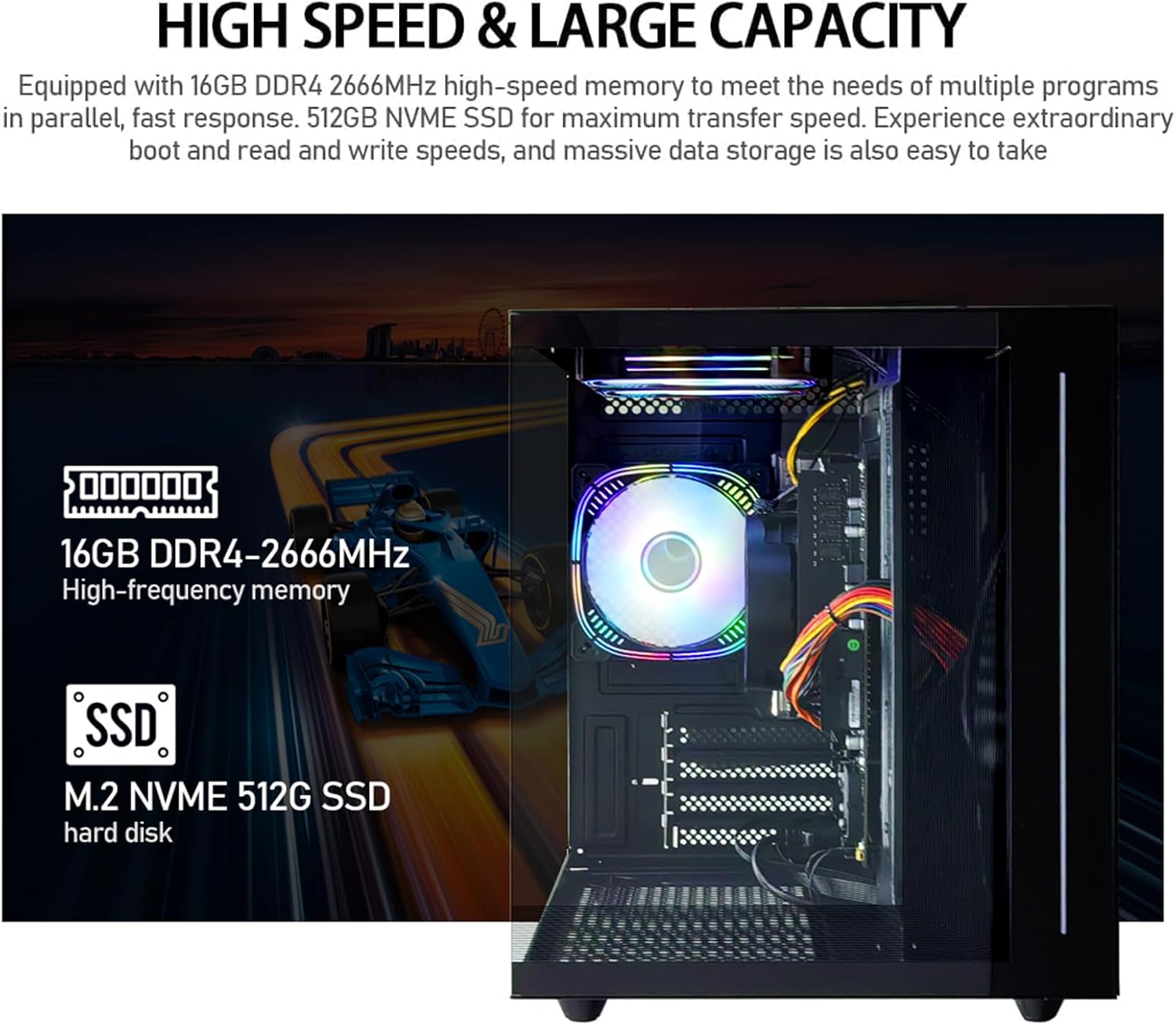
Obraz 4: Wewnętrzny view of the PC, emphasizing the 16GB DDR4 high-frequency memory and the M.2 NVMe 512GB SSD for high-speed data transfer.

Image 5: Visual representation of the AMD Radeon Vega Graphics 7 capabilities, suitable for esports games, video clips, graphic design, and corporate office tasks.
6. Konserwacja
Proper maintenance ensures the longevity and performance of your PC.
6.1 Czyszczenie
- Zewnętrzny: Use a soft, lint-free cloth to wipe the exterior surfaces. For stubborn marks, slightly dampi szmatkę z wodą.
- Wentylacja: Regularly check and clean the ventilation grilles to prevent dust buildup, which can impede airflow and cause overheating. Use compressed air to gently clear dust from fan blades and vents.
6.2 Wentylacja i chłodzenie
The PC is equipped with three built-in 120mm chassis fans for rapid heat dissipation and cooling, ensuring stable performance during intensive use. Ensure these fans are not obstructed.

Image 6: Illustration of the PC's cooling system, highlighting the RGB-enabled fans designed for rapid and silent heat dissipation.
6.3 Aktualizacje oprogramowania
Keep your operating system, drivers, and applications updated to ensure security, stability, and optimal performance. Windows updates are managed through the operating system settings.
7. Rozwiązywanie Problemów
W tej sekcji znajdziesz rozwiązania typowych problemów, na jakie możesz natrafić.
- Brak zasilania:
- Upewnij się, że kabel zasilający jest solidnie podłączony zarówno do komputera, jak i do gniazdka elektrycznego.
- Sprawdź, czy gniazdko elektryczne działa prawidłowo, podłączając do niego inne urządzenie.
- Check the power switch on the back of the PC (if present) is in the 'On' position.
- Brak obrazu na monitorze:
- Confirm the monitor is powered on and correctly connected to the PC's HDMI or VGA port.
- Sprawdź, czy na monitorze wybrano właściwe źródło sygnału wejściowego.
- Try connecting the monitor to a different port if available, or test with another monitor.
- System działa wolno lub nie odpowiada:
- Zamknij niepotrzebne aplikacje działające w tle.
- Sprawdź, czy na dysku SSD jest wystarczająca ilość wolnego miejsca.
- Przeskanuj komputer pod kątem złośliwego oprogramowania.
- Upewnij się, że system operacyjny i sterowniki są aktualne.
- Brak połączenia z internetem:
- For Wi-Fi, ensure the Wi-Fi adapter is enabled and you are connected to the correct network with the correct password.
- For wired connection, ensure the Ethernet cable is securely connected to both the PC and the router/modem.
- Uruchom ponownie router/modem.
If you encounter issues not covered here, or if the problem persists, please contact suevery customer support.
8. Specyfikacje
| Część | Specyfikacja |
|---|---|
| Numer modelu | SUSU-V900W |
| Edytor | AMD Ryzen5-5600GT (6 Cores, 12 Threads, 3.6GHz up to 4.6GHz Turbo) |
| Gniazdo procesora | Gniazdo AM4 |
| BARAN | 16GB DDR4 3200MHz (Max. 32GB) |
| Składowanie | 512GB NVMe SSD (PCIE x 4 interface) |
| Grafika | Integrated AMD Radeon RX Vega 7 Graphics (1.9G) |
| System operacyjny | Okna |
| Łączność bezprzewodowa | Wi-Fi 802.11ax |
| Porty USB 2.0 | 4 |
| Porty USB 3.0 | 2 |
| Porty HDMI | 1 |
| VGA Ports | 1 |
| Chassis Fans | 3 x 120mm (Built-in) |
| Wymiary (dł. x szer. x wys.) | Wymiary 39.62 x 35.81 x 33.27 cm |
| Waga | 6.89 kilogramów |
9. Gwarancja i wsparcie
Your suevery AMD Ryzen5 5600GT Gaming PC comes with a standard manufacturer's warranty. Please refer to the warranty card included in your package for specific terms and conditions, including warranty duration and coverage details.
For technical support, service inquiries, or to report any issues, please contact suevery customer support through the contact information provided on your warranty card or the official suevery website. Please have your model number (SUSU-V900W) and purchase details ready when contacting support.