
1. Wprowadzenie
This manual provides detailed instructions for the proper use and maintenance of your Oakcastle HIFI500 Remote Control. This remote is designed as a replacement or spare for the Oakcastle HIFI500 audio system, ensuring seamless control over its functions. Please read this manual thoroughly before use to ensure optimal performance and longevity of your remote control.
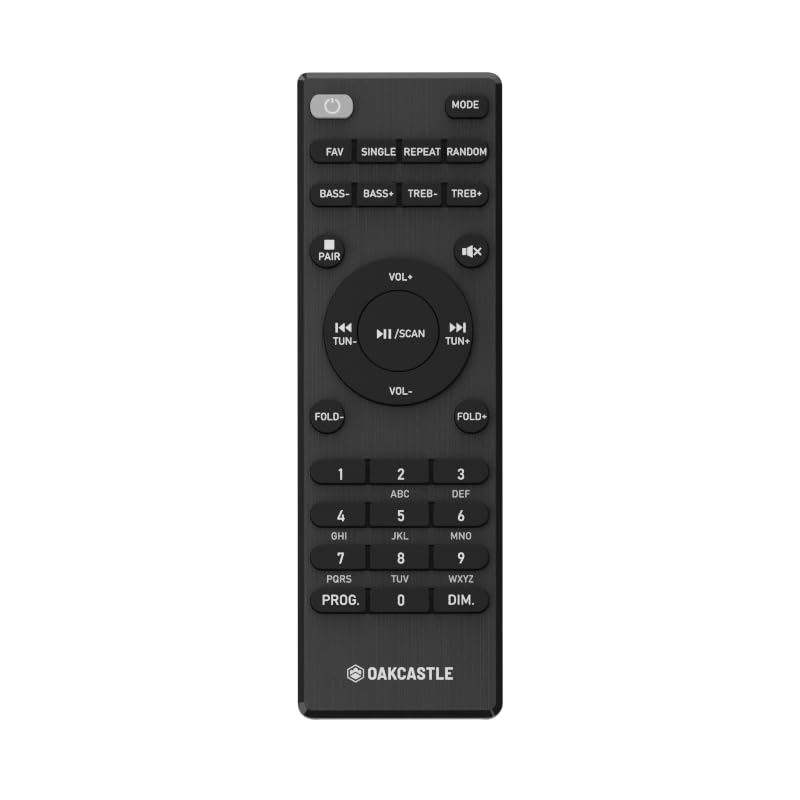
Rysunek 1.1: Przód view of the Oakcastle HIFI500 Remote Control. This image displays the compact design and button layout, including power, volume, source selection, and playback controls, typical for operating the HIFI500 audio system.
2. Konfiguracja
2.1. Instalacja baterii
The Oakcastle HIFI500 Remote Control requires two AAA batteries (not included) for operation. Follow these steps to install the batteries:
- Znajdź komorę baterii z tyłu pilota.
- Naciśnij zakładkę i przesuń pokrywę baterii w dół, aby ją otworzyć.
- Włóż dwie baterie AAA, upewniając się, że bieguny dodatni (+) i ujemny (-) są prawidłowo ustawione względem oznaczeń wewnątrz komory.
- Wsuń pokrywę baterii z powrotem na miejsce, aż zaskoczy.
Notatka: Always use new batteries and dispose of old batteries responsibly. Do not mix old and new batteries, or different types of batteries.
2.2. Początkowe użycie
Once batteries are installed, the remote control is ready for use with your Oakcastle HIFI500 audio system. Point the remote directly at the infrared (IR) receiver on your HIFI500 system. No additional pairing is typically required for this replacement remote.
3. Obsługa pilota
The Oakcastle HIFI500 Remote Control provides full functionality for your HIFI500 audio system. Below is a general guide to common button functions:
- Przycisk zasilania (⏻): Turns the HIFI500 system on or off.
- Zwiększanie/zmniejszanie głośności (Obj+ / Obj-): Reguluje poziom wyjściowy audio.
- Niemy (🔇): Tymczasowo wycisza dźwięk.
- Source/Input (Źródło): Cycles through available audio inputs (e.g., CD, FM, Bluetooth, AUX).
- Sterowanie odtwarzaniem (▶ / ⏸ / ⏹ / ⏪ / ⏩): Controls media playback (Play, Pause, Stop, Rewind, Fast Forward) for compatible sources like CD or USB.
- Przyciski nawigacyjne (▲ / ▼ / ◀ / ▶): Used to navigate menus and selections on the HIFI500 system display.
- Przycisk OK/Enter: Potwierdza wybór.
- Klawiatura numeryczna (0-9): For direct input of radio frequencies, track numbers, or other numerical data.
Refer to your Oakcastle HIFI500 audio system's main user manual for specific functions and advanced operations.
4. Konserwacja
4.1. Czyszczenie
To clean your remote control, gently wipe the surface with a soft, dry cloth. For stubborn dirt, slightly dampPrzetrzyj ściereczkę wodą lub delikatnym, nieściernym środkiem czyszczącym. Unikaj stosowania silnych środków chemicznych, rozpuszczalników i materiałów ściernych, ponieważ mogą one uszkodzić wykończenie pilota lub jego wewnętrzne elementy.
4.2. Wymiana baterii
Replace batteries when the remote's response becomes sluggish or stops working. Follow the battery installation steps outlined in Section 2.1. Always replace both batteries simultaneously with new ones.
4.3. Przechowywanie
When not in use for extended periods, it is recommended to remove the batteries from the remote control to prevent leakage, which can cause damage. Store the remote in a cool, dry place away from direct sunlight and extreme temperatures.
5. Rozwiązywanie Problemów
If you encounter issues with your Oakcastle HIFI500 Remote Control, please refer to the following common problems and solutions:
- Pilot nie odpowiada:
- Sprawdź, czy baterie zostały prawidłowo zainstalowane i czy ich biegunowość jest prawidłowa.
- Wymień baterie na nowe.
- Ensure there are no obstructions between the remote control and the HIFI500 system's IR receiver.
- Make sure you are within the effective range and pointing the remote directly at the HIFI500 system.
- Funkcja przerywana:
- Często oznacza to niski poziom naładowania baterii. Wymień baterie.
- Ensure the remote's IR emitter is clean and free from dirt or smudges.
If the problem persists after trying these solutions, please contact Oakcastle customer support.
6. Specyfikacje
| Funkcja | Specyfikacja |
|---|---|
| Model | HIFI500 Remote Control |
| Marka | Dąbowy zamek |
| Technologia łączności | Podczerwieni (IR) |
| Źródło zasilania | Baterie 2 x AAA (brak w zestawie) |
| Maksymalna liczba obsługiwanych urządzeń | 1 (Oakcastle HIFI500 Audio System) |
| Funkcja specjalna | Lekki |
| Waga przedmiotu | 2.82 uncji (około 80 gramów) |
| Wymiary opakowania | 8 x 3.2 x 2.5 cala (ok. 20.3 x 8.1 x 6.3 cm) |
| Producent | WIĘKSZOŚĆ |
7. Gwarancja i wsparcie
7.1. Informacje o gwarancji
This Oakcastle HIFI500 Remote Control is covered by a manufacturer's warranty. Please refer to the warranty card included with your original Oakcastle HIFI500 audio system or visit the official Oakcastle webSzczegółowe warunki gwarancji znajdziesz na stronie. Zachowaj dowód zakupu na wypadek roszczeń gwarancyjnych.
7.2. Obsługa klienta
For technical assistance, troubleshooting beyond this manual, or warranty inquiries, please contact Oakcastle customer support. You can typically find contact information, including phone numbers, email addresses, and support portals, on the official Oakcastle webstrona.
Please have your product model (HIFI500 Remote Control) and purchase details ready when contacting support.