
1. Wprowadzenie
This manual provides essential information for the safe and effective operation of your ION Audio Retro Glow Boombox. This device combines classic audio playback with modern connectivity, featuring an AM/FM radio, cassette player/recorder, Bluetooth 5.3, USB, and SD card playback capabilities. Please read this manual thoroughly before use and retain it for future reference.
2. Informacje dotyczące bezpieczeństwa
- Nie narażaj urządzenia na działanie wody i wilgoci.
- Unikać umieszczania urządzenia w pobliżu źródeł ciepła lub w bezpośrednim świetle słonecznym.
- Zapewnij odpowiednią wentylację, nie blokuj żadnych otworów wentylacyjnych.
- Używaj wyłącznie dodatków/akcesoriów wskazanych przez producenta.
- Odłącz urządzenie od zasilania podczas burzy z piorunami lub gdy nie jest używane przez dłuższy czas.
- Wszelkie prace serwisowe należy powierzać wykwalifikowanemu personelowi.
3. Co jest zawarte
Po rozpakowaniu należy sprawdzić, czy wszystkie wymienione poniżej przedmioty znajdują się na miejscu i są w dobrym stanie:
- ION Audio Retro Glow Boombox
- Kabel zasilający
- Skrócona instrukcja obsługi
4. Koniec produktuview
The Retro Glow Boombox features a translucent housing with multi-colored LED lights that synchronize with music. It includes dual full-range speakers for robust audio output.
Panel przedni

Rycina 1: Przód view of the Retro Glow Boombox, showcasing the cassette deck, radio tuner, and illuminated dual speakers.
Najlepsze elementy sterujące

Rysunek 2: Szczegółowy view of the top panel, including volume, bass, treble controls, cassette function buttons (Pause, Stop/Eject, F.FWD, REW, Play, REC), and mode selectors (Tape, Aux, Radio, Bluetooth/USB/SD).
Side Panel and Rear
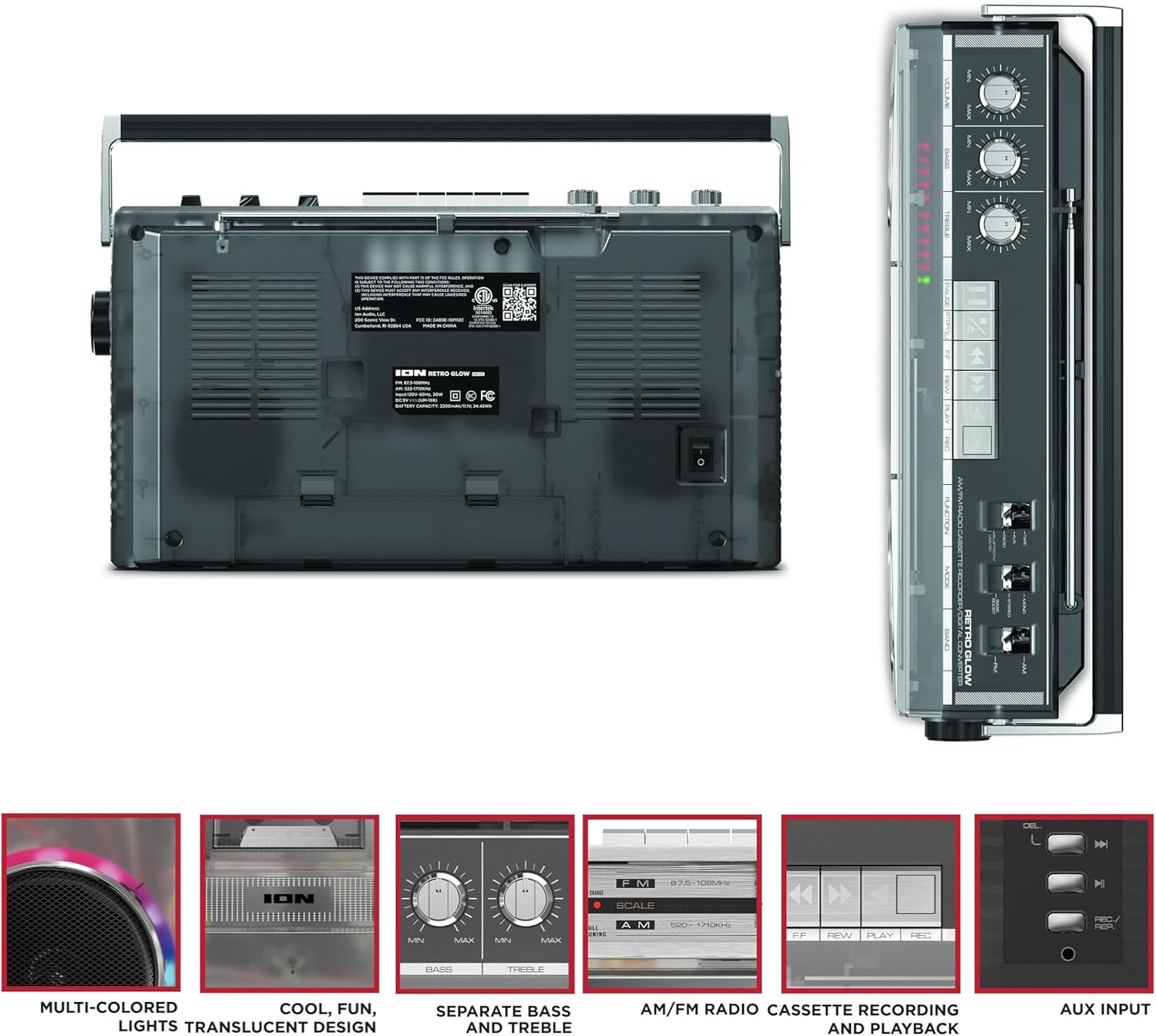
Figure 3: Side panel illustrating the USB port, SD card slot, and playback control buttons. The rear panel includes the power input and battery compartment.
5. Konfiguracja
Zasilanie boomboxa
The Retro Glow Boombox can be powered via the included AC power cable or by batteries for portable use.
- Zasilanie prądem zmiennym: Connect the power cable to the AC input on the rear of the unit and then to a wall outlet.
- Moc baterii: Open the battery compartment on the rear and insert the required batteries (type and quantity specified in specifications).

Rysunek 4: Tył view of the boombox, highlighting the power input and the battery compartment for portable operation.
6. Instrukcja obsługi
Ogólne działanie
- Włączanie/wyłączanie: Użyj wyłącznika zasilania, aby włączyć lub wyłączyć urządzenie.
- Regulacja głośności: Adjust the 'VOLUME' knob on the top panel to increase or decrease the sound level.
- Kontrola tonów: Use the 'BASS' and 'TREBLE' knobs to customize the audio output to your preference.
- Światła LED: The multi-colored LED lights around the speakers dance in sync with the music. Refer to the Quickstart Guide for specific controls to change light modes or turn them off.
Funkcjonalność radia
- Switch the 'FUNCTION' selector to 'RADIO'.
- Select 'AM' or 'FM' using the 'BAND' switch.
- Extend the telescopic antenna for optimal FM reception. For AM, rotate the unit for best reception.
- Use the 'TUNING' knob to scan for stations.
Odtwarzacz/Rejestrator kasetowy
- Odtwarzanie nagranego dźwięku: Press the 'STOP/EJ' button to open the cassette door. Insert a cassette tape and close the door. Press 'PLAY' to begin playback.
- Nagranie: To record from the radio, built-in microphone, or an external source (via Aux input), ensure a blank cassette is inserted. Select the desired source using the 'FUNCTION' switch. Press the 'REC' button (often simultaneously with 'PLAY') to start recording.
- Szybkie przewijanie do przodu/do tyłu: Use the 'F.FWD' and 'REW' buttons for tape navigation.
Łączność Bluetooth
- Switch the 'FUNCTION' selector to 'BLUETOOTH/USB/SD'. The unit will enter pairing mode.
- On your Bluetooth-enabled device, search for 'Retro Glow Boombox' and select it to pair.
- Once paired, you can stream audio wirelessly to the boombox.
Odtwarzanie z USB i karty SD
- Insert a USB drive or SD card into the respective slot on the side panel.
- Switch the 'FUNCTION' selector to 'BLUETOOTH/USB/SD'. The unit should automatically detect and begin playing audio filez włożonego nośnika.
- Use the playback control buttons (play/pause, skip forward/backward) on the side panel to manage your audio.
Wejście pomocnicze
- Connect an external audio device (e.g., smartphone, MP3 player) to the 'AUX' input using a 3.5mm audio cable (not included).
- Switch the 'FUNCTION' selector to 'AUX'. Audio from your external device will play through the boombox speakers.
7. Konserwacja
- Czyszczenie: Do czyszczenia zewnętrznej części urządzenia należy używać miękkiej, suchej ściereczki. Nie należy używać środków czyszczących o właściwościach ściernych ani rozpuszczalników.
- Pielęgnacja magnetofonu kasetowego: Regularnie czyść głowice taśmy i rolki dociskowe delikatnie przecierając je wacikiem.ampnasycone alkoholem izopropylowym, aby zapewnić optymalną jakość dźwięku i zapobiec uszkodzeniu taśmy.
- Składowanie: Gdy nie używasz boomboxa, przechowuj go w chłodnym, suchym miejscu, z dala od bezpośredniego światła słonecznego i ekstremalnych temperatur.
8. Rozwiązywanie Problemów
Brak zasilania
- Upewnij się, że kabel zasilający jest solidnie podłączony zarówno do urządzenia, jak i do działającego gniazdka elektrycznego.
- Jeśli używasz baterii, sprawdź, czy są prawidłowo włożone i nie są rozładowane.
Brak dźwięku
- Check the volume level on the boombox and the connected audio source (if applicable).
- Ensure the correct function mode (Radio, Tape, Bluetooth, USB/SD, Aux) is selected.
- For cassette playback, verify the tape is inserted correctly and the heads are clean.
Problemy z parowaniem Bluetooth
- Make sure the boombox is in Bluetooth pairing mode.
- Ensure your Bluetooth device is within range (typically 30 feet or 10 meters).
- Spróbuj rozparować i ponownie sparować urządzenie.
9. Specyfikacje
| Wymiary produktu | 9.25 x 16.25 x 5.25 cala |
| Waga przedmiotu | 8.93 funta |
| Technologia łączności | Bluetooth 5.3, USB, SD Card, Aux Input |
| Typ głośnika | Stereo, Full-Range |
| Źródło zasilania | AC Power Cable, Rechargeable Battery (approx. 10-hour life) |
| Cechy specjalne | AM/FM Radio, Cassette Player/Recorder, Multi-colored LED Lights, Retro VU Meters, Separate Bass and Treble Controls |
10. Gwarancja i wsparcie
For warranty information or technical support, please refer to the Quickstart Guide included with your product or visit the official ION Audio webZachowaj paragon, ponieważ dowód zakupu może być wymagany w przypadku roszczeń gwarancyjnych.