
1. Koniec produktuview
The CHOETECH B695 is a versatile 10000mAh magnetic power bank designed for convenient charging of multiple devices. It features both wireless charging capabilities and multiple wired output options, including built-in USB-C and Lightning cables. Its compact design and integrated safety features make it an ideal portable power solution.

Obraz: przód i tył view of the CHOETECH B695 Magnetic Power Bank, showcasindzięki kompaktowej konstrukcji i licznym portom.
Główne cechy:
- 10000 mAh Pojemność: Zapewnia ample moc dla wielu ładowań.
- Ładowanie 2 w 1: Supports both magnetic wireless charging and wired charging.
- Wbudowane kable: Integrated USB-C and Lightning cables for direct device connection.
- Wiele wyjść: Includes USB-A, Type-C (input/output), and dedicated wireless charging for phones and watches.
- Wyrównanie magnetyczne: Ensures secure and efficient wireless charging for compatible devices.
- Cyfrowy wyświetlacz LED: Clearly indicates remaining battery percentage.
- Kompleksowa ochrona bezpieczeństwa: Built-in safeguards against overcharge, overdischarge, overcurrent, overvoltage, temperature, short circuit, overpower, recovery, and electromagnetic field issues.
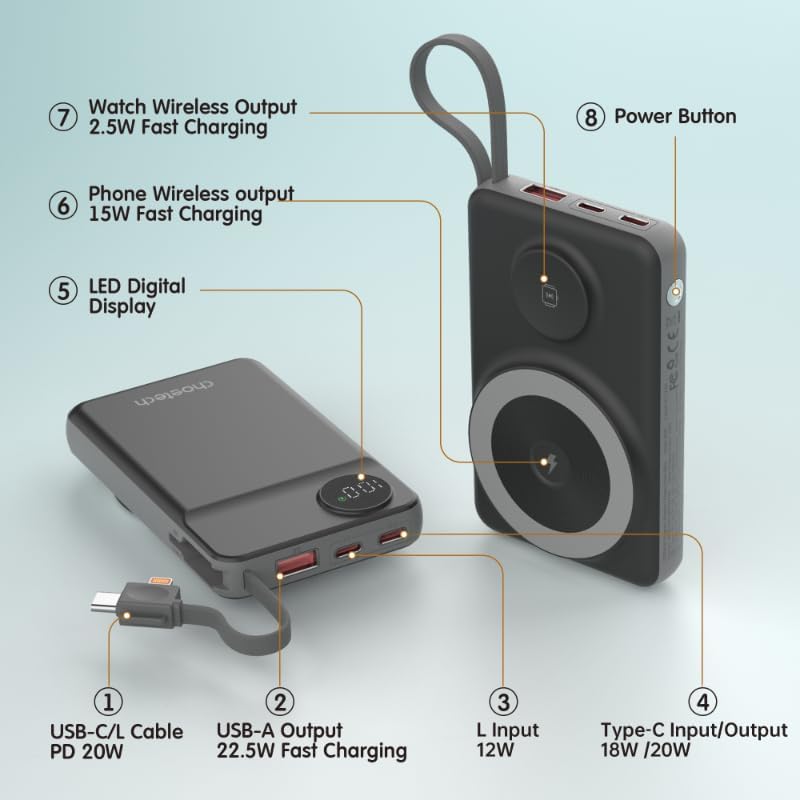
Image: Detailed diagram labeling the ports and features of the CHOETECH B695, including USB-C/L cable, USB-A output, L input, Type-C input/output, LED display, phone wireless output, watch wireless output, and power button.
2. Rozpoczęcie pracy: konfiguracja
2.1 Ładowanie powerbanku
Before initial use, fully charge your CHOETECH B695 power bank. This ensures optimal performance and battery longevity.
- Connect a compatible USB-C charging cable (not included) to the Type-C Input/Output port (4) on the power bank.
- Connect the other end of the cable to a USB wall adapter (not included).
- The LED Digital Display (5) will show the charging progress. It will display "100" when fully charged.
- Alternatively, you can use the built-in Lightning input (3) to charge the power bank with a Lightning cable and adapter.
Notatka: For fastest charging of the power bank, use a PD (Power Delivery) compatible wall adapter with the Type-C port.
3. Instrukcja obsługi
3.1 Sprawdzanie poziomu baterii
Press the Power Button (8) once to activate the LED Digital Display (5), which will show the current battery percentage.
3.2 Ładowanie przewodowe
The CHOETECH B695 offers multiple wired charging options:
- Using Built-in USB-C/L Cable (1):
- Pull out the integrated USB-C or Lightning cable from its storage slot.
- Connect the appropriate cable end to your device's charging port.
- Ładowanie rozpocznie się automatycznie.
- Using USB-A Output (2):
- Connect your device's USB charging cable to the USB-A Output port (2).
- Podłącz drugi koniec kabla do urządzenia.
- Rozpocznie się ładowanie.
- Using Type-C Input/Output (4):
- Connect your device's USB-C charging cable to the Type-C Input/Output port (4).
- Podłącz drugi koniec kabla do urządzenia.
- Rozpocznie się ładowanie.

Image: The CHOETECH B695 power bank connected to a smartphone via its built-in USB-C cable, demonstrating wired charging.
3.3 Wireless Charging (Phone)
The power bank supports magnetic wireless charging for compatible smartphones (e.g., iPhone 12 series and newer, or Android phones with magnetic cases).
- Upewnij się, że powerbank jest odpowiednio naładowany.
- Align your compatible smartphone with the larger magnetic charging pad (6) on the power bank.
- The phone should snap into place magnetically, and wireless charging will begin.

Image: A smartphone magnetically attached to the larger wireless charging pad and a smartwatch on the smaller pad of the CHOETECH B695, illustrating simultaneous wireless charging.
3.4 Wireless Charging (Watch)
The power bank includes a dedicated smaller magnetic charging pad for smartwatches.
- Upewnij się, że powerbank jest odpowiednio naładowany.
- Place your compatible smartwatch onto the smaller magnetic charging pad (7).
- The watch should align magnetically, and wireless charging will begin.
3.5 Ładowanie jednoczesne
The CHOETECH B695 can charge multiple devices simultaneously using a combination of its wired and wireless outputs.

Image: The CHOETECH B695 power bank connected to and wirelessly charging multiple devices, including smartphones and a smartwatch, demonstrating its multi-output capability.
4. Informacje dotyczące bezpieczeństwa i funkcji ochronnych
The CHOETECH B695 is equipped with multiple safety mechanisms to protect your devices and the power bank itself.
- Ochrona przed przeładowaniem: Zapobiega ładowaniu akumulatora ponad jego pojemność.
- Zabezpieczenie przed nadmiernym rozładowaniem: Protects the battery from being fully depleted, extending its lifespan.
- Zabezpieczenie nadprądowe: Zabezpiecza przed nadmiernym przepływem prądu.
- Przepełnienietage Ochrona: Chroni przedtage skoki.
- Ochrona temperaturowa: Monitors and regulates the internal temperature to prevent overheating.
- Zabezpieczenie przed zwarciem: Automatyczne wyłączenie w przypadku zwarcia.
- Ochrona przed przeciążeniem: Prevents power output beyond safe limits.
- Ochrona odzyskiwania: Allows the device to recover from protection states.
- Ochrona przed polem elektromagnetycznym: Shields against harmful electromagnetic interference.

Image: An infographic detailing the nine safety protection features integrated into the CHOETECH B695 power bank, including overcharge, overdischarge, overcurrent, overvoltage, temperature, short circuit, overpower, recovery, and electromagnetic field protection.
Ważny: Do not expose the power bank to extreme temperatures, direct sunlight, or water. Do not disassemble or attempt to repair the device. Keep out of reach of children.
5. Konserwacja
- Czyszczenie: Use a soft, dry cloth to clean the power bank. Avoid liquid cleaners.
- Składowanie: Przechowuj powerbank w chłodnym i suchym miejscu, z dala od bezpośredniego światła słonecznego i ekstremalnych temperatur.
- Stan baterii: Aby zachować sprawność akumulatora, należy w pełni ładować i rozładowywać powerbank co najmniej raz na trzy miesiące, jeśli nie jest regularnie używany.
- Pielęgnacja kabli: Handle the built-in cables gently. Avoid excessive bending or pulling to prevent damage.
6. Rozwiązywanie Problemów
6.1 Power Bank nie ładuje się
- Ensure the charging cable is securely connected to both the power bank's input port and the wall adapter.
- Sprawdź, czy zasilacz sieciowy działa prawidłowo i jest podłączony do gniazdka elektrycznego.
- Try a different USB-C or Lightning charging cable and wall adapter.
6.2 Urządzenie nie ładuje się z powerbanku
- Ładowanie przewodowe:
- Sprawdź czy power bank jest wystarczająco naładowany (sprawdź wyświetlacz LED).
- Upewnij się, że kabel ładujący jest bezpiecznie podłączony zarówno do portu wyjściowego power banku, jak i do urządzenia.
- Spróbuj użyć innego kabla ładującego lub innego portu wyjściowego w powerbanku.
- Press the power button once to activate output if necessary.
- Ładowanie bezprzewodowe:
- Upewnij się, że Twoje urządzenie obsługuje bezprzewodowe ładowanie magnetyczne.
- Zdejmij z urządzenia wszelkie grube etui i metalowe przedmioty, które mogą zakłócać ładowanie bezprzewodowe.
- Ensure your device is correctly aligned with the magnetic charging pad on the power bank.
- Sprawdź, czy power bank jest wystarczająco naładowany.
6.3 Powolne ładowanie
- Ensure you are using a fast-charging compatible cable and adapter for both charging the power bank and charging your devices.
- Some devices may limit charging speed when multiple devices are connected simultaneously.
- Environmental factors (e.g., high temperature) can affect charging efficiency.
6.4 LED Display Not Working
- Naciśnij mocno przycisk zasilania.
- Jeśli powerbank jest całkowicie rozładowany, wyświetlacz może się nie zaświecić, dopóki powerbank się nie naładuje.
7. Specyfikacje
| Model | B695 |
| Pojemność baterii | 10000mAh |
| Wbudowane wyjście kablowe | USB-C/L Cable PD 20W |
| Wyjście USB-A | Szybkie ładowanie 22.5 W |
| Wejście/wyjście typu C | 18W / 20W |
| Wejście Lightning | 12 W |
| Wyjście bezprzewodowe telefonu | Szybkie ładowanie 15 W |
| Oglądaj wyjście bezprzewodowe | Szybkie ładowanie 2.5 W |
| Wymiary (dł. x szer. x grubość) | 7.7 dł. x 9.7 szer. x 16.2 cm |
| Waga przedmiotu | 0.05 kilograma (50 g) |
| Kolor | Czarny |
8. Gwarancja i wsparcie
CHOETECH products are designed and manufactured to the highest quality standards. For warranty information and customer support, please refer to the warranty card included with your purchase or visit the official CHOETECH webstrona.
If you encounter any issues or have questions regarding your CHOETECH B695 power bank, please contact CHOETECH customer service for assistance.