
1. Wprowadzenie
This manual provides detailed instructions for the safe and effective use of your TOTAL TMT57026 Laser Distance Meter. Please read this manual thoroughly before operating the device and keep it for future reference. This device is designed for accurate distance measurements up to 70 meters, suitable for various professional and DIY applications.
2. Instrukcje bezpieczeństwa
- Promieniowanie laserowe: This device emits Class 2 laser radiation. Do not stare into the laser beam or direct it at other people or animals.
- Ochrona oczu: Unikaj bezpośredniego narażenia oczu na wiązkę lasera.
- Środowisko operacyjne: Nie należy używać urządzenia w atmosferach wybuchowych ani w pobliżu materiałów łatwopalnych.
- Wodoodporność: To urządzenie jest nie jest wodoodporny. Unikać narażenia na działanie wody i wysokiej wilgotności.
- Konserwacja: Only qualified personnel should repair the device.
- Baterie: Use only specified AAA batteries. Do not mix old and new batteries or different types of batteries.
3. Koniec produktuview
Familiarize yourself with the components of your TOTAL TMT57026 Laser Distance Meter.
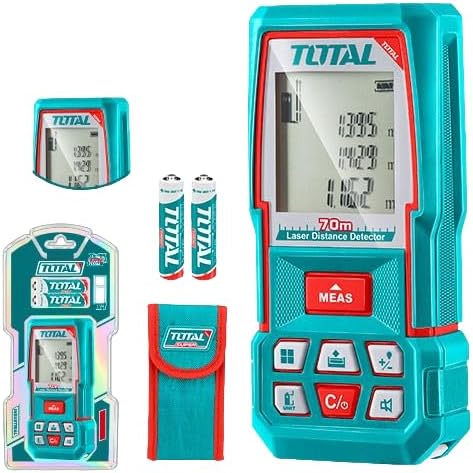
Figure 1: The TOTAL TMT57026 Laser Distance Meter, showing the device itself, two AAA batteries, a carrying pouch, and retail packaging. The device features a digital display and multiple function buttons.
Kluczowe komponenty:
- Nadajnik/odbiornik laserowy: Znajduje się w górnej części urządzenia.
- Ekran wyświetlacza: Shows measurements, units, and mode indicators.
- Przycisk MEAS: Initiates single or continuous measurement.
- Przycisk JEDNOSTKA: Zmienia jednostki miary (np. metry, stopy, cale).
- C/O Button: Clears the last measurement or turns the device off.
- Przyciski funkcyjne: For area, volume, addition, subtraction, and other calculations.
- Komora baterii: Znajduje się z tyłu urządzenia.
4. Konfiguracja
4.1 Instalacja baterii
- Znajdź pokrywę komory baterii z tyłu urządzenia.
- Aby otworzyć pokrywę, przesuń ją lub odepnij.
- Insert two (2) AAA 1.5V disposable batteries, ensuring correct polarity (+/-). The device includes two AAA batteries.
- Dokładnie zamknij pokrywę komory baterii.
4.2 Włączanie/wyłączanie
- Włączanie: Naciśnij POMIAR button briefly. The display will light up.
- Aby wyłączyć: Naciśnij i przytrzymaj WSPÓŁ button for approximately 3 seconds. The device will also automatically power off after a period of inactivity to conserve battery life.
5. Instrukcja obsługi
5.1 Podstawowy pomiar odległości
- Upewnij się, że urządzenie jest włączone.
- Skieruj wiązkę lasera na powierzchnię docelową.
- Naciśnij POMIAR button once. The laser will activate, and the measurement will appear on the display.
- The measurement will be held on the screen until a new measurement is taken or the device is turned off.
5.2 Pomiar ciągły (śledzenie)
- Naciśnij i przytrzymaj POMIAR Naciśnij przycisk i przytrzymaj przez około 2 sekundy.
- The device will enter continuous measurement mode, displaying real-time distance as you move the device.
- Naciśnij POMIAR naciśnij przycisk ponownie, aby zatrzymać pomiar ciągły i przytrzymać ostatnią wartość.
5.3 Zmiana jednostek miary
- Naciśnij JEDNOSTKA button repeatedly to cycle through available units: meters (m), feet (ft), and inches (in).
- Wybrana jednostka zostanie wyświetlona na wyświetlaczu.
5.4 Pomiar powierzchni i objętości
The device supports calculation of area and volume. Refer to the icons on the function buttons for specific modes.
- Press the appropriate function button (e.g., the button with the square icon for area, or cube icon for volume).
- Follow the on-screen prompts to take the required measurements (e.g., length, width for area; length, width, height for volume).
- Wyświetlony zostanie obliczony wynik.
5.5 Dodawanie i odejmowanie
Użyj +/- button to add or subtract measurements.
- Wykonaj pierwszy pomiar.
- Naciśnij +/- button to select addition or subtraction mode.
- Take the second measurement. The device will automatically perform the calculation and display the result.
6. Konserwacja
6.1 Czyszczenie
- Przetrzyj urządzenie miękką, damp ściereczka. Nie należy używać środków czyszczących o właściwościach ściernych ani rozpuszczalników.
- Clean the laser lens carefully with a soft, lint-free cloth, similar to cleaning camera lenses.
6.2 Przechowywanie
- Przechowuj urządzenie w suchym i chłodnym miejscu, z dala od bezpośredniego światła słonecznego i ekstremalnych temperatur.
- Jeśli urządzenie będzie przechowywane przez dłuższy czas, należy wyjąć baterie, aby zapobiec wyciekowi.
6.3 Wymiana baterii
- When the battery indicator on the display shows low power, replace both AAA batteries following the instructions in Section 4.1.
7. Rozwiązywanie Problemów
| Problem | Możliwa przyczyna | Rozwiązanie |
|---|---|---|
| Urządzenie nie włącza się. | Baterie są rozładowane lub nieprawidłowo zainstalowane. | Sprawdź biegunowość baterii lub wymień je na nowe baterie AAA. |
| Niedokładne pomiary. | Laser lens is dirty; target surface is too reflective/non-reflective; device is unstable. | Clean the laser lens. Measure against a suitable, stable surface. Ensure device is held steady. |
| Wiązka laserowa nie jest widoczna. | Jasne światło otoczenia; laser wyłączony. | Operate in lower light conditions. Ensure device is powered on and MEAS button is pressed. |
| Na wyświetlaczu pojawia się kod błędu. | Pomiar poza zakresem; błąd wewnętrzny. | Ensure target is within 0.05m to 70m range. Try restarting the device. If error persists, contact support. |
8. Specyfikacje
- Model: TMT57026
- Marka: CAŁKOWITY
- Zakres pomiarowy: 0.05 do 70 metrów
- Jednostki miary: Metry (m), stopy (ft), cale (in)
- Klasa laserowa: Klasa 2
- Baterie: 2 x AAA, 1.5V (included)
- Typ baterii: Jednorazowe
- Automatic Laser Shut-off: Yes (after inactivity)
- Automatic Device Shut-off: Yes (after inactivity)
- Wymiary produktu: Około 17 x 5 x 0.1 cm
- Waga przedmiotu: Około 160 g (0.16 kilograma)
- Tworzywo: Plastikowy
- Kolor: Turkus
- Poziom wodoodporności: Nie jest wodoodporny
- Producent: Całkowity
- Kraj pochodzenia: Chiny
9. Gwarancja i wsparcie
For warranty information and technical support, please contact TOTAL customer service. Keep your purchase receipt as proof of purchase.
For further assistance, please refer to the official TOTAL webodwiedź witrynę lub skontaktuj się z lokalnym dystrybutorem.