
Wstęp
Welcome to the user manual for your AMACOOL Handheld Ice Cooler Fan. This innovative device is engineered to deliver powerful and instant cooling relief, featuring advanced semiconductor technology for an ice-cooling effect. Its portable design and long-lasting battery make it an ideal companion for staying comfortable in various environments, from travel to outdoor activities. Please read this manual thoroughly to ensure safe and optimal use of your fan.
Ważne informacje dotyczące bezpieczeństwa
Aby zapobiec obrażeniom ciała lub uszkodzeniu urządzenia, należy przestrzegać następujących środków ostrożności:
- Nie zanurzaj wentylatora w wodzie ani innych płynach.
- Przechowywać w miejscu niedostępnym dla dzieci i zwierząt domowych.
- Do not insert fingers or foreign objects into the fan blades or cooling plate.
- Use only the provided charging cable or a certified 5V charger.
- Unikaj ekstremalnych temperatur i bezpośredniego światła słonecznego.
- Nie próbuj samodzielnie demontować ani naprawiać wentylatora. Skontaktuj się z obsługą klienta, aby uzyskać pomoc.
- Przed podłączeniem kabla ładującego upewnij się, że port ładowania jest suchy.
Zawartość opakowania
Zaznacz pole, aby upewnić się, że wszystkie elementy są obecne:
- 1 x AMACOOL Handheld Ice Cooler Fan
- Kabel ładujący 1 x USB-C
- 1 x Smycz
- 1 x Instrukcja obsługi (ten dokument)

Image: The AMACOOL Handheld Ice Cooler Fan shown with its accompanying lanyard and charging cable, illustrating the complete package contents.
Produkt ponadview
Familiarize yourself with the key components of your AMACOOL Handheld Ice Cooler Fan:
- Łopatki wentylatora: Located at the top, responsible for airflow.
- Ceramic Cooling Plate: Positioned at the center of the fan head, provides instant ice cooling.
- Cyfrowy wyświetlacz LED: Shows battery level, fan speed, and cooling mode.
- Scroll Switch: Used to adjust fan speed and activate cooling mode.
- Port ładowania typu C: Located at the bottom for recharging the internal battery.
- Anti-Lost Lanyard Slot: Do przymocowania dołączonej smyczy.
- Base Anti-Slip Pad: Zapewnia stabilność po umieszczeniu na powierzchni.

Obraz: Wybuch view diagram of the fan, highlighting its internal components such as aerodynamic blades, ceramic cooling plate, LED digital display, and scroll switch.
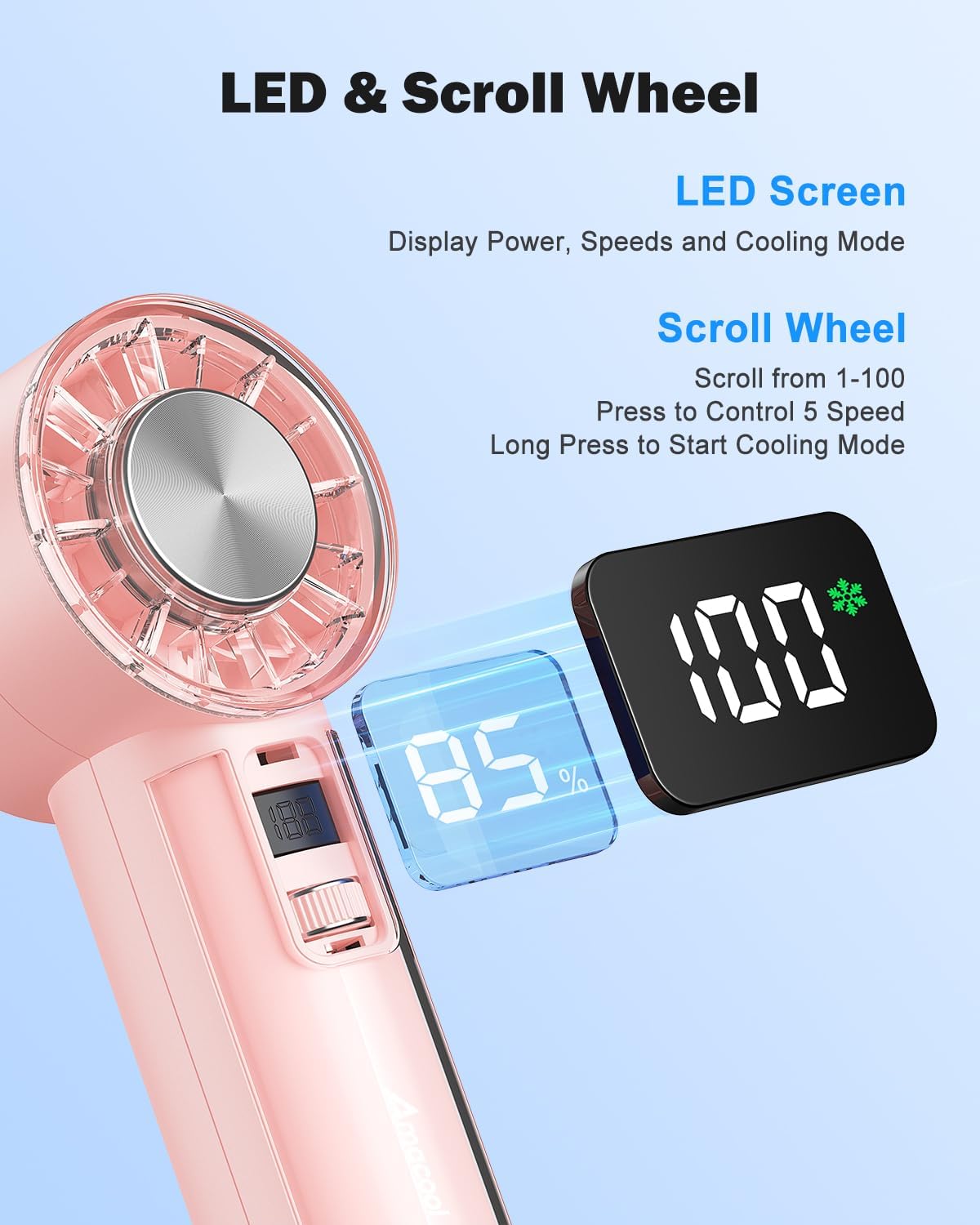
Obraz: szczegółowy view of the fan's LED screen, showing battery percentage and speed settings, along with the scroll wheel for control.

Image: Close-ups of various design details, including the Type-C charging port, sleek body, anti-lost lanyard attachment, and the base anti-slip pad.
Organizować coś
Ładowanie wentylatora
Before first use, fully charge your AMACOOL Handheld Ice Cooler Fan.
- Connect the provided USB-C charging cable to the charging port at the bottom of the fan.
- Plug the other end of the USB-C cable into a 5V USB power adapter (not included) or a computer's USB port.
- The LED digital display will show the charging progress. A full charge typically takes a few hours.
- Po pełnym naładowaniu wyświetlacz wskaże 100%. Odłącz kabel ładujący.
Mocowanie smyczy
For convenient portability, attach the included lanyard:
- Thread the thin loop of the lanyard through the lanyard slot located near the top of the fan handle.
- Pass the main strap of the lanyard through the loop you just created and pull to secure.
Instrukcja obsługi
Włączanie/wyłączanie zasilania
- Włączanie: Briefly press the scroll switch. The fan will start in Normal mode at a low speed.
- Aby wyłączyć: Briefly press the scroll switch repeatedly until the fan speed reaches 0, or long press the scroll switch for 2 seconds.
Regulacja prędkości wentylatora
The fan offers 100 stepless speed settings for precise airflow control.
- Aby zwiększyć prędkość: Scroll the switch upwards.
- Aby zmniejszyć prędkość: Scroll the switch downwards.
- The LED display will show the current speed setting (0-100).

Image: A woman experiencing the strong airflow from the fan, illustrating its powerful cooling capability with 9500 RPM.
Activating Ice Cooling Mode
For an extra layer of heat protection and instant cool relief:
- Aktywować: Long press the scroll switch for 2 seconds while the fan is on. The LED display will show a snowflake icon, indicating Ice Cooling mode is active.
- Aby dezaktywować: Long press the scroll switch for 2 seconds again. The snowflake icon will disappear.
Note: Ice Cooling mode consumes more power. The fan can operate for up to 2 hours in Ice Cooling mode on a full charge, compared to up to 18 hours in Normal fan mode.

Image: The fan's instant cooling chip is highlighted, with illustrations showing the fan being used to cool the face, neck, and wrist, demonstrating its versatility for personal ice therapy.
Monitoring Battery and Settings
The visual LED screen provides real-time information:
- Poziom naładowania baterii: Displays as a percentage (np. 85%).
- Prędkość wentylatora: Displays as a number from 0 to 100.
- Tryb chłodzenia: A snowflake icon indicates Ice Cooling mode is active.
Konserwacja
Proper care will extend the life of your fan:
- Czyszczenie: Use a soft, dry cloth to wipe the exterior of the fan. For the fan blades, use a cotton swab or a soft brush to gently remove dust. Do not use abrasive cleaners or immerse the fan in water.
- Składowanie: When not in use for extended periods, store the fan in a cool, dry place, away from direct sunlight and extreme temperatures. Ensure the battery is partially charged (around 50%) before storage to maintain battery health.
Rozwiązywanie problemów
If you encounter any issues with your fan, please refer to the following table:
| Problem | Możliwa przyczyna | Rozwiązanie |
|---|---|---|
| Wentylator się nie włącza. | Bateria jest rozładowana. | Naładuj wentylator za pomocą dołączonego kabla USB-C. |
| Przepływ powietrza przez wentylator jest słaby. | Fan speed is too low. / Obstruction in fan blades. | Increase fan speed using the scroll switch. / Check for and remove any obstructions from the fan blades. |
| Ice Cooling mode not working. | Not activated. / Battery too low. | Long press the scroll switch for 2 seconds to activate. / Ensure the fan has sufficient battery charge. |
| Wentylator wydaje nietypowy hałas. | Ciało obce w wentylatorze. | Turn off the fan immediately and check for any foreign objects. If the noise persists, discontinue use and contact support. |
| Wyświetlacz nie działa. | Fan is off. / Malfunction. | Turn on the fan. If the issue persists after charging and restarting, contact customer support. |
Specyfikacje
| Marka | AMACOOL |
| Model | Handheld Ice Cooler Fan |
| Kolor | Różowy |
| Wymiary produktu | Wymiary 5.89 x 5.21 x 15.49 cm |
| Waga przedmiotu | 281 gramów |
| Źródło zasilania | Zasilany bateryjnie (akumulator 4,000mAh) |
| Tomtage | 5 wolty |
| Maksymalna prędkość przepływu powietrza | Do 9,500 obr./min. |
| Ustawienia prędkości wentylatora | 100 stepless adjustable speeds |
| Technologia chłodzenia | Instant-cool semiconductor technology |
| Czas pracy baterii (w przybliżeniu) | Up to 18 hours (Normal mode), Up to 2 hours (Ice Cooling mode) |
| Cechy specjalne | Portable, Lightweight, LED Digital Display, Ice Cooling Mode |
Gwarancja i wsparcie
Your AMACOOL Handheld Ice Cooler Fan is covered by a manufacturer's warranty. Please refer to the warranty card included in your package for specific terms and conditions. For technical support, troubleshooting assistance, or warranty claims, please contact AMACOOL customer service through the retailer's platform or the contact information provided on the product packaging.
We are committed to providing you with a high-quality product and excellent customer service.