
Wstęp
This manual provides essential information for setting up, operating, and maintaining your UPERFECT 15.6-inch FHD Portable Touchscreen Monitor. Please read it thoroughly before using the product to ensure optimal performance and longevity. This monitor is designed to enhance your productivity and entertainment experience with its versatile connectivity and intuitive touchscreen functionality.
Zawartość opakowania
Proszę zaznaczyć pole dotyczące następujących elementów:
- Przenośny monitor o przekątnej 15.6 cala
- Smart Cover (doubles as a stand)
- Kabel USB-C do USB-C
- Kabel USB-A do USB-C
- Kabel mini HDMI do HDMI
- Zasilacz (5 V 3 A)
- M3*5mm VESA Screws (4 pcs)

Cechy produktu
- 10-punktowy pojemnościowy ekran dotykowy: Provides precise and fluid interaction for various tasks.
- 15.6-inch Full HD (1920x1080) IPS Display: Offers clear images, vivid colors, and a wide 178-degree viewkąt.
- Obsługa HDR: Enhances contrast and color range for a more immersive visual experience.
- Technologia pielęgnacji oczu: Includes a blue light filter to reduce eye strain during prolonged use.
- Ultraprzenośna konstrukcja: With only 0.4 inches thickness and 1.5 lbs weight, it is ideal for travel and remote work.
- Integrated Smart Cover: Protects the screen and functions as a stable stand for desktop use.
- Zgodność z mocowaniem VESA: Supports 75x75mm VESA mounting for fixed installations or multi-monitor setups.
- Wszechstronna łączność: Features two full-function USB-C ports, one Mini HDMI port, and a 3.5mm audio jack for wide device compatibility.
- Dwa zintegrowane głośniki: Delivers clear and balanced audio for an enhanced multimedia experience.
- Wiele trybów wyświetlania: Supports Mirror, Extend, and Second Monitor modes, as well as horizontal and vertical display orientations.


Konfiguracja i połączenia
The UPERFECT portable monitor offers flexible connectivity options. No drivers are required for most connections.
Understanding the Ports

- Miniport HDMI: Do przesyłania obrazu i dźwięku z urządzeń wyposażonych w wyjście HDMI.
- Type C 3.1 Ports (x2): Full-function ports for power, video, audio, and touch signal transmission.
- Gniazdo audio 3.5 mm: Do podłączenia zewnętrznych słuchawek lub głośników.
- Przycisk koła pasowego: Used to navigate the On-Screen Display (OSD) menu and adjust settings.
- Przycisk zasilania/wstecz: Used to power the monitor on/off and to go back in the OSD menu.
Łączenie się z urządzeniami
Refer to the diagram below for common connection methods:
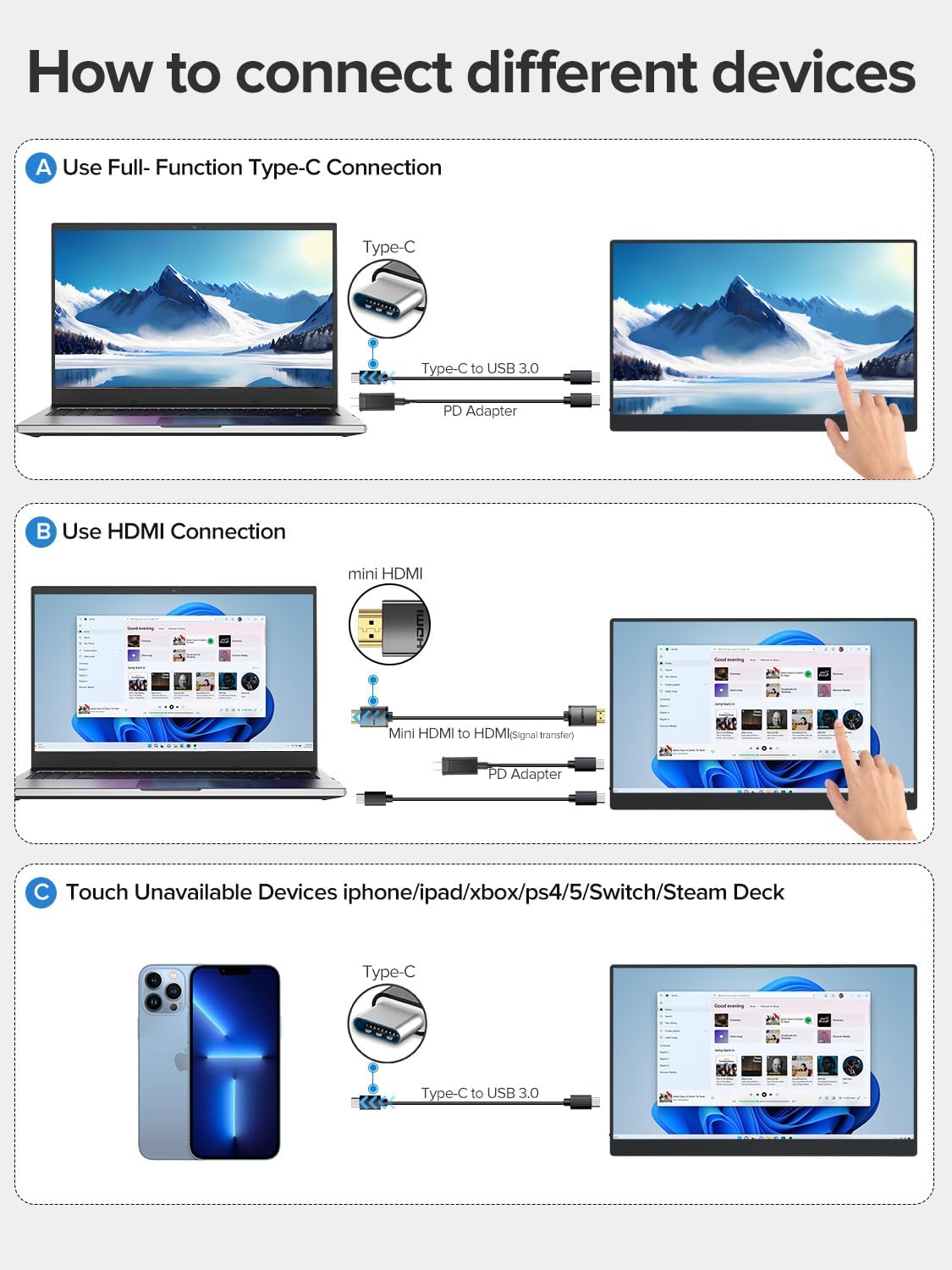
- Using a Full-Function USB-C Cable: Connect one end of the USB-C to USB-C cable to your device's full-function USB-C port and the other end to one of the monitor's Type C 3.1 ports. This single cable can transmit power, video, audio, and touch signals. An additional power adapter may be needed for some devices or if the monitor requires more power.
- Using HDMI and USB-A to USB-C Cables: Connect the Mini HDMI to HDMI cable from your device's HDMI port to the monitor's Mini HDMI port for video and audio. Then, connect the USB-A to USB-C cable from your device's USB-A port to one of the monitor's Type C 3.1 ports for power and touch functionality. An additional power adapter may be required.
- Devices Without Touch Support: For devices like iPhones, iPads, Xbox, PS5, Nintendo Switch, or Steam Deck, you can connect for display and audio using the appropriate cables (e.g., USB-C for video/power or HDMI for video/audio). Touch functionality will not be available for these devices.
Using the Protective Case as a Stand
The included smart cover can be folded to create a stable stand for your monitor. Watch the video below for a demonstration.
Instrukcja obsługi
Włączanie/wyłączanie zasilania
- Aby włączyć monitor, naciśnij przycisk Przycisk zasilania/wstecz.
- To power off the monitor, press and hold the Przycisk zasilania/wstecz for a few seconds until the screen turns off.
Menu ekranowe (OSD)
Menu OSD umożliwia dostosowanie różnych ustawień wyświetlania. Użyj Przycisk koła pasowego to navigate and select options, and the Przycisk zasilania/wstecz to exit or go back.
- Naciśnij Przycisk koła pasowego aby otworzyć menu OSD.
- Zwiń Przycisk koła pasowego up or down to navigate through menu options.
- Naciśnij Przycisk koła pasowego aby wybrać opcję lub potwierdzić ustawienie.
- Naciśnij Przycisk zasilania/wstecz to go back to the previous menu or exit the OSD.
Funkcjonalność dotykowa
The monitor features a 10-point capacitive touchscreen for intuitive interaction. Touch functionality depends on the connected device.

- Obsługa Multi-Touch: Fully supported for Windows PCs, Android phones, and tablets, allowing for gestures like pinch-to-zoom, scrolling, and swiping.
- Single-Touch Support: For Mac devices (MacBook, iMac, Mac mini), single-touch gestures are supported.
- No Touch Support: Devices such as iPhones, iPads, Xbox, PS5, Nintendo Switch, and Steam Deck do not support touch input on this monitor. The monitor will function as a non-touch display for these devices.

Tryby wyświetlania
The monitor supports various display configurations to suit your needs:

- Tryb lustrzany: Kopiuje zawartość głównego ekranu na przenośny monitor.
- Tryb rozszerzania: Extends your desktop across both screens, providing more workspace. You can set the portable monitor as your main screen.
- Tryb drugiego ekranu: Uses the portable monitor as a secondary display. Note that touch functionality may be limited or unavailable in this mode for certain operating systems or devices.
- Orientacja: The monitor supports both horizontal (landscape) and vertical (portrait) orientations. Adjust settings on your connected device as needed.
Konserwacja
- Czyszczenie ekranu: Użyj miękkiej, niestrzępiącej się ściereczki, lekko wyczyśćampCzyścić wodą lub płynem do czyszczenia ekranów. Unikać stosowania silnych środków chemicznych i materiałów ściernych.
- Czyszczenie ciała: Przetrzyj obudowę monitora miękką, suchą ściereczką.
- Składowanie: When not in use, store the monitor in its protective case in a cool, dry place away from direct sunlight and extreme temperatures.
- Obsługiwanie: Unikaj upuszczania monitora i narażania go na silne uderzenia. Nie kładź na nim ciężkich przedmiotów.
Rozwiązywanie problemów
| Problem | Możliwa przyczyna | Rozwiązanie |
|---|---|---|
| Brak wyświetlacza/Brak sygnału | Incorrect cable connection; Insufficient power; Incorrect input source selected. | Ensure cables are securely connected. Connect the power adapter. Check your device's display settings. Use the OSD menu to select the correct input source. |
| Funkcja dotykowa nie działa | Incorrect cable connection; Device does not support touch; Operating system limitations. | Ensure the USB-C cable (or USB-A to USB-C for HDMI) is connected and supports touch data. Verify your device's compatibility with touch input. Some devices/OS configurations may limit touch functionality. |
| Migotanie ekranu | Cable issue; Power instability. | Try a different cable. Ensure the monitor is receiving stable power, especially if using a single USB-C connection. Connect the dedicated power adapter. |
| Brak dźwięku | Volume too low; Incorrect audio output selected on device; Faulty cable. | Adjust monitor volume via OSD. Check your device's audio output settings. Ensure cables are properly connected. |
Specyfikacje
| Funkcja | Specyfikacja |
|---|---|
| Numer modelu | UP15605 |
| Rozmiar ekranu | 15.6 cali |
| Rezolucja | FHD 1080p (1920 x 1080 pikseli) |
| Typ panelu | Ekran LCD IPS |
| Częstotliwość odświeżania | 60 Hz |
| Czas reakcji | 1 milisekunda |
| Proporcje obrazu | 16:9 |
| Współczynnik kontrastu | 2000:1 |
| Jasność | 300 lm (nits) |
| Viewing kąt | 178 stopni |
| Powierzchnia ekranu | Matowy |
| Kolorowa wartość gamutowa | 125% |
| Cechy specjalne | USB Hub, Touchscreen, Portable, Flicker-Free, Ultra-Thin, HDR, Eye Care, Contrast Enhancement, G-Sync Compatible |
| Interfejs sprzętowy | Mini HDMI, USB-C (x2) |
| Wymiary produktu (gł. x szer. x wys.) | Wymiary 35 x 22 x 1 cm |
| Waga | 2 kilograma (ok. 1.5 funty) |
| Kompatybilne urządzenia | Desktop PC, Laptop, Smartphone, Tablet, Game Consoles |
Gwarancja i wsparcie
Your UPERFECT monitor comes with a roczna gwarancja Gwarancja obowiązuje od daty zakupu i obejmuje wady produkcyjne. Prosimy zachować dowód zakupu na wypadek roszczeń gwarancyjnych.
For technical support, warranty inquiries, or any questions regarding your product, please contact UPERFECT customer service through the retailer's platform or the official UPERFECT website. Our support team is available to assist you with any issues you may encounter.