
Produkt ponadview
The GOBOULT Y1 Pro Wireless Earbuds are designed to provide a high-quality audio experience with features like extended playtime, clear calling, and low-latency gaming. This manual provides detailed instructions for setting up, operating, and maintaining your earbuds.

Obraz: Pokaz kolażuasing key features of the GOBOULT Y1 Pro Earbuds, including 60 hours playtime, Zen Quad Mic ENC, 45ms low latency gaming, 13mm bass drivers, Type-C fast charging, and Bluetooth 5.3.
Zawartość opakowania
- GOBOULT Y1 Pro Wireless Earbuds
- Etui ładujące
- Kabel do ładowania USB typu C.
- Nauszniki (różne rozmiary)
- Końcówki douszne (różne rozmiary)
- Karta gwarancyjna
Organizować coś
1. Ładowanie słuchawek i etui
Before initial use, ensure both the earbuds and the charging case are fully charged. This optimizes battery life and performance.
- Connect the provided USB Type-C charging cable to the charging port on the case and to a compatible USB power adapter (not included).
- Na etui ładującym zaświeci się wskaźnik LED, pokazujący stan ładowania.
- A full charge typically takes a few hours. A quick 10-minute charge can provide approximately 120 minutes of playtime.

Image: The GOBOULT Y1 Pro earbuds and charging case, illustrating the Type-C fast charging capability, where 10 minutes of charge provides 120 minutes of playtime.
2. Parowanie początkowe
Aby po raz pierwszy sparować słuchawki douszne z urządzeniem, wykonaj następujące czynności:
- Remove any protective film from the charging contacts on the earbuds.
- Place both earbuds into the charging case and close the lid for a few seconds.
- Open the charging case lid. The earbuds will automatically power on and enter pairing mode, indicated by flashing LED lights.
- Na smartfonie lub innym urządzeniu z włączoną funkcją Bluetooth przejdź do ustawień Bluetooth.
- Szukaj dostępne urządzenia i wybierz „GOBOULT Y1 Pro" z listy.
- Po nawiązaniu połączenia usłyszysz komunikat głosowy potwierdzający pomyślne sparowanie.

Image: A diagram illustrating the initial setup steps, including removing protective film and opening the case, along with a detailed guide to the touch controls for both left and right earbuds.
3. Automatyczne ponowne łączenie
Po pierwszym sparowaniu słuchawki douszne automatycznie połączą się z ostatnio sparowanym urządzeniem po wyjęciu ich z etui ładującego, jeśli w urządzeniu włączony będzie moduł Bluetooth.

Image: GOBOULT Y1 Pro earbuds and charging case, demonstrating Bluetooth 5.3 for stable, efficient, and fast pairing with a connected smartphone.
Instrukcja obsługi
Włączanie/wyłączanie zasilania
- Włączanie: Open the charging case lid. The earbuds will power on automatically. Alternatively, if outside the case, long press the touch area on both earbuds for 3 seconds.
- Wyłączone: Place both earbuds back into the charging case and close the lid. They will power off automatically. Alternatively, long press the touch area on both earbuds for 5 seconds.
Sterowanie dotykowe
The GOBOULT Y1 Pro earbuds feature intuitive touch controls for managing music, calls, and other functions. Refer to the diagram below and the following list for specific actions:
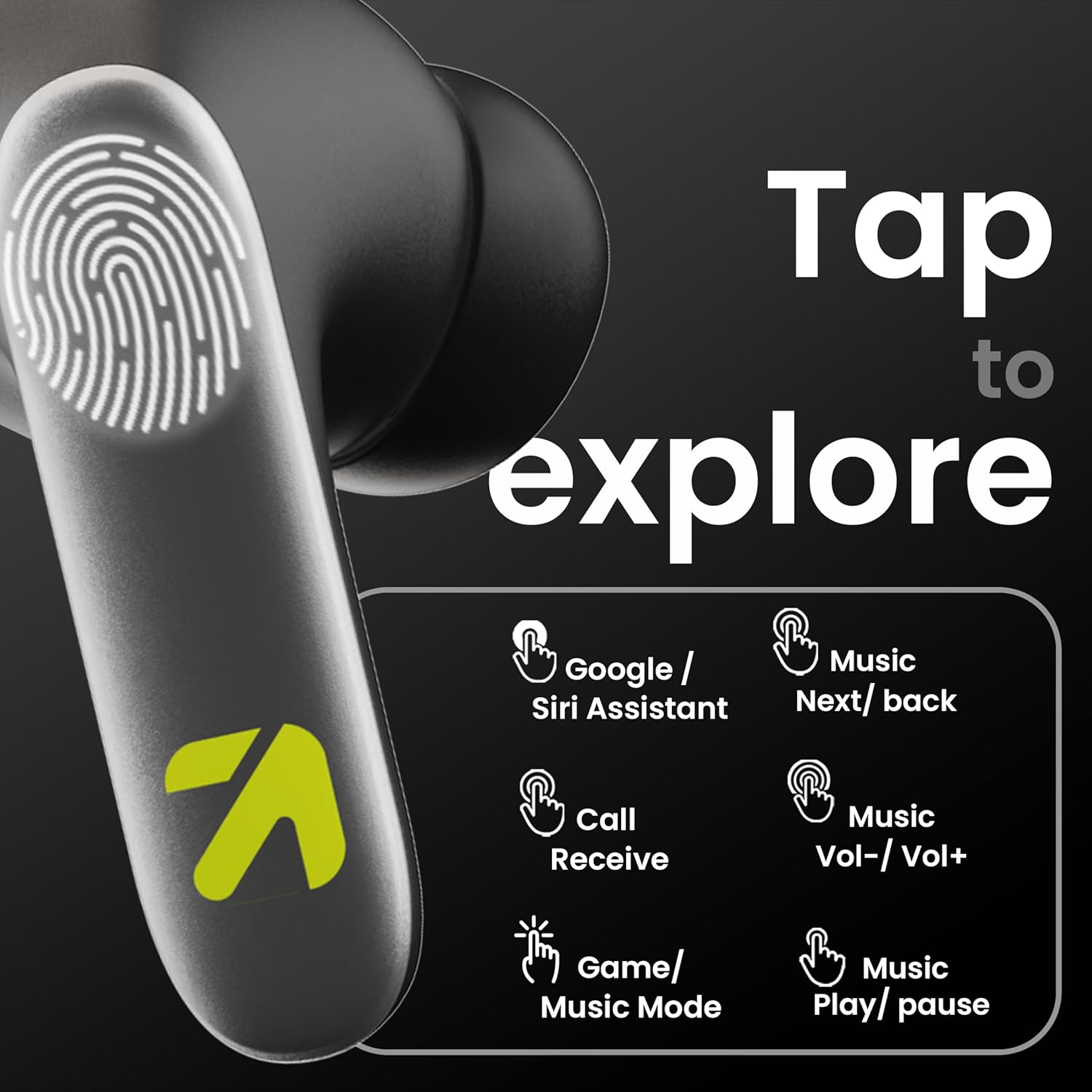
Image: A visual guide to the touch controls on the GOBOULT Y1 Pro earbuds, detailing actions for Google/Siri Assistant, music navigation, call management, volume control, and game/music mode switching.
- Pojedyncze dotknięcie (lewo/prawo): Odtwarzaj/wstrzymuj muzykę, odbieraj/kończ połączenia.
- Dwukrotne dotknięcie (lewa słuchawka): Poprzednia piosenka
- Dwukrotne dotknięcie (prawa słuchawka): Następna piosenka.
- Potrójne dotknięcie (lewa słuchawka): Zmniejsz głośność.
- Potrójne dotknięcie (prawa słuchawka): Zwiększ głośność.
- Long Press (2 seconds, Left/Right): Reject incoming call, Activate Voice Assistant (Google/Siri).
- Four Taps (Left/Right): Activate/Deactivate Gaming Mode.
Tryb gry
For an enhanced gaming experience, activate the ultra-low latency Gaming Mode:
- Aktywacja: Tap the touch area four times on either earbud.
- Dezaktywacja: Tap the touch area four times again.

Image: GOBOULT Y1 Pro earbuds and charging case, highlighting the 45ms low latency gaming mode for real-time audio synchronization, activated by four taps.
Asystent głosowy
Quickly access your device's voice assistant (Siri or Google Assistant) for hands-free control:
- Aktywacja: Perform a long tap on the touch area of either earbud.

Image: Illustration showing how to access Siri or Google Assistant with a long tap on the earbud's touch sensor.
Eliminacja hałasu z otoczenia (ENC)
The GOBOULT Y1 Pro features Zen Quad Mic ENC technology, ensuring crystal-clear calls by effectively filtering out ambient noise from your surroundings.

Image: A diagram explaining how Environmental Noise Cancellation (ENC) works by isolating your voice from environmental noise, ensuring clear communication during calls.
Konserwacja
Czyszczenie
- Regularnie czyść słuchawki douszne i etui ładujące miękką, suchą i niepozostawiającą włókien ściereczką.
- Ensure the charging contacts on both the earbuds and inside the case are free from dust and debris to maintain proper charging.
- Do not use abrasive cleaners, solvents, or harsh chemicals, as these may damage the product.
Odporność na wodę
The GOBOULT Y1 Pro earbuds are rated IPX5 water-resistant. This means they are protected against low-pressure water jets from any direction, making them suitable for workouts and light splashes.
- Nie zanurzaj słuchawek w wodzie.
- Avoid exposing them to heavy rain or extreme moisture.
- Przed włożeniem słuchawek do etui ładującego należy upewnić się, że są suche, aby zapobiec ich uszkodzeniu.

Image: GOBOULT Y1 Pro earbuds with water droplets, illustrating their IPX5 water resistance, providing protection against sweat and splashes.
Rozwiązywanie problemów
If you encounter any issues with your GOBOULT Y1 Pro earbuds, refer to the following common troubleshooting steps:
Słuchawki douszne nie łączą się lub nie parują
- Sprawdź, czy zarówno słuchawki douszne, jak i etui ładujące mają wystarczającą ilość baterii.
- Turn off Bluetooth on your device, wait 5 seconds, then turn it back on.
- On your device, "Forget" or "Unpair" "GOBOULT Y1 Pro" from the Bluetooth list, then attempt the pairing process again.
- Place both earbuds back into the charging case, close the lid, wait 10 seconds, then open the lid to re-enter pairing mode.
Działa tylko jedna wkładka douszna
- Upewnij się, że obie słuchawki douszne są naładowane.
- Włóż obie słuchawki z powrotem do etui ładującego, zamknij pokrywę, a następnie otwórz ją ponownie. Często powoduje to ich ponowną synchronizację.
- Jeśli problem nadal występuje, spróbuj zresetować słuchawki douszne (sprawdź instrukcję producenta) web(jeśli nie ma tu szczegółowych instrukcji resetowania, odwiedź tę witrynę).
Słaba jakość dźwięku lub niski poziom głośności
- Ensure the earbuds are properly seated in your ears to create a good seal. Try different sized eartips.
- Wyczyść kratki słuchawek z wszelkich zanieczyszczeń.
- Sprawdź głośność i ustawienia dźwięku urządzenia źródłowego audio.
- Zbliż się do podłączonego urządzenia, aby uniknąć zakłóceń sygnału.
Problemy z ładowaniem
- Upewnij się, że kabel ładujący jest pewnie podłączony do obudowy i źródła zasilania.
- Try a different USB Type-C charging cable or power adapter.
- Wyczyść styki ładowania na słuchawkach dousznych i wewnątrz etui suchym wacikiem.
Specyfikacje
| Funkcja | Szczegół |
|---|---|
| Marka | GOBOULT |
| Nazwa modelu | AirBass |
| Wersja Bluetooth | 5.3 |
| Umieszczenie ucha | W uchu |
| Kontrola hałasu | Eliminacja hałasu z otoczenia (ENC) |
| Rozmiar sterownika audio | 13 milimetrów |
| Całkowity czas gry | Do 60 godzin (z etui ładującym) |
| Niskie opóźnienie | 45 ms (tryb gier) |
| Typ ładowania | Szybkie ładowanie typu C |
| Odporność na wodę | IPX5 |
| Metoda kontroli | Dotykać |
| Kompatybilne urządzenia | Smartfony, tablety, laptopy, komputery stacjonarne, inteligentne głośniki |
| Waga przedmiotu | 50 gram |
| Kraj pochodzenia | Chiny |
Informacje o gwarancji
The GOBOULT Y1 Pro Wireless Earbuds are covered by a 1 rok gwarancji producenta od daty zakupu.
This warranty covers manufacturing defects. Please retain your proof of purchase for any warranty claims. The warranty does not cover damage caused by misuse, accidents, unauthorized modifications, or normal wear and tear.
Wsparcie
For further assistance, technical support, or warranty inquiries, please contact:
- Producent: Exotic Mile Private Limited, B-67 Wazirpur Industrial Area, New Delhi 110052
- Importer: Exotic Mile Pvt. Ltd. , B67 Wazirpur Industrial Area , New Delhi 110052
- For customer service contact details, please refer to the GOBOULT official webwitryna lub platforma, na której dokonano zakupu produktu.