
Wstęp
The Motorola DLR1060 is a 6-channel digital business radio designed for reliable and private communication in various professional environments. Operating in the digital 900 MHz ISM license-free band, this radio offers enhanced clarity and security compared to analog systems. Its compact and lightweight design, combined with robust features, makes it an essential tool for efficient team coordination.
Co jest zawarte
The Motorola DLR1060 package typically includes the following items:
- Motorola DLR1060 2-Way Digital Business Radio (quantity as per pack size)
- Akumulator litowo-jonowy
- Tacka ładująca z zasilaczem
- Kabura obrotowa na pasek
- User Guide and Safety Leaflet

Image: A typical 6-pack of Motorola DLR1060 digital business radios, showcasing the compact design of each unit.
Główne cechy
- Digital 900 MHz ISM License-Free Band: Ensures private and reliable communication.
- Rozszerzony zasięg: Covers up to 300,000 square feet or 20 floors.
- 6 kanałów: Provides multiple communication lines for different teams or purposes.
- Komunikaty głosowe: User-friendly voice prompts for channel navigation, battery status, and feature customization.
- Radio Profile ID: Unique 4-digit ID for enhanced privacy and direct communication.
- Computer Programming Software (CPS): Allows for personalized setups, including Private Groups, custom channel names, and radio settings.
- Trwała konstrukcja: Complies with Military Standards 810 C, D, E, F, and G for resistance against shock, vibration, extreme temperatures, and dust.
- Długa żywotność baterii: Internal rechargeable battery provides up to 14 hours of continuous operation.
- Instant Mute: Quickly silence the radio when needed.
- Customizable Top Button: Przypisz często używane funkcje, aby zapewnić sobie szybki dostęp.
Organizować coś
1. Ładowanie akumulatora
- Insert the rechargeable Lithium-Ion battery into the radio, ensuring it clicks securely into place.
- Place the radio into the charging tray.
- Connect the power adapter to the charging tray and plug it into a standard electrical outlet.
- The charging indicator light on the tray will illuminate to show charging status. A full charge typically takes several hours.

Image: The Motorola DLR1060 radio securely seated in its charging cradle, ready for power connection.
2. Attaching the Belt Holster
- Align the radio with the swivel belt holster.
- Slide the radio into the holster until it locks into position.
- Attach the holster to your belt or clothing for convenient carrying.
Instrukcja obsługi
1. Włączanie/wyłączanie zasilania
- Aby włączyć, naciśnij i przytrzymaj Zasilanie/Menu button (usually located on the top or side) until you hear a tone or voice prompt.
- Aby wyłączyć, naciśnij i przytrzymaj Zasilanie/Menu button again until the radio shuts down.

Obraz: Bok view of the DLR1060 radio, highlighting the power button and volume controls for easy access.
2. Regulacja głośności
- Użyj Zwiększanie głośności (+) I Ściszanie (-) buttons on the side of the radio to adjust the listening volume.
3. Wybór kanału
- Obróć Pokrętło wyboru kanałów (typically on the top) to choose one of the 6 available channels.
- Radio przekaże komunikat głosowy informujący o wybranym numerze kanału.
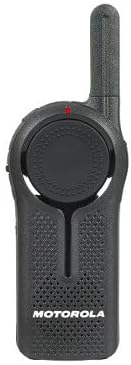
Obraz: Przód view of the DLR1060 radio, featuring the prominent channel selector knob and integrated speaker.
4. Nadawanie i odbieranie
- Aby przesłać, naciśnij i przytrzymaj Naciśnij i mów (PTT) przycisk z boku radia. Mów wyraźnie do mikrofonu.
- Zwolnij przycisk PTT, aby usłyszeć odpowiedź.
- Upewnij się, że korzystasz z tego samego kanału, co osoba, z którą chcesz się porozumieć.
5. Private Communication (Radio Profile ID)
- The DLR1060 uses a unique 4-digit Radio Profile ID for private communication. This ID must be programmed into all radios intended for a private group.
- Refer to the Computer Programming Software (CPS) manual for detailed instructions on setting up and managing Radio Profile IDs and Private Groups.
Konserwacja
Czyszczenie radia
- Przetrzyj zewnętrzną część radia miękką szmatką.amp płótno.
- Do not use harsh chemicals, cleaning solvents, or strong detergents, as these can damage the radio's casing i komponentów wewnętrznych.
- Ensure the radio is powered off and disconnected from any charging accessories before cleaning.
Pielęgnacja baterii
- Always use genuine Motorola batteries and charging accessories.
- Unikaj wystawiania baterii na działanie ekstremalnych temperatur.
- If the radio will not be used for an extended period, store the battery separately in a cool, dry place.
Rozwiązywanie problemów
| Problem | Możliwe rozwiązanie |
|---|---|
| Radio się nie włącza. | Sprawdź, czy akumulator jest całkowicie naładowany i prawidłowo włożony. |
| Nie można nadawać ani odbierać. | Verify that all radios are on the same channel and have the correct Radio Profile ID. Check if the battery is low. |
| Słaba jakość dźwięku lub szumy. | Move closer to the other radio or to an open area. Check for obstructions. Ensure the antenna is clear. |
| Żywotność baterii jest krótsza niż oczekiwano. | Ensure the battery is fully charged before use. Battery performance can degrade over time; consider replacing older batteries. |
Specyfikacje
| Funkcja | Szczegół |
|---|---|
| Pasmo częstotliwości | 900 MHz ISM (License-Free) |
| Kanały | 6 |
| Zakres | Up to 300,000 sq ft / 20 Floors |
| Żywotność baterii | Do 14 godzin (typowe użytkowanie) |
| Normy trwałości | Military Standards 810 C, D, E, F, G |
| Materiał obudowy | Poliwęglan |
| Identyfikator FCC | AZ489FT5870 |
| Kompatybilne urządzenia | Speaker, Headphone, Laptop (for CPS) |
| Kolor | Czarny |
Gwarancja i wsparcie
For detailed warranty information and technical support, please refer to the documentation provided with your product or visit the official Motorola Solutions webZachowaj paragon jako dowód zakupu na wypadek reklamacji.