
Wstęp
Welcome to the ShiftCam SnapStudio Light user manual. This guide provides essential information for setting up, operating, and maintaining your magnetic LED ring light. Please read this manual thoroughly before using the product to ensure optimal performance and safety.
Co jest w pudełku
- ShiftCam SnapStudio Light
- Mini Tripod/Handle
- Kabel ładujący USB-C (Uwaga: zasilacz nie jest dołączony)
Główne cechy
- Kompaktowa konstrukcja: Approximately 38% smaller than traditional circular ring lights, enhancing portability.
- Potężne oświetlenie: Features 106 built-in LEDs, offering an adjustable output of 440-600 lumens for consistent lighting.
- Możliwość dostosowania oświetlenia: 10-step brightness control and adjustable color temperature from 2500K (warm) to 6000K (cool).
- Versatile Angle Adjustment: A 180° rotatable magnetic puck allows seamless switching between front and rear camera illumination.
- Zintegrowana moc: Built-in battery provides up to 40 minutes of full brightness, rechargeable via USB-C.
- Elastyczny montaż: Includes a dual-purpose handle that functions as both a handgrip and a compact tripod stand.
- Kompatybilność z MagSafe: Effortless magnetic attachment compatible with MagSafe-enabled devices and cases.
Organizować coś
- Ładowanie: Before first use, fully charge the SnapStudio Light using the provided USB-C cable. The charging port is located on the side of the device.
- Attaching the Tripod/Handle: Screw the mini tripod/handle into one of the four available mounting points on the SnapStudio Light. This allows for various orientations (portrait or landscape).

Image: The ShiftCam SnapStudio Light with its dual-purpose handle, which can be used as a handgrip or a compact tripod, demonstrating flexible mounting options.
- Montaż urządzenia:
- Ensure your device is MagSafe compatible or has a MagSafe-enabled case.
- Align your smartphone with the magnetic puck in the center of the SnapStudio Light until it securely snaps into place.
- The magnetic puck can be rotated 180 degrees to direct light towards either the front or rear camera.

Image: Illustration of MagSafe compatibility, showing how the SnapStudio Light attaches to an iPhone 12 or newer, and how to use it with other phones via a MagSafe sticker or case.
Instrukcja obsługi
- Włączanie/wyłączanie: Press and hold the power button (indicated by a circle with a vertical line) on the side of the light to turn it on or off.
- Regulacja temperatury barwowej: Use the 'K-' and 'K+' buttons to cycle through 10 steps of color temperature, from warm (2500K) to cool (6000K).
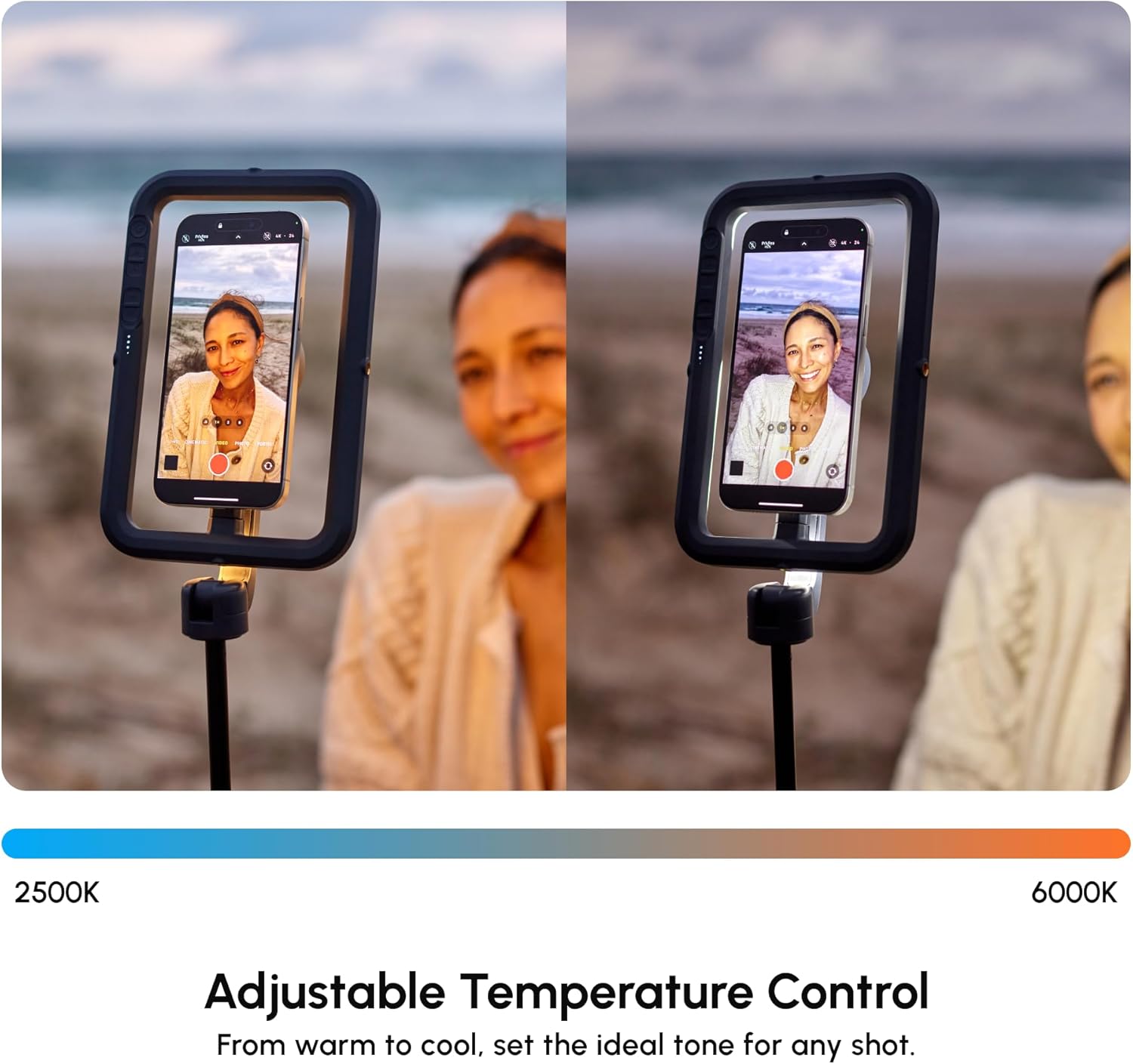
Image: The SnapStudio Light's adjustable temperature control, illustrating the range from warm 2500K to cool 6000K for setting the ideal tone.
- Regulacja jasności: Use the '+' and '-' buttons (often indicated by sun/snowflake icons) to adjust the light intensity across 10 brightness levels.

Image: The SnapStudio Light's adjustable brightness control, demonstrating how to dim or brighten the light to match creative vision.
- Rotating the Light Source: The central magnetic puck can be manually rotated 180 degrees to switch between illuminating the front-facing camera or the rear-facing camera.

Image: The 180° rotatable magnetic puck of the SnapStudio Light, allowing easy switching of lighting direction between selfie and subject.

Obraz: szczegółowy view of the SnapStudio Light's control panel, showing buttons for power, color temperature adjustment (K-/K+), and brightness adjustment (+/-).
Konserwacja
- Czyszczenie: Wipe the device with a soft, dry cloth. Avoid abrasive cleaners or solvents.
- Ładowanie: Recharge the battery regularly to maintain optimal performance. Avoid prolonged storage with a completely depleted battery.
- Składowanie: Store the SnapStudio Light in a cool, dry place away from direct sunlight and extreme temperatures.
- Wodoodporność: To urządzenie nie jest wodoodporne. Unikaj kontaktu z płynami.
Rozwiązywanie problemów
- Światło nie włącza się:
- Sprawdź poziom naładowania baterii. W razie potrzeby naładuj.
- Upewnij się, że przycisk zasilania jest wciśnięty i przytrzymany wystarczająco długo.
- Światło nie ładuje się:
- Verify the USB-C cable is securely connected to both the light and a power source.
- Wypróbuj inny kabel USB-C lub zasilacz.
- Device Not Attaching Securely:
- Ensure your smartphone is MagSafe compatible or using a MagSafe-enabled case.
- Check for any obstructions between the phone and the magnetic puck.
- Nierównomierny strumień świetlny:
- Check battery level. Low battery can affect brightness.
- Ensure no physical damage to the LED array.
Specyfikacje
| Marka | ShiftCam |
| Nazwa modelu | SnapStudio Light |
| Numer modelu | S-AC03-ST |
| Diody LED | 106 wbudowane diody LED |
| Moc wyjściowa | 440-600 lumenów (regulowane) |
| Temperatura barwowa | 2500K - 6000K (10-step adjustable) |
| Poziomy jasności | 10-stopniowa regulacja |
| Żywotność baterii | Up to 40 minutes at full brightness |
| Interfejs ładowania | USB typu C |
| Kompatybilność magnetyczna | Kompatybilny z MagSafe |
| Rotatable Puck | Obrót o 180° |
| Dołączone akcesoria | Mini Tripod/Handle |
| Odporność na wodę | Nie jest wodoodporny |
| UPC | 799793506935 |
Gwarancja i wsparcie
Gwarancja: The ShiftCam SnapStudio Light comes with a 1-year manufacturer's warranty. Please retain your proof of purchase for warranty claims.
Wsparcie: Aby uzyskać dalszą pomoc, zarejestrować produkt lub view additional accessories, please visit the official ShiftCam webstrona lub skontaktuj się z obsługą klienta.