
Wstęp
The Kinhank Super Console X2 Pro is a versatile retro gaming system designed to bring a vast library of classic games to your fingertips. Featuring a powerful Amlogic S905X2 chip, it seamlessly integrates two operating systems: EmuELEC 4.5 for an extensive gaming experience with over 100,000 pre-installed games and 60+ emulators, and Android 9.0 for multimedia entertainment including 4K UHD video playback. This manual provides detailed instructions for setting up, operating, maintaining, and troubleshooting your Super Console X2 Pro.
Zawartość opakowania
Sprawdź, czy w przesyłce znajdują się wszystkie wymienione poniżej elementy. Jeśli brakuje któregokolwiek z nich lub jest on uszkodzony, skontaktuj się z obsługą klienta.

Figure 1: Super Console X2 Pro Package Contents
- 1 x Super Console X2 Pro Unit
- 2 x kontrolery do gier
- 1 x Pilot zdalnego sterowania
- 1 x karta TF o pojemności 256 GB (z zainstalowanymi grami)
- 1 x koncentrator USB
- 1 x odbiornik USB
- 1 x zasilacz
- Kabel 1 x HD
- 1 x Instrukcja obsługi
Przewodnik po konfiguracji
Follow these steps to set up your Super Console X2 Pro for the first time:
- Połącz z telewizorem: Connect one end of the provided HD Cable to the HD OUT port on the Super Console X2 Pro and the other end to an available HD input on your television or monitor.
- Podłącz zasilanie: Plug the Power Adapter into the DC IN port on the console, then plug the adapter into a wall outlet.
- Podłącz kontrolery: Insert the USB Receiver into one of the USB ports on the console. The wireless controllers will automatically pair with the receiver. For wired controllers, connect them directly to the USB ports.
- Włączanie: Naciśnij przycisk zasilania na konsoli lub pilocie, aby włączyć urządzenie.
- Wybierz wejście: Switch your TV's input source to the corresponding HD input you connected the console to.
- Początkowy rozruch: The console will boot into either the EmuELEC gaming system or the Android 9.0 system. You can switch between these systems using the remote control.
Instrukcja obsługi
System Switching (EmuELEC / Android)
The Super Console X2 Pro features a dual-system design, allowing you to switch between the EmuELEC gaming system and the Android 9.0 smart TV system. Use the provided remote control to seamlessly transition between modes.

Figure 2: Switching Between EmuELEC and Android Systems
Zarządzanie grą (EmuELEC)
- Zapisywanie postępu gry: During gameplay, access the in-game menu (usually by pressing a specific button combination on the controller, refer to emulator-specific guides) to save your progress.
- Ładowanie postępu gry: From the in-game menu, select the option to load a previously saved game.
- Pausing Games: Most emulators allow pausing directly from the controller.
- Creating Favorites: Navigate to a game in the game list, and use the controller's menu option to add it to your favorites list for quick access.
- Adding/Removing Games: Games are stored on the TF card. To add new games, connect the TF card to a computer and transfer ROM files to the appropriate emulator folders. To remove games, delete them from the TF card.
Łączność sieciowa
The console supports both wired (Ethernet) and wireless (Wi-Fi) network connections.
- Wi-Fi: Go to the network settings in Android mode. Select your Wi-Fi network, enter the password, and connect. The console supports dual-band 2.4G/5G Wi-Fi for stable connections.
- Ethernet: Connect an Ethernet cable from your router to the LAN port on the console for a wired 1000M connection.

Figure 3: Wireless Connectivity and Multimedia Capabilities
Bluetooth Connection (BT5.0)
The console supports Bluetooth 5.0 for connecting additional devices such as headphones, external controllers, or keyboards. Access Bluetooth settings in Android mode to pair new devices.
4K UHD Display Output
When operating in Android mode, the Super Console X2 Pro supports 4K UHD video output, providing a high-resolution visual experience on compatible displays.
Główne cechy
- Vast Game Library: Enjoy an unparalleled gaming experience with over 100,000 pre-built games. The console supports more than 60 emulators, covering a wide range of classic gaming platforms.
- Dual System Functionality: Seamlessly switch between the EmuELEC 4.5 gaming system and the Android 9.0 smart TV system. This allows you to enjoy both retro gaming and modern streaming applications on a single device.
- Wyjątkowa wydajność: Powered by the Amlogic S905X2 chip, the console delivers smooth gameplay and streaming with minimal frame drops or freezes. It features 2GB DDR4 RAM and 8GB EMMC storage for fast loading and operation.
- Zaawansowana łączność: Equipped with 1000M Ethernet, dual-band 2.4G/5G Wi-Fi, and Bluetooth 5.0, ensuring fast, stable, and versatile connections for online gaming, streaming, and peripheral device pairing.
- Funkcje przyjazne dla użytkownika: Easily save and load game progress, pause and resume gaming sessions, and create custom favorite lists. The system also supports effortless addition or removal of games.

Figure 4: Extensive Game Library and Emulator Support
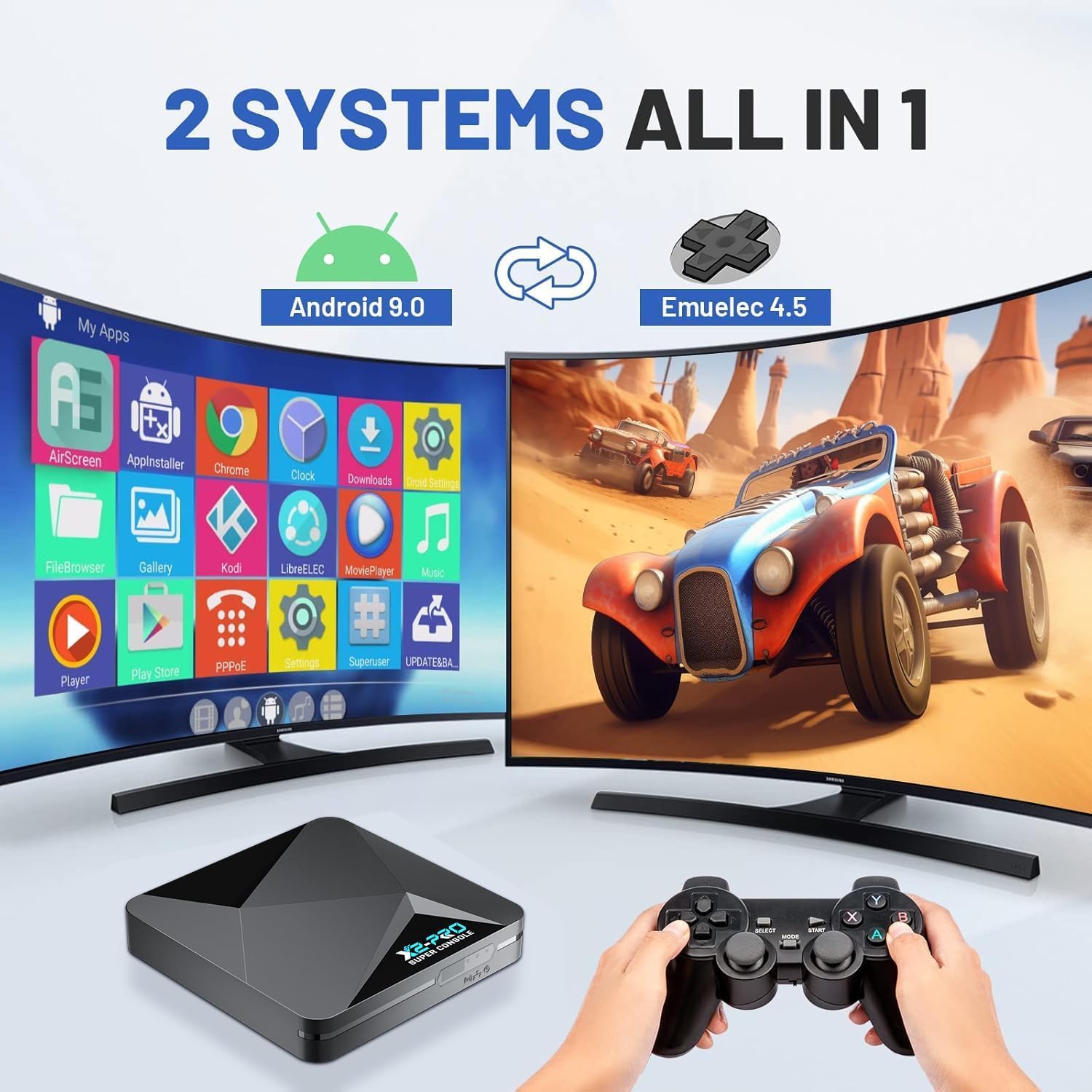
Figure 5: Dual System Integration (Android 9.0 & EmuELEC 4.5)

Figure 6: High-Performance Hardware
Konserwacja
Proper maintenance will extend the lifespan of your Super Console X2 Pro.
- Czyszczenie: Do czyszczenia zewnętrznej części konsoli używaj miękkiej, suchej ściereczki. Nie używaj płynnych środków czyszczących ani materiałów ściernych.
- Wentylacja: Upewnij się, że konsola znajduje się w dobrze wentylowanym miejscu, aby zapobiec przegrzaniu. Nie blokuj otworów wentylacyjnych.
- Składowanie: Jeśli konsola nie będzie używana przez dłuższy czas, należy ją przechowywać w chłodnym, suchym miejscu, z dala od bezpośredniego światła słonecznego i ekstremalnych temperatur.
- Aktualizacje oprogramowania: Periodically check for system updates in Android mode to ensure optimal performance and access to the latest features.
Rozwiązywanie problemów
If you encounter issues with your Super Console X2 Pro, refer to the table below for common problems and solutions.
| Problem | Możliwa przyczyna | Rozwiązanie |
|---|---|---|
| No power/Console does not turn on | Zasilacz nie jest prawidłowo podłączony; Problem z gniazdkiem elektrycznym | Ensure power adapter is securely connected to console and wall outlet. Try a different outlet. |
| Brak obrazu na telewizorze | HD Cable loose; Incorrect TV input selected | Check HD Cable connections. Ensure TV input matches the port used (e.g., HD1, HD2). |
| Kontrolery nie odpowiadają | USB receiver not connected; Controllers not paired; Low battery (if applicable) | Ensure USB receiver is plugged in. Re-pair controllers if necessary. Replace controller batteries. |
| Games run slowly or freeze | Overheating; Software issue; Corrupted game file | Ensure proper ventilation. Restart the console. Try a different game. |
| Nie można połączyć się z siecią Wi-Fi | Nieprawidłowe hasło; Problem z routerem; Zakłócenia sygnału | Double-check Wi-Fi password. Restart router. Move console closer to router or use Ethernet. |
Specyfikacje
| Funkcja | Szczegół |
|---|---|
| Model | Super Console X2 Pro |
| Edytor | Amlogic S905X2 |
| Systemy operacyjne | EmuELEC 4.5, Android 9.0 |
| BARAN | 2 GB DDR4 |
| Składowanie | 8GB EMMC (internal), 256GB TF Card (external) |
| Emulatory | 60+ obsługiwanych |
| Games Pre-installed | 100,000+ |
| Wyjście wideo | 4K UHD (Android mode) |
| Sieć | 1000M Ethernet, Dual-band 2.4G/5G Wi-Fi |
| Bluetooth | BT5.0 |
| Wymiary | 8.74 x 7.13 x 4.69 cala (opakowanie) |
| Waga | 1.81 funta (przedmiot) |
| UPC | 768502025784 |
| ASIN | B0DYNK5YG2 |
| Data wydania | 1 listopada 2024 r. |
Obsługa klienta
Kinhank is committed to providing exceptional customer support. If you encounter any issues, have questions, or require assistance with your Super Console X2 Pro, please do not hesitate to reach out to us.
Sposób kontaktu: Please contact us directly through Amazon's buyer-seller messaging system. This ensures a prompt and efficient response to your inquiries.
Our dedicated support team is ready to offer assistance and resolve any concerns you may have.