
1. Wprowadzenie
Thank you for choosing the BMAX I8 Plus Android 16 Tablet. This manual provides essential information for the safe and efficient use of your device. Please read it carefully before use and keep it for future reference.
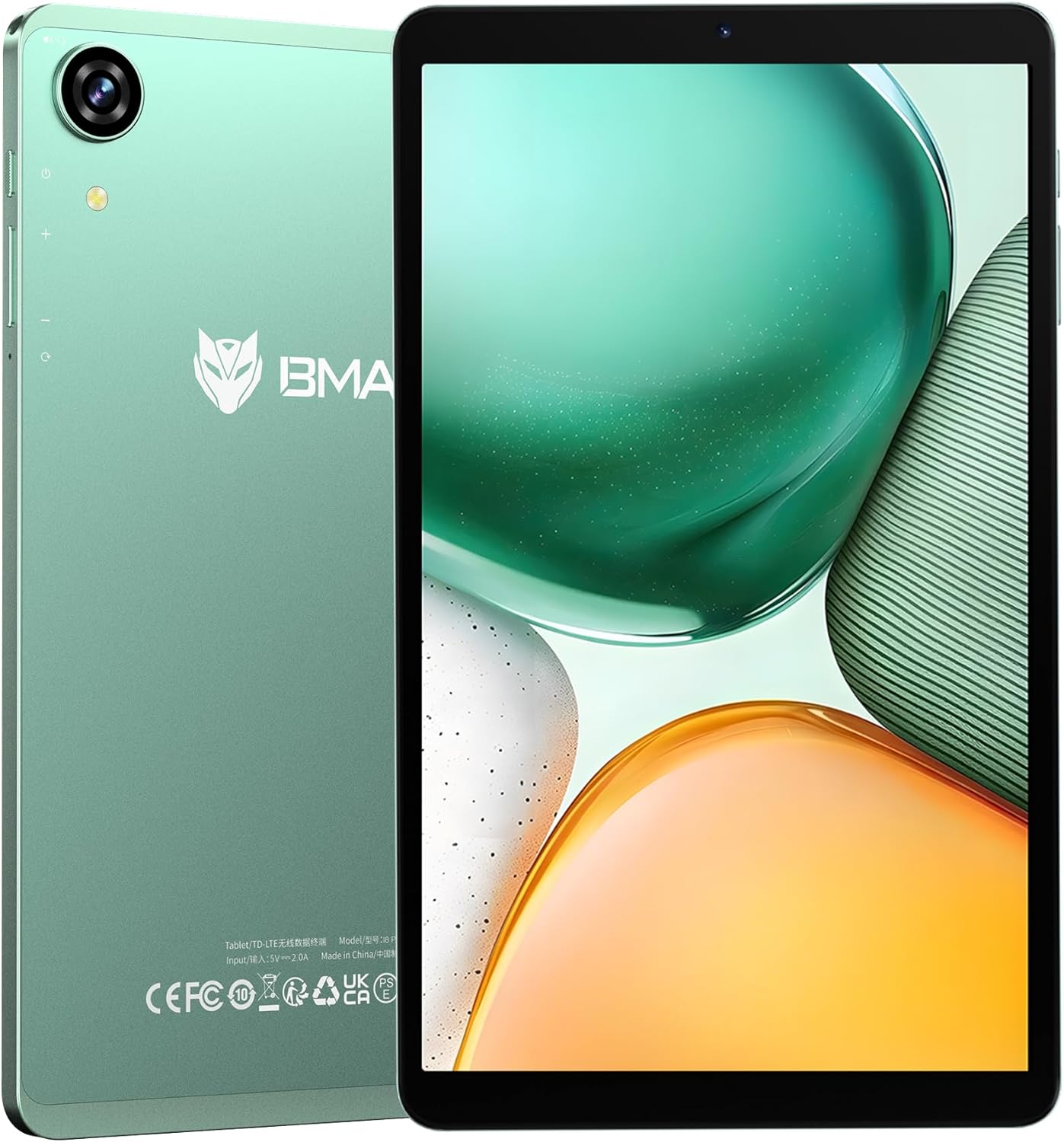
Figure 1: BMAX I8 Plus Tablet Overview
The BMAX I8 Plus is an 8.7-inch tablet featuring the latest Android 16 OS, optimized for performance and user experience. It offers 20GB (4GB physical + 16GB virtual) RAM, 128GB internal storage expandable up to 1TB, and is powered by a Unisoc T7250 octa-core CPU with Mali G57 GPU. Key features include 4G LTE connectivity, dual-band Wi-Fi, Bluetooth 5.2, a 90Hz high refresh rate display, Widevine L1 certification for high-quality streaming, face recognition, split-screen multitasking, and parental control options.
2. Zawartość opakowania
Po rozpakowaniu prosimy upewnić się, że znajdują się w nim wszystkie wymienione poniżej elementy:
- BMAX I8 Plus Tablet
- Kabel USB typu C.
- Zasilacz
- Narzędzie do wyjmowania karty SIM
- Instrukcja obsługi (ten dokument)
Video 1: Unboxing the BMAX I8 Plus Tablet. This video demonstrates the unboxing process and shows all included accessories, such as the tablet, charging cable, power adapter, and SIM ejector tool.
3. Układ urządzenia
Familiarize yourself with the physical components of your BMAX I8 Plus tablet:

Figure 2: BMAX I8 Plus Tablet Component Diagram
- Przednia kamera: For video calls and face recognition.
- Kamera tylna: Do robienia zdjęć i nagrywania filmów.
- Mikrofon: Do wejścia audio.
- Gniazdo słuchawkowe 3.5 mm: Do podłączenia przewodowych słuchawek.
- Przycisk zasilania: To turn the device on/off or put it to sleep/wake it up.
- Przyciski głośności: Aby dostosować głośność urządzenia.
- Zresetuj otwór: For force restarting the device if unresponsive.
- SIM & SD Card Slot: For inserting SIM cards and microSD cards.
- Port ładowania typu C: Do ładowania urządzenia i przesyłania danych.
- Prelegenci: Do wyjścia audio.
4. Konfiguracja
4.1 Pierwsze ładowanie
Before first use, fully charge your tablet. Connect the USB Type-C cable to the tablet's charging port and the power adapter to a wall outlet. The battery indicator will show charging status.

Figure 3: Charging the BMAX I8 Plus Tablet
4.2 Włączanie/wyłączanie zasilania
- Włączanie: Press and hold the Power button until the BMAX logo appears.
- Aby wyłączyć: Naciśnij i przytrzymaj przycisk zasilania, a następnie wybierz z opcji opcję „Wyłącz”.
- Zrestartować: Naciśnij i przytrzymaj przycisk zasilania, a następnie wybierz z opcji opcję „Uruchom ponownie”.
4.3 Instalacja karty SIM i karty MicroSD
The tablet supports dual SIM cards and a microSD card for expanded storage up to 1TB.
- Locate the SIM & SD card slot on the side of the tablet.
- Włóż narzędzie do wyjmowania karty SIM do małego otworu obok tacki i delikatnie naciśnij, aż tacka wyskoczy.
- Place your SIM card(s) and/or microSD card into the designated slots on the tray, ensuring correct orientation.
- Ostrożnie wsuń tackę z powrotem do tabletu, aż zatrzaśnie się na swoim miejscu.
Video 2: SIM and SD Card Installation. This video demonstrates how to correctly insert SIM cards and a microSD card into the tablet's tray.
5. Korzystanie z tabletu
5.1 System operacyjny Android 16
Your BMAX I8 Plus tablet runs on the latest Android 16 OS, offering enhanced stability, improved operational comfort, and support for new features. The system UI has been optimized for a more user-friendly experience.

Rysunek 4: Interfejs systemu operacyjnego Android 16
5.2 Funkcje wyświetlacza
- Wysoka częstotliwość odświeżania 90 Hz: Enjoy a smooth visual experience with seamless animations.
- IPS In-cell TDDI Display: Zapewnia wygodę viewing with 1340x800 resolution and a 16:10 aspect ratio.
- Certyfikacja Widevine L1: Stream high-quality content from platforms like Netflix, YouTube, Amazon Prime Video, and Disney+.
- Projekcja bezprzewodowa: Easily connect your tablet to a larger TV for an expanded viewzdobywania doświadczenia.

Figure 5: Widevine L1 Support for High-Quality Streaming

Figure 6: Wireless Screen Casting Functionality
5.3 Łączność
- 4G LTE: Dual SIM support for flexible mobile communication.
- Dwuzakresowe Wi-Fi (2.4G/5G): Szybkie i stabilne połączenia bezprzewodowe.
- Bluetooth 5.2: Reduced latency for wireless accessories, improving audio synchronization.
- GPS: Supports GPS, Beidou, Galileo, and Glonass for accurate navigation and location services.

Figure 7: 4G LTE and VoLTE Communication

Figure 8: GPS Navigation Support
5.4 Kamery i dźwięk
- Kamera tylna: 13MP with autofocus and LED flash for clear photos in various conditions.
- Przednia kamera: 5MP for smooth video calls and selfies.
- Podwójne głośniki: Two sound cavity speakers provide a pure and immersive audio experience.
- Radio FM: Słuchaj swoich ulubionych stacji radiowych FM.

Figure 9: High-Quality Cameras for Photos and Video Calls

Rysunek 10: Wrażenia z dźwięku immersyjnego
5.5 Bezpieczeństwo i produktywność
- Rozpoznawanie twarzy: Unlock your tablet quickly and securely in 0.3 seconds by simply facing the camera.
- Podzielony ekran: Display two applications simultaneously, enhancing multitasking efficiency.
- Wsparcie OTG: Transfer photos, videos, and files with external devices.
- Przestrzeń prywatna: Keep sensitive apps and data invisible for enhanced privacy.
- App Pair: Pair frequently used apps for quick multitasking.

Figure 11: Fast and Secure Face Recognition Unlock

Rysunek 12: Wielozadaniowość na podzielonym ekranie
5.6 Kids Protection (Parental Controls)
The tablet offers parental control features to manage children's usage. Utilize Google's built-in 'FamilyLink' to set screen time limits, monitor app usage, remotely lock the device, and check your child's tablet location information. This helps parents provide a balanced learning and entertainment environment.

Figure 13: Parental Controls for Kids Protection
6. Konserwacja
6.1 Pielęgnacja baterii
The tablet is equipped with a 6000mAh cobalt lithium battery. To prolong battery life:
- Unikaj ekstremalnych temperatur.
- Use the provided charger and cable.
- Nie należy dopuszczać do zbyt częstego całkowitego rozładowania akumulatora.
- W przypadku długotrwałego przechowywania naładuj akumulator do około 50%.
6.2 Czyszczenie
Do czyszczenia ekranu i obudowy tabletu używaj miękkiej, niepozostawiającej włókien ściereczki. Unikaj stosowania silnych środków chemicznych i materiałów ściernych.
7. Rozwiązywanie Problemów
Jeśli napotkasz problemy z tabletem, wypróbuj poniższe podstawowe czynności rozwiązywania problemów:
- Urządzenie nie odpowiada: Naciśnij i przytrzymaj przycisk zasilania przez 10–15 sekund, aby wymusić ponowne uruchomienie.
- Aplikacje ulegają awarii: Clear the cache of the problematic app or reinstall it.
- Słabe połączenie Wi-Fi: Restart your router and the tablet. Ensure you are within range of the Wi-Fi signal.
- Bateria szybko się rozładowuje: Sprawdź, czy aplikacje działające w tle są używane, zmniejsz jasność ekranu lub wyłącz niepotrzebne funkcje, takie jak GPS lub Bluetooth, gdy z nich nie korzystasz.
For more complex issues, please refer to the support information in Section 9.
8. Specyfikacje
| Funkcja | Specyfikacja |
|---|---|
| Marka | BMAX |
| Nazwa modelu | I8 Plus |
| OS | Android 16 |
| Rozmiar ekranu | 8.68 cali |
| Rozdzielczość wyświetlacza | 1340x800 pikseli |
| Częstotliwość odświeżania | 90 Hz |
| Procesor | Unisoc T7250 Octa-Core (2x A75@1.8GHz + 6x A55) |
| Procesor graficzny | Mali-G57 |
| BARAN | 20 GB (4 GB pamięci fizycznej + 16 GB pamięci wirtualnej) |
| Pamięć wewnętrzna | 128 GB |
| Możliwość rozbudowy pamięci masowej | Do 1TB za pomocą karty microSD |
| Kamera tylna | 13MP with Autofocus and LED Flash |
| Przednia kamera | 5MP |
| Bateria | 6000mAh |
| Port ładowania | USB typu C |
| Wi-Fi | 802.11a/b/g/n/ac (2.4G/5G Dual-band) |
| Bluetooth | 5.2 |
| Sieć komórkowa | 4G LTE (obsługa dwóch kart SIM) |
| Nawigacja | GPS, Beidou, Galileo, Glonass |
| Wymiary | 8.4mm thin, approx. 355g weight |
| Kolor | Zielony |
| Certyfikaty | PSE, CE, FCC, TELEC, GMS, Widevine L1 |
9. Gwarancja i wsparcie
Your BMAX I8 Plus tablet comes with a one-year quality warranty. We are committed to providing satisfactory support to our customers.
9.1 Kontakt z pomocą techniczną
If you have any questions or require assistance, please contact us via email. Support is available in both English and Japanese.
Aby się z nami skontaktować:
- Go to your Amazon account > Order History > Select your order > Contact Seller.
- Alternatively, on the product page, click on the store name below the "Add to Cart" button, then click "Ask a question" in the upper right corner to send us an email.

Rysunek 14: Informacje dotyczące obsługi klienta