
YEEHAO DHC-A-DC501L-0Purple
YEEHAO 32MP Dual Lens Toddler Camera User Manual
Model: DHC-A-DC501L-0Purple
1. Wprowadzenie
Thank you for choosing the YEEHAO 32MP Dual Lens Toddler Camera. This digital camera is designed specifically for young children, offering a fun and safe way to explore photography and videography. Its intuitive interface and durable design make it an ideal gift for children aged 3-9.
Główne cechy
- 32MP Dual Lens: Capture high-resolution photos and selfies with both front and rear lenses.
- Nagrywanie wideo w jakości HD 1080P: Record clear and vibrant videos.
- Intuicyjny interfejs: Easy-to-use controls designed for children, preventing freezing issues.
- No Games: Focuses purely on photography and videography, limiting screen time.
- Multiple Funny Photo Frames & Filters: Enhance creativity with various built-in effects.
- Rechargeable Battery & USB Transfer: Convenient charging and easy file przesłać do komputera.
- W zestawie karta TF 32 GB: Ample storage pre-installed for immediate use.
- Shockproof Soft Case & Safety Lanyard: Durable design with comfortable and secure carrying options.
2. Co znajduje się w pudełku
Sprawdź zawartość paczki, aby upewnić się, że znajdują się w niej wszystkie elementy:
- 1 x Aparat dla dzieci
- 1 x Etui ochronne
- 1 x karta TF 32 GB (wstępnie zainstalowana)
- 1 x kabel do ładowania USB
- 1 x Smycz
- 1 x Instrukcja obsługi
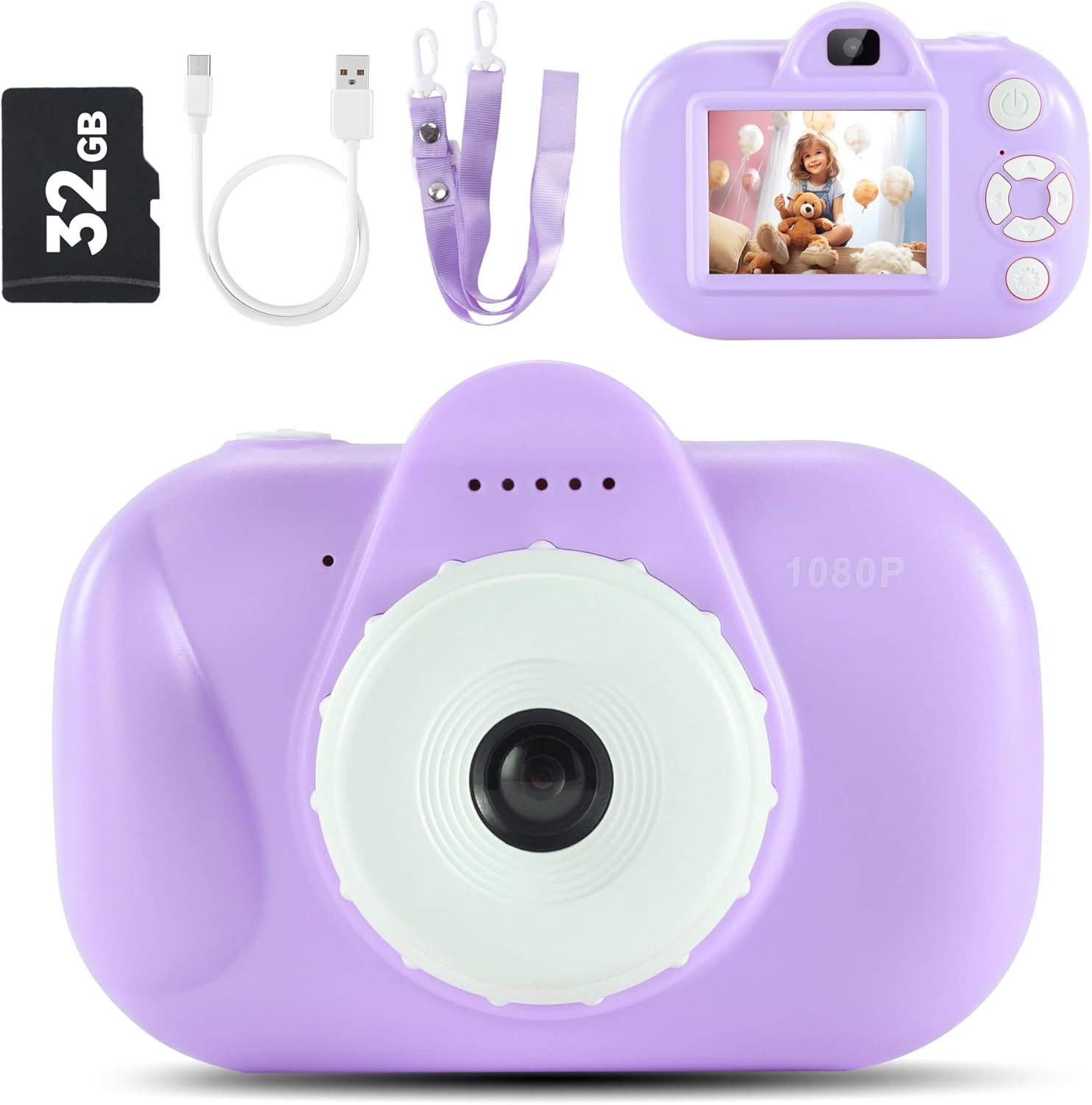
Image: Contents of the YEEHAO Kids Camera package.
3. Konfiguracja
3.1 Ładowanie kamery
Before first use, fully charge the camera. Connect the included USB cable to the camera's charging port and the other end to a USB power source (e.g., computer, wall adapter). The charging indicator light will show the charging status.

Image: Charging the camera and transferring fileprzez USB.
3.2 Wkładanie karty TF
The 32GB TF card is pre-installed. If you need to remove or re-insert it, gently push the card into the slot until it clicks. To remove, push again until it springs out.
3.3 Mocowanie smyczy
Attach the safety breakaway lanyard to the designated loop on the camera. This allows for easy and secure carrying around the neck, preventing accidental drops.
4. Obsługa aparatu
4.1 Włączanie/wyłączanie zasilania
Aby włączyć lub wyłączyć kamerę, naciśnij i przytrzymaj przycisk zasilania (zazwyczaj umieszczony na górze lub z boku).
4.2 Robienie zdjęć
Navigate to photo mode using the mode button. Frame your shot using the screen, then press the shutter button to capture the image. The camera features a 32MP dual lens for both front and rear photography.
4.3 Nagrywanie filmów
Switch to video recording mode. Press the shutter button once to start recording and again to stop. The camera supports 1080P HD video recording.

Image: Kids camera recording 1080P HD video.
4.4 Korzystanie z ramek i filtrów fotograficznych
In photo mode, use the navigation buttons to browse through various fun photo frames and filters. Select your desired effect before taking a picture to add a creative touch.

Obraz: Byłyamples of funny frames and filters available on the camera.
4.5 Playing Back Media
Enter playback mode to view your captured photos and videos. Use the navigation buttons to scroll through your media. Press the OK button to view filmy.
4.6 Przenoszenie Files do komputera
Connect the camera to your computer using the provided USB cable. The camera will appear as a removable disk. You can then drag and drop photos and videos to your computer.
5. Konserwacja
5.1 Czyszczenie
Use a soft, dry cloth to clean the camera body. For the lens and screen, use a microfiber cloth specifically designed for optics. Do not use liquid cleaners or abrasive materials.
5.2 Przechowywanie
Przechowuj aparat w chłodnym, suchym miejscu, z dala od bezpośredniego światła słonecznego i ekstremalnych temperatur. Jeśli nie używasz aparatu przez dłuższy czas, upewnij się, że akumulator jest częściowo naładowany (około 50%), aby wydłużyć jego żywotność.
5.3 Pielęgnacja baterii
To maximize battery life, avoid fully discharging the battery frequently. Charge the camera regularly, even if not in constant use. Do not attempt to replace the internal battery yourself.
6. Rozwiązywanie Problemów
| Problem | Możliwa przyczyna | Rozwiązanie |
|---|---|---|
| Kamera nie włącza się. | Niski poziom naładowania baterii. | Ładuj kamerę przez co najmniej 2 godziny. |
| Nie można robić zdjęć/kręcić filmów. | Karta TF jest pełna lub nieprawidłowo włożona. | Check TF card insertion. Transfer files to computer and delete from card to free up space. |
| Obrazy są niewyraźne. | Lens is dirty; insufficient light; camera shake. | Clean the lens. Ensure adequate lighting. Hold the camera steady. |
| Kamera zawiesza się. | Błąd oprogramowania. | Press the reset button (if available, usually a small pinhole) or hold the power button for 10 seconds to force a restart. |
7. Specyfikacje
| Funkcja | Szczegół |
|---|---|
| Nazwa modelu | DHC-A-DC501L-0Purple |
| Marka | TAK |
| Maksymalny WebRozdzielczość obrazu kamery | 32 MP |
| Rozdzielczość wideo | Rozdzielczość 1080P HD |
| Utrzymany File Format | Plik AVI |
| Składowanie | Karta TF 32 GB (w zestawie) |
| Baterie | Wymagane są 1 baterie 9 V. (w zestawie) |
| Wymiary produktu | 4.21 x 2.65 x 1.87 cala |
| Waga przedmiotu | 6.7 uncji |
| Technologia czujnika fotograficznego | CMOS |
| Proporcje obrazu | 4:3 |
| Stabilizacja obrazu | Cyfrowy |
| Zoom optyczny | 0.1 |
| Rozszerzone minimum ISO | 100 |
8. Gwarancja i wsparcie
YEEHAO products are manufactured to the highest quality standards. For information regarding warranty coverage, please refer to the warranty card included with your purchase or visit the official YEEHAO webstrona.
For technical support, troubleshooting assistance, or any questions about your camera, please contact YEEHAO customer service. Contact details can typically be found on the product packaging or the brand's official webstrona.
Zasoby internetowe:
- YEEHAO Store on Amazon: Visit the YEEHAO Store
Ask a question about this manual
Ask about setup, troubleshooting, compatibility, parts, safety, or missing instructions. Manuals+ will review the question and use this page’s manual context to help answer it.