
1. Wprowadzenie
Thank you for choosing the JUNJIEUNVO Q16 Wireless Translation Earbuds. These open-ear design earbuds offer a comfortable listening experience, advanced Bluetooth 5.4 connectivity, IPX5 waterproof rating, and support for real-time language translation across over 100 countries. This manual provides detailed instructions on how to set up, operate, and maintain your earbuds to ensure optimal performance.
2. Zawartość opakowania
Proszę sprawdzić, czy w paczce znajdują się następujące elementy:
- JUNJIEUNVO Q16 Wireless Translation Earbuds (Left and Right)
- Etui ładujące
- Instrukcja obsługi
- Charging Cable (USB-C, not always included, please check packaging)
3. Koniec produktuview
The Q16 earbuds feature an open-ear design for comfort and situational awareness, housed in a compact charging case. The case includes a digital display for battery status.

Rysunek 3.1: Q16 Earbuds in their charging case, showing the left (L) and right (R) indicators along with the digital battery display.

Rysunek 3.2: The open-ear design of the Q16 earbuds, emphasizing comfort and awareness of surroundings.

Rysunek 3.3: Diagram illustrating the directional sound transmission technology, designed to protect privacy and reduce sound leakage.
4. Konfiguracja
4.1 Ładowanie słuchawek dousznych i etui
Before first use, fully charge the earbuds and the charging case. The charging case has a 500mAh battery, and each earbud has a 40mAh battery. A full charge takes approximately 1.5 hours.
- Connect the charging cable (typically USB-C) to the charging port on the case and to a USB power source.
- The digital display on the charging case will show the charging progress.
- Place the earbuds into the charging case. Ensure they are correctly seated; the case will indicate if they are charging.
4.2 parowanie Bluetooth
The Q16 earbuds use Bluetooth 5.4 for a stable and efficient connection. The pairing process is automatic upon opening the case.
- Upewnij się, że Bluetooth w Twoim smartfonie lub innym urządzeniu jest włączony.
- Otwórz pokrywę etui ładującego. Słuchawki automatycznie przejdą w tryb parowania.
- Na swoim urządzeniu wyszukaj urządzenia Bluetooth i wybierz „Q16” z listy.
- Po nawiązaniu połączenia usłyszysz dźwięk potwierdzający, a słuchawki będą gotowe do użycia.
- For subsequent connections, simply open the charging case, and the earbuds will automatically reconnect to the last paired device.
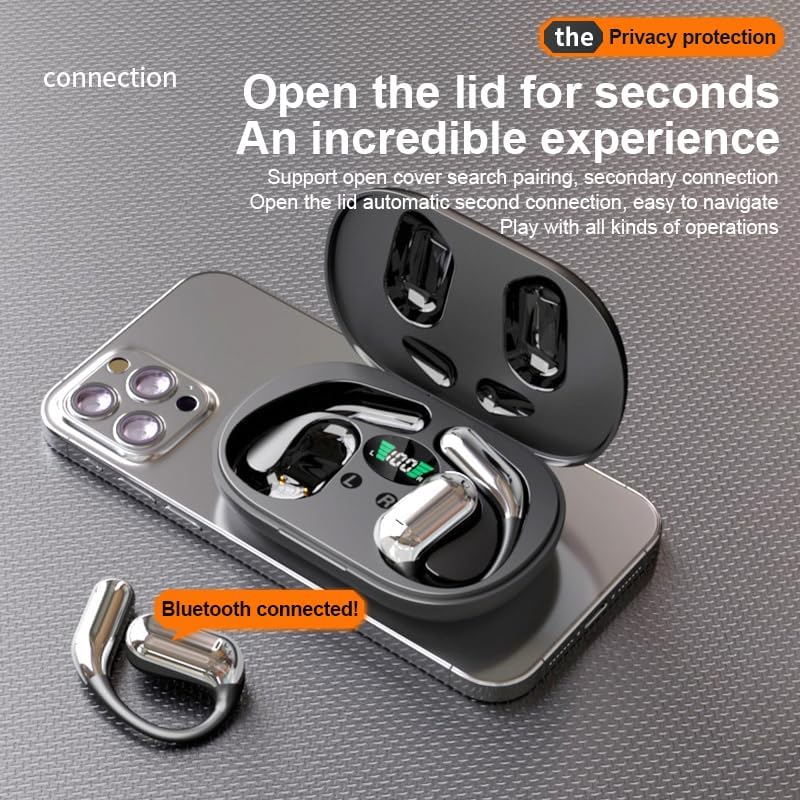
Rysunek 4.1: The Q16 earbuds connected to a smartphone, indicating successful Bluetooth pairing.
5. Instrukcja obsługi
5.1 Włączanie/wyłączanie zasilania
- Włączanie: Otwórz pokrywę etui ładującego, a słuchawki włączą się automatycznie.
- Wyłączone: Włóż słuchawki douszne z powrotem do etui ładującego i zamknij pokrywę. Słuchawki automatycznie się wyłączą i rozpoczną ładowanie.
5.2 Odtwarzanie muzyki
(Specific touch controls are not detailed in the provided product data. The following are common gestures; refer to the manufacturer's official app or website for precise controls.)
- Odtwórz/Pauza: Stuknij raz dowolną słuchawkę.
- Następny utwór: Kliknij dwukrotnie prawą słuchawkę.
- Poprzedni utwór: Kliknij dwukrotnie lewą słuchawkę.
- Regulacja głośności: (Typically a long press or triple tap, specific action not provided. Adjust via your connected device if not available on earbuds.)

Rysunek 5.1: Illustration of the panoramic stereo surround sound feature, enhancing the audio experience.
5.3 Zarządzanie połączeniami
- Odbieranie/kończenie połączeń: Stuknij raz dowolną słuchawkę.
- Odrzuć połączenie: Naciśnij i przytrzymaj dowolną słuchawkę przez 2 sekundy.
5.4 Language Translation Function
The Q16 earbuds support real-time translation for over 100 languages. This feature typically requires a dedicated translation application on your paired smartphone.
- Download and install the recommended translation app (refer to product packaging or manufacturer's website for app details) on your smartphone.
- Upewnij się, że słuchawki są połączone ze smartfonem przez Bluetooth.
- Open the translation app and follow its instructions to initiate real-time translation. The earbuds will act as your audio input/output device for the translation.
5.5 Stopień wodoodporności IPX5
The earbuds are rated IPX5 waterproof, meaning they are resistant to splashing water from any direction. This makes them suitable for sports and outdoor activities. Note: The charging case is not waterproof. Avoid exposing the charging case to water.
6. Konserwacja i pielęgnacja
- Czyszczenie: Delikatnie przetrzyj słuchawki i etui ładujące miękką, suchą i niepozostawiającą włókien ściereczką. Nie używaj silnych środków chemicznych ani materiałów ściernych.
- Składowanie: Gdy nie używasz słuchawek, przechowuj je w etui ładującym, aby je chronić i utrzymać naładowanie. Przechowuj w chłodnym, suchym miejscu, z dala od ekstremalnych temperatur.
- Unikaj wody: While the earbuds are IPX5 waterproof, avoid submerging them in water. The charging case is not waterproof.
- Pielęgnacja baterii: Aby przedłużyć żywotność baterii, unikaj częstego całkowitego rozładowywania słuchawek i etui ładującego. Ładuj je regularnie, nawet jeśli nie są używane regularnie.
7. Rozwiązywanie Problemów
| Problem | Rozwiązanie |
|---|---|
| Słuchawki nie łączą się z urządzeniem. |
|
| Brak dźwięku w słuchawkach. |
|
| Słuchawki się nie ładują. |
|
| Funkcja tłumaczenia nie działa. |
|
8. Specyfikacje
| Funkcja | Szczegół |
|---|---|
| Nazwa modelu | YYK-Q16 |
| Wersja Bluetooth | Wersja 5.4+EDR |
| Żeton | Blue Flood |
| Obsługiwane protokoły | AVRCP V1.6, A2DP V1.3, HFP V1.7 (jednoczesne LE i BR/EDR) |
| Usage/Playback Time | Około 8 godzin (przy 80% głośności) |
| Czas czuwania | 80 godziny |
| Czas ładowania | Około 1.5 godzin |
| Odległość bezprzewodowa | 10 metrów |
| Pojemność baterii słuchawek | 40mAh (każdy) |
| Pojemność akumulatora etui ładującego | 500mAh |
| Stopień wodoodporności | IPX5 (tylko wkładki douszne) |
| Wsparcie tłumaczeń | Over 100 languages |
| Umieszczenie ucha | On Ear (Open-ear design) |
| Impedancja | 32 omy |
| Masa netto | 84 g (łącznie) |
9. Gwarancja i wsparcie
For warranty information and customer support, please refer to the documentation included with your purchase or visit the official JUNJIEUNVO webJeśli napotkasz jakiekolwiek problemy nieopisane w tym podręczniku, skontaktuj się z naszym działem obsługi klienta, aby uzyskać pomoc.
Producent: UNVO
Marka: JUNJIEUNVO


