
1. Wprowadzenie
This manual provides essential information for the setup, operation, and maintenance of your Bmax B4 Turbo N150 Mini PC. Please read this manual thoroughly before using the device to ensure proper functionality and safety.

Image 1.1: The Bmax B4 Turbo N150 Mini PC. This image displays the compact design of the mini PC, showcasing its small form factor and sleek appearance.
2. Informacje dotyczące bezpieczeństwa
- Aby zapobiec przypadkowemu upadkowi, należy ustawić urządzenie na stabilnej, płaskiej powierzchni.
- Nie wystawiaj urządzenia na działanie wody, wilgoci ani ekstremalnych temperatur.
- Używaj wyłącznie dołączonego zasilacza. Użycie niewłaściwego zasilacza może uszkodzić urządzenie i unieważnić gwarancję.
- Unikaj blokowania otworów wentylacyjnych, aby zapobiec przegrzaniu.
- Nie próbuj samodzielnie otwierać ani naprawiać urządzenia. W przypadku jakichkolwiek napraw skontaktuj się z wykwalifikowanym personelem serwisowym.
3. Zawartość opakowania
Sprawdź, czy w opakowaniu znajdują się wszystkie elementy:
- Bmax B4 Turbo N150 Mini PC
- Zasilacz (DC12V/2A)
- Uchwyt montażowy
- Instrukcja obsługi (ten dokument)
4. Koniec produktuview
4.1. Porty i złącza

Obraz 4.1: Koniecview of Bmax B4 Turbo N150 Mini PC ports. This image illustrates the various input and output ports available on the mini PC, including USB, HDMI, Type-C, and Ethernet connections.
The Bmax B4 Turbo N150 Mini PC features a comprehensive set of ports for connectivity:
- Panel przedni:
- 2 porty USB 3.0
- 1 x gniazdo audio 3.5 mm
- Przycisk zasilania
- Tylny panel:
- 1 x DC12V/2A Power Input
- 2 porty USB 2.0
- 1 x HDMI 2.1 Port (supports 4K@60Hz)
- 1 x Type-C Port (full features, 10Gbps)
- 1 x RJ45 Gigabit Ethernet Port
- Przycisk Clear CMOS
4.2. Główne cechy
- Edytor: Intel 13th Gen Twin Lake N150 (4 Cores, 4 Threads, 0.8GHz base, up to 3.6GHz burst frequency).
- Pamięć: 16GB DDR4 3200MHz RAM.
- Składowanie: 1TB SSD.
- Grafika: Integrated Intel UHD Graphics (up to 1 GHz).
- System operacyjny: Pre-installed Windows 11, supports Linux and Ubuntu.
- Połączenie bezprzewodowe: Wi-Fi 5 (802.11a/b/g/n/ac) and Bluetooth 5.0.
- Układ chłodzenia: Built-in silent fan for efficient heat dissipation.

Image 4.2: Intel N150 Processor specifications. This graphic details the technical specifications of the Intel N150 CPU, including core count, thread count, cache, TDP, and clock speeds.
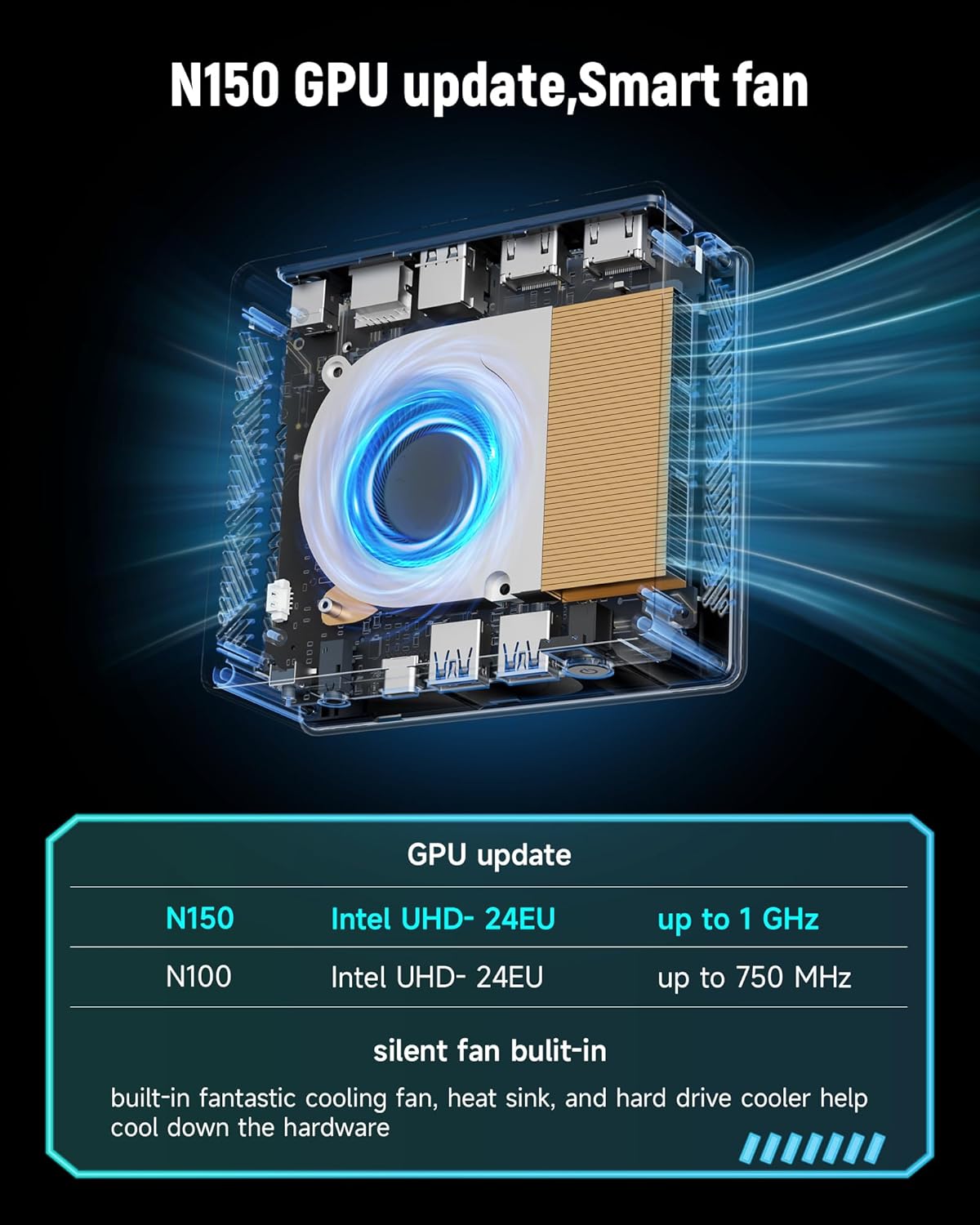
Obraz 4.3: Wewnętrzny view of the cooling system. This image highlights the internal fan and heatsink design, demonstrating the cooling solution implemented in the mini PC.
5. Konfiguracja
5.1. Podłączanie do wyświetlacza
- Connect one end of an HDMI cable to the HDMI 2.1 port on the rear of the Mini PC.
- Connect the other end of the HDMI cable to an HDMI input port on your monitor or TV.
5.2. Podłączanie urządzeń peryferyjnych
- Connect your USB keyboard and mouse to the available USB ports on the Mini PC.
- For audio output, connect speakers or headphones to the 3.5mm audio jack on the front panel.
5.3. Podłączenie zasilania
- Plug the power adapter into the DC12V/2A input port on the rear of the Mini PC.
- Podłącz zasilacz do gniazdka ściennego.
6. Instrukcja obsługi
6.1. Włączanie/wyłączanie zasilania
- Włączanie: Naciśnij przycisk zasilania znajdujący się na panelu przednim. Zaświeci się kontrolka zasilania.
- Aby wyłączyć: From the Windows 11 operating system, click the Start button, then Power, and select "Shut down." Alternatively, you can press and hold the power button for approximately 5 seconds to force a shutdown (not recommended for regular use).
6.2. Łączność sieciowa
6.2.1. Wired Connection (Ethernet)
- Connect an Ethernet cable from your router or modem to the RJ45 port on the rear of the Mini PC.
- The system should automatically detect and connect to the wired network.
6.2.2. Połączenie bezprzewodowe (Wi-Fi)
- Once Windows 11 has loaded, click the Wi-Fi icon in the taskbar.
- Wybierz żądaną sieć Wi-Fi z listy i wpisz hasło, jeśli zostaniesz o to poproszony.

Image 6.1: High-speed network connection capabilities. This image visually represents the mini PC's support for high-speed Wi-Fi 5, Bluetooth 5.0, and Gigabit LAN, indicating robust connectivity options.
6.3. Łączność Bluetooth
To connect Bluetooth devices (e.g., headphones, keyboard, mouse):
- Upewnij się, że Twoje urządzenie Bluetooth jest w trybie parowania.
- On Windows 11, go to Ustawienia > Bluetooth i urządzenia.
- Turn on Bluetooth and click "Add device."
- Select your device from the list and follow the on-screen prompts to complete pairing.
6.4. Konfiguracja podwójnego wyświetlacza
The Mini PC supports dual displays via the HDMI 2.1 port and the full-featured Type-C port. To set up dual monitors:
- Podłącz główny monitor do portu HDMI.
- Connect your secondary monitor to the Type-C port (using a compatible Type-C to HDMI/DisplayPort adapter if necessary).
- Once both monitors are connected, right-click on the desktop, select "Display settings," and configure your display preferences (e.g., extend, duplicate).
7. Konserwacja
- Czyszczenie: Do czyszczenia obudowy Mini PC należy używać miękkiej, suchej ściereczki. Nie należy używać płynów czyszczących ani aerozoli.
- Wentylacja: Ensure that the ventilation openings are clear of dust and obstructions to maintain optimal cooling performance.
- Aktualizacje oprogramowania: Regularly update your operating system and drivers to ensure system stability and security.
8. Rozwiązywanie Problemów
8.1. Brak zasilania
- Sprawdź, czy zasilacz jest prawidłowo podłączony do komputera Mini PC i gniazdka ściennego.
- Sprawdź, czy gniazdko ścienne działa prawidłowo, testując je za pomocą innego urządzenia.
8.2. Brak wyświetlacza
- Sprawdź, czy kabel HDMI jest prawidłowo podłączony do komputera Mini PC i monitora.
- Ensure the monitor is powered on and set to the correct input source (e.g., HDMI 1).
- Try connecting the Mini PC to a different monitor or TV to rule out a monitor issue.
8.3. Problemy z łącznością sieciową
- wired: Sprawdź połączenie kabla Ethernet. Uruchom ponownie router/modem.
- Bezprzewodowy: Ensure Wi-Fi is enabled in Windows settings. Verify the Wi-Fi password. Restart your router.
8.4. System Unresponsive
- If the system becomes unresponsive, press and hold the power button for 5-10 seconds to force a shutdown. Then, power it back on.
- If issues persist, consider using the "Clear CMOS Button" on the rear panel (consult section 4.1 for location) to reset BIOS settings to default. This may require a small, pointed object to press.
9. Specyfikacje
| Funkcja | Specyfikacja |
|---|---|
| Marka | Bmax |
| Model | B4 Turbo N150 |
| Edytor | Intel 13th Gen Twin Lake N150 (4 Cores, 4 Threads) |
| Częstotliwość bazowa procesora | 0.8 GHz |
| Processor Burst Frequency | Do 3.6 GHz |
| BARAN | 16 GB DDR4 3200 MHz |
| Składowanie | Dysk SSD 1TB |
| Grafika | Intel UHD Graphics (up to 1 GHz) |
| System operacyjny | Windows 11 (pre-installed), supports Linux, Ubuntu |
| Wi-Fi | Wi-Fi 5 (802.11a/b/g/n/ac) |
| Bluetooth | Bluetooth 5.0 |
| Sieć Ethernetowa | 1x Gigabitowa sieć LAN RJ45 |
| Porty USB | 2 x USB 3.0, 2 x USB 2.0 |
| Wyjście wideo | 1 x HDMI 2.1 (4K@60Hz), 1 x Type-C (full features) |
| Port audio | 1 x gniazdo audio 3.5 mm |
| Moc wejściowa | Prąd stały 12 V/2 A |
| Wymiary (dł. x szer. x wys.) | 4.92 x 4.41 x 1.73 cala |
10. Gwarancja i wsparcie
For warranty information and technical support, please refer to the warranty card included with your product or visit the official Bmax webZachowaj paragon jako dowód zakupu na wypadek reklamacji.