
Ważne informacje dotyczące bezpieczeństwa
Please read this manual carefully before assembly and use. Keep it for future reference.
- Always ensure the desk is properly anchored to the wall or floor to prevent tipping. Use appropriate anchoring hardware for your wall type.
- Do not place heavy objects on the desk that could cause it to tip or become unstable. Distribute weight evenly.
- Exercise caution during assembly to avoid injuries from heavy or sharp components. It is recommended to assemble with two people.
- Trzymaj dzieci i zwierzęta domowe z dala od miejsca montażu.
- Przed użyciem upewnij się, że wszystkie śruby i elementy mocujące są solidnie dokręcone. Regularnie sprawdzaj i dokręcaj w razie potrzeby.
- Do not overload the integrated power outlets. Refer to the specifications for maximum load.
Konfiguracja i montaż
This Grandder L-Shaped Gaming Desk (Model E109-40T) requires assembly. The package includes detailed assembly instructions. While all necessary tools are not included, standard household tools may be required.
Zawartość opakowania
Verify that all components listed in the included assembly guide are present before beginning assembly.
- Desk panels (carbon fiber surface, MDF)
- Elementy ramy metalowej
- Podstawa monitora
- Integrated power strip (2 AC outlets, 1 USB, 1 Type-C)
- LED light strip with controller
- Sprzęt montażowy (śruby, nakrętki itp.)
- Instrukcja montażu
Kroki montażu
- Rozpakuj i zidentyfikuj: Ostrożnie rozpakuj wszystkie elementy i rozłóż je na czystej, miękkiej powierzchni, aby zapobiec zarysowaniom. Zidentyfikuj każdą część za pomocą dołączonego schematu montażu.
- Montaż ramy: Assemble the main metal frame according to the instructions. Ensure all connections are secure but do not fully tighten screws until the entire frame is assembled.
- Odwracalna konstrukcja: Decide whether you want the L-shaped corner on the left or right side of the desk. The design is reversible, allowing for flexible placement. Follow the specific instructions for your chosen orientation.
- Zamontuj panele biurkowe: Secure the carbon fiber desk panels to the assembled frame.
- Montaż podstawki pod monitor: Przymocuj podstawkę pod monitor do głównej powierzchni biurka.
- Zintegrowana listwa zasilająca: Install the recessed power strip into its designated slot. Connect the power cable.
- Zastosuj pasek świetlny LED: Adhere the LED light strip to the underside of the monitor stand or as indicated in the manual. Connect it to the power source.
- Montaż półki magazynowej: Attach the adjustable storage shelf to the side frame. This shelf is also removable.
- Ostateczne dokręcanie: Gdy wszystkie elementy znajdą się na swoim miejscu i zostaną wyrównane, należy dokręcić wszystkie śruby i elementy mocujące.
- Umiejscowienie i zakotwiczenie: Position the desk in its desired location. For safety, anchor the desk to a wall using appropriate hardware (not included) to prevent tipping, especially if heavy equipment is placed on it.

Figure 1: Dimensions and reversible design of the Grandder L-shaped gaming desk. The corner section can be installed on either the left or right side.
Instrukcja obsługi
Zintegrowana listwa zasilająca
The desk features a recessed power strip for convenient access to power and charging.
- Gniazdka AC: Two 125V/12A AC outlets are provided for powering devices such as monitors, computers, or other peripherals.
- Porty USB: One 5V/3A USB-A port and one 5V/3A USB-C port are available for charging smartphones, tablets, and other USB-powered devices.
- Przewód zasilający: The integrated power strip is connected via a 1.5m power cable. Plug this cable into a standard wall outlet.
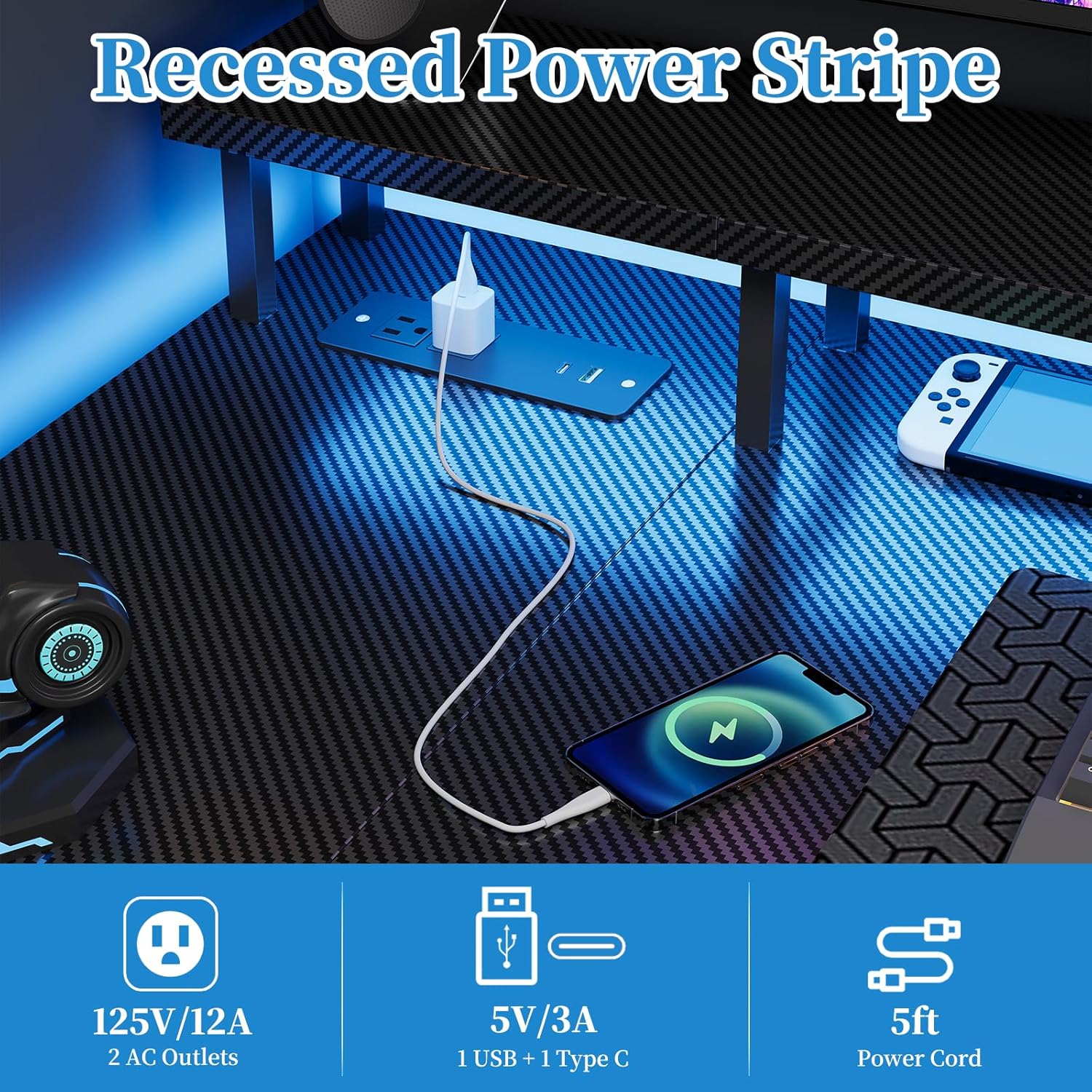
Figure 2: Recessed power strip with AC, USB-A, and USB-C outlets.
Działanie paska świetlnego LED
The desk includes a multi-functional LED light strip to enhance your environment. It is controlled via an inline controller.
- Włączanie/wyłączanie: Use the power button on the controller to turn the LED strip on or off.
- Wybór kolorów: Cycle through various colors using the color selection button. The strip offers 20 color change options.
- Regulacja jasności: Adjust the brightness levels to your preference using the dedicated brightness buttons.
- Kontrola prędkości: For dynamic lighting modes, adjust the speed of color transitions or effects.
- Predefined Modes: The controller may offer several predefined lighting modes for different atmospheres.

Figure 3: LED light strip with controller for color, brightness, and speed adjustments.
Monitor Stand and Storage Shelf
- Podstawka pod monitor: The elevated monitor stand promotes ergonomic viewing posture, reducing neck and eye strain. Place your monitor(s) directly on this stand.
- Regulowana półka do przechowywania: The side storage shelf can be adjusted or removed to accommodate various items, such as a computer tower, books, or accessories.

Figure 4: Ergonomic design of the monitor stand for improved posture.

Figure 5: Adjustable storage shelf for flexible organization.
Konserwacja
- Czyszczenie: Przetrzyj powierzchnie biurka miękką,amp cloth. Avoid abrasive cleaners or harsh chemicals that could damage the carbon fiber finish or MDF.
- Elementy złączne: Okresowo sprawdzaj wszystkie śruby i elementy mocujące, aby upewnić się, że są dobrze dokręcone. W razie potrzeby dokręć je, aby zachować stabilność.
- Elementy elektryczne: Ensure the power strip and LED light strip connections are secure. Do not attempt to repair electrical components yourself. If damage occurs, discontinue use and contact customer support.
- Rozkład masy: Avoid concentrating heavy loads on one area of the desk. Distribute weight evenly across the surface and shelves.
Rozwiązywanie problemów
Niestabilność biurka
- Wydanie: Biurko chwieje się lub wydaje się niestabilne.
- Rozwiązanie:
- Check all assembly screws and bolts. Tighten any loose fasteners.
- Ensure the desk is on a level surface. Use leveling feet (if included) or shims to stabilize.
- Verify that the desk is properly anchored to the wall if heavy items are placed on it.
Gniazdka elektryczne nie działają
- Wydanie: Devices plugged into the AC or USB ports are not receiving power.
- Rozwiązanie:
- Ensure the desk's main power cable is securely plugged into a functional wall outlet.
- Sprawdź, czy gniazdko ścienne działa, podłączając do niego inne urządzenie.
- Avoid overloading the power strip. Disconnect some devices to see if power is restored.
- If the issue persists, contact customer support. Do not attempt to disassemble the power strip.
LED Light Strip Not Functioning
- Wydanie: The LED light strip does not turn on or is not responding to the controller.
- Rozwiązanie:
- Ensure the LED strip is properly connected to its power source and the controller.
- Check if the main power cable for the desk is plugged in.
- Verify that the controller's battery (if applicable) is functional or that it is receiving power.
- Try pressing the power button on the controller firmly.
- Jeśli problem będzie się powtarzał, skontaktuj się z obsługą klienta.
Specyfikacja produktu
| Numer modelu | E109-40T |
| Marka | Grandder |
| Typ | Reversible L-Shaped Gaming Desk |
| Wymiary (dł. x szer. x wys.) | 100 x 50 x 75 cm (main section), 70 x 100 x 75 cm (overall L-shape) |
| Waga | 12.8 kilograma |
| Kolor | Carbon Black Aspect |
| Tworzywo | Carbon Fiber Surface, Engineered Wood (MDF) |
| Gniazdka elektryczne | 2 x AC (125V/12A), 1 x USB-A (5V/3A), 1 x USB-C (5V/3A) |
| Długość kabla zasilającego | 1.5 metrów |
| Cechy specjalne | Integrated LED Lights, Recessed Power Strip, Monitor Stand, Reversible L-Shape, Adjustable Storage Shelf |
| Wymagany montaż | Tak |
Informacje o gwarancji
The Grandder L-Shaped Gaming Desk (Model E109-40T) comes with a Dożywotnia gwarancja. This warranty covers manufacturing defects and material flaws under normal use. It does not cover damage resulting from misuse, accidents, unauthorized modifications, or normal wear and tear.
To make a warranty claim, please retain your proof of purchase and contact Grandder customer support.
Obsługa klienta
If you have any questions, require assistance with assembly, or encounter any issues with your Grandder L-Shaped Gaming Desk, please do not hesitate to contact our professional customer service team.
Our team is available 24/7 to provide prompt and reliable assistance.
Informacje kontaktowe: Please refer to the contact details provided on your purchase receipt or the Grandder official webwitryna z najnowszymi kanałami wsparcia.