
Wstęp
Welcome to your Akozon Mini Theremin Musical Instrument Kit. This manual provides essential information for setting up, operating, and maintaining your device. Please read these instructions carefully before use to ensure optimal performance and longevity of your instrument.
Produkt ponadview
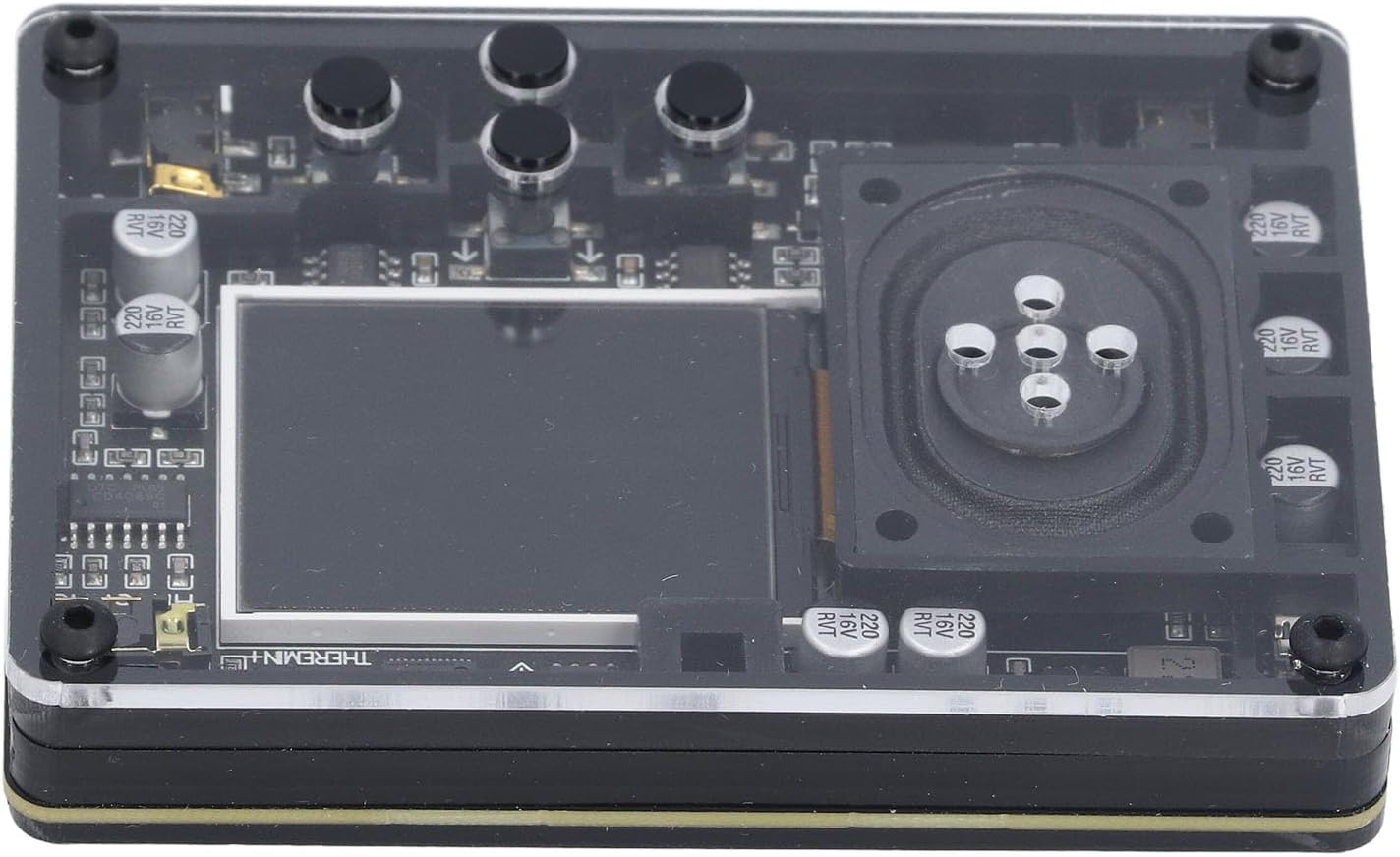
The Akozon Mini Theremin is a compact musical instrument designed for creating unique sounds through electromagnetic fields. It features an interactive screen display, adjustable tuning, and a variety of instrument types and tones, offering a versatile musical experience.
- Adjustable tuning settings for diverse sound creation.
- Compact and portable design for use anywhere.
- Interactive screen display provides real-time feedback.
- Detailed display information includes waveform, timing, frequency, volume, and corresponding piano pitch (display can be disabled).
- Offers 20 distinct instrument types and 70 tones.
- Conveniently powered via a Type-C USB interface.
Zawartość opakowania
Sprawdź, czy w przesyłce znajdują się wszystkie elementy wymienione poniżej:
- 1 x Theremin Module
- 1 x kabel USB typu C
- 2 x Anteny
- 1 x Instrukcja obsługi (ten dokument)

Instrukcje konfiguracji
Podłączanie anten
The Theremin operates using two antennas, which are crucial for detecting hand movements to control pitch and volume.
- Locate the two antenna ports on the side of the Theremin module.
- Carefully insert each antenna into its respective port. Ensure they are securely connected to prevent signal loss.

Włączanie urządzenia
The Theremin is powered via a standard Type-C USB interface.
- Connect the provided Type-C USB cable to the Theremin's Type-C port.
- Podłącz drugi koniec kabla USB do kompatybilnego źródła zasilania USB (np. portu USB komputera, zasilacza ściennego USB).
- The device will power on automatically once connected to a power source.

Instrukcja obsługi
Podstawowa obsługa
The Theremin is played by moving your hands in the air around its antennas. One antenna typically controls pitch, and the other controls volume. Experiment with hand proximity and movement to produce different sounds.
The interactive screen display provides real-time visual feedback on your performance, aiding in control and understanding of the sound output.
Informacje wyświetlane na ekranie
The screen can display the following information to assist with your musical endeavors:
- Waveform of the sound being produced.
- Time and Frequency (this display can be turned off if preferred).
- Current Volume level.
- Corresponding Piano Pitch for easy reference.
Use the control buttons located near the screen to navigate menus and adjust display settings according to your preference.
Adjusting Tones and Instrument Types
The device offers a wide range of sonic possibilities with 20 different instrument types and 70 tones.
Refer to the on-screen menu for options to select and adjust these settings. This allows you to customize your sound and explore various musical textures.
Konserwacja
Czyszczenie
To maintain the appearance and functionality of your Theremin, use a soft, dry cloth to gently clean the exterior. Avoid using liquid cleaners, solvents, or abrasive materials, as these can damage the device's surface or internal components.
Składowanie
Store the device in a cool, dry place away from direct sunlight, high humidity, and extreme temperatures. For extended storage periods, it is recommended to disconnect the antennas and the power cable.
Rozwiązywanie problemów
Brak wyjścia dźwięku
- Kontrola mocy: Ensure the device is properly powered on and the Type-C USB cable is securely connected to a working power source.
- Połączenie antenowe: Verify that both antennas are securely inserted into their respective ports. Loose connections can prevent proper operation.
- Ustawienia głośności: Check that the volume settings on the device are not set to minimum or muted.
- Pozycja dłoni: Confirm your hands are positioned correctly near the antennas. The Theremin requires specific hand movements to generate sound.

Wyświetlacz nie działa
- Zasilanie: Sprawdź, czy urządzenie jest zasilane.
- Ustawienia wyświetlania: Check if the display has been intentionally turned off via the device's settings menu.
- Uporczywy problem: If the display remains unresponsive after checking the above, contact customer support for further assistance.
Specyfikacje
| Funkcja | Szczegół |
|---|---|
| Numer modelu przedmiotu | Akozon7pkyecr5di |
| Waga przedmiotu | 8.2 uncji |
| Wymiary opakowania | 6.69 x 6.3 x 1.97 cala |
| Zasilacz | Interfejs typu C |
| Instrument Types | 20 |
| Dźwięki | 70 |
| Wyświetl zawartość | Waveform, time and frequency (can be turned off), volume and corresponding piano pitch |
| Wymagane baterie | NIE |
Gwarancja i wsparcie
Informacje o gwarancji
This product comes with a standard manufacturer's warranty. Please refer to the warranty card or documentation included in your package for specific terms, conditions, and duration of the warranty.
Obsługa klienta
For technical assistance, troubleshooting not covered in this manual, or warranty claims, please contact Akozon customer support. You can find more information and contact details by visiting the official Akozon store on Amazon: