
1. Wprowadzenie
1.1 Produkt powyżejview
The Rraycom 5MP Wireless Security Camera is a battery-powered, outdoor-ready surveillance device designed for home security. It features 5MP ultra-HD video, a 130° wide field of view, and dual light source night vision for both full-color and infrared options. Equipped with AI motion detection, two-way audio, a siren alarm, and spotlight, it provides comprehensive monitoring and deterrence. The camera supports both cloud and local SD card storage and is compatible with Amazon Alexa.
1.2 Główne cechy
- 2.5K (5MP) Ultra-HD Video: Zapewnia wyraźny i szczegółowy obraz nadzorutage.
- Szerokie pole 130° View: Minimizes blind spots for broader coverage.
- Full-Color & Infrared Night Vision: Offers versatile night monitoring options.
- Akumulator: Ensures wire-free operation and flexible placement.
- Wodoodporność IP65: Zaprojektowane tak, aby wytrzymać różne warunki pogodowe i móc używać na zewnątrz.
- PIR Motion Detection with AI Analysis: Accurately detects human movement and sends real-time notifications.
- Dwukierunkowy dźwięk: Allows for remote communication with visitors or intruders.
- Syrena alarmowa i reflektor: Deters unwanted visitors with audible and visual alerts.
- Cloud/SD Card Storage: Oferuje elastyczne opcje przechowywania nagrań wideo.
- Integracja z Alexą: Enables voice control for live view dostęp.

Obraz: Ponadview of the Rraycom 5MP Wireless Security Camera and its main features.
1.3 Co znajduje się w pudełku?
Sprawdź zawartość przesyłki. Jeśli brakuje któregokolwiek z elementów lub jest on uszkodzony, skontaktuj się z obsługą klienta.
- Rraycom 5MP Wireless Security Camera (x1)
- Wspornik montażowy (x1)
- Mounting Screws and Wall Anchors (x1 set)
- Kabel USB do ładowania (x1)
- Instrukcja obsługi (x1)
2. Rozpoczęcie pracy: konfiguracja
2.1 Ładowanie kamery
Before initial use, fully charge the camera battery. Connect the provided USB charging cable to the camera's charging port and to a standard 5V USB power adapter (not included). The indicator light will show charging status and turn solid when fully charged.
2.2 Instalacja aplikacji
Download the companion app, VistaFlow, from your mobile device's app store.
- Dla urządzeń z systemem iOS: Szukaj "VistaFlow" in the Apple App Store.
- Dla urządzeń z systemem Android: Szukaj "VistaFlow" in the Google Play Store.
Follow the on-screen instructions to create an account and log in.
2.3 Parowanie urządzeń (połączenie Wi-Fi)
- Upewnij się, że Twoje urządzenie mobilne jest podłączone do Sieć Wi-Fi 2.4 GHzKamera nie obsługuje Wi-Fi 5 GHz.
- Open the VistaFlow app and tap the "Add Device" or "+" icon.
- Wybierz model aparatu z listy.
- Follow the in-app instructions to power on the camera and put it into pairing mode (usually indicated by a flashing LED).
- Scan the QR code displayed on your phone screen with the camera lens, or follow alternative pairing methods if prompted.
- Po podłączeniu nadaj nazwę swojej kamerze i zakończ proces konfiguracji.
2.4 Montaż kamery
Choose a suitable location for your camera, considering Wi-Fi signal strength, desired viewing angle, and power access for occasional recharging. The camera is IP65 waterproof, making it suitable for outdoor installation.
- Zaznacz miejsca wywiercenia otworów, korzystając z uchwytu montażowego jako szablonu.
- W przypadku montażu na murze lub płycie gipsowo-kartonowej wywierć otwory i włóż kołki rozporowe.
- Secure the mounting bracket to the wall or ceiling with screws.
- Zamontuj kamerę w uchwycie montażowym i dostosuj kąt, aby uzyskać optymalny zasięg.
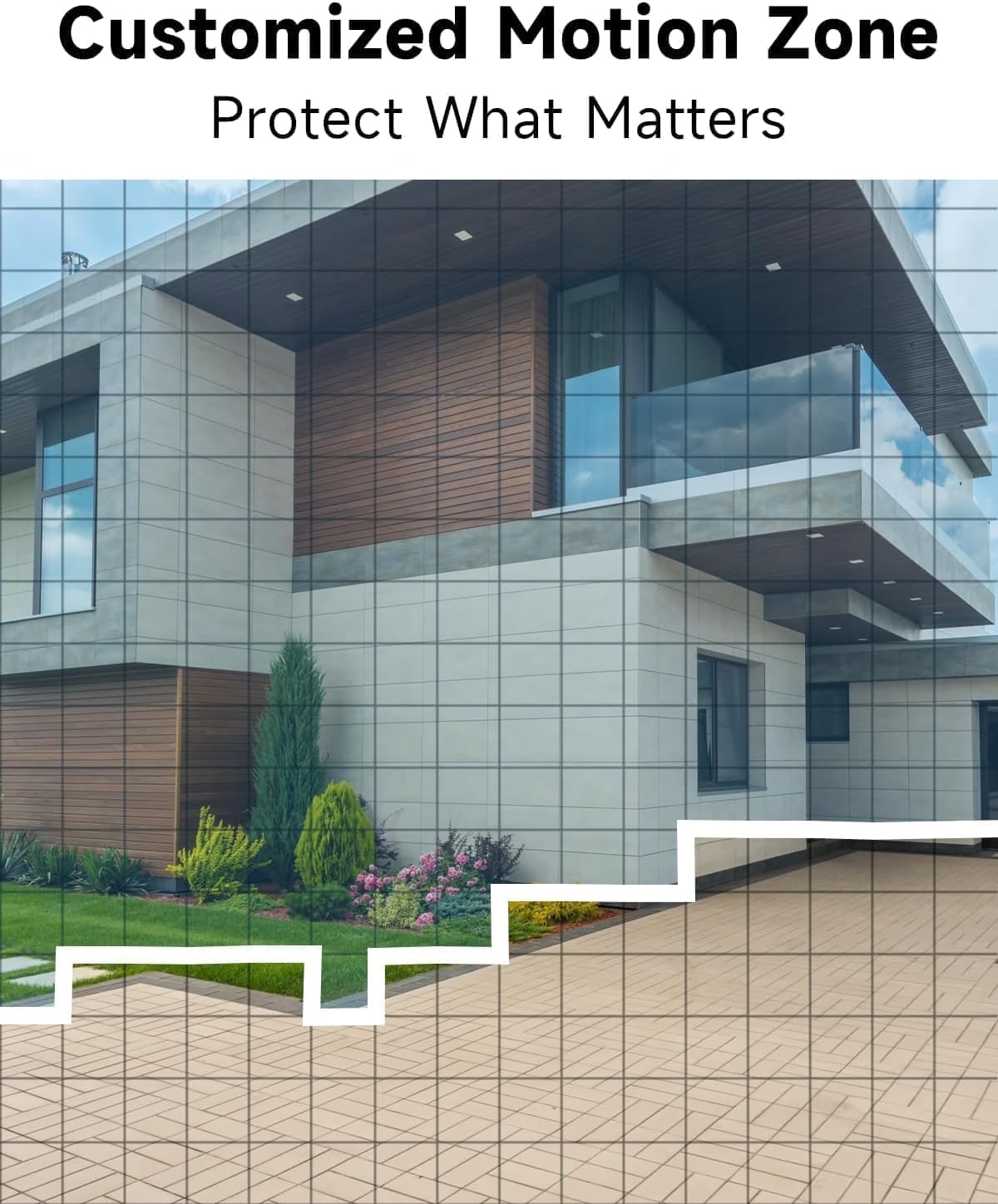
Obraz: Byłyample of camera placement and customized motion zone setup.
3. Instrukcja obsługi
3.1 Na żywo View
Access the VistaFlow app and select your camera to view the live feed. You can pinch to zoom and pan across the 130° wide-angle view. The 5MP resolution provides clear details.

Image: Visual comparison of 5MP versus 1080P video resolution.
3.2 Detekcja ruchu i analiza AI
The camera uses a PIR sensor and AI analysis to detect motion, specifically identifying persons to reduce false alarms. When motion is detected, you will receive a notification on your phone.
- Spersonalizowane strefy aktywności: In the app settings, you can define specific areas within the camera's view where motion detection should be active, ignoring other areas.
- Regulacja czułości: Adjust the motion detection sensitivity to suit your environment and reduce unwanted alerts.

Image: AI Motion Detection in action, highlighting alert options.
3.3 Dźwięk dwukierunkowy
The built-in microphone and speaker allow for real-time two-way communication. Tap the microphone icon in the live view mówić przez kamerę i słuchać dźwięku z kamery.

Ilustracja: Demonstracja dwukierunkowej komunikacji dźwiękowej.
3.4 Widzenie nocne
Kamera oferuje dwa tryby widzenia nocnego:
- Pełnokolorowa wizja nocna: Utilizes the built-in spotlight to provide color images in low-light conditions.
- Nocna Nocna Wizja: Wykorzystuje diody LED podczerwone do uzyskiwania czarno-białych obrazów w całkowitej ciemności.
Możesz przełączać się między tymi trybami lub ustawić je na automatyczne w ustawieniach aplikacji.

Image: Comparison of color and infrared night vision modes.
3.5 Siren Alarm & Spotlight
In response to motion detection, or manually activated via the app, the camera can trigger a siren alarm and turn on its spotlight to deter intruders. You can customize the siren sound with pre-recorded messages.
3.6 Opcje przechowywania
Kamera obsługuje dwie metody przechowywania nagranego materiału wideo:
- Przechowywanie w chmurze: A free rolling 3-day cycled cloud storage service is provided. Optional subscription plans may be available for extended cloud storage.
- Karta micro sd: Insert a micro SD card (up to 256GB, not included) into the camera's SD card slot for local storage.
3.7 Integracja z Alexą
The Rraycom camera is compatible with Amazon Alexa. To enable this feature:
- Otwórz aplikację Alexa na swoim urządzeniu mobilnym.
- Go to "Skills & Games" and search for "VistaFlow".
- Enable the skill and link your VistaFlow account.
- Odkryj urządzenia.
You can then use voice commands such as: "Alexa, show me the [camera name]" to view the live feed on compatible Alexa devices (e.g., Echo Show).
4. Konserwacja
4.1 Zarządzanie baterią
The camera is powered by a rechargeable battery. Battery life varies based on usage, motion detection frequency, and environmental factors.
- Ładowanie: When the battery level is low, you will receive a notification via the app. Disconnect the camera from its mount and charge it using the provided USB cable.
- Optymalizacja czasu pracy baterii: Reduce motion detection sensitivity, shorten recording duration, and minimize live view access to extend battery life.
4.2 Czyszczenie
Periodically clean the camera lens and body to ensure optimal performance.
- Use a soft, dry, lint-free cloth to wipe the lens. For stubborn smudges, a slightly damp Można użyć ściereczki, a następnie wytrzeć do sucha.
- Wyczyść korpus aparatu za pomocąamp płótno. Unikaj stosowania ostrych środków chemicznych lub ściernych środków czyszczących.
5. Rozwiązywanie Problemów
5.1 Typowe problemy i rozwiązania
| Wydanie | Możliwe rozwiązanie |
|---|---|
| Kamera nie łączy się z siecią Wi-Fi | Ensure your Wi-Fi is 2.4GHz. Check Wi-Fi signal strength at the camera's location. Restart your router and the camera. Re-attempt pairing in the app. |
| Detekcja ruchu nie działa lub występuje zbyt wiele fałszywych alarmów | Check motion detection settings in the app. Adjust sensitivity. Define activity zones to exclude irrelevant areas. Ensure camera lens is clean. |
| Niska jakość obrazu | Ensure the camera lens is clean. Check Wi-Fi signal strength. Ensure the camera is set to 5MP resolution in app settings if available. |
| Bateria się nie ładuje | Ensure the USB cable is securely connected. Try a different USB power adapter. Check if the charging port is clean and free of debris. |
| Cannot hear or speak through two-way audio | Sprawdź ustawienia głośności w telefonie i aplikacji. Upewnij się, że aplikacja ma uprawnienia do korzystania z mikrofonu i głośnika. |
6. Specyfikacje techniczne
| Funkcja | Specyfikacja |
|---|---|
| Rezolucja | 5 MP (2.5K QHD) |
| Pole View | 130° |
| Łączność | Wi-Fi (tylko 2.4 GHz) |
| Źródło zasilania | Zasilany bateryjnie |
| Odporność na warunki atmosferyczne | Wodoodporność IP65 |
| Wizja nocna | Full-Color, Infrared |
| Audio | Dźwięk dwukierunkowy |
| Wykrywanie ruchu | PIR with AI Analysis (Person Detection) |
| Opcje przechowywania | Cloud (3-day free rolling), Micro SD Card (up to 256GB) |
| Integracja inteligentnego domu | Amazon Alexa |
| Kompatybilne urządzenia | iOS, Android |
| Zastosowanie wewnątrz/na zewnątrz | Plenerowy |
7. Gwarancja i obsługa klienta
7.1 Informacje o gwarancji
Rraycom products come with a limited warranty. Please refer to the warranty card included in your package or visit the official Rraycom webSzczegółowe warunki gwarancji można znaleźć na naszej stronie.
7.2 Obsługa klienta
If you encounter any issues or have questions regarding your Rraycom 5MP Wireless Security Camera, please contact our customer support team. Contact information can be found on the Rraycom webmiejscu lub w opakowaniu produktu.