
Wstęp
Dziękujemy za zakupasing the NEEWER CB200B PRO LED Video Light. This professional-grade COB LED light offers high brightness, excellent color rendering, and versatile control options for various photography and videography applications. Please read this manual thoroughly before use to ensure proper operation and to maximize the product's performance and lifespan.
Informacje dotyczące bezpieczeństwa
- Nie należy patrzeć bezpośrednio w źródło światła, gdy jest ono włączone.
- Przechowywać urządzenie w suchym miejscu. Nie dotykać mokrymi rękami.
- Ensure the light is securely mounted on a stable light stand before operation.
- Nie blokuj otworów wentylacyjnych, aby zapobiec przegrzaniu.
- Używaj wyłącznie dołączonego zasilacza i kabla.
- Przechowywać w miejscu niedostępnym dla dzieci i zwierząt domowych.
- Odłącz zasilanie przed czyszczeniem lub konserwacją.
Zawartość opakowania

Image: Contents of the NEEWER CB200B PRO LED Video Light package, including the light unit, reflector, power cable, and manual.
- 1 × NEEWER CB200B PRO LED Video Light
- 1 × Standard Reflector
- 1 × Protective Cover
- 1 × Zasilacz
- 1 × Power Cord (JP plug)
- 1 × Instrukcja obsługi
Produkt ponadview
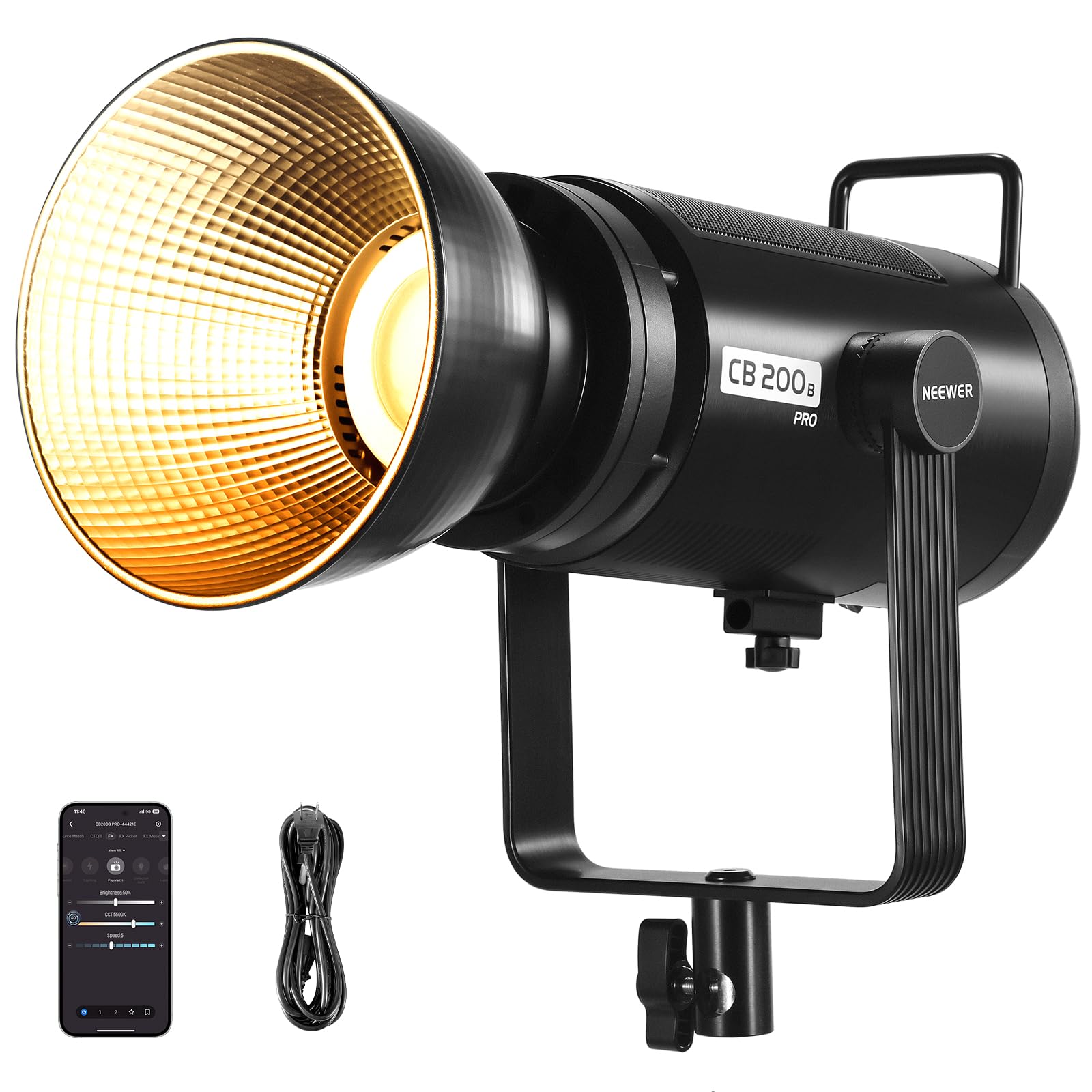
Obraz: Przód view of the NEEWER CB200B PRO LED Video Light with the standard reflector attached, highlighting its powerful COB LED.
The NEEWER CB200B PRO is a 210W bi-color COB LED video light designed for professional use. It features a robust all-metal construction, an advanced cooling system, and multiple control options.
Główne cechy:
- High Output & Color Accuracy: 210W COB LED with 90,000 Lux at 1 meter (with reflector) and CRI/TLCI 97+ for accurate color reproduction.
- Temperatura dwubarwna: Regulowana temperatura barwowa od 2700K do 6500K.
- Ściemnianie: 0-100% stepless brightness adjustment.
- Metody kontroli: On-board panel, NEEWER App, and 2.4G wireless remote control.
- Efekty specjalne: 12 built-in scene effects for creative lighting.
- Układ chłodzenia: Ultra-quiet fan with real-time temperature display and overheat protection.
- Montowanie: Standard Bowens mount for various light modifiers and a 360° rotatable U-shaped bracket.
Organizować coś
- Montaż światła:
Attach the CB200B PRO to a sturdy light stand using the U-shaped bracket. Ensure the bracket is tightened securely to prevent accidental movement or falling. The U-shaped bracket allows for 360° rotation and tilt adjustment.

Image: Detail of the U-shaped bracket allowing 360-degree rotation and tilt adjustment for the light.
- Mocowanie reflektora:
Remove the protective cover from the COB LED. Align the standard reflector with the Bowens mount on the front of the light. Rotate the reflector clockwise until it clicks into place, ensuring it is firmly attached.

Image: Close-up of the Bowens mount on the NEEWER CB200B PRO, indicating where accessories like reflectors or softboxes attach.
- Podłączenie zasilania:
Connect the power adapter to the light's power input port. Then, connect the power cord to the adapter and plug it into a suitable power outlet (AC 100-240V, 50/60Hz).
Instrukcja obsługi
1. On-Board Panel Control

Image: The control panel of the NEEWER CB200B PRO LED Video Light, showing the display and control knobs/buttons.
- Włączanie/wyłączanie: Naciśnij przycisk zasilania, aby włączyć lub wyłączyć światło.
- Regulacja jasności: Rotate the 'SET' dial to adjust the brightness from 0% to 100%.
- Regulacja temperatury barwowej: Press the 'SET' dial to switch to color temperature adjustment mode. Rotate the dial to change the color temperature from 2700K (warm) to 6500K (cool).
- Efekty sceniczne: Press the 'SCENE' button to cycle through 12 special lighting effects. Rotate the 'SET' dial to adjust parameters for each effect.
- Tryb wentylatora: Press the 'FAN MODE' button to switch between different fan modes (e.g., Silent Mode, Booster Mode).
- Tryb cichy: Reduces power to 60W (30,000 Lux at 1m) and stops the fan for noise-sensitive environments.
- Tryb Booster: Provides maximum output of 210W (90,000 Lux at 1m) with active fan cooling.

Image: The fan mode button on the NEEWER CB200B PRO, illustrating the silent mode feature for quiet operation.
2. NEEWER App Control
The NEEWER CB200B PRO can be controlled wirelessly via the dedicated NEEWER App on your smartphone (iOS/Android). This allows for convenient remote adjustments of brightness, color temperature, and special effects.
- Pobierz aplikację: Szukaj 'NEEWER' in your device's app store and install the application.
- Łączenie w pary: Turn on the CB200B PRO. Open the NEEWER App and follow the on-screen instructions to connect to your light via Bluetooth.
- Kontrola: Once connected, you can adjust all parameters, including brightness, color temperature, and scene effects, directly from your smartphone. The app also supports multi-light synchronization for compatible NEEWER lights (e.g., RGB1, RGB 1200, MS150C, MS150B, FS150B, FS150C, FS300C).
3. Sterowanie bezprzewodowe 2.4G
The light features a built-in 2.4G wireless system, allowing control with a compatible 2.4G remote control (sold separately) within a range of up to 20 meters.
- Ustaw kanał: On the light's control panel, set the 2.4G channel (CH00-CH99).
- Zdalne parowanie: Ensure your 2.4G remote control is set to the same channel as the light.
- Działanie: Use the remote control to adjust brightness, color temperature, and other settings.
4. Special Scene Effects

Image: Visual representation of the 12 special scene effects available on the NEEWER CB200B PRO, including lightning, fire, and TV screen effects.
The CB200B PRO includes 12 dynamic lighting effects to enhance your video and photography projects. These can be accessed and adjusted via the control panel or the NEEWER App.
- Błyskawica
- Zła żarówka
- Eksplozja
- Spawalniczy
- Błysk CCT
- Impuls kolorów
- Światło świecy
- Pętla CCT
- Pętla INT
- Ekran telewizora
- Fajerwerki
- I więcej...
Konserwacja
- Czyszczenie: Do czyszczenia korpusu lampy używaj miękkiej, suchej ściereczki. Nie używaj środków czyszczących ani rozpuszczalników o działaniu ściernym.
- Składowanie: When not in use, store the light in a cool, dry place, preferably in its original packaging or a protective case. Ensure the protective cover is placed over the COB LED.
- Wentylacja: Regularly check that the ventilation openings are free from dust and debris to ensure efficient cooling.
Rozwiązywanie problemów
| Problem | Możliwa przyczyna | Rozwiązanie |
|---|---|---|
| Światło się nie włącza. | Brak podłączenia zasilania. | Check if the power cord and adapter are securely connected and plugged into a working outlet. |
| Moc światła jest niska. | Silent Mode is active. | Switch to Booster Mode or adjust brightness settings. |
| Kontrola aplikacji nie działa. | Bluetooth not enabled or light not paired. | Ensure Bluetooth is enabled on your smartphone and the light is paired correctly in the NEEWER App. |
| Ostrzeżenie o przegrzaniu. | Blocked ventilation or prolonged high-power use. | Ensure ventilation openings are clear. Reduce power output or allow the unit to cool down. |
Specyfikacje

Image: Diagram showing key specifications of the NEEWER CB200B PRO LED Video Light.
| Funkcja | Szczegół |
|---|---|
| Model | CB200B PRO |
| Moc wejściowa | Prąd zmienny 100-240 V, 50/60 Hz |
| Maksymalna moc | 210 W |
| CRI | 97+ |
| TLCI | 97+ |
| Maksymalne natężenie oświetlenia | Booster Mode: 90,000 lux/1m Silent Mode: 29,900 lux/1m |
| Zakres jasności | 0-100% |
| Zakres temperatury barwowej | 2700K-6500K |
| Tryby sceny | 12 |
| Channel Range (2.4G) | CH.0-CH.99 |
| Wymiary | Wymiary 52 x 24 x 22.9 cm |
| Waga | 6.15 kilogramów |
Gwarancja i wsparcie
NEEWER products come with a standard warranty. For detailed warranty information, please refer to the warranty card included in your package or visit the official NEEWER website. If you encounter any issues or have questions regarding your CB200B PRO LED Video Light, please contact NEEWER customer support. Contact information can be found on our webstronie lub w załączonej instrukcji obsługi.
Oficjalny NEEWER Webstrona: www.neewer.com