
Wstęp
This manual provides essential instructions for the safe and effective operation of your Pentax Optio Z10 digital camera. Please read this manual thoroughly before using the camera and retain it for future reference.
Zawartość opakowania
Verify that all items are present in your package. The standard package for the Pentax Optio Z10 typically includes:
- Pentax Optio Z10 Digital Camera Body
- Akumulator litowo-jonowy
- Ładowarka baterii
- Kabel USB
- Pasek na nadgarstek
- Software CD-ROM (if applicable)
- Instrukcja obsługi (ten dokument)
- SD/SDHC Memory Card (may be included depending on retailer/bundle)
- Memory Card Reader (may be included depending on retailer/bundle)
- Camera Case (may be included depending on retailer/bundle)
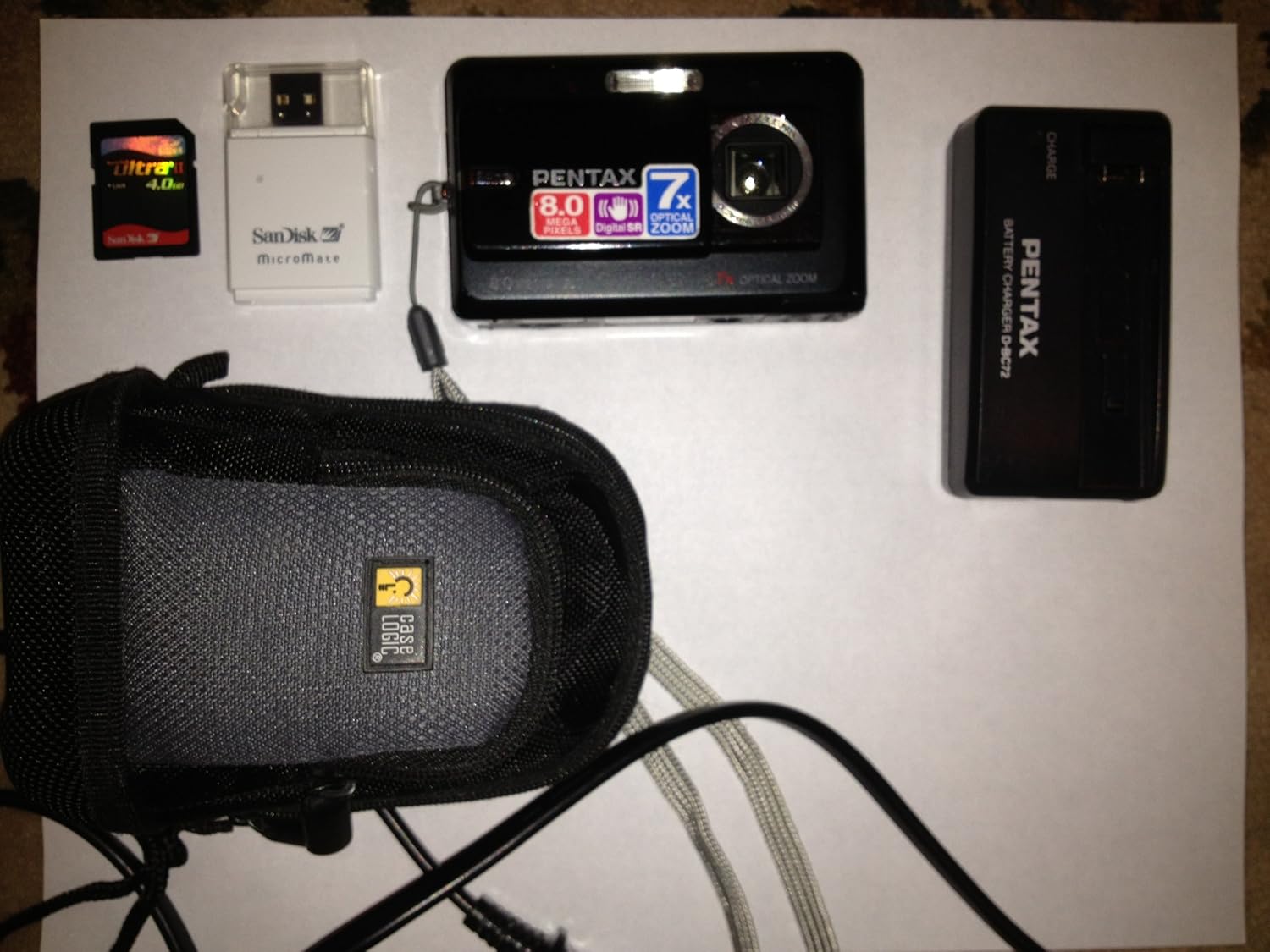
Figure 1: Pentax Optio Z10 Camera and Accessories. This image displays the Pentax Optio Z10 digital camera, an SD memory card, a SanDisk MicroMate USB card reader, a Pentax D-BC72 battery charger, and a Case Logic camera case. These items represent typical components that may be included with the camera.
Organizować coś
1. Ładowanie akumulatora
- Insert the rechargeable lithium-ion battery into the provided battery charger. Ensure correct orientation.
- Connect the battery charger to a power outlet using the appropriate power cable.
- The charging indicator light on the charger will illuminate (e.g., orange or red) during charging.
- Once charging is complete, the indicator light will change color (e.g., green) or turn off. Remove the battery from the charger.
2. Wkładanie baterii i karty pamięci
- Otwórz pokrywę komory baterii/karty pamięci w aparacie.
- Insert the charged battery into the compartment, ensuring the correct polarity.
- Insert an SD or SDHC memory card into the designated slot. Push until it clicks into place.
- Zamknij dokładnie pokrywę komory.
3. Początkowe ustawienia aparatu
Upon first power-on, you may be prompted to set the date, time, and language. Follow the on-screen instructions using the camera's navigation buttons and LCD monitor.
Obsługa aparatu
1. Włączanie/wyłączanie zasilania
Naciśnij MOC Naciśnij przycisk, aby włączyć lub wyłączyć kamerę. Obiektyw wysunie się po włączeniu zasilania.
2. Podstawowe tryby fotografii
The Pentax Optio Z10 features various shooting modes, accessible via the mode dial or menu:
- Auto Picture Mode: The camera automatically detects the scene type and applies optimal settings.
- Program AE Mode: Allows manual adjustment of some settings while the camera sets aperture and shutter speed.
- Tryby scen: Pre-set modes for specific situations (e.g., Portrait, Landscape, Night Scene).
- Tryb filmu: Do nagrywania wideo.
3. Robienie zdjęcia
- Włącz kamerę.
- Skadruj ujęcie korzystając z 2.5-calowego monitora LCD.
- Press the shutter button halfway down to activate autofocus and exposure. The focus frame will turn green when focus is achieved.
- Naciśnij całkowicie spust migawki, aby wykonać zdjęcie.
4. Operacje powiększania
Use the zoom lever (typically around the shutter button) to adjust the 7x optical zoom. Push towards 'W' for wide-angle and 'T' for telephoto.
5. Tryb odtwarzania
Naciśnij ODTWARZANIE NAGRANEGO DŹWIĘKU przycisk do ponownegoview captured images and videos. Use the navigation buttons to scroll through files.
6. Podłączanie do komputera
Connect the camera to a computer using the supplied USB cable. The camera will appear as a removable disk, allowing you to transfer photos and videos.
Konserwacja i pielęgnacja
- Czyszczenie obiektywu: Use a soft, lint-free cloth specifically designed for camera lenses. Avoid touching the lens with fingers.
- Czyszczenie monitora LCD: Delikatnie przetrzyj miękką, suchą ściereczką. Nie używaj środków czyszczących o właściwościach ściernych.
- Pielęgnacja baterii: Store batteries in a cool, dry place. Do not expose to extreme temperatures.
- Składowanie: Jeśli aparat nie będzie używany przez dłuższy czas, należy wyjąć baterię i przechowywać go w suchym i wolnym od kurzu miejscu.
- Wodoodporność: The Pentax Optio Z10 is nie jest wodoodporny. Unikać narażenia na działanie wody i wysokiej wilgotności.
Rozwiązywanie problemów
| Problem | Możliwa przyczyna / rozwiązanie |
|---|---|
| Kamera się nie włącza. | Battery is discharged. Charge the battery. Battery is inserted incorrectly. Reinsert with correct polarity. |
| Nie można robić zdjęć. | Karta pamięci jest pełna. Usuń niepotrzebne zdjęcia lub włóż nową kartę. Memory card is not inserted. Insert an SD/SDHC card. Bateria jest słaba. Naładuj baterię. |
| Obrazy są niewyraźne. | Subject is too close. Ensure minimum focus distance. Camera shake. Use Digital Shake Reduction or a tripod. Obiektyw jest brudny. Wyczyść obiektyw. |
| LCD monitor is blank. | Camera is in power-saving mode. Press any button to wake. Brightness setting is too low. Adjust in menu. |
Specyfikacje
- Czujnik obrazu: 8.0-megapikselowy przetwornik CCD (1/2.5 cala)
- Efektywne piksele: 8.0 megapiksela
- Obiektyw: Pentax Zoom Lens, 7x Optical Zoom (equivalent to 38-266mm in 35mm format)
- Zoom cyfrowy: Około. 5.1x
- Monitor LCD: 2.5-inch TFT color LCD, approx. 230,000 dots
- Nośniki danych: SD/SDHC memory card, 52 MB built-in memory
- File Format: Still images: JPEG (Exif 2.21), Movies: AVI (Motion JPEG)
- Rozdzielczość wideo: 640 x 480 / 320 x 240, 30 fps
- Czułość ISO: Auto, Manual (80-3200)
- Prędkość migawki: 1/1440 do 4 sekund
- Źródło zasilania: Akumulator litowo-jonowy
- Wymiary (szer. x wys. x gł.): Około 97 x 58 x 22 mm (3.8 x 2.3 x 0.9 cala)
- Waga: Approximately 145g (5.12 oz) without battery and memory card
- Łączność: USB 2.0
- Cechy szczególne: Digital Shake Reduction, High-speed Face Recognition, Auto Picture mode
Gwarancja i wsparcie
This Pentax Optio Z10 camera, if purchased as "Renewed," typically comes with a 90-day limited warranty. Please refer to your purchase documentation or contact your retailer for specific warranty terms and conditions.
For technical support or service inquiries, please visit the official Pentax support webOdwiedź witrynę lub skontaktuj się z działem obsługi klienta. Zachowaj dowód zakupu, gdy będziesz szukać pomocy.
Note: As this is a renewed product, warranty terms may differ from new products.