
1. Koniec produktuview
The Fanvil V60P is a professional IP phone designed for business communication. It features a color display, programmable keys, and Power over Ethernet (PoE) support for simplified installation and operation. This manual provides essential information for setting up, operating, and maintaining your device.
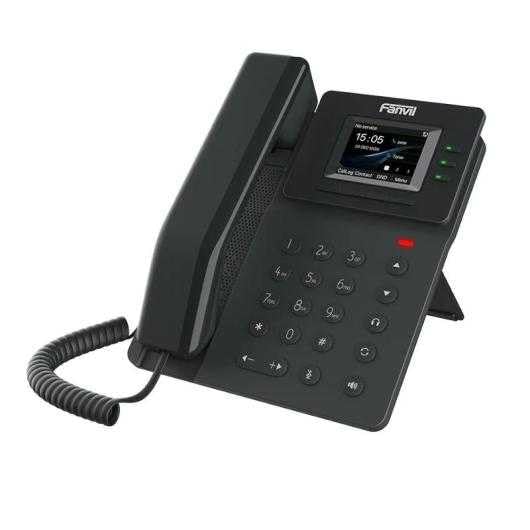
Figure 1: Fanvil V60P Professional IP Phone. This image shows the black IP phone with its handset, color display, and numeric keypad. The display shows "15:05" and menu options.
2. Konfiguracja i instalacja
2.1 Zawartość opakowania
Przed instalacją sprawdź, czy w opakowaniu znajdują się wszystkie elementy:
- Fanvil V60P IP Phone unit
- Słuchawka i przewód spiralny
- Kabel Ethernetowy
- Podstawka
- Krótki przewodnik instalacji (jeśli dołączony)
2.2 połączenie fizyczne
- Zamocuj stojak: Przymocuj podstawkę biurkową stabilnie do tylnej części urządzenia telefonicznego.
- Podłącz słuchawkę: Podłącz jeden koniec spiralnego przewodu do słuchawki, a drugi koniec do portu słuchawki w podstawie telefonu.
- Connect to Network and Power (PoE):
- Podłącz jeden koniec kabla Ethernet do Sieć lokalna port on the phone.
- Connect the other end of the Ethernet cable to a Power over Ethernet (PoE) enabled switch or injector. The phone will power on automatically.
- Połącz z komputerem (opcjonalnie): If you need to connect a computer through the phone, connect an Ethernet cable from your PC to the PC port on the phone.
Note: If PoE is not available, a separate power adapter (not included) may be required. Refer to the product specifications for compatible power adapter details.
3. Instrukcja obsługi
3.1 Podstawowe funkcje wywołań
- Nawiązywanie połączenia:
- Podnieś słuchawkę lub naciśnij przycisk głośnika.
- Wybierz żądany numer za pomocą klawiatury.
- Naciśnij Cyferblat soft key or wait for the automatic dialing timeout.
- Odbieranie połączenia:
- Podnieś słuchawkę.
- Alternatively, press the Speakerphone button or the Odpowiedź klawisz programowy.
- Zakończenie połączenia: Hang up the handset or press the Speakerphone button.
3.2 Using Programmable DSS Keys
The Fanvil V60P features 6 programmable DSS (Direct Station Select) keys. These keys can be configured for various functions such as speed dial, line keys, busy lamp field (BLF), or other custom features as defined by your system administrator.
- To use a programmed DSS key, simply press the corresponding button.
- Configuration of DSS keys is typically done via the phone's web interface or your IP PBX system.
3.3 Local Phonebook
The phone supports a local phonebook with up to 1000 entries.
- Uzyskaj dostęp do książki telefonicznej za pomocą Informator or Łączność przycisk funkcyjny na wyświetlaczu.
- Use the navigation keys to browse entries.
- Select an entry and press the Cyferblat przycisk funkcyjny umożliwiający nawiązanie połączenia.
3.4 Konferencje audio
The V60P supports local 6-party audio conferencing.
- Establish a call with the first participant.
- Naciśnij Konf soft key. The first participant will be put on hold.
- Dial the number of the second participant and establish the call.
- Naciśnij Konf soft key again to merge all participants into a conference.
- Repeat steps 2-4 to add more participants, up to a total of 6.
4. Konserwacja
4.1 Czyszczenie urządzenia
To maintain the appearance and functionality of your Fanvil V60P IP Phone (made of plastic material), follow these cleaning guidelines:
- Disconnect the phone from its power source (PoE) before cleaning.
- Użyj miękkiego, lekko damp, lint-free cloth to wipe the surfaces.
- Avoid using harsh chemicals, abrasive cleaners, or solvents, as these can damage the plastic and display.
- Nie rozpylaj środków czyszczących bezpośrednio na telefon.
4.2 aktualizacji oprogramowania sprzętowego
Firmware updates may be released periodically to improve performance, add features, or fix bugs. Consult your IT administrator or Fanvil's official website for information on available updates and instructions for installation.
5. Rozwiązywanie Problemów
This section addresses common issues you might encounter with your Fanvil V60P IP Phone.
| Problem | Możliwa przyczyna | Rozwiązanie |
|---|---|---|
| Telefon się nie włącza. | Brak połączenia PoE lub uszkodzony kabel Ethernet. | Ensure the Ethernet cable is securely connected to the LAN port and a PoE-enabled switch/injector. Verify the PoE source is active. |
| Brak sygnału wybierania. | SIP registration failure or network issue. | Check network connectivity. Verify SIP account settings with your IT administrator. Restart the phone. |
| Nie można wykonywać/odbierać połączeń. | Network issues, incorrect SIP configuration, or firewall blocking. | Confirm network connection. Check SIP registration status on the phone's display. Contact your IT administrator for network and SIP configuration verification. |
| Niska jakość dźwięku. | Przeciążenie sieci lub uszkodzona słuchawka/głośnik. | Check network bandwidth and latency. Try using a different handset or speaker mode. If the issue persists, contact support. |
6. Specyfikacje
| Funkcja | Szczegół |
|---|---|
| Model | V60P |
| System | Linux |
| Wyświetlacz | 2.4-inch, 320 x 240 Color Screen |
| Klucze DSS | 6 Programowalne klawisze |
| Linie SIP | 4 |
| Lokalna książka telefoniczna | Wpisy 1000 |
| Słuchawka | Przewodowa słuchawka |
| Konferencje audio | 6-party Local Conference |
| Wideband Codecs | G.722, Dzieło |
| Narrowband Codecs | G.711, G.723.1, G.726, G.729, G.729A, G.729B, G.729AB, iLBC |
| PoE | Tak |
| Porty sieciowe | 2 porty Ethernet 10/100 Mb/s |
| EHS Support | Tak |
| Obsługa IPv6 | Tak |
| Tworzywo | Plastikowy |
| Wymiary (dł. x szer. x wys.) | Wymiary 15 x 200 x 15 cm |
| Waga | 600 gram |
| Identyfikator dzwoniącego | Tak |
| Operacja wieloliniowa | Tak |
| Conference Call Functionality | Support Multiple Conferences |
| Standby Duration (if applicable) | 10 godziny |
7. Gwarancja i wsparcie
7.1 Gwarancja na produkt
The Fanvil V60P IP Phone comes with a three-year warranty against manufacturing defectsNiniejsza gwarancja obejmuje wady materiałowe i wykonawcze powstałe w wyniku normalnego użytkowania. Prosimy zachować dowód zakupu na potrzeby roszczeń gwarancyjnych.
7.2 Wsparcie techniczne
For technical assistance, troubleshooting beyond this manual, or warranty inquiries, please contact your reseller or Fanvil's official customer support channels. You may need to provide your product model (V60P) and serial number.