
XIAOMI 24044RN32L
Instrukcja obsługi smartfona XIAOMI Redmi A3X
Model: 24044RN32L
1. Wprowadzenie
This manual provides essential instructions for setting up, operating, and maintaining your XIAOMI Redmi A3X smartphone. Please read this guide thoroughly to ensure proper use and to maximize the device's capabilities. The Redmi A3X features a 6.71-inch HD+ display, a 5000mAh battery, and runs on Android 14.
2. Zawartość opakowania
Sprawdź, czy w pudełku z produktem znajdują się wszystkie elementy:
- XIAOMI Redmi A3X Mobile Phone
- Kabel USB typu C.
- Narzędzie do wyjmowania karty SIM
- Szybki przewodnik
- Karta gwarancyjna
- Informacje dotyczące bezpieczeństwa
- Wall Charger (Note: Availability may vary by region.)
3. Urządzenie ponadview
Familiarize yourself with the physical components of your Redmi A3X smartphone.
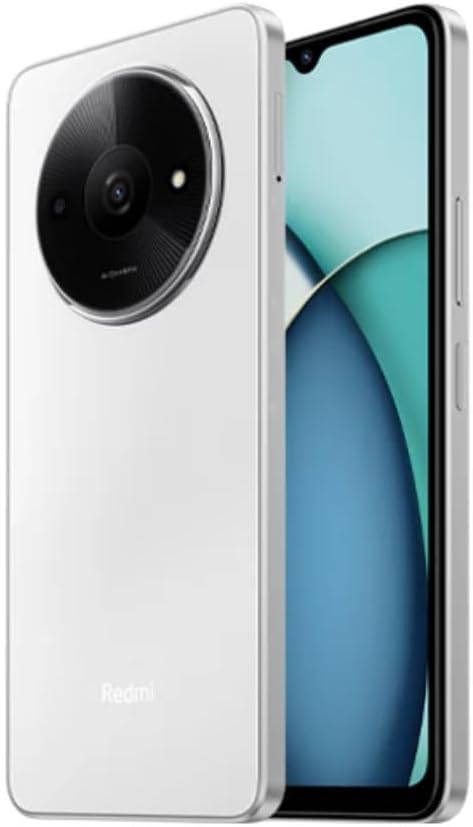
Rysunek 3.1: Przód i tył View of the Redmi A3X. This image displays the phone in Moonlight White, highlighting its 6.71-inch display and the distinctive circular camera module on the back.

Rysunek 3.2: Redmi A3X Certification Information. This image shows the phone's screen displaying regulatory details such as the model number (24044RN32L), FCC ID (2AFZZN32L), and battery capacity (5000mAh).
3.1 Cechy fizyczne
- Wyświetlacz: 6.71-inch Dot Drop HD+ display.
- Kamera tylna: Circular module housing the 8MP main camera and auxiliary lens.
- Przednia kamera: Located in the display's dot drop notch.
- Boczny czujnik odcisku palca: Integrated into the power button for convenient unlocking.
- Port USB typu C: Do ładowania i przesyłania danych.
- Gniazdo słuchawkowe 3.5 mm: For audio accessories.
- Tacka na kartę SIM: Supports Dual SIM and microSD card expansion.
4. Konfiguracja
4.1 Wkładanie kart SIM i karty MicroSD
- Znajdź tackę na kartę SIM znajdującą się z boku urządzenia.
- Insert the SIM eject tool into the small hole on the SIM tray to open it.
- Place your Nano-SIM card(s) and/or microSD card into the tray with the gold contacts facing down. Ensure correct orientation as indicated on the tray.
- Ostrożnie wsuń tackę z powrotem do telefonu, aż będzie przylegać do jego boku.
Notatka: This device supports dual SIM cards and a microSD card simultaneously. For USA market, this phone is compatible with T-Mobile, Mint, Tello, and other T-Mobile network providers. Outside the USA, it works with any GSM carrier SIM.
4.2 Pierwsze włączenie i ładowanie
- To power on, press and hold the power button (located on the side) until the XIAOMI logo appears.
- Postępuj zgodnie z instrukcjami wyświetlanymi na ekranie, aby dokończyć konfigurację początkową, obejmującą wybór języka, połączenie Wi-Fi i konfigurację konta Google.
- To charge the device, connect the USB Type-C cable to the phone's charging port and the other end to the provided wall charger.
- The device supports 10W charging. Use only XIAOMI-approved chargers and cables.
5. Instrukcja obsługi
5.1 Podstawowa nawigacja
Your Redmi A3X runs on Android 14. Navigate the interface using gestures or on-screen buttons. Swipe up from the bottom to access the app drawer, swipe down from the top for notifications and quick settings.
5.2 Funkcje wyświetlacza
- 6.71" HD+ Dot Drop Display: Oferuje szeroki viewObszar objęty badaniem.
- Częstotliwość odświeżania 90 Hz: Provides a smoother visual experience for scrolling and app usage. This can be adjusted in display settings.
- Ściemnianie DC: Reduces screen flickering at low brightness levels for improved eye comfort.
- Światło nocne: Adjusts screen colors to warmer tones to reduce blue light exposure, especially useful before sleep. Activate this feature in Display settings.
6. Funkcje aparatu
The Redmi A3X is equipped with an 8MP main rear camera and a 5MP front camera, offering various modes for photography and videography.
6.1 Kamera tylna
- Rezolucja: 8MP with f/2.0 aperture and a 4P lens. Includes an auxiliary QVGA lens.
- Nagrywanie wideo: Supports 1080P at 30fps and 720P at 30fps.
- Tryby: filmCamera, HDR mode, Portrait mode, Time-lapse.
Przednia kamera 6.2
- Rezolucja: 5MP z przysłoną f/2.2.
- Nagrywanie wideo: Supports 1080P at 30fps and 720P at 30fps.
- Tryby: filmCamera, HDR mode, Soft-light ring, Portrait mode, Time-lapse.
7. Łączność
7.1 Pasma sieciowe
The device supports a wide range of network bands for global compatibility:
- 4G LTE TDD: 38/40/41
- 4G LTE FDD: 1/3/5/7/8/20/28
- 3G WCDMA: 1/5/8
- 2G GSM: 2/3/5/8
7.2 Łączność bezprzewodowa
- Wi-Fi: Supports 2.4GHz and 5GHz Wi-Fi networks.
- Bluetooth: Wersja 5.4 do podłączania akcesoriów bezprzewodowych.
- Radio FM: Supported via the 3.5mm headphone jack.
- GPS: Integrated GPS, Glonass, Galileo, and Beidou for accurate location services.
8. Funkcje bezpieczeństwa
Your Redmi A3X offers multiple options to secure your device and data.
- Boczny czujnik odcisku palca: Register your fingerprint(s) for quick and secure unlocking. Access this in Settings > Security & privacy > Device unlock.
- Odblokowywanie twarzą AI: Use your face to unlock the device. Ensure good lighting conditions for optimal performance. Access this in Settings > Security & privacy > Device unlock.
9. Konserwacja
9.1 Ogólna opieka
- Przechowuj urządzenie w suchym miejscu. Wilgoć może uszkodzić obwody elektroniczne.
- Unikaj ekstremalnych temperatur. Wysokie temperatury mogą skrócić żywotność urządzeń elektronicznych i uszkodzić baterie.
- Nie upuszczaj, nie uderzaj ani nie potrząsaj urządzeniem. Nieostrożne obchodzenie się może spowodować uszkodzenie wewnętrznych płytek drukowanych i mechaniki precyzyjnej.
- Clean the screen and body with a soft, dry cloth. Avoid using harsh chemicals or abrasive materials.
9.2 Aktualizacje oprogramowania
Your Redmi A3X will receive regular software updates. It is designed to receive 2 major Android version updates and 3 years of security patch updates. Ensure your device is connected to Wi-Fi and has sufficient battery before performing updates.
10. Rozwiązywanie Problemów
| Problem | Możliwe rozwiązanie |
|---|---|
| Urządzenie nie włącza się. | Upewnij się, że bateria jest naładowana. Podłącz ładowarkę i odczekaj kilka minut przed ponownym włączeniem. |
| Nie można połączyć się z siecią. | Check if the SIM card is correctly inserted. Verify that mobile data is enabled in settings. Restart the device. Confirm network compatibility with your carrier. |
| Czytnik linii papilarnych nie działa. | Ensure your finger is clean and dry. Re-register your fingerprint in settings if the issue persists. |
| Niska wydajność. | Close unused applications. Clear cache from apps. Restart the device. Consider performing a factory reset if issues persist (back up data first). |
11. Specyfikacje
| Funkcja | Szczegół |
|---|---|
| Numer modelu | 24044RN32L |
| Wyświetlacz | 6.71" Dot Drop HD+ (1650x720), 90Hz Refresh Rate, DC Dimming |
| Edytor | Unisoc T603, Octa-core up to 1.8GHz |
| BARAN | 3 GB |
| Pamięć wewnętrzna | 64 GB |
| Możliwość rozbudowy pamięci masowej | microSD (up to 1TB, shared with SIM slot) |
| Kamera tylna | 8MP (f/2.0) + Auxiliary lens |
| Przednia kamera | 5 MP (f/2.2) |
| Bateria | 5000mAh (typ), 10W charging |
| System operacyjny | Android 14 |
| Łączność | Dual SIM, 4G LTE, Wi-Fi (2.4GHz/5GHz), Bluetooth 5.4, GPS, FM Radio |
| Czujniki | Side fingerprint sensor, AI face unlock, Virtual proximity, Virtual ambient light, Accelerometer, Electronic compass |
| Gniazdo audio | 3.5mm |
| Wymiary | Approx. 7.11 x 3.25 x 0.33 inches (based on package dimensions and 8.3mm thickness from description) |
| Waga | 12.8 uncji |
12. Gwarancja i wsparcie
Your XIAOMI Redmi A3X comes with a warranty. Please refer to the included Warranty Card for detailed terms and conditions. For technical support or further assistance, please visit the official XIAOMI support webwitryny lub skontaktuj się z obsługą klienta.
Więcej informacji i zasobów pomocy znajdziesz na stronie Sklep XIAOMI na Amazon.
Ask a question about this manual
Ask about setup, troubleshooting, compatibility, parts, safety, or missing instructions. Manuals+ will review the question and use this page’s manual context to help answer it.