
1. Wprowadzenie
This manual provides essential information for the proper setup, operation, and maintenance of your VAULTEK MX Series High Capacity Smart Handgun Safe. The MX Series safe offers advanced security features including a biometric scanner, smart keypad, and Wi-Fi connectivity for live alerts and remote monitoring. Please read these instructions thoroughly before using your safe to ensure optimal performance and security.

Image 1.1: The VAULTEK MX Series Smart Handgun Safe in its closed state.
2. Główne cechy
- High Capacity Interior: Stores up to 8 handguns, magazines, and other valuables. Features a modular interior with a pull-out height-adjustable shelf and a high-density foam twin pistol rack.
- ViSN (Vaultek Intelligent Safe Network) Technology: Wi-Fi enabled cloud platform for managing the safe and receiving live alerts for activity. Includes an iOS/Android smartphone app for intuitive setup and real-time monitoring.
- Solidna konstrukcja: Constructed from 14-gauge carbon steel body and 12-gauge steel door with a durable powder coat finish. Features anti-pry bars and dual anti-impact latches for enhanced security.
- Quick Access Options: Oversized high-resolution biometric scanner (stores up to 80 fingerprints), auto-illuminating 8-digit keypad with proximity sensor, Nano Key 3.0, and backup manual keys.
- Automatic Opening Door: Provides instant access to contents upon successful authentication.
- Impact Detection System: Sounds an alarm if a bump or impact is detected.
- Ambient LED Interior Lighting: Illuminates the safe's interior for visibility in low-light conditions.

Image 2.1: Detail of the biometric scanner and keypad for quick access.
3. Zawartość opakowania
Sprawdź, czy w przesyłce znajdują się wszystkie elementy:
- VAULTEK MX Series Smart Handgun Safe
- (2) Backup Keys
- Nano Key 3.0 (panic button)
- Kabel zasilający
- Height Adjustable Pull Out Shelf
- Twin Pistol Rack (high density foam)
- Sprzęt montażowy

Image 3.1: Backup Keys

Image 3.2: Nano Key 3.0

Image 3.3: Power Cable

Image 3.4: Mounting Hardware

Image 3.5: Interior Shelf

Image 3.6: Twin Pistol Rack
4. Przewodnik konfiguracji
4.1 Rozpakowanie i wstępna kontrola
Carefully remove the safe and all accessories from the packaging. Inspect the safe for any signs of damage. If any components are missing or damaged, contact VAULTEK customer support immediately.
4.2 Powering the Safe
Connect the provided power cable to the safe and a wall outlet. The safe is designed to operate primarily on AC power. For backup power, install 4 AAA batteries (not included) into the designated battery compartment. These batteries provide power for up to 3 months in case of a power outage.

Image 4.1: Connecting the power cable to the safe.
4.3 Montaż sejfu
The MX Series safe includes pre-drilled mounting holes and hardware for securing it to a stationary object, such as a nightstand or closet shelf. This helps prevent unauthorized removal of the safe. Choose a secure location and follow the instructions provided with the mounting hardware for proper installation.

Image 4.2: The safe securely placed on a surface.
4.4 App Installation and Wi-Fi Setup (ViSN)
The VAULTEK ViSN platform utilizes Wi-Fi connectivity for advanced features. Download the official VAULTEK smartphone app from the iOS App Store or Google Play Store. Follow the in-app guided setup to connect your safe to your home Wi-Fi network and enable live alerts and remote monitoring. Notatka: ViSN safes are designed for use in the US only; Wi-Fi functions are not supported outside the US.
Pobierz aplikację tutaj: https://qrco.de/bfCd27

Image 4.3: The VAULTEK ViSN smartphone app for monitoring and control.
5. Instrukcja obsługi
5.1 Metody dostępu
Your MX Series safe offers multiple ways to gain access:
- Skaner biometryczny: Place a programmed finger on the scanner. The safe will verify your fingerprint and open automatically.
- Klawiatura: Enter your 8-digit access code using the auto-illuminating keypad.
- Klucz Nano 3.0: Use the Nano Key 3.0 for the fastest entry point.
- Klucze zapasowe: In case of electronic failure or forgotten codes, use the provided backup keys to manually open the safe.
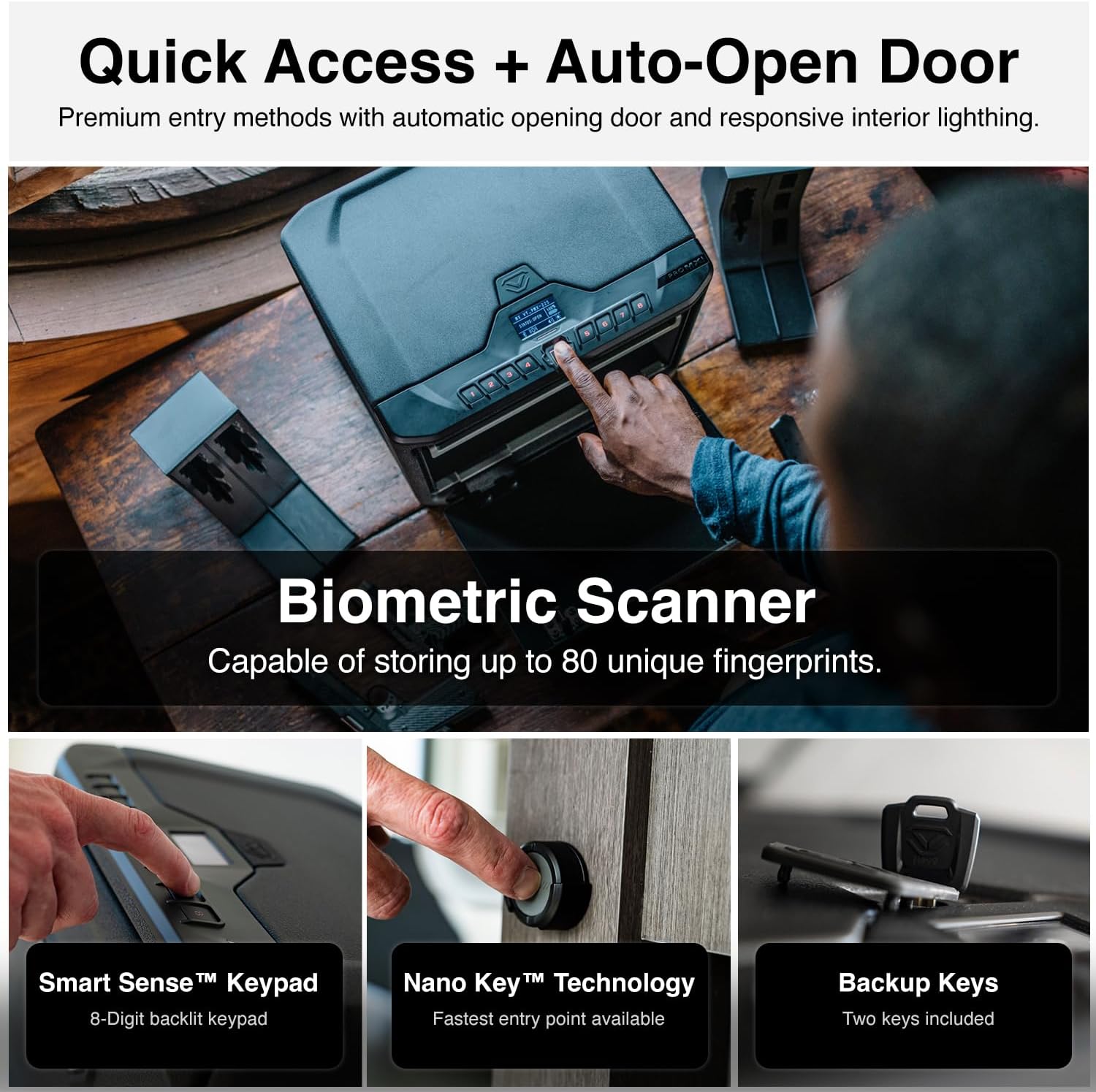
Image 5.1: Accessing the safe using the biometric scanner.
5.2 Programming Fingerprints
The biometric scanner can store up to 80 unique fingerprints. Refer to the VAULTEK app or the safe's LCD screen for guided instructions on how to enroll new fingerprints. Ensure your finger is clean and dry for accurate scanning.
5.3 Setting Keypad Codes
You can set and change your 8-digit keypad access code through the safe's LCD screen interface or via the VAULTEK app. Choose a strong, memorable code and avoid sharing it.
5.4 Using the Auto-Open Door
Upon successful authentication via biometric scan, keypad code, or Nano Key, the safe's door will automatically open, providing quick access to your stored items. The interior LED lights will also activate.
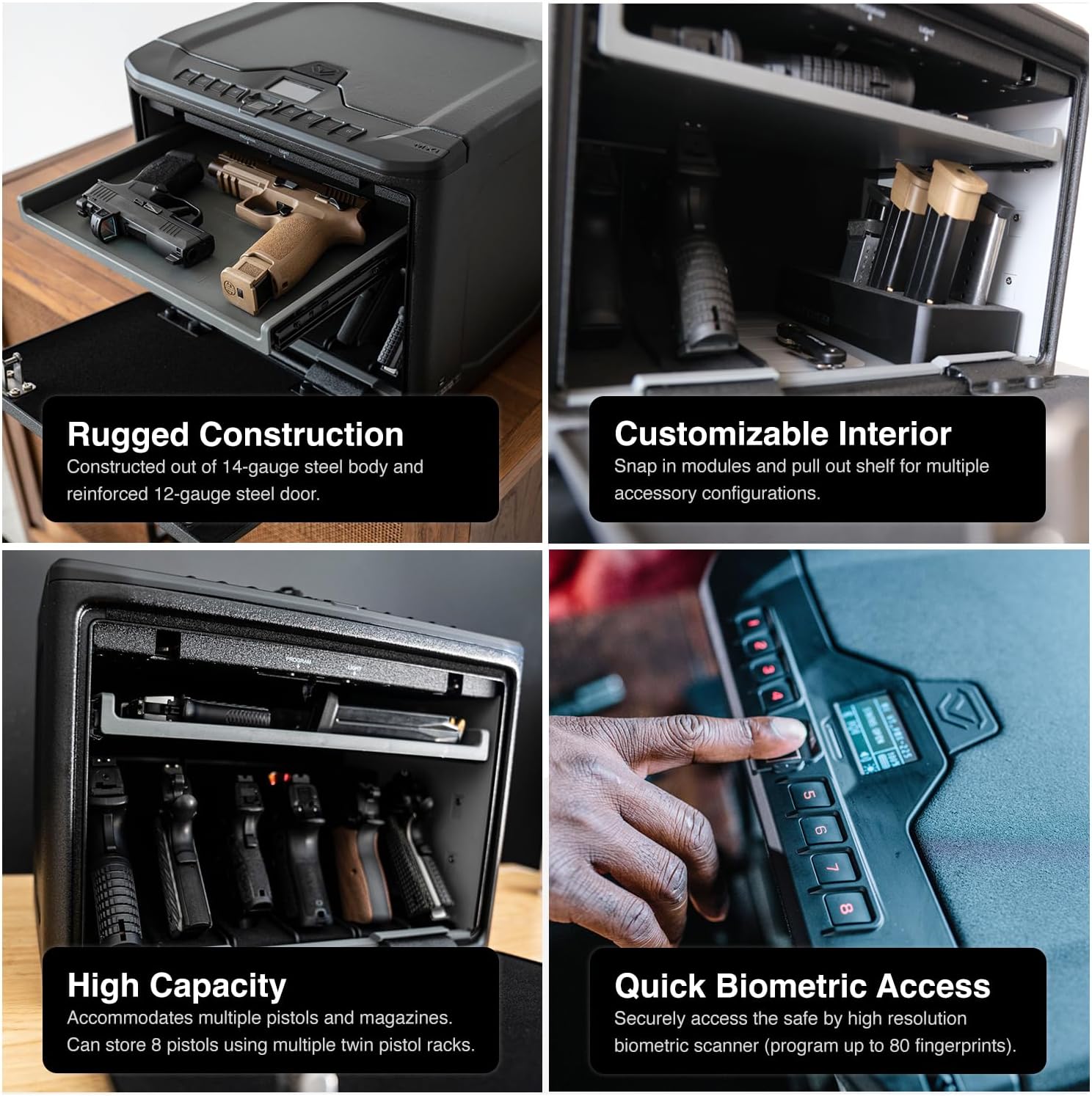
Image 5.2: The safe's interior with the auto-open door.
5.5 Understanding Live Alerts
Through the ViSN platform, your safe can send live alerts to your smartphone for critical activities such as:
- Tamppróby erowania
- Wykrywanie uderzeń
- Ostrzeżenia o niskim poziomie baterii
- Unauthorized access attempts
Configure alert preferences within the VAULTEK app.
5.6 Modular Interior Configuration
The safe's interior is designed for customization. The pull-out shelf can be adjusted for height, and the twin pistol rack can be positioned to accommodate multiple handguns and magazines. Additional accessory modules (sold separately) can further enhance organization.

Image 5.3: Configurable interior with multiple handguns and magazines.
6. Konserwacja
6.1 Wymiana baterii
The safe uses 4 AAA batteries for backup power. When the battery level is low, you will receive an alert via the ViSN app and the safe's LCD screen. Replace all four batteries simultaneously with new, high-quality alkaline batteries to ensure reliable backup power.
6.2 Czyszczenie
Wyczyść zewnętrzną część sejfu miękką,amp cloth. Avoid using abrasive cleaners or solvents that could damage the finish. Regularly wipe the biometric scanner surface to ensure optimal performance.
6.3 aktualizacji oprogramowania sprzętowego
Periodically check the VAULTEK app for available firmware updates. These updates can improve performance, add new features, and enhance security. Follow the in-app instructions for performing firmware updates.
7. Rozwiązywanie Problemów
- Sejf nie otwiera się: Ensure the safe is powered (AC or backup batteries). Re-attempt biometric scan with a clean, dry finger or re-enter the keypad code carefully. If issues persist, use the backup keys.
- Access Denied: This indicates an incorrect fingerprint or keypad code. Try again with a registered fingerprint or the correct code. Repeated incorrect attempts may trigger a lockout period or alert.
- Brak połączenia Wi-Fi: Check your home Wi-Fi network status. Ensure the safe is within range of your router. Reconfigure Wi-Fi settings through the VAULTEK app if necessary.
- No Live Alerts: Verify that alerts are enabled in the VAULTEK app settings and that your smartphone has an active internet connection.
- Interior Lights Not Working: Check power connection and battery status. If the issue persists, contact customer support.
8. Specyfikacje
| Funkcja | Szczegół |
|---|---|
| Marka | VAULTEK |
| Numer modelu | Seria MX |
| Wymiary produktu (Gł. x Szer. x Wys.) | 11.5" gł. x 15" szer. x 11.6" wys. |
| Głębokość komory | 8 cali |
| Typ zamka | Dual Anti-Impact Patented Latch System, Biometric Fingerprint, Backlit Numeric Keypad, Nano Key 3.0, Backup Keys |
| Tworzywo | Progressive Formed 14-Gauge Steel Body and 12-Gauge Steel Door |
| Pojemność | Up to 8 handguns |
| Cechy specjalne | Anti-Theft, Biometric Fingerprint, Vaultek ViSN WiFi Connectivity for Instant Live Alerts, Auto-Open Door, Modular Interior, Impact Detection |
| Typ montażu | Wstępnie nawiercone otwory montażowe |
| Źródło zasilania | AC Power, 4x AAA Battery Backup |
| UPC | 850014786816 |
9. Gwarancja i wsparcie
For warranty information, product registration, or technical assistance, please visit the official VAULTEK webOdwiedź witrynę lub skontaktuj się bezpośrednio z działem obsługi klienta. Zachowaj paragon zakupu na wypadek reklamacji.
Manufacturer: Vaultek Safe, Inc.
Aby uzyskać dalszą pomoc, odwiedź stronę VAULTEK Store on Amazon.