
Wstęp
The daylight Halo Go 2 is a portable and rechargeable magnifying lamp designed to provide precise illumination and magnification for detailed tasks. This manual provides essential information for the safe and effective use, setup, operation, and maintenance of your Halo Go 2 lamp.
Informacje dotyczące bezpieczeństwa
- Nie demontuj ani nie modyfikuj lamp. This may cause damage or injury and will void the warranty.
- Utrzymaj lamp z dala od wody i innych płynów.
- Do ładowania używaj wyłącznie dostarczonego kabla USB.
- Unikaj bezpośredniego, długotrwałego świecenia światłem LED.
- Przechowywać w miejscu niedostępnym dla dzieci.
- Upewnij się, że lamp is placed on a stable, flat surface during use.
Zawartość opakowania
Proszę sprawdzić, czy w paczce znajdują się następujące elementy:
- daylight Halo Go 2 Magnifying Lamp
- Kabel ładujący USB
- Velvet Carry Case
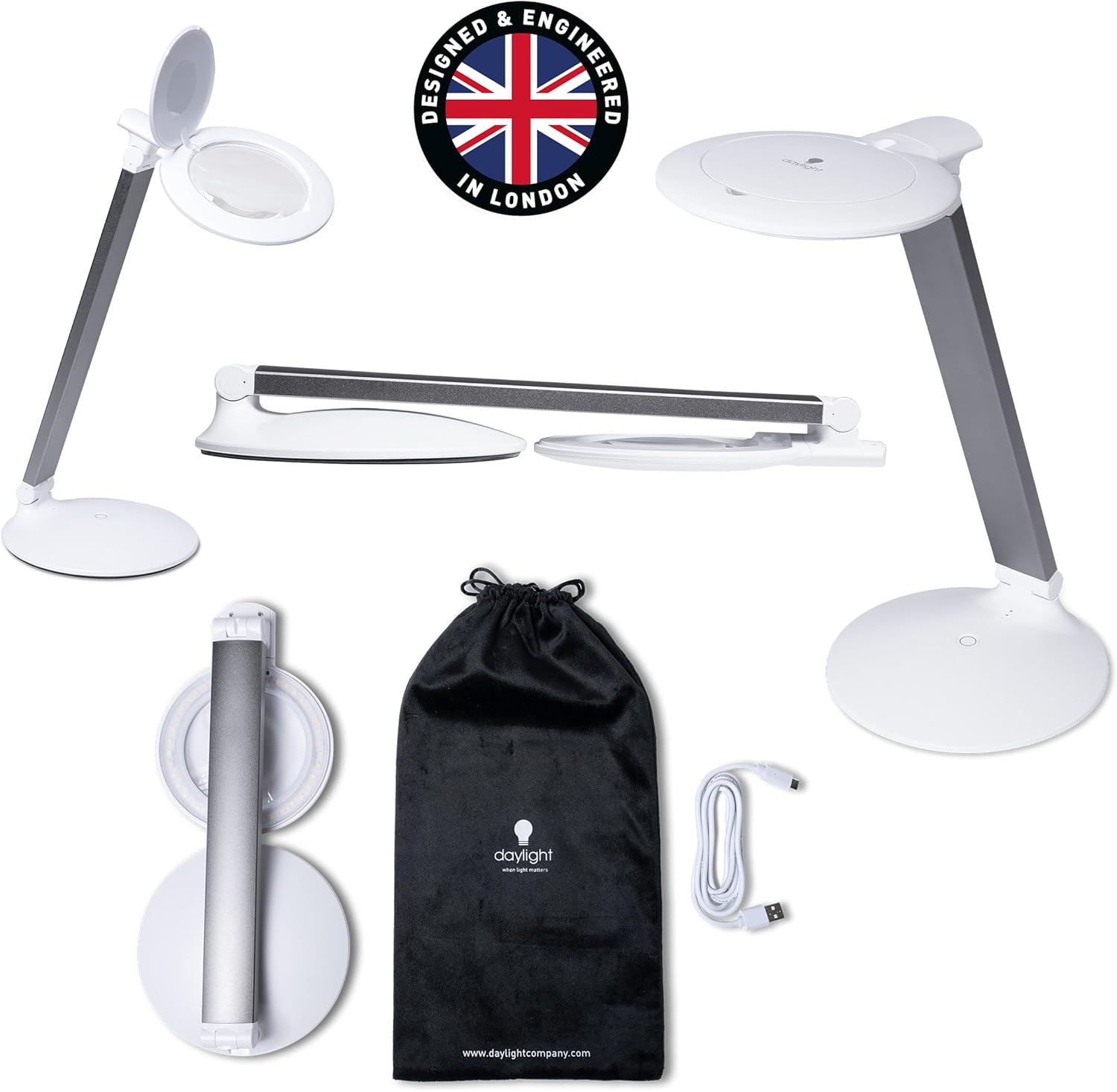
Image: The Halo Go 2 lamp, its USB charging cable, and the included velvet carry case.
Produkt ponadview
The Halo Go 2 lamp features a compact, foldable design for portability and ease of storage. Key components include the lamp head with an integrated magnifying lens, an adjustable arm, a stable base, and a power/brightness control button.

Image: The Halo Go 2 lamp fully extended, showing the lamp head, arm, and base.

Obraz: Wizualna reprezentacja lamp's foldable design, transitioning from an upright position to a compact, flat form.
Organizować coś
- Rozpakować: Ostrożnie wyjąć wszystkie elementy z opakowania.
- Rozwijać się: Delikatnie rozłóż lamp from its compact position. The arm can be adjusted to your desired angle.
- Opłata początkowa: Przed pierwszym użyciem zaleca się pełne naładowanie akumulatora.amp. Refer to the 'Charging' section for instructions.
Instrukcja obsługi
- Włączanie/wyłączanie: Press the power button located on the base of the lamp to turn it on. Press again to cycle through brightness settings and turn off.
- Dostosuj jasność: Lamp features two brightness settings. Press the power button once for the high mode (powerful light for detailed work) and a second time for the low mode (softer glow for general tasks or reading). A third press will turn the lamp wyłączony.
- Korzystanie z lupy: Open the lens safety cover to access the 5-diopter (2.25X) magnifying lens. For higher magnification, use the integrated 12-diopter (4.0X) inset lens.
- Regulacja ramienia: Lamp's arm is flexible, allowing you to position the light and magnifier precisely where needed.
- Standalone Lamp Używać: Lamp can be used as a regular task lamp by keeping the lens safety cover closed.

Obraz: Byłyamples of the Halo Go 2 lamp in use for reading (low brightness) and detailed nail work (high brightness).

Image: Various applications of the Halo Go 2 lamp, demonstrating its use for detailed tasks like nail care and embroidery with magnification.
Ładowanie
The Halo Go 2 lamp is equipped with a rechargeable battery, offering up to 8 hours of consistent lighting on a full charge.
- Podłącz dostarczony kabel ładujący USB do portu ładowania w urządzeniu.ampbaza.
- Plug the other end of the USB cable into a compatible USB power source (e.g., laptop, phone charger, USB power bank).
- The charging indicator lights (usually small LEDs on the base) will illuminate to show charging status. Refer to the product's specific indicator behavior for full charge notification.
- Once fully charged, disconnect the lamp ze źródła zasilania.
Konserwacja
- Czyszczenie obiektywu: Use a soft, lint-free cloth specifically designed for optical lenses to clean the magnifying lens. Do not use abrasive cleaners or harsh chemicals.
- Czyszczenie lamp Ciało: Wytrzyj lamppowierzchnia z miękkim, damp szmatką. Unikaj dostania się wilgoci do otworów.
- Składowanie: When not in use, fold the lamp into its compact form and store it in the included velvet carry case to protect it from dust and scratches.
Rozwiązywanie problemów
| Problem | Możliwa przyczyna | Rozwiązanie |
|---|---|---|
| Lamp nie włącza się. | Bateria jest rozładowana. | Naładuj lamp całkowicie za pomocą dołączonego kabla USB. |
| Lamp nie pobiera opłat. | Wadliwy kabel USB lub zasilacz. | Spróbuj użyć innego kabla USB lub zasilacza. Upewnij się, że połączenia są stabilne. |
| Światło migocze lub jest słabe. | Niski poziom naładowania baterii. | Naładuj lamp. |
| Magnification is unclear. | Lens is dirty or smudged. | Wyczyść soczewkę miękką, niepozostawiającą włókien ściereczką. |
Specyfikacje
- Model: Halo Go 2 (U25400)
- Powiększenie: 5 Diopter (2.25X), 12 Diopter (4.0X) inset
- Źródło światła: PROWADZONY
- Temperatura barwowa: 6,000 tys.
- Jasność: 4,200 Lux at 15cm, 330 Lumens
- Współczynnik oddawania barw (CRI): 95+
- Pobór mocy: 5W
- Tomtage: 5V (prąd stały)
- Czas pracy baterii: Do 8 godzin (przy pełnym naładowaniu)
- Żywotność LED: 25,000 godziny
- Wymiary: 1.97" gł. x 6.1" szer. x 13.58" wys. (po rozłożeniu)
- Waga przedmiotu: 2.1 funtów
- Tworzywo: Lightweight Metal, Plastic
- Cechy szczególne: 3-Way, Adjustable Arm, Cordless, Portable, Rechargeable
- Zawartość zestawu: Carrying Case, Power Cable
- Kod UPC: 809802254006
Gwarancja i wsparcie
The daylight Halo Go 2 Magnifying Lamp jest dostarczany z 2-letnia gwarancja producenta. For warranty claims, technical support, or any inquiries regarding your product, please contact daylight customer service. Keep your proof of purchase for warranty validation.
For further assistance, please visit the official daylight webodwiedź witrynę lub skontaktuj się z ich kanałami obsługi klienta.