
1. Wprowadzenie
Thank you for choosing the HOU iPad Keyboard Case. This manual provides detailed instructions for setting up, operating, and maintaining your new keyboard case. Designed for enhanced productivity and protection, this accessory transforms your iPad into a versatile workstation.
2. Zgodność
This keyboard case is designed to be compatible with specific iPad models. Please verify your iPad's model number to ensure proper fit and functionality.
How to Check Your iPad Model:
- Idź do Ustawienia na Twoim iPadzie.
- Stuknij w Ogólny, Następnie O.
- Zlokalizuj Numer modelu. It typically starts with 'A' followed by four digits (e.g., A2602).
- Alternatively, the model number is printed in tiny text on the back case of your iPad.
Kompatybilne modele iPada:
- iPad 9th Generation 10.2 inch 2021 (Model Numbers: A2602/A2603/A2604/A2605)
- iPad 8th Generation 10.2 inch 2020 (Model Numbers: A2270/A2428/A2429/A2430)
- iPad 7th Generation 10.2 inch 2019 (Model Numbers: A2200/A2197/A2198)
- iPad Air 3 (10.5 cala)
- iPad Pro 10.5 inch 2017

3. Główne cechy
The HOU iPad Keyboard Case offers a range of features designed to enhance your iPad experience:
- Silent & Responsive Typing: Equipped with premium silicone-coated scissor switches for quiet, comfortable, and efficient typing.
- Konstrukcja z możliwością odłączenia magnetycznego: The keyboard can be easily detached from the case, allowing for flexible use in tablet mode or laptop mode.
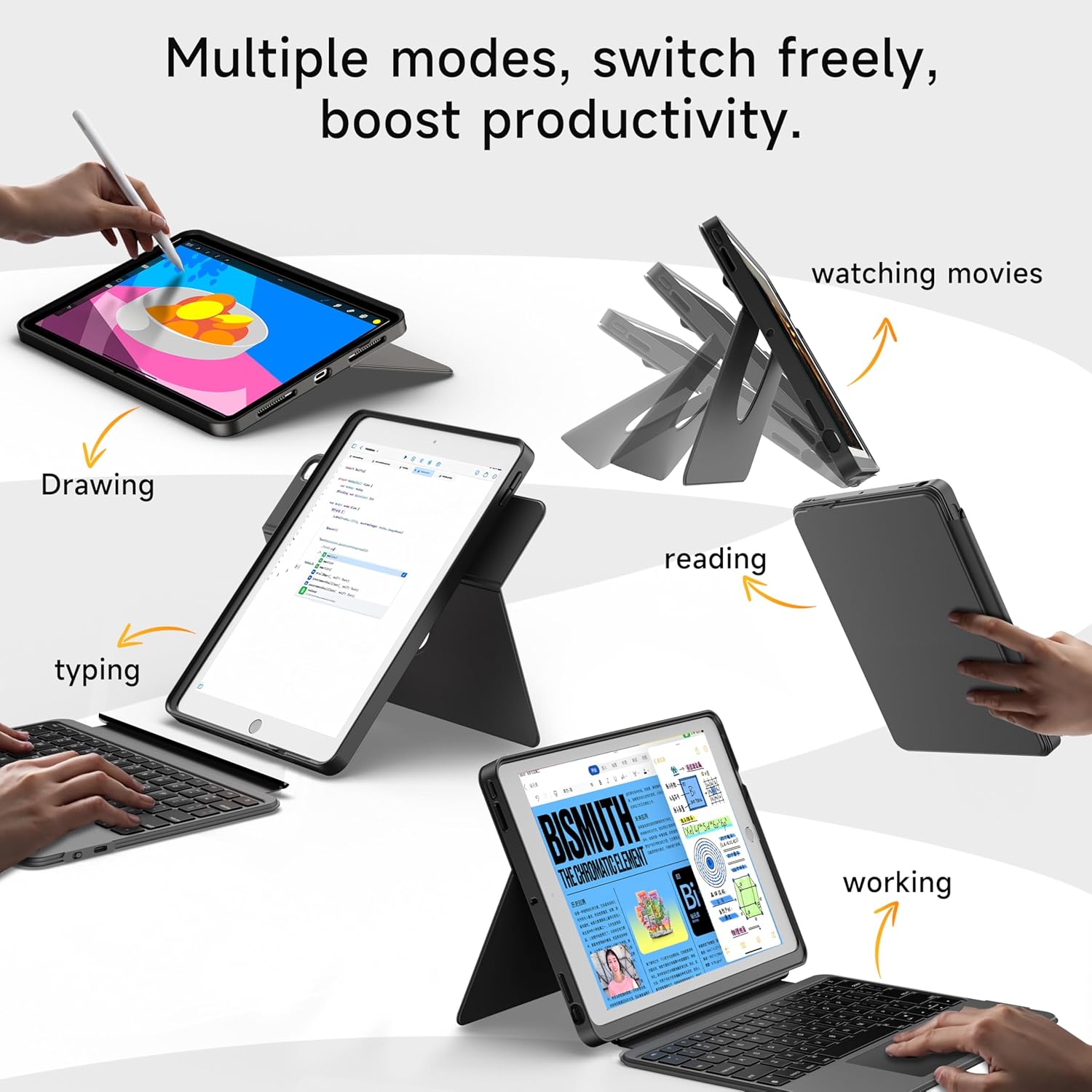
- 360° Rotating Stand with Adjustable Angles: Provides versatile viewing angles, supporting both portrait and landscape orientations for various activities like reading, watching, or presenting.
- Klawiatura podświetlana w 7 kolorach: Features adjustable 7-color backlighting for typing in low-light conditions, with customizable brightness levels.
- Ochrona na poziomie wojskowym: The shockproof silicone case offers 360° protection against drops and spills.
- Secure Apple Pencil Storage: Includes an elastic strap to securely hold your Apple Pencil.
- Zintegrowany panel dotykowy: A large multi-touch touchpad supports iOS gestures for precise navigation.
- Długa żywotność baterii: The keyboard features a 500mAh battery, providing up to 50 hours of use with backlighting off, or 4-6 hours with backlighting on.

4. Instrukcje konfiguracji
4.1. Ładowanie klawiatury
Before first use, ensure the keyboard is fully charged.
- Znajdź port ładowania USB-C z boku klawiatury.
- Connect the provided USB-C cable to the keyboard and a compatible power adapter (not included).
- The LED indicator will turn red during charging and turn off when fully charged. A 2-hour charge provides weeks of use.

4.2. Parowanie Bluetooth
Aby podłączyć klawiaturę do iPada przez Bluetooth, wykonaj następujące czynności:
- Ensure the keyboard is charged and turn it on using the power switch.
- Na iPadzie przejdź do Ustawienia > Bluetooth.
- Naciśnij i przytrzymaj FN + CONTROL + R keys on the keyboard for 3 seconds to enter pairing mode. The Bluetooth indicator light on the keyboard will flash.
- On your iPad, select "HOU Keyboard" from the list of available devices.
- Once paired, the Bluetooth indicator light on the keyboard will turn off.
5. Instrukcja obsługi
5.1. Korzystanie z klawiatury
The keyboard provides a full QWERTY layout with dedicated iOS command keys for efficient workflow.
- Klawisze skrótu: Access one-tap shortcuts for screen brightness, media playback, volume control, Lock, Home, and Emoji functions.
- Pisanie na maszynie: Enjoy a comfortable and quiet typing experience for documents, emails, and more.

5.2. Regulacja podświetlenia
The keyboard features 7-color backlighting with adjustable brightness.
- Mienić się: Naciskać FN + Light Bulb icon to cycle through the 7 available colors.
- Dostosuj jasność: Naciskać FN + strzałka w górę or FN + strzałka w dół to increase or decrease backlight brightness.
5.3. Korzystanie z touchpada
The large multi-touch touchpad supports various iOS gestures for intuitive navigation:
- Stuknięcie jednym palcem: Click/Select.
- Two Fingers Swipe: Przewiń w górę/w dół/w lewo/w prawo.
- Three Fingers Swipe Up: Przejdź do ekranu głównego.
- Three Fingers Swipe Down: View Centrum sterowania.
- Uszczypnij/rozsuń: Powiększ/pomniejsz.
5.4. Utilizing the 360° Rotating Stand
The integrated stand allows for flexible viewopcje:
- Tryb poziomy: Ideal for watching videos, presentations, or typing.
- Tryb portretowy: Perfect for reading documents, browsing social media, or video calls.
- Regulowane nachylenie: Tilt the screen from 90° (typing) to 170° (movie nights) for optimal comfort.


6. Konserwacja
To ensure the longevity and optimal performance of your HOU iPad Keyboard Case, follow these maintenance guidelines:
- Czyszczenie: Użyj miękkiego, damp Ściereczką do przecierania obudowy i klawiatury. Unikaj stosowania silnych środków chemicznych i materiałów ściernych.
- Składowanie: When not in use, keep the keyboard case closed to protect the screen and keyboard. Store in a cool, dry place away from extreme temperatures.
- Unikaj płynów: While the case offers some protection, avoid direct exposure to liquids to prevent damage to the electronic components.
7. Rozwiązywanie Problemów
If you encounter any issues with your HOU iPad Keyboard Case, refer to the following common solutions:
- Klawiatura nie łączy się przez Bluetooth:
- Sprawdź, czy klawiatura jest całkowicie naładowana i włączona.
- Turn off and on your iPad's Bluetooth, then try pairing again.
- Make sure your iPad's operating system is iOS 15.3 or later.
- Klawiatura nie odpowiada:
- Check the keyboard's battery level. Recharge if necessary.
- Ponownie podłącz połączenie Bluetooth.
- Podświetlenie nie działa:
- Sprawdź, czy klawiatura jest włączona.
- Naciskać FN + Light Bulb icon to activate or change backlight settings.
- Touchpad Lag or Unresponsiveness:
- Sprawdź, czy bateria klawiatury nie jest krytycznie słaba.
- Restart the Bluetooth connection on your iPad.
8. Specyfikacje produktu
| Funkcja | Szczegół |
|---|---|
| Marka | DOM |
| Numer modelu | B0DTKBTV4H |
| Kompatybilne urządzenia | iPad 9th/8th/7th Gen 10.2", iPad Air 3, iPad Pro 10.5" 2017 |
| Technologia łączności | Bluetooth |
| Opis klawiatury | Ergonomic, Ultra-Silent Keys, X-shaped high-rebound keys |
| Cechy specjalne | Backlit (7-Color), Detachable Case, Hotkeys and Media Keys, Portable, Trackpad, 360° Rotating Stand, Apple Pencil Holder |
| Pojemność baterii | 500 mAh (lit) |
| Żywotność baterii | Up to 50 hours (backlight off), 4-6 hours (backlight on) |
| Port ładowania | USB-C |
| Tworzywo | Silicone (Shockproof, Military-Grade Protection) |
| Waga przedmiotu | 1.34 funta (około 608 g) |
| Zawarte komponenty | Keyboard, Case, USB-C Charging Cable |
9. Gwarancja i obsługa klienta
Your HOU iPad Keyboard Case is backed by a comprehensive warranty and dedicated customer support.
- 1-letnia gwarancja wymiany: Enjoy peace of mind with a 1-year replacement warranty covering manufacturing defects.
- Polityka zwrotów w ciągu 30 dni: Jeśli nie jesteś w pełni zadowolony z zakupu, możesz go zwrócić w ciągu 30 dni i otrzymać pełny zwrot pieniędzy.
- Obsługa klienta 24/7: For any questions, concerns, or assistance, please contact our customer support team available 24 hours a day, 7 days a week.