
Produkt ponadview
The JUOVI CLIP J1 is a compact and durable wireless portable Bluetooth speaker designed for versatile use. Featuring an integrated carabiner, IP68 waterproof and dustproof rating, and up to 24 hours of playtime, it delivers premium HD sound for both indoor and outdoor environments. This speaker also includes a unique Beat Mode and supports wireless stereo pairing for an immersive audio experience.
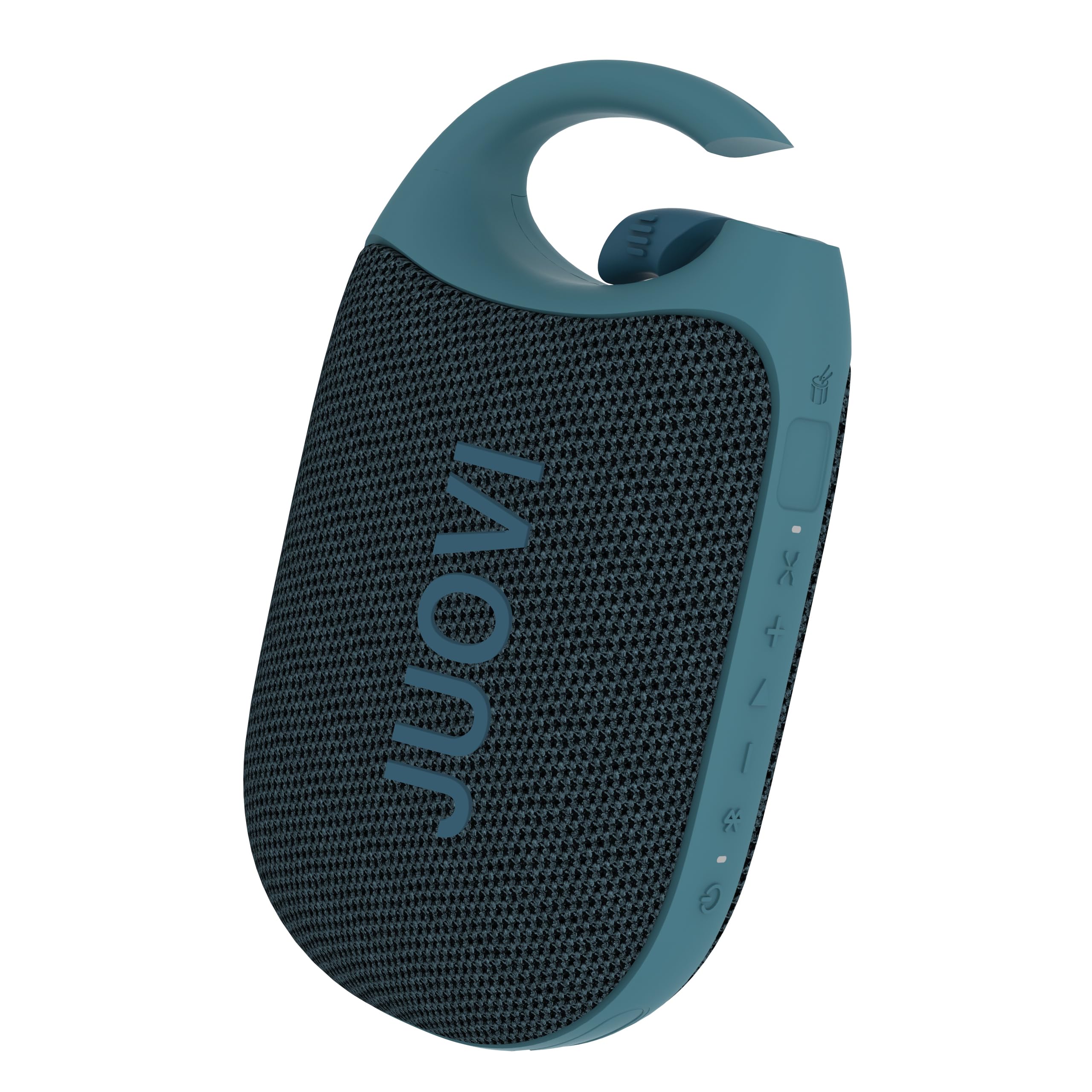
Figure 1: JUOVI CLIP J1 Bluetooth Speaker (Blue)
Co jest w pudełku
- Głośnik Bluetooth x 1
- Kabel ładujący 3A typu A do typu C (30 cm) x 1
- Instrukcja obsługi x 1
Organizować coś
1. Ładowanie głośnika
Before first use, fully charge the speaker using the provided USB-C charging cable. Connect the USB-A end to a compatible power adapter (not included) and the USB-C end to the speaker's charging port. The Power/Bluetooth indicator light will show charging status.

Figure 2: Speaker highlighting 24-hour playtime.
2. Włączanie/wyłączanie zasilania
- Włączanie: Press and hold the Power button (1) for 2 seconds. The Power/Bluetooth indicator (8) will light up.
- Aby wyłączyć: Press and hold the Power button (1) for 2 seconds. The indicator light will turn off.
3. Parowanie Bluetooth
- Ensure the speaker is powered on and the Power/Bluetooth indicator (8) is blinking, indicating it's in pairing mode.
- Włącz Bluetooth na swoim urządzeniu (smartfonie, tablecie itp.) i wyszukaj dostępne urządzenia.
- Select "JUOVI CLIP J1" from the list. The indicator light will turn solid blue once connected.
- Zasięg bezprzewodowy głośnika wynosi do 10 metrów (33 stóp).
4. Bezprzewodowe parowanie stereo (TWS)
To achieve powerful, multidimensional sound, you can connect two JUOVI CLIP J1 speakers together:
- Upewnij się, że oba głośniki są włączone i nie są połączone z żadnym innym urządzeniem Bluetooth.
- On one speaker, press and hold the Bluetooth button (2) for 2 seconds to activate TWS pairing mode. The speaker will emit a tone.
- Oba głośniki automatycznie wyszukają się i połączą ze sobą. Po połączeniu jeden głośnik będzie pełnił funkcję głównego (lewego kanału), a drugi drugiego (prawego kanału).
- Połącz urządzenie z głównym głośnikiem przez Bluetooth, jak opisano w kroku 3.

Figure 3: Two speakers connected for Wireless Stereo Pairing.
Operacyjny
1. Funkcje przycisków
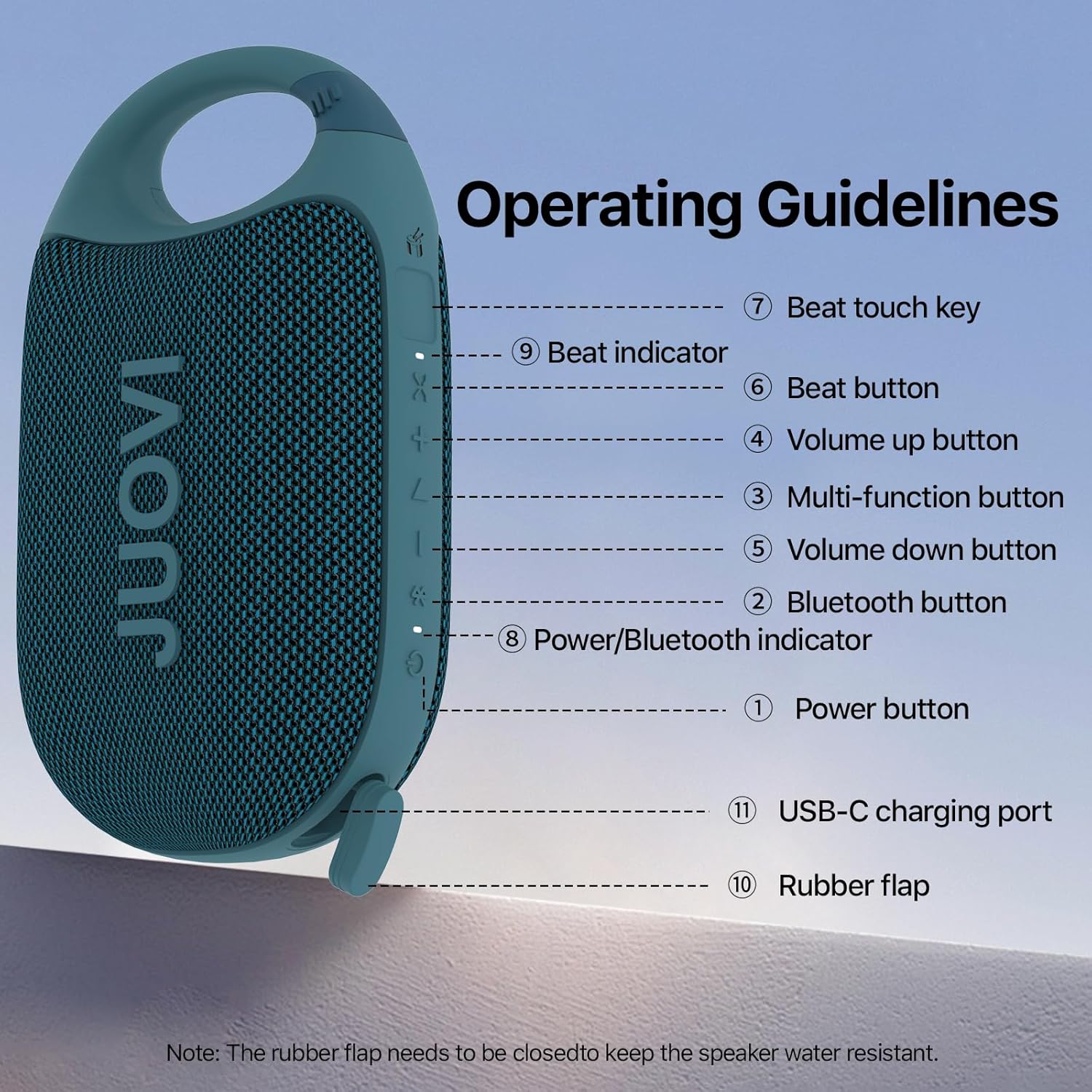
Figure 4: Operating Guidelines and Button Layout.
| Przycisk/Akcja | Funkcjonować |
|---|---|
| Power Button (1) - Long Press (2s) | Włączanie/wyłączanie zasilania |
| Bluetooth Button (2) - Short Press | Pairing Connected/Disconnected |
| Bluetooth Button (2) - Long Press (2s) | Stereo Link Function On/Off |
| Multi-function Button (3) - Short Press | Muzyka Odtwórz/Pauza |
| Multi-function Button (3) - Twice Press | Następna piosenka |
| Multi-function Button (3) - Third Press | Poprzednia piosenka |
| Volume Up Button (4) - Short Press | Zwiększ głośność |
| Volume Down Button (5) - Short Press | Zmniejsz głośność |
| Beat Button (6) - Short Press | Beat On/Off |
| Beat Button (6) - Long Press (1s) | Beat Mode Switching |
| Beat Touch Key (7) | Activates Beat Sound |
2. Beat Mode and App Control
The JUOVI CLIP J1 features a unique Beat Mode that generates dynamic sound variations. You can sync beats to your music or create standalone rhythms. For enhanced customization, download the JUOVI GO appAplikacja umożliwia:
- Access 20 high-fidelity instrument sounds.
- Freely layer sounds with beat modes.
- Customize your listening experience through the app's smart EQ, adjusting for crisp, mellow, rich, or personalized sound.

Figure 5: Customize sound and beats via the JUOVI GO app.
Konserwacja
1. Pielęgnacja wodoodporna i pyłoszczelna
The speaker is IP68-rated, meaning it withstands splashes, submersion, and heavy rain. To maintain its waterproof integrity, ensure the rubber flap covering the USB-C charging port is securely closed at all times when not charging.

Figure 6: Speaker demonstrating IP68 waterproof capability.
2. Czyszczenie
Przetrzyj głośnik miękką, damp płótno. Nie używaj ostrych środków chemicznych ani ściernych środków czyszczących.
3. Przechowywanie
Store the speaker in a cool, dry place away from direct sunlight and extreme temperatures. If storing for an extended period, charge the battery periodically to prolong its lifespan.
Rozwiązywanie problemów
- Głośnik się nie włącza: Upewnij się, że bateria jest naładowana. Podłącz ją do źródła zasilania za pomocą kabla USB-C.
- Nie można sparować przez Bluetooth: Make sure the speaker is in pairing mode (blinking indicator). Check that Bluetooth is enabled on your device and it's within 10 meters of the speaker. Try restarting both the speaker and your device.
- Brak dźwięku: Check the volume levels on both the speaker and your connected device. Ensure the speaker is successfully paired.
- Słaba jakość dźwięku: Przesuń głośnik bliżej urządzenia, aby zmniejszyć zakłócenia. Upewnij się, że między głośnikiem a urządzeniem nie ma żadnych przeszkód.
- Stereo pairing not working: Ensure both speakers are not connected to any other device before attempting TWS pairing. Follow the TWS pairing instructions carefully.
Specyfikacje
| Funkcja | Szczegół |
|---|---|
| Nazwa modelu | J6301 |
| Marka | JUOVI |
| Technologia łączności | Bluetooth |
| Technologia komunikacji bezprzewodowej | Bluetooth |
| Zasięg Bluetooth | 10 metrów |
| Typ głośnika | Na zewnątrz i wewnątrz |
| Cechy specjalne | Dustproof, Portable, Shockproof, Stereo Pairing, Waterproof |
| Poziom wodoodporności | Wodoodporny (IP68) |
| Źródło zasilania | Zasilany bateryjnie |
| Pojemność baterii | 1800 mlnamp Godziny |
| Czas ładowania | 3.5 godzin |
| Pauza w szkole | Do 24 godzin |
| Maksymalna moc wyjściowa głośnika | 8 watów |
| Tryb wyjścia audio | Mono (Stereo with TWS) |
| Stosunek sygnału do szumu | 90dB |
| Odpowiedź częstotliwościowa | 20 kHz |
| Waga przedmiotu | 250.7 gramów (8.8 uncji) |
| Wymiary produktu | 5.43" gł. x 3.17" szer. x 2.07" wys. |
| Tworzywo | Plastikowy |
| Metoda kontroli | Aplikacja, dotyk |
Gwarancja i wsparcie
This product comes with a Limited Warranty. For detailed warranty information or technical support, please refer to the contact information provided in the packaging or visit the official JUOVI webstrona.
Oficjalny film o produkcie
Film 1: Oficjalny produktview of the JUOVI Clip Wireless Portable Bluetooth Speaker, showcasinjego cech i konstrukcji.