
1. Wprowadzenie
This manual provides essential information for the setup, operation, and maintenance of your VIMTAG 8310 5G/2.4G 4MP Camera. Please read thoroughly before use to ensure proper functionality and safety.

Figure 1: VIMTAG 8310 5G/2.4G 4MP Camera
2. Co znajduje się w pudełku
Sprawdź, czy w opakowaniu znajdują się wszystkie elementy:
- Camera Body with power cable
- Instrukcja obsługi
- Śruba montażowa
- Zasilacz
3. Koniec produktuview
The VIMTAG 8310 camera features a compact design suitable for both indoor and outdoor use. Key components include:
- Obiektyw: Captures 2.5K (4MP) video.
- Podczerwień i światło białe: Do widzenia w nocy.
- Mikrofon: Do dwukierunkowej komunikacji audio.
- Głośnik: Do dwukierunkowej komunikacji audio i powiadomień.
- Gniazdo karty SD: Supports Micro SD cards up to 512GB for local storage.
- Przycisk resetowania: W celu przywrócenia ustawień fabrycznych.
- Port zasilania: Micro USB for continuous power supply.

Figure 2: Camera features overview
4. Konfiguracja i instalacja
4.1 Pobieranie aplikacji i rejestracja konta
- Download the 'Canny Cam' app from your device's app store (iOS/Android).
- Register a new account using your email address and follow the on-screen instructions.
- Zaloguj się na nowo utworzone konto.

Figure 3: App download and registration process
4.2 Powering On and Device Connection
- Connect the camera to the power adapter using the provided USB cable and plug it into a power outlet.
- Open the 'Canny Cam' app and tap the '+' icon to add a new device.
- Follow the in-app instructions to connect the camera to your 5G/2.4G Wi-Fi network. This typically involves scanning a QR code displayed on your phone with the camera lens.
- Po nawiązaniu połączenia możesz nadać kamerze nazwę i przypisać ją do konkretnego pomieszczenia.
Video 1: Why choose Vimtag Mini G3 Outdoor Security Camera? (Seller)
4.3 Montaż kamery
The camera comes with a versatile stand that allows for various mounting options:
- Tabletop/Free Standing: Place the camera on any flat surface. The stand has padded feet for stability.
- Montaż ścienny/sufitowy: The base of the stand can be detached and screwed into a wall or ceiling using the provided mounting screws. The camera then easily attaches to the mounted base.

Figure 4: Easy setup and mounting options

Figure 5: Mounting the camera to a wall
5. Obsługa aparatu
5.1 Na żywo View i dwukierunkowe audio
Access the live video feed anytime, anywhere through the Canny Cam app. Use the built-in microphone and speaker for two-way communication.

Rysunek 6: Dwukierunkowa transmisja dźwięku w działaniu
5.2 Tryby widzenia nocnego
The camera offers full-color night vision, enhanced by a built-in LED light, and traditional infrared night vision. Switch between modes via the app settings.

Figure 7: Comparison of Color and Infrared Night Vision
Video 2: How to set full-color night vision of Vimtag Mini G3 (Seller)
5.3 Inteligentne wykrywanie i alerty
Configure motion, human, and sound detection settings within the app. Receive instant alerts on your mobile device when activity is detected.
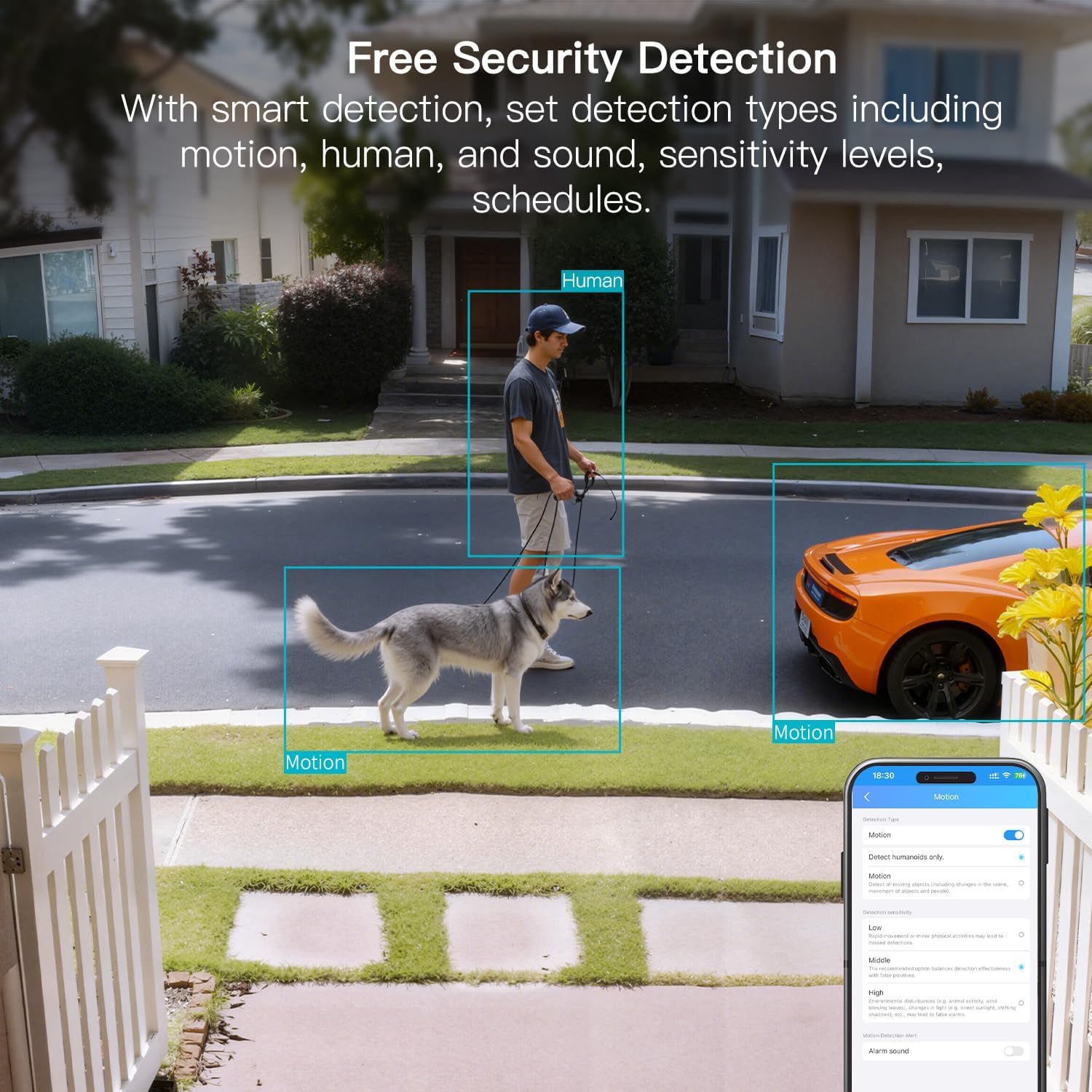
Figure 8: AI Detection capabilities

Figure 9: Smart alarm modes with sound and light
5.4 Opcje przechowywania
The camera supports continuous 24/7 recording to a Micro SD card (up to 512GB, sold separately) or secure Cloud storage (subscription required).

Figure 10: Local and Cloud storage options
6. Specyfikacje
| Funkcja | Szczegół |
|---|---|
| Nazwa modelu | 8310 |
| Zastosowanie wewnątrz/na zewnątrz | Na zewnątrz (odporność na warunki atmosferyczne IP65) |
| Rozdzielczość przechwytywania wideo | 2.5K (1440p) |
| Efektywna rozdzielczość obrazu nieruchomego | 4 MP |
| Technologia łączności | Wi-Fi (2.4 & 5G Hz, Dual Band, Wi-Fi 6) |
| Cechy specjalne | 2-Way Audio, HD Resolution, Motion Sensor, Color Night Vision, AI Detection, Alexa Support |
| Viewing kąt | 130 stopni |
| Zakres noktowizora | 33 stóp |
| Źródło zasilania | Elektryczny przewodowy (5 V, 5 W) |
| Maksymalna obsługiwana pamięć Flash | 512 GB (Micro SD) |
| Wymiary produktu | 1.57 x 2.28 x 2.76 cala |
7. Konserwacja
- Czyszczenie: Do czyszczenia obiektywu i korpusu aparatu używaj miękkiej, suchej ściereczki. Unikaj silnych środków chemicznych.
- Aktualizacje oprogramowania układowego: Regularly check the Canny Cam app for firmware updates to ensure optimal performance and security.
- Zarządzanie kartami SD: If using a Micro SD card, periodically check its status and format it via the app to maintain recording quality.
8. Rozwiązywanie Problemów
- Problemy z łącznością: Ensure the camera is within range of your Wi-Fi router. Verify Wi-Fi password and network stability. The camera supports both 2.4GHz and 5GHz bands.
- Problemy z nagrywaniem: Check if the Micro SD card is inserted correctly and has sufficient space. If using Cloud storage, verify your subscription status.
- Brak alertów: Confirm motion/human/sound detection is enabled in the app settings and notification permissions are granted for the Canny Cam app on your phone.
- Słaba jakość obrazu: Ensure the lens is clean. Check network stability for optimal streaming resolution.
- Zresetować urządzenie: If issues persist, use the reset button on the camera to restore factory settings. You will need to reconfigure the device after a reset.
9. Gwarancja i wsparcie
KRZEPATAG offers a 2-year warranty and lifetime technical support for this product. For assistance, please contact VIMTAG obsługa klienta:
- E-mail: Customer@vimtag.com
- Wsparcie w aplikacji: Access the 'Message Center' within the Canny Cam app for direct support.
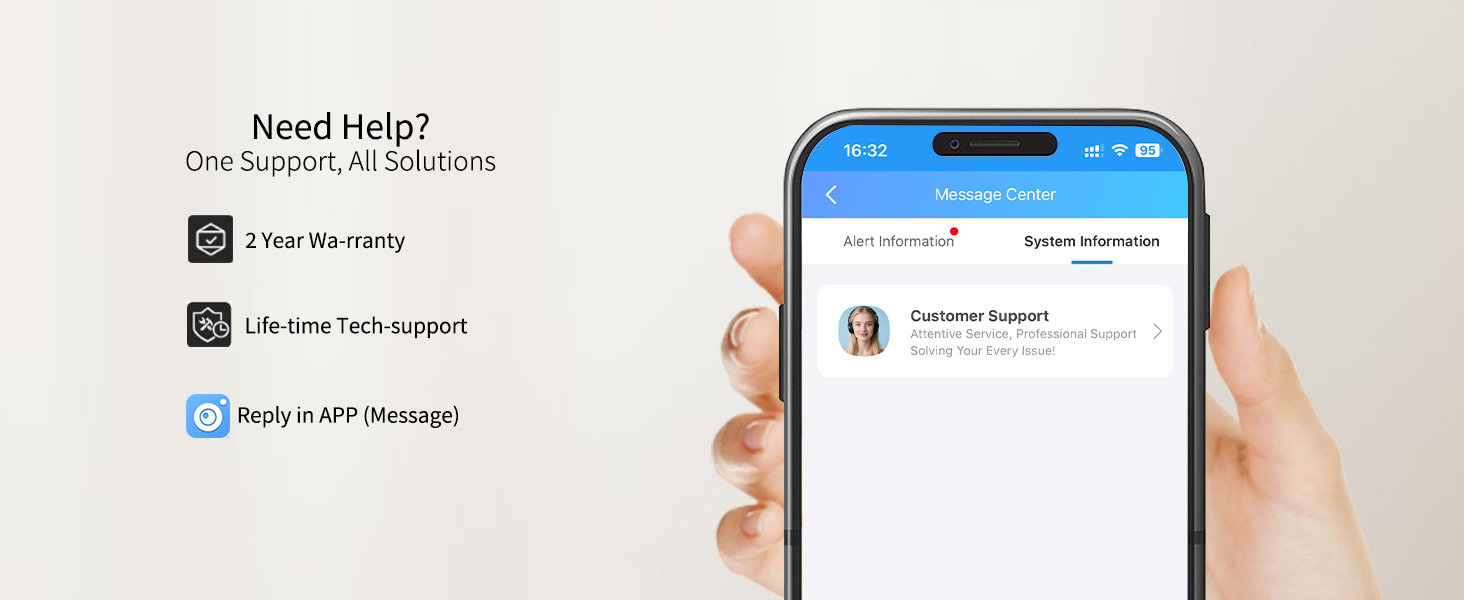
Figure 11: VIMTAG Obsługa klienta