
Wstęp
Thank you for choosing the SONICAKE Sprint QAM-15 Electric Guitar Amplifier. This portable 15-watt combo amplifier is designed for practice, travel, and small gigs, offering versatile tone control and essential connectivity. This manual provides detailed instructions to help you get the most out of your ampliyfikator.
Główne cechy:
- Portable & Lightweight Design (approx. 7.45 lbs, 11.5"x11.5"x4.5")
- Dual-Channel Versatility (Clean and Overdrive)
- Enhanced Connectivity (3.5mm Headphone Output, 3.5mm AUX Input)
- Professional Sound Control (3-Band EQ: Treble, Mid, Bass, Gain, Volume)
- Closed-Back Design for High-Quality Audio Output
Instrukcje bezpieczeństwa
Please read and understand these safety instructions before operating your amplifier. Zachowaj tę instrukcję do wykorzystania w przyszłości.
- Źródło zasilania: Połącz amplifier tylko do określonej pojemności zasilaczatage zgodnie ze wskazaniem na urządzeniu.
- Wentylacja: Nie zasłaniaj żadnych otworów wentylacyjnych. Zapewnij odpowiedni przepływ powietrza wokół ampfiltr, aby zapobiec przegrzaniu.
- Woda i wilgoć: Nie wystawiaj na działanie amplifier to rain, moisture, or any liquids. Do not place objects filled with liquids on the ampliyfikator.
- Źródła ciepła: Zachowaj ampz dala od źródeł ciepła, takich jak grzejniki, kratki wentylacyjne, piece lub inne urządzenia (w tym amp(lifiers) wytwarzające ciepło.
- Czyszczenie: Clean only with a dry cloth. Avoid using liquid or aerosol cleaners.
- Serwisowanie: Nie próbuj samodzielnie naprawiać tego produktu. Wszelkie czynności serwisowe należy powierzyć wykwalifikowanemu personelowi serwisowemu.
- Kable: Chroń przewód zasilający przed deptaniem i przytrzaśnięciem, zwłaszcza przy wtyczkach, gniazdkach i miejscach, w których wychodzi z urządzenia.
Produkt ponadview

Przód view of the SONICAKE Sprint QAM-15 Electric Guitar Amplifier, showcasindzięki kompaktowej konstrukcji i panelowi sterowania.
Funkcje panelu sterowania:

Szczegółowy view z amplifier's control panel, highlighting each knob and input for user reference.
- WEJŚCIE: 1/4" (6.35mm) jack for connecting your electric guitar.
- ZDOBYĆ: Kontroluje ilość wstępnegoamplification or distortion. Higher settings increase saturation.
- OD (Overdrive) Button: Toggles between the clean channel and the overdrive channel. Press in for overdrive, out for clean.
- VOL (objętość): Dostosowuje ogólną głośność wyjściową ampliyfikator.
- TRE (Sopranowy): Dostosowuje odpowiedź wysokich częstotliwości ampliyfikator.
- MID (Middle): Adjusts the mid-range frequency response of the ampliyfikator.
- GITARA BASOWA: Dostosowuje odpowiedź niskiej częstotliwości ampliyfikator.
- AUX (Auxiliary) Input: 3.5mm jack for connecting external audio devices (e.g., MP3 player, phone) to play along with backing tracks.
- PHONES (Headphone Output): 3.5mm jack for connecting headphones for silent practice. Mutes the main speaker when in use.
- Przycisk zasilania: Obraca amplifier włączony lub wyłączony.
- POWER Indicator LED: Świeci się, gdy amplifier jest włączony.
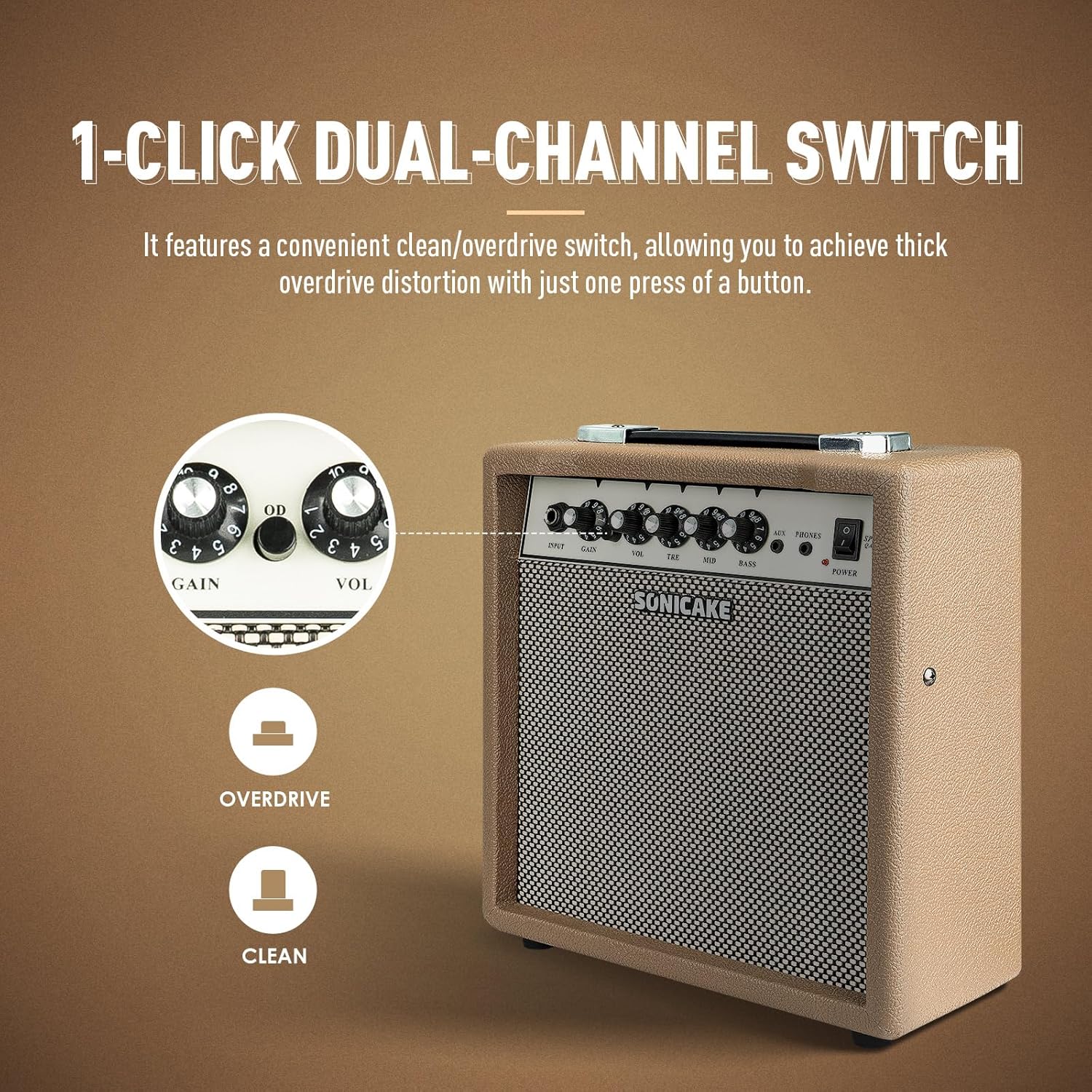
The OD button allows for instant switching between clean and overdrive tones.
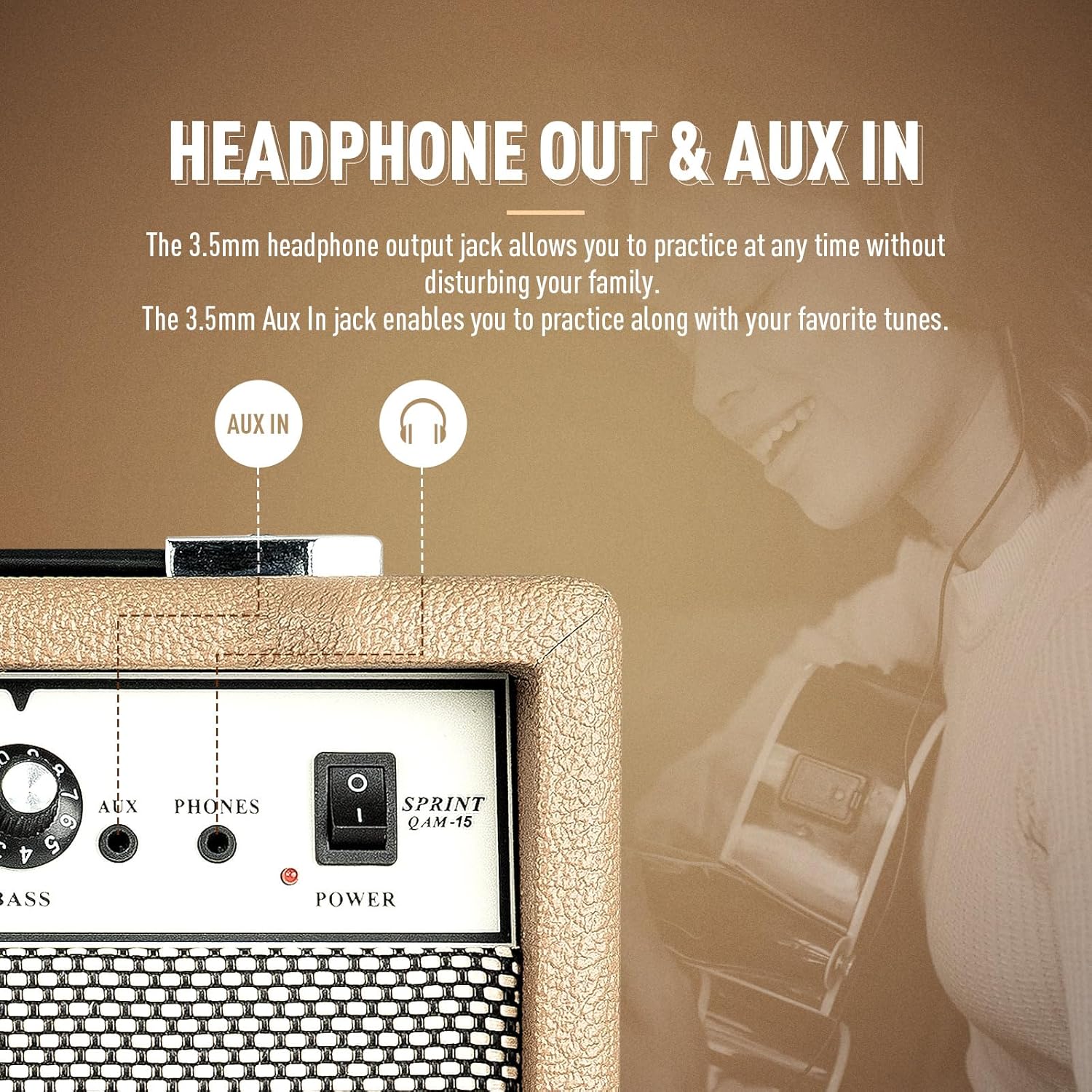
Ten amplifier features dedicated AUX In and Headphone Out jacks for versatile practice options.
Organizować coś
- Rozpakowywanie: Ostrożnie usuń ampWyjmij filtr z opakowania. Sprawdź, czy nie ma śladów uszkodzeń.
- Umieszczenie: Umieść amplifier on a stable, flat surface. Ensure there is adequate space around the unit for ventilation.
- Podłączenie zasilania: Podłącz dostarczony kabel zasilający do amplifier's power input jack and then to a suitable electrical outlet. Ensure the power switch on the amplifier is in the 'OFF' position before connecting to power.
- Podłączenie gitary: Connect your electric guitar to the 'INPUT' jack on the amplifier's front panel using a standard 1/4" (6.35mm) instrument cable.
- Ustawienia początkowe: Before powering on, set the 'VOL' knob to its minimum position (fully counter-clockwise) and the 'GAIN' knob to a low setting. Set the 'TRE', 'MID', and 'BASS' knobs to their center (12 o'clock) positions.
Instrukcja obsługi
Podstawowa obsługa:
- Włączanie: Flip the 'POWER' switch to the 'ON' position. The power indicator LED will illuminate.
- Regulacja głośności: Slowly turn the 'VOL' knob clockwise to increase the overall output volume to your desired level.
- Wyłączone: When finished, turn the 'VOL' knob to its minimum position, then flip the 'POWER' switch to the 'OFF' position.
Wybór kanału:
The Sprint QAM-15 features two distinct channels: Clean and Overdrive.
- Wyczyść kanał: With the 'OD' button in the 'OUT' position, the amplifier operates in the clean channel, providing a clear, uncolored tone.
- Kanał Overdrive: Press the 'OD' button 'IN' to engage the overdrive channel. This adds distortion and sustain to your guitar tone. The 'GAIN' knob becomes more active in this mode.
Tone Control (3-Band EQ):
Use the 'TRE', 'MID', and 'BASS' knobs to shape your amplifier's tone:
- TRE (Sopranowy): Adjusts the brightness and clarity of your sound. Turn clockwise for more sparkle, counter-clockwise for a warmer tone.
- MID (Middle): Controls the presence and punch of your sound. Adjust to cut through a mix or to create a scooped sound.
- GITARA BASOWA: Adjusts the low-end fullness and depth of your sound. Turn clockwise for a thicker, heavier tone, counter-clockwise for a tighter sound.
Gain Control:
The 'GAIN' knob controls the amount of signal sent to the amplifier's pre-amp stage. Higher gain settings result in more distortion and sustain, particularly noticeable in the overdrive channel. Experiment with the 'GAIN' and 'VOL' knobs to find your desired balance of distortion and overall loudness.
Łączność:
- Wejście AUX: Connect an external audio device (e.g., smartphone, tablet, MP3 player) to the 'AUX' input using a 3.5mm stereo cable. This allows you to play along with backing tracks or your favorite music through the amplifier's speaker. The volume of the AUX input is controlled by your external device.
- Wyjście słuchawkowe: Connect a pair of headphones to the 'PHONES' output using a 3.5mm stereo plug. This will mute the amplifier's main speaker, allowing for silent practice. The headphone volume is controlled by the amplifier's 'VOL' knob.
Konserwacja
- Czyszczenie: Regularnie wycieraj amplifier's exterior with a soft, dry, lint-free cloth. Do not use abrasive cleaners, solvents, or waxes.
- Składowanie: W przypadku nieużywania przez dłuższy czas, należy przechowywać ampPrzechowywać w chłodnym i suchym miejscu, z dala od bezpośredniego światła słonecznego i ekstremalnych temperatur.
- Obsługiwanie: Always carry the amplifier using its handle. Avoid dropping or subjecting the unit to strong impacts.
- Wentylacja: Zapewnij ampOtwory wentylacyjne filtra pozostają wolne od kurzu i zanieczyszczeń.
Rozwiązywanie problemów
If you encounter issues with your SONICAKE Sprint QAM-15 amplifier, zapoznaj się z poniższymi typowymi problemami i rozwiązaniami:
| Problem | Możliwa przyczyna | Rozwiązanie |
|---|---|---|
| Brak dźwięku z ampliyfikator. |
|
|
| Dźwięk jest zniekształcony lub hałaśliwy. |
|
|
| Wejście AUX nie działa. |
|
|
If the problem persists after trying these solutions, please contact SONICAKE customer support or a qualified technician.
Specyfikacje

Dimensions of the SONICAKE Sprint QAM-15 ampliyfikator.
- Model: QAM-15
- Moc wyjściowatage: 15 watów
- Waga przedmiotu: Około 7.94 funta (3.6 kg)
- Wymiary produktu: 4.53 x 11.42 x 11.42 cala (11.5 x 29 x 29 cm)
- Zgodne urządzenia: Gitara elektryczna
- Typ materiału: Plastikowy
- Kolor: Beżowy
Gwarancja i wsparcie
For detailed warranty information, please refer to the warranty card included with your product or visit the official SONICAKE webZachowaj dowód zakupu na wypadek roszczeń gwarancyjnych.
For technical support, product registration, or further inquiries, please visit the official SONICAKE webna stronie internetowej lub skontaktuj się z działem obsługi klienta, korzystając z danych kontaktowych podanych na stronie webstrona.