
Wstęp
The Trust Gaming GXT 498B Forta Gaming Headset is officially licensed for PlayStation 5 and PlayStation 4 consoles, designed to provide an immersive audio experience. This wired over-ear headset features 50mm drivers for powerful sound, a detachable microphone with a pop filter for clear communication, and comfortable ear pads for extended gaming sessions. This manual provides instructions for setup, operation, maintenance, and troubleshooting to ensure optimal performance of your headset.
Co jest w pudełku
- Trust Gaming GXT 498B Forta Gaming Headset
- Detachable Microphone with Pop Filter
- 1.2m Audio Cable (3.5mm jack)
- Instrukcja obsługi

Image: The retail packaging for the Trust Gaming GXT 498B Forta Gaming Headset, showing the headset and included accessories.
Instrukcje konfiguracji
- Podłącz kabel audio: Locate the 3.5mm audio jack on your PlayStation 5 DualSense wireless controller or PlayStation 4 DualShock 4 wireless controller. Insert the 3.5mm audio cable from the headset firmly into the controller's audio jack.
- Podłącz mikrofon: The microphone is detachable. Align the microphone's connector with the port on the left earcup of the headset and push it in until it clicks securely into place. Ensure the pop filter is correctly positioned over the microphone for optimal voice clarity.
- Dopasowanie zestawu słuchawkowego: Extend or retract the adjustable padded headband to fit comfortably over your head. The earcups are moveable to ensure a snug fit over your ears.
- Configure Audio Settings (PlayStation):
- W przypadku PS5: Idź do Ustawienia > Dźwięk > Wyjście audio. Wybierać Słuchawki as the output device. Adjust the volume and microphone levels as needed.
- W przypadku PS4: Idź do Ustawienia > Urządzenia > Urządzenia audio. Wybierać Zestaw słuchawkowy podłączony do kontrolera as the input and output device. Adjust the volume and microphone levels.
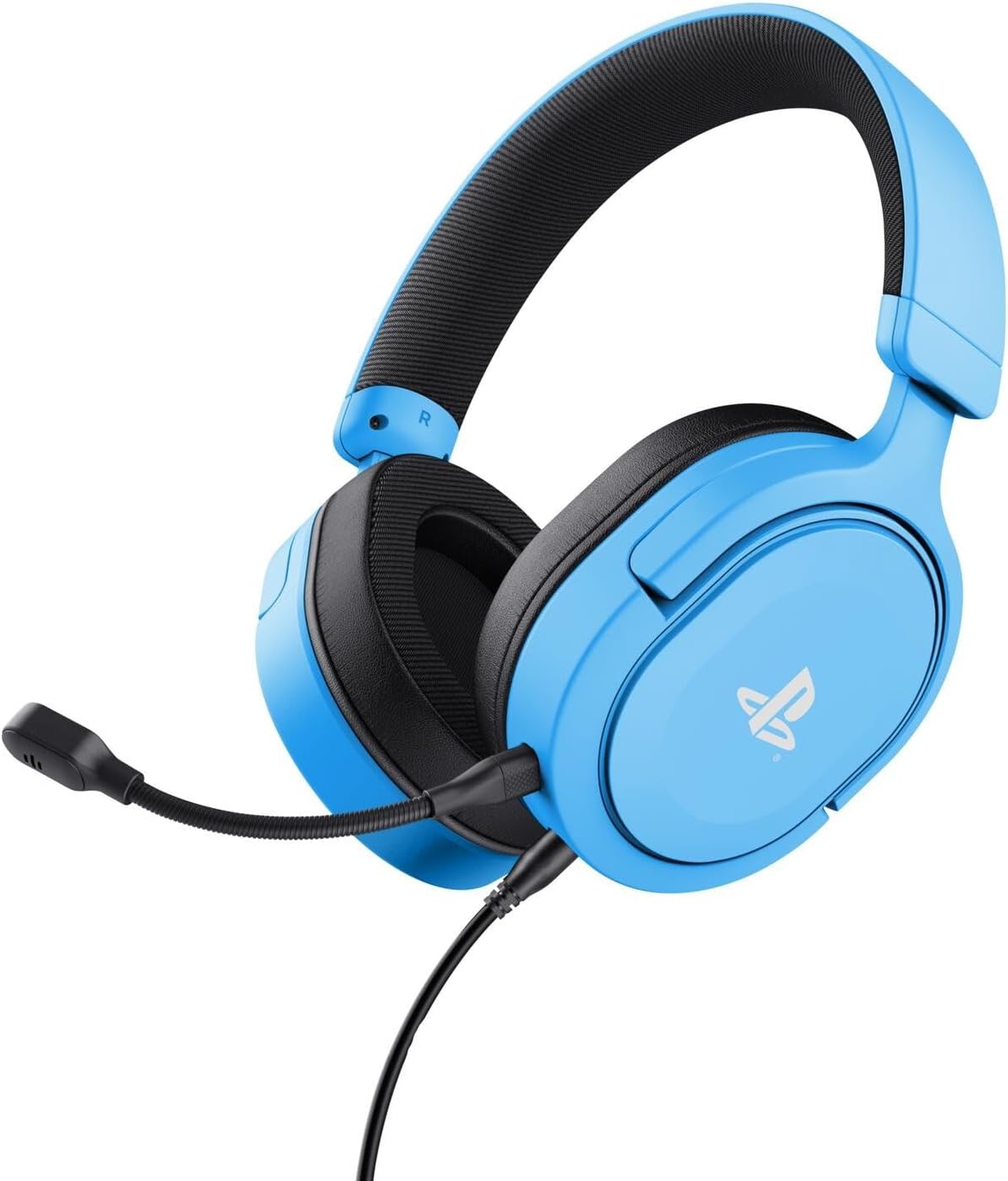
Image: The Trust Gaming GXT 498B Forta Gaming Headset, showcasinze względu na swoją konstrukcję i odłączany mikrofon.
Instrukcja obsługi
- Regulacja głośności: The headset features an in-line volume control wheel on the audio cable. Rotate the wheel up or down to adjust the audio output level.
- Wyciszenie mikrofonu: An in-line mute switch is located on the audio cable. Slide the switch to mute or unmute the microphone.
- Dźwięk 3D: The headset supports 3D Audio on compatible PlayStation 5 games, providing an enhanced spatial sound experience. Ensure 3D Audio is enabled in your PS5 sound settings for optimal immersion.
- Odłączany mikrofon: The microphone can be detached when not in use for a more streamlined headset profile. Store it safely to prevent loss or damage.

Obraz: Zbliżenie view of the Trust Gaming GXT 498B Forta headset, highlighting the earcups and the attached audio cable with controls.
Konserwacja
- Czyszczenie: Do czyszczenia zestawu słuchawkowego użyj miękkiej, suchej ściereczki. W przypadku nauszników delikatnie przetrzyjamp Można użyć ściereczki, ale należy uważać, aby wilgoć nie dostała się do kratek głośników. Nie należy używać silnych środków chemicznych ani ściernych środków czyszczących.
- Składowanie: Przechowuj zestaw słuchawkowy w chłodnym, suchym miejscu, z dala od bezpośredniego światła słonecznego i ekstremalnych temperatur. Unikaj umieszczania ciężkich przedmiotów na zestawie słuchawkowym.
- Pielęgnacja kabli: Avoid sharp bends or kinks in the audio cable. Do not pull the cable forcefully when disconnecting.
- Pielęgnacja mikrofonu: Handle the detachable microphone with care. When not in use, detach it and store it safely to prevent damage.
Rozwiązywanie problemów
- Brak dźwięku w zestawie słuchawkowym:
- Ensure the 3.5mm audio cable is fully inserted into both the headset and the controller.
- Check the in-line volume control wheel on the cable and turn it up.
- Verify audio settings on your PlayStation console (refer to "Setup Instructions" section).
- Test the headset with another device (e.g., smartphone, PC) to determine if the issue is with the headset or the console.
- Mikrofon nie działa:
- Sprawdź, czy odłączany mikrofon jest solidnie przymocowany do zestawu słuchawkowego.
- Check the in-line microphone mute switch and ensure it is in the "unmute" position.
- Verify microphone input settings on your PlayStation console (refer to "Setup Instructions" section).
- Ensure the pop filter is not obstructing the microphone's input.
- Sound Quality Issues (Distortion, Low Volume):
- Adjust the volume levels on both the headset's in-line control and your console's settings.
- Sprawdź, czy kabel audio nie jest uszkodzony lub zagięty.
- Try connecting the headset to a different audio source to rule out console-specific issues.
Specyfikacje
| Nazwa modelu | GXT 498B Forta |
| Numer modelu | 25556 |
| Łączność | Przewodowy (gniazdo 3.5 mm) |
| Długość kabla | 1.2 metrów |
| Rozmiar kierowcy | 50 mm |
| Zakres częstotliwości | 20 Hz - 20 000 Hz |
| Impedancja | 32 omy |
| Wrażliwość | 90dB |
| Typ mikrofonu | Detachable with Pop Filter |
| Umieszczenie ucha | Nauszne |
| Waga przedmiotu | 253 gram |
| Kompatybilne urządzenia | PlayStation 5, PlayStation 4, PC |
| Tworzywo | Plastic (up to 65% recycled) |
Gwarancja i wsparcie
This Trust Gaming GXT 498B Forta Gaming Headset is covered by the manufacturer's standard warranty. For detailed warranty information, please refer to the documentation included with your purchase or visit the official GXTrust website. For technical support, troubleshooting assistance beyond this manual, or warranty claims, please contact GXTrust customer service through their official support channels.
Prosimy zachować dowód zakupu w celach gwarancyjnych.