
1. Wprowadzenie
This manual provides detailed instructions for the installation, setup, operation, and maintenance of your Defiant Touchpad Electronic Deadbolt. This electronic deadbolt offers enhanced security and convenient access control for your home. Please read this manual thoroughly before installation and use to ensure proper function and safety.
2. Informacje dotyczące bezpieczeństwa
- Nie próbuj demontować ani modyfikować zamka. Może to spowodować unieważnienie gwarancji i pogorszenie bezpieczeństwa.
- Use only the specified battery type (if applicable) and ensure correct polarity during installation.
- Keep backup keys in a secure location away from the property where the lock is installed.
- Regularnie sprawdzaj zamek pod kątem oznak zużycia lub uszkodzeń.
3. Zawartość opakowania
Przed rozpoczęciem instalacji sprawdź, czy wszystkie komponenty są obecne:
- Touchpad Deadbolt (Exterior Keypad and Interior Thumb-turn Mechanism)
- 2 Keys (for mechanical override)
- Installation Hardware (screws, strike plate, latch mechanism)
- Instrukcja instalacji (ten dokument)
4. Instalacja
The Defiant Touchpad Electronic Deadbolt is designed for a straightforward one-tool installation process. A Phillips head screwdriver is typically the only tool required.
- Przygotuj drzwi: Ensure your door has standard bore holes (typically 2-1/8 inches for the deadbolt and 1 inch for the latch). If replacing an existing deadbolt, remove it.
- Zainstaluj zatrzask: Insert the latch mechanism into the edge of the door. Ensure the 'UP' arrow or indicator faces upwards. Secure it with the provided screws.
- Zainstaluj klawiaturę zewnętrzną: Feed the cable from the exterior keypad through the bore hole in the door. Align the keypad with the latch mechanism and press it firmly against the door.
- Zamontuj wewnętrzną płytę montażową: On the interior side of the door, place the mounting plate over the cable and align it with the exterior keypad. Secure it to the exterior keypad using the long screws provided.
- Connect the Cable and Install the Interior Assembly: Connect the cable from the exterior keypad to the interior assembly. Carefully tuck the excess cable into the door. Align the interior assembly (with the thumb-turn) over the mounting plate and secure it with the remaining screws.
- Montaż blachy zaczepowej: Install the strike plate on the door frame, aligning it with the deadbolt latch. Secure it with screws.
- Operacja testowa: Close the door and test the deadbolt's mechanical operation using the thumb-turn and the backup key. Ensure the deadbolt extends and retracts smoothly.
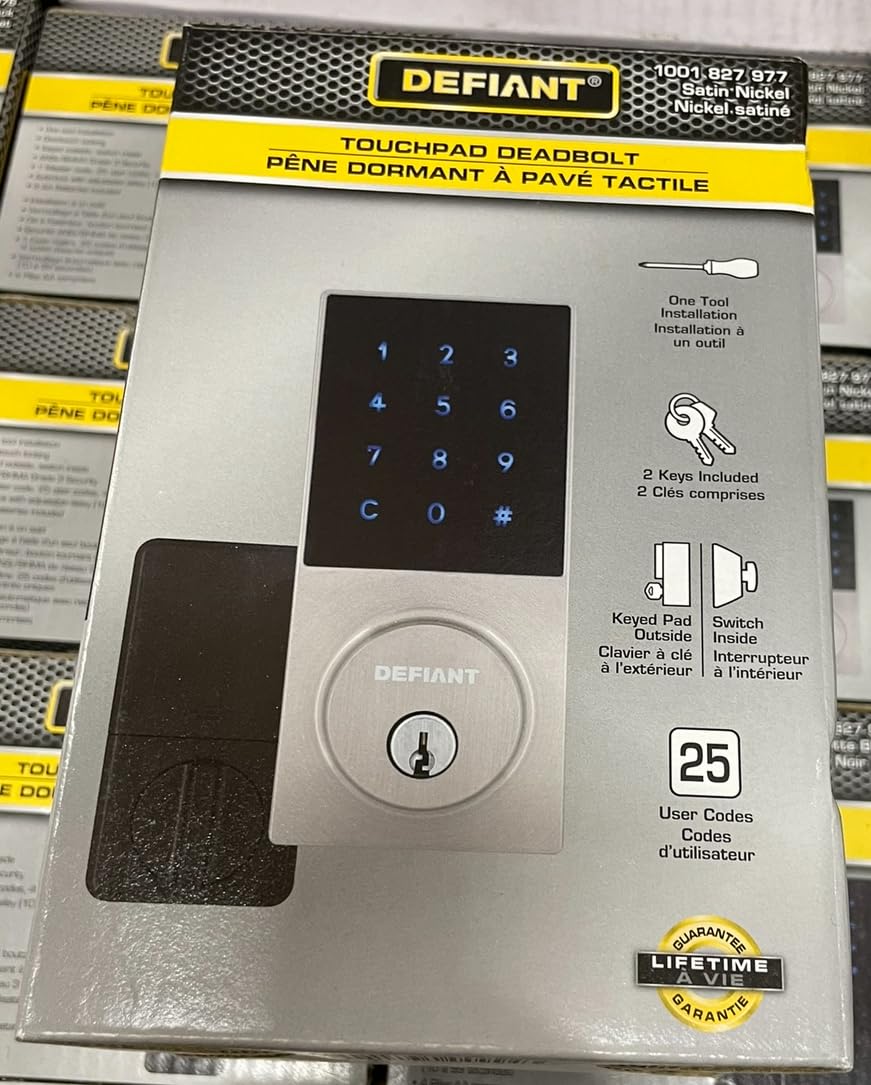
Image: The Defiant Touchpad Electronic Deadbolt showing the exterior keypad, interior thumb-turn, and included keys. This image illustrates the main components involved in the installation process.
5. Setup and Programming User Codes
Your deadbolt supports up to 25 unique user codes. Follow these steps to program new codes:
- Wejdź w tryb programowania: Locate the 'Program' button on the interior assembly (usually near the battery compartment). Press and hold the 'Program' button until the keypad illuminates and you hear a beep.
- Enter Master Code (if applicable): If a master code has been set, enter it now. (Refer to specific model instructions for initial master code setup).
- Create New User Code: Enter a new 4-8 digit user code on the backlit keypad. Press the 'Lock' button (or a designated 'Enter' button) to confirm. The lock will beep to confirm successful programming.
- Test New User Code: Close the door and enter the newly programmed user code. The deadbolt should retract, allowing entry.
To delete a user code or reset the lock, refer to the specific instructions provided with your lock model, as procedures may vary.
6. Operating the Deadbolt
The Defiant Touchpad Electronic Deadbolt offers multiple ways to secure and access your property.
6.1. Zamykanie drzwi
- Z zewnątrz: Press the 'Lock' button on the keypad. The deadbolt will extend.
- Z wnętrza: Rotate the thumb-turn to the locked position.
6.2. Odblokowanie drzwi
- Korzystanie z kodu użytkownika: Enter a valid 4-8 digit user code on the backlit keypad. The deadbolt will retract.
- Używanie klucza: Insert one of the provided backup keys into the keyhole on the exterior keypad and turn it to unlock.
- Z wnętrza: Rotate the thumb-turn to the unlocked position.
7. Konserwacja
Proper maintenance ensures the longevity and reliable operation of your deadbolt.
- Czyszczenie: Wyczyść klawiaturę i powierzchnie zewnętrzne miękką, miękką szmatką.amp ściereczką. Unikaj środków czyszczących o działaniu ściernym i rozpuszczalników, które mogą uszkodzić wykończenie lub elementy elektroniczne.
- Wymiana baterii: The deadbolt is powered by batteries (typically AA, not included). When the batteries are low, the lock will usually provide an audible or visual low battery warning. To replace, remove the interior cover, replace the old batteries with new ones, ensuring correct polarity, and then reattach the cover.
- Smarowanie: Periodically apply a small amount of graphite lubricant to the keyway to ensure smooth key operation. Do not use oil-based lubricants.
8. Rozwiązywanie Problemów
Jeśli masz problemy z zasuwą, zapoznaj się z poniższymi typowymi problemami i ich rozwiązaniami:
- Klawiatura nie odpowiada: Check battery levels. Replace batteries if necessary. Ensure the cable connection between the exterior and interior assemblies is secure.
- Deadbolt Does Not Lock/Unlock: Ensure the door is properly aligned and not binding. Check for obstructions in the door frame or strike plate. Verify that the correct user code is being entered.
- Ostrzeżenie o niskim poziomie naładowania baterii: Replace all batteries immediately with new, high-quality alkaline batteries.
- Zapomniany kod użytkownika: If you have forgotten a user code, you may need to reset the lock to factory settings and reprogram all codes. Refer to your specific model's instructions for a factory reset procedure.
9. Specyfikacje
| Marka | Wyzywający |
| Numer modelu | 1001827977 |
| Kolor | Nikiel satynowy |
| Tworzywo | Metal |
| Typ zamka | Zasuwa |
| Typ kontrolera | Panel dotykowy |
| Pojemność kodu użytkownika | Up to 25 unique codes |
| Cechy specjalne | Illuminated Keypad, Keyed Entry, One Tool Installation |
| Pozycja Wymiary (dł. x szer. x wys.) | Wymiary 38.7 x 38.7 x 51.6 cm |
| Waga przedmiotu | 907.18 gramów |
10. Gwarancja i wsparcie
This Defiant Touchpad Electronic Deadbolt is backed by a lifetime guarantee, ensuring quality and durability. For technical assistance, warranty claims, or further inquiries, please refer to the contact information provided with your purchase documentation or visit the manufacturer's official webstrona.


