
Wstęp
This manual provides comprehensive instructions for the installation, operation, and maintenance of your FURITEK Unity PRO 3500kv 2-in-1 Micro FOC Brushless System. This system integrates an inrunner motor with an Electronic Speed Controller (ESC), designed for 1/18 and 1/24 scale RC crawlers and cars, including the TRX4M.
Przed użyciem produktu należy dokładnie przeczytać instrukcję, aby zagwarantować jego prawidłowe działanie i długą żywotność.
Informacje dotyczące bezpieczeństwa
Ważne środki ostrożności:
- This product is not intended for use by children. Adult supervision is required for operation by individuals under 18 years of age.
- Always disconnect the battery from the system when not in use to prevent accidental operation and potential damage.
- Ensure all connections are secure and properly insulated to avoid short circuits.
- Operate your RC vehicle in a safe environment, away from people, pets, and obstacles.
- Do not modify the system components. Unauthorized modifications can lead to malfunction and void the warranty.
- Keep the system away from extreme temperatures and direct sunlight.
Cechy produktu
The FURITEK Unity PRO system incorporates several advanced features:
- Konstrukcja wodoodporna i pyłoszczelna: The enclosing case protects internal components from environmental elements.
- FOC Technology: Field-Orientated Control for smooth throttle response and efficient power delivery.
- Integrated 5A BEC: Built-in Battery Eliminator Circuit with adjustable voltage settings (5.5V, 7.4V, 8.4V) to power high-torque servos.
- Separate Power Switch: Allows convenient system activation and deactivation.
- Integracja aplikacji mobilnej: Compatibility with the Furicar app (Android/iOS) for real-time telemetry, tuning, and programming (repeater module may be required).
- Dożywotnie aktualizacje oprogramowania sprzętowego: Ensures access to the latest features and performance enhancements.
Konfiguracja i instalacja
Follow these steps for proper installation of the Unity PRO system into your RC vehicle:
- Rozpakuj komponenty: Carefully remove all components from the packaging. Verify that you have the Unity PRO motor with integrated ESC, the separate power switch, and any included accessories like the pinion gear.

Image 1: The FURITEK Unity PRO 3500kv 2-in-1 Micro FOC Brushless System components, including the motor with integrated ESC, power switch, and wiring.
- Mount the Motor/ESC Unit: Securely mount the Unity PRO motor/ESC unit into your RC chassis. Ensure it is positioned to allow for proper gear mesh and airflow.
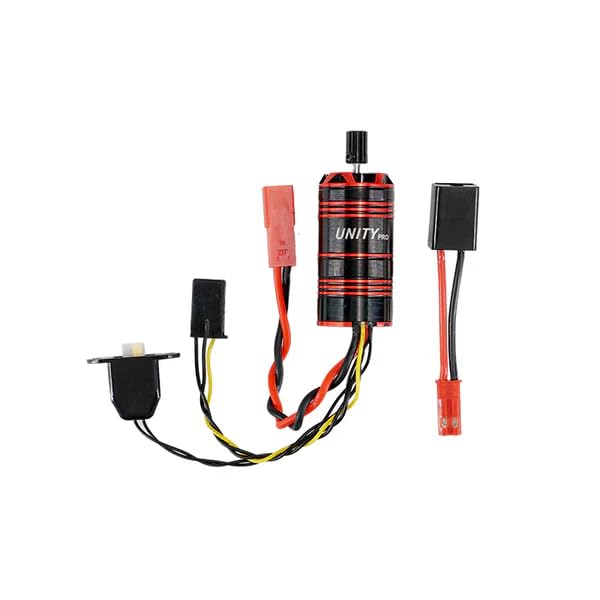
Image 2: The FURITEK Unity PRO system installed within an RC crawler chassis, showing its compact integration.
- Install Pinion Gear: Attach the appropriate pinion gear to the motor shaft. Ensure the gear mesh with the spur gear is correct to prevent premature wear and damage.
- Połącz z odbiornikiem: Plug the signal wire from the Unity PRO ESC into the throttle channel of your RC receiver.
- Podłącz przełącznik zasilania: Connect the separate power switch to the designated port on the ESC. Position the switch in an easily accessible location on your vehicle.
- Podłącz akumulator: Connect your battery to the power input leads of the ESC. Ensure correct polarity. The system supports various battery types; refer to specifications for voltagi limity.
- BEC tomtagUstawienie: The integrated 5A BEC can be configured for 5.5V, 7.4V, or 8.4V output. Adjust this setting via the Furicar mobile app to match the voltage requirements of your servos and other accessories.
Instrukcja obsługi
Once installed, follow these steps to operate your Unity PRO system:
- Włączanie: Ensure your transmitter is turned on first. Then, activate the separate power switch on your RC vehicle to power on the Unity PRO system.
- Kalibrowanie: Perform throttle calibration according to your transmitter's instructions and the ESC's manual (if specific steps are required beyond standard setup). This ensures proper synchronization between your transmitter and the ESC.
- Początkowy bieg: Begin with slow, controlled movements to verify all functions are operating correctly. The FOC technology provides smooth, precise throttle control.
- Mobile App Tuning: For advanced tuning and real-time telemetry, download the Furicar app from your device's app store. Connect to the Unity PRO system (a repeater module may be necessary for some features) to adjust parameters such as throttle curves, drag brake, and more.
- Pobierz Furicar App for Android or search for "Furicar" on the iOS App Store.
- Follow the in-app instructions for connecting to your device.
- Wyłączone: Always turn off the RC vehicle's power switch first, then turn off your transmitter.
Konserwacja
Regular maintenance ensures optimal performance and extends the lifespan of your Unity PRO system:
- Czyszczenie: Despite its waterproof and dustproof design, periodically clean the exterior of the motor and ESC to remove accumulated dirt and debris. Use a soft brush or compressed air. Avoid using harsh chemicals.
- Inspekcje: Regularly inspect all wiring and connectors for signs of wear, damage, or loose connections. Ensure the motor is securely mounted.
- Aktualizacje oprogramowania układowego: Weź awanturętage of the free lifetime firmware updates. Check the Furitek website or the Furicar app periodically for new firmware releases. Updating firmware can improve performance, add features, and resolve issues.
- Składowanie: When not in use for extended periods, store the system in a cool, dry place, disconnected from the battery.
Rozwiązywanie problemów
If you encounter issues with your Unity PRO system, consider the following:
- Brak zasilania:
- Sprawdź podłączenie akumulatora i poziom naładowania.
- Sprawdź, czy wyłącznik zasilania jest całkowicie włączony.
- Sprawdź, czy wszystkie połączenia okablowania są bezpieczne.
- Brak reakcji silnika/nietypowe zachowanie:
- Re-calibrate the ESC with your transmitter.
- Check the signal wire connection to the receiver.
- Ensure the motor shaft is not obstructed and the pinion gear is free.
- Inspect for any physical damage to the motor or ESC.
- Przegrzanie:
- Verify proper gear mesh.
- Ensure adequate airflow around the motor/ESC unit.
- Check for excessive load on the motor (e.g., binding drivetrain).
- Problemy z łącznością aplikacji:
- Upewnij się, że Bluetooth jest włączony w Twoim urządzeniu mobilnym.
- Verify the repeater module (if used) is correctly connected and powered.
- Restart the app and the Unity PRO system.
If problems persist, contact Furitek customer support for further assistance.
Specyfikacje
| Funkcja | Szczegół |
|---|---|
| Numer modelu | FUR-2575 |
| Typ silnika | Silnik bezszczotkowy Inrunner |
| Wartość KV | 3500kV |
| Typ ESC | Integrated FOC (Field-Orientated Control) |
| Wyjście BEC | 5A (Adjustable: 5.5V, 7.4V, 8.4V) |
| Ochrona przed wodą/kurzem | Completely Waterproof and Dustproof |
| Wsparcie aplikacji mobilnych | Furicar App (Android/iOS) for tuning and telemetry |
| Zalecany wiek | 12 months and up (Adult supervision recommended for operation) |
| Wymiary produktu | 5 x 5 x 5 cala; 1.6 uncji |
Gwarancja i wsparcie
Aktualizacje oprogramowania układowego: The FURITEK Unity PRO system includes free lifetime firmware updates. This ensures your system benefits from the latest features and performance improvements throughout its lifespan.
Gwarancja na produkt: For specific warranty terms and conditions, please refer to the official Furitek webOdwiedź witrynę lub skontaktuj się z punktem sprzedaży. Zachowaj dowód zakupu na wypadek roszczeń gwarancyjnych.
Obsługa klienta: If you require technical assistance, have questions about your product, or need to report an issue, please visit the official Furitek Store on Amazon lub producenta website (Furitek - HELIDIRECT) for contact information.