
AIKELA YX01,YK01
Instrukcja obsługi głośnika Bluetooth AIKELA z pilotem do przewijania filmów i podstawką na telefon
Brand: AIKELA | Model: YX01, YK01
Wstęp
Thank you for choosing the AIKELA Bluetooth Speaker with Video Scrolling Remote and Phone Stand. This multi-functional device is designed to enhance your media experience by providing amplified sound, a stable viewing platform, and convenient remote control. Whether you're watching videos, listening to podcasts, or making hands-free calls, this product offers a seamless and enjoyable experience.

The AIKELA Bluetooth Speaker with Phone Stand and its accompanying remote control.
Zawartość opakowania
Proszę sprawdzić, czy w paczce znajdują się następujące elementy:
- Bluetooth Speaker with Phone Stand x 1
- Pilot zdalnego sterowania x 1
- Kabel typu C x 1
- Instrukcja obsługi x 1

Wizualna reprezentacja wszystkich elementów zawartych w opakowaniu produktu.
Cechy produktu
- Small But Powerful Sound: The upgraded wireless Bluetooth speaker delivers clear, loud sound for music, movies, videos, and podcasts. It includes a built-in microphone for crisp hands-free calls, which can also assist individuals with hearing loss.
- Video Scrolling Remote: A dedicated Bluetooth remote allows for easy scrolling, pausing, playing videos, and adjusting phone volume. This feature is ideal for platforms like YouTube, TikTok, or Netflix, freeing your hands during various activities.
- Adjustable Phone Stand: The stand features a weighted base with non-slip silicone to securely hold your phone. Its adjustable angle ensures optimal viewing, whether on a desk, kitchen counter, or bedside table.
- Portable & Long-Lasting: With a foldable, lightweight design, the speaker is easy to transport. Its rechargeable battery provides up to 10 hours of use on a single 1.5-hour charge, making it suitable for home, office, or travel.

The product combines a Bluetooth speaker, phone stand, built-in microphone, and remote control.

Cieszyć się amplified sound for media and clear hands-free calls.

The phone stand is adjustable and foldable for convenience.

The speaker offers up to 10 hours of battery life on a 1.5-hour charge.
Przewodnik po konfiguracji
1. Ładowanie urządzenia
Before first use, fully charge the AIKELA Bluetooth Speaker using the provided Type-C cable. Connect the cable to the speaker's charging port and a compatible USB power source.
2. Włączanie/wyłączanie zasilania
Locate the ON/OFF button on the speaker. Press and hold to power on or off the device.
3. Parowanie Bluetooth (głośnik)
- Ensure the speaker is powered on and in pairing mode (indicated by a blinking blue LED light).
- On your smartphone or tablet, go to Bluetooth settings.
- Szukaj available devices and select "YX01" (or similar name) to connect.
- Once connected, the LED light will become solid blue.
4. Bluetooth Pairing (Remote Control)
- Slide the ON/OFF button on the back of the remote control to the ON position.
- On your smartphone or tablet, go to Bluetooth settings.
- Szukaj available devices and select "YK01 (Remote Control)" to connect.
- Once connected, the remote is ready for use.
5. iOS Specific Setup for Remote Control
For iOS devices, you must enable AssistiveTouch for the remote control to function correctly with video scrolling and other gestures. Follow these steps:
- Idź do Ustawienia.
- Wybierać Dostępność.
- Uzyskiwać Dotykać.
- Włączyć coś Wspomagający dotyk.
- Zapewnić Wykonaj gesty dotykowe jest włączony.
- Dostosuj Czułość śledzenia to 20%-30% for optimal performance.

Step-by-step guide for enabling AssistiveTouch on iOS devices to use the remote control.
6. Adjusting the Phone Stand
The phone stand is designed to be adjustable for various viewing angles. Gently adjust the hinges to achieve your desired height and tilt. Ensure your device is securely placed on the stand's non-slip surface. The stand is compatible with most 4"-13" smartphones, tablets, and e-readers.
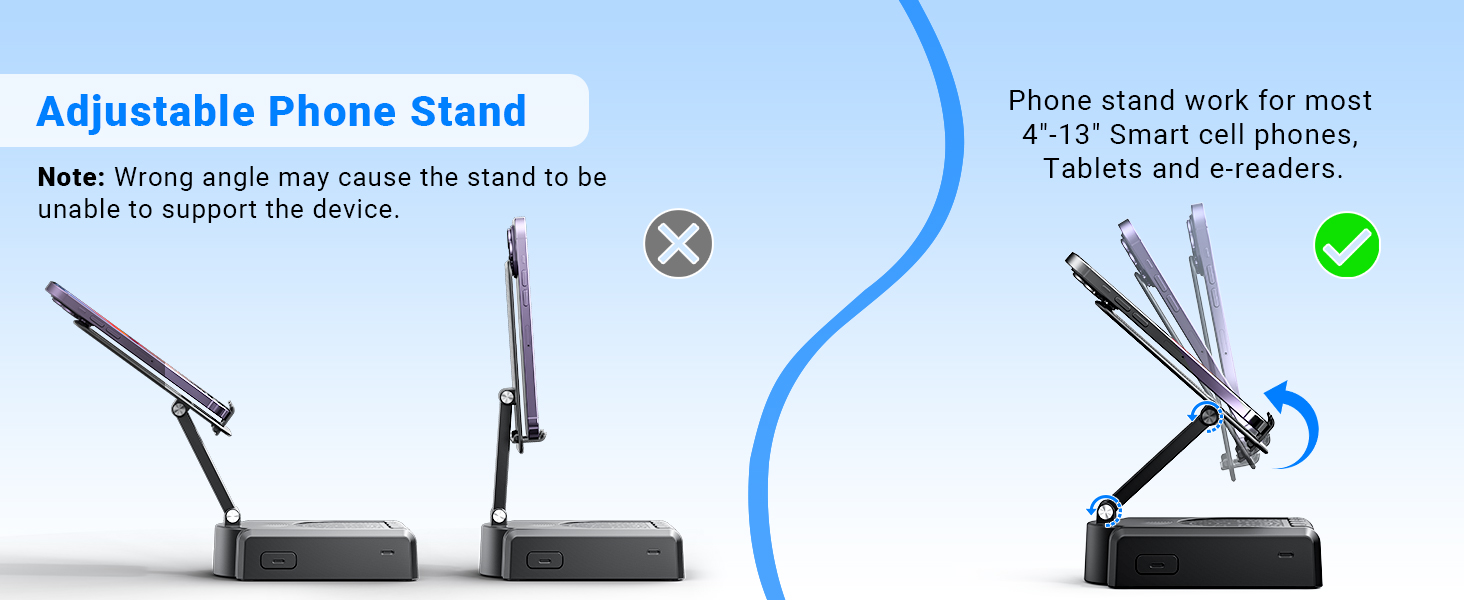
Demonstration of the adjustable angles of the phone stand.
Instrukcje obsługi
Sterowanie głośnikami
The speaker features intuitive buttons for basic functions:
- WŁ./WYŁ.: Włączanie i wyłączanie urządzenia.
- Pauza/Odtwórz/Odbierz/Rozłącz: Control media playback and phone calls.
- Poprzedni/Tom-: Skip to the previous track or decrease volume.
- Następny/Tom+: Skip to the next track or increase volume.
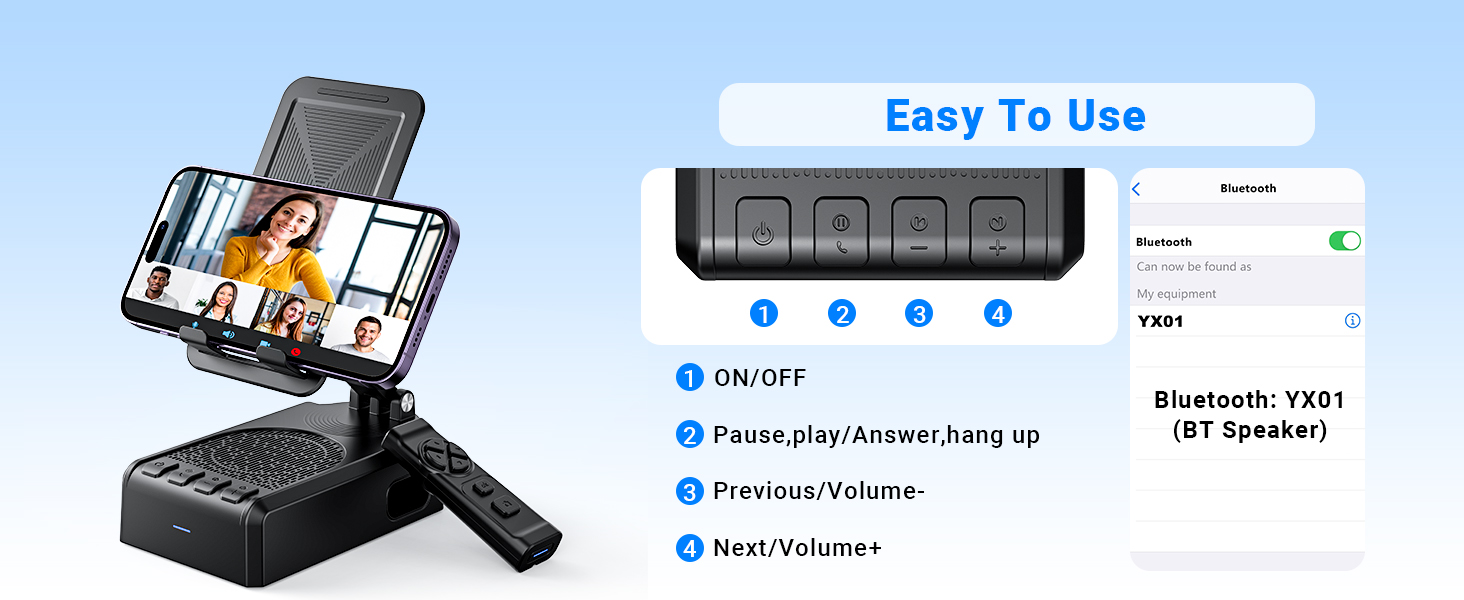
Nadview przycisków sterujących głośnika i ich funkcji.
Funkcje pilota zdalnego sterowania
The Bluetooth remote control provides convenient hands-free operation for various applications:
- Single click (Up/Down arrows): Scroll up/down in apps like TikTok or YouTube.
- Single click (Left/Right arrows): Swipe left/right (e.g., for next/previous video).
- Long press (Left/Right arrows): Adjust volume (Volume- / Volume+).
- OK button (center): Odtwórz/wstrzymaj multimedia.
- Double click (OK button): Single 'like' in social media apps.
- Long press 3s (OK button): Continuous likes (in TikTok live state).
- Przycisk aparatu: Exit continuous likes (in TikTok live state).
Note: The remote control is not compatible with music software or Kindle devices.
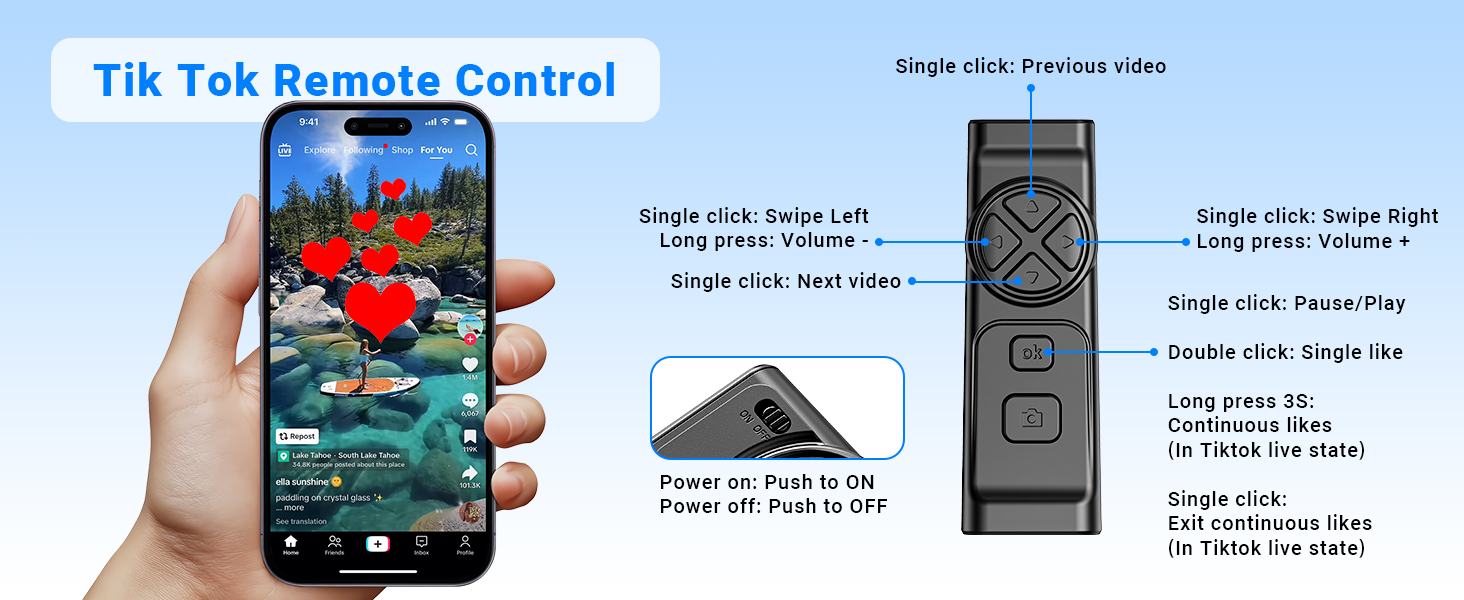
Detailed functions of the remote control for video scrolling and interaction.
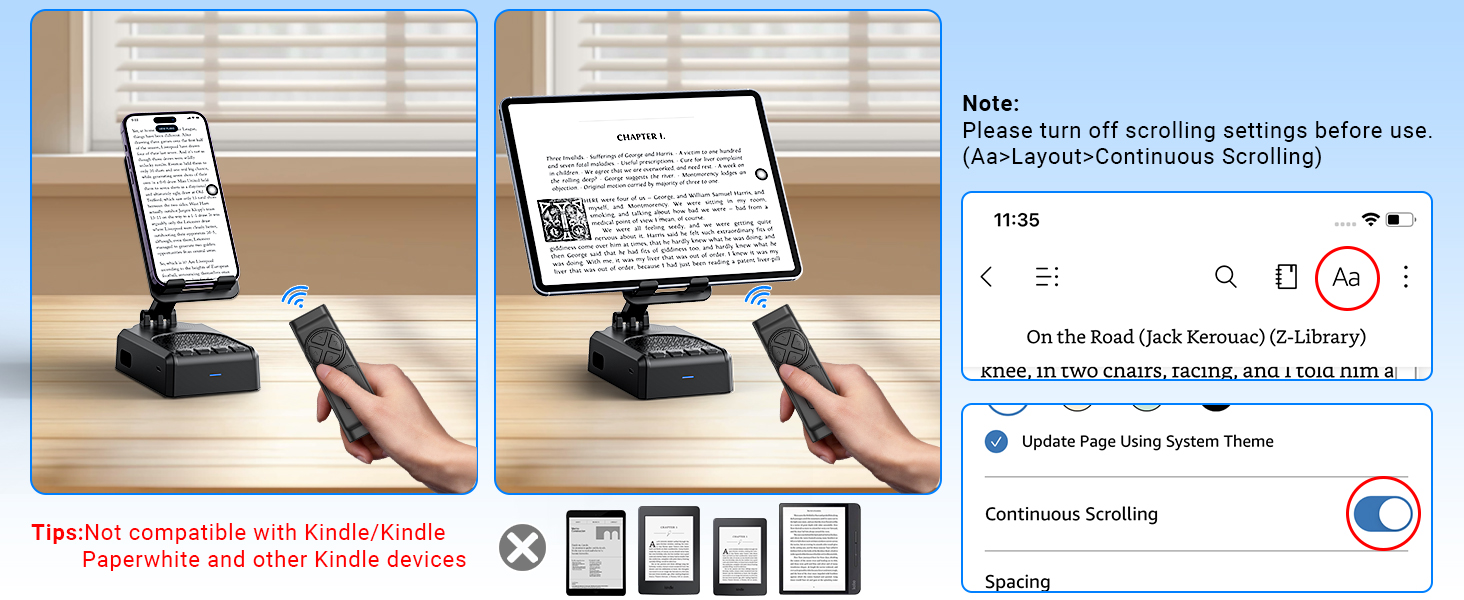
Important note regarding the remote control's compatibility with certain applications and devices.
Pielęgnacja i konserwacja
- Przechowuj urządzenie w suchym miejscu. Nie wystawiaj go na działanie wilgoci ani ekstremalnych temperatur.
- Czyść urządzenie miękką, suchą ściereczką. Unikaj stosowania silnych środków chemicznych i ściernych środków czyszczących.
- Przechowuj urządzenie w chłodnym, suchym miejscu, gdy nie jest używane.
- Unikaj upuszczania i narażania urządzenia na silne uderzenia.
Rozwiązywanie problemów
Remote Control Issues (iOS)
Problem: The remote control cannot scroll through videos on an iOS device.
Rozwiązanie: Ensure AssistiveTouch is properly configured. Go to Ustawienia > Dostępność > Dotyk > AssistiveTouch. Turn on AssistiveTouch, then turn on Wykonaj gesty dotykowe, and adjust the Czułość śledzenia to 20%-30%.
Problem: Remote control still not working after enabling AssistiveTouch.
Rozwiązanie:
- Verify the remote control is powered on (slide the button on the back to ON).
- Confirm the remote is paired with your phone via Bluetooth. Check your phone's Bluetooth settings.
- If issues persist, try disabling and re-enabling the AssistiveTouch function.
Visual guide for troubleshooting remote control issues on iOS devices.
Low Volume on Android Devices
Problem: The speaker volume is too low on an Android device.
Rozwiązanie: After connecting the speaker via Bluetooth, go to your phone's Bluetooth settings, find the connected speaker (e.g., YX01), tap the gear icon or settings icon next to it, and ensure 'Sync volume with phone' or 'Media volume sync' is enabled.

Instructions for adjusting volume sync settings on Android devices.
Dane techniczne
| Funkcja | Specyfikacja |
|---|---|
| Nazwa modelu | YX01, YK01 |
| Typ głośnika | przenośny głośnik |
| Cechy specjalne | Bass Boost, Built-In Microphone, Lightweight, Portable, Stereo Pairing |
| Kompatybilne urządzenia | Android phone, Samsung, Tablet, iPad, iPhone |
| Liczba jednostek | 1.0 Liczba |
| Konfiguracja kanału dźwięku przestrzennego | 1.0 |
| Kolor | Czarny |
| Żywotność baterii | 10 godzin |
| Wymiary produktu | 5.7" gł. x 2.08" szer. x 3.34" wys. |
| Waga przedmiotu | 0.36 kilograma (12.6 uncji) |
| jest wodoodporny | FAŁSZ |
| Czas ładowania | 1.5 godzin |
| Rodzaj gwarancji | Ograniczony |
| Maksymalny zasięg (Bluetooth) | 393 Inches (10 Meters) |
| Liczba elementów | 1 |
| Metoda kontroli | Zdalny, dotykowy |
| Technologia komunikacji bezprzewodowej | Bluetooth |
| Źródło zasilania | Zasilany bateryjnie |
| Liczba baterii | Wymagane baterie 2 A (w zestawie) |
| Typ sterownika audio | Dynamiczny sterownik |
| Liczba mikrofonów | 1 |
| Protokół łączności | Bluetooth |
| Styl | Nowoczesny |
| Producent | AIKELA |
| Maksymalna moc wyjściowa głośnika | 1 watów |
| Tryb wyjścia audio | Stereofoniczny |
| Typ montażu | Uchwyt na blat |
Gwarancja i wsparcie
AIKELA provides 12 months of support for your Speaker Stand. If you encounter any problems or have questions, please contact customer service. For quick assistance, use the 'Find Order - Contact Seller' option on your purchase platform.
Ask a question about this manual
Ask about setup, troubleshooting, compatibility, parts, safety, or missing instructions. Manuals+ will review the question and use this page’s manual context to help answer it.