
UNITOPSCI A4034A3
UNITOPSCI 10.4 Inch Single Din Adjustable Vertical Car Stereo
Instrukcja obsługi
Model: A4034A3 | Brand: UNITOPSCI
1. Wprowadzenie
This manual provides detailed instructions for the installation, operation, and maintenance of your UNITOPSCI 10.4 Inch Single Din Adjustable Vertical Car Stereo. Please read this manual thoroughly before using the product to ensure proper function and safety.
Główne cechy:
- 10.4 Inch IPS 1280*480 Vertical Touchscreen with Detachable & Adjustable Design
- Obsługa bezprzewodowego CarPlay i Android Auto
- Bluetooth 5.2 for Hands-Free Calling and Audio Streaming
- FM/AM/RDS Radio with EQ Adjustments
- USB & TF Card Playback and Charging
- Funkcjonalność łącza lustrzanego
- Wsparcie dla tyłu View Camera and Steering Wheel Control (SWC)
- Seven Color Backlight Options

Rysunek 1.1: Koniecview of the UNITOPSCI 10.4 Inch Car Stereo with included backup camera and smartphone integration icons.
2. Co znajduje się w pudełku
Proszę sprawdzić zawartość przesyłki na poniższej liście:
- 1 x odtwarzacz samochodowy MP5
- 1 x kabel zasilający
- 1 x kabel klaksonowy
- 1 x MIC
- 1 x wspornik montażowy
- 1 x Instrukcja obsługi
- 1 x D-BUS Cable
- 1 x 12 LEDs Backup Camera
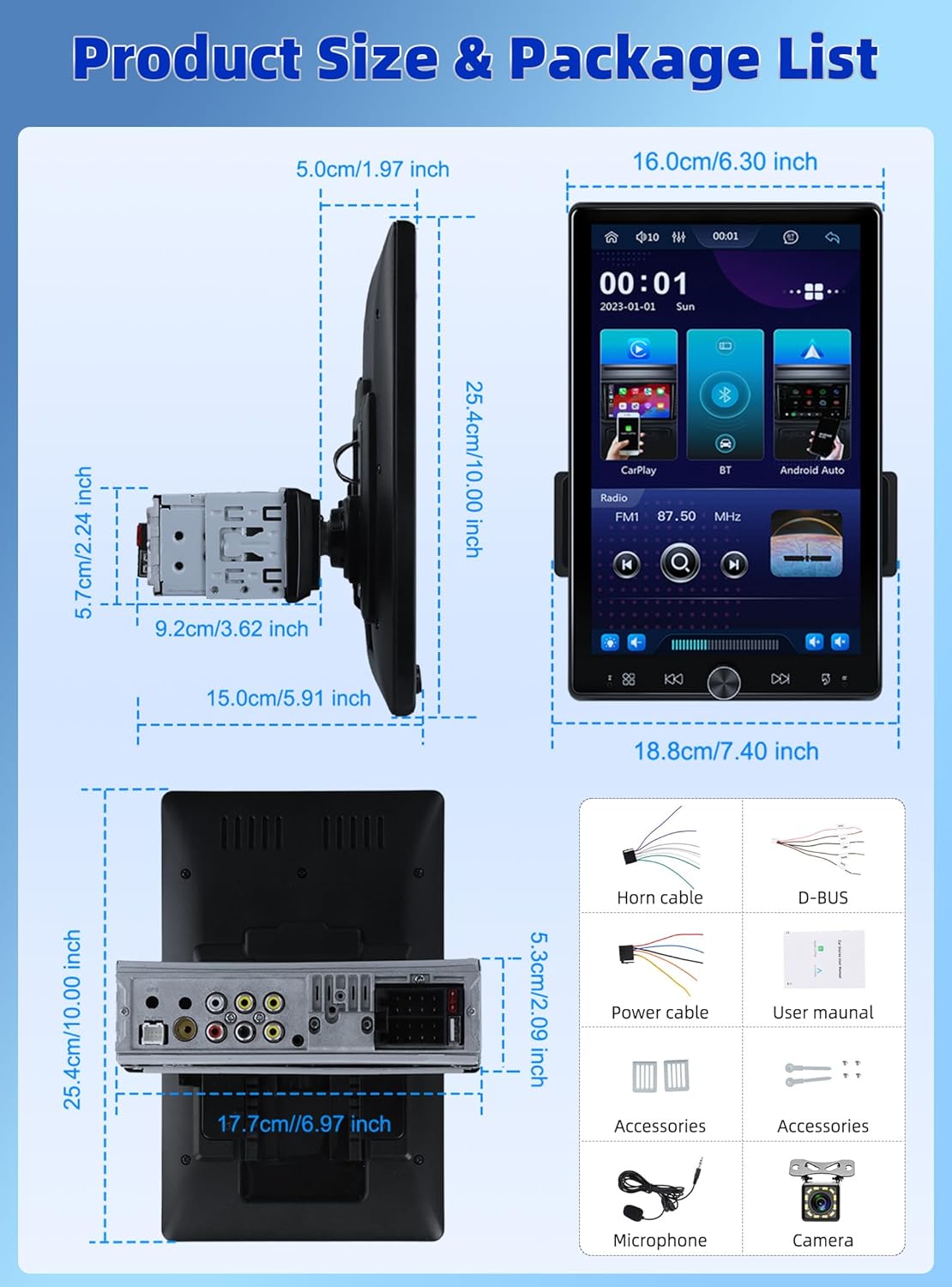
Figure 2.1: Diagram showing the dimensions of the car stereo and a visual representation of the included package contents.
3. Konfiguracja i instalacja
Proper installation is crucial for optimal performance. It is recommended to have this unit installed by a professional.
3.1 Regulacja ekranu
The 10.4-inch floating touchscreen is designed for adjustability to provide the best viewing angle. It can be adjusted in three directions:
- Approximately 30° front/rear tilt
- Approximately 30° left/right tilt
- Approximately 5cm vertical movement

Figure 3.1: Illustration of the adjustable and floating design of the 10.4-inch touchscreen, highlighting tilt and vertical movement capabilities.
3.2 Tył View Okablowanie kamery
To enable the automatic display of the reversing video, connect the included rear view camera according to the diagram below. Ensure the trigger wire (labeled "back" or "reverse" on the power cable) is connected to the reversing light positive.
- The rear camera features 12 LED lights for clear images in various conditions.
- A 170° horizontal wide angle provides a comprehensive view.

Rysunek 3.2: Szczegółowy schemat okablowania do podłączenia tylnej części view kamerę do samochodowego systemu stereo.
4. Instrukcja obsługi
4.1 Bezprzewodowy CarPlay i Android Auto
Connect your smartphone wirelessly or via USB to access CarPlay or Android Auto. This allows seamless integration of your phone's contacts, GPS navigation, music, and other applications directly on the car stereo screen.

Figure 4.1: Display showing the Wireless CarPlay and Android Auto interfaces, including voice assistant prompts.
4.2 Łączność Bluetooth 5.2
The unit features advanced Bluetooth 5.2 technology for faster and more stable connections. Use Bluetooth for hands-free calling and streaming music with lossless sound quality.

Figure 4.2: Screenshots illustrating the Bluetooth 5.2 interface for hands-free calls and music playback.
4.3 FM/RDS Radio and EQ
Enjoy digital stereo FM radio with 18 preset stations. The RDS function provides real-time road conditions, news, and weather. Customize your audio experience using the multi-band EQ mode.

Figure 4.3: Visuals of the FM/RDS radio interface and the adjustable equalizer settings.
4.4 USB & TF Card Functionality
The unit supports USB for media playback and phone charging. The TF card slot allows for playing various audio formats.
4.5 Knob Control and Backlight
A physical knob provides easy adjustment for volume, mute, and power on/off. The unit also features seven customizable backlight colors to match your car's interior.

Figure 4.4: Depiction of the various interfaces, USB charging capability, the adjustable knob, and the seven-color backlight feature.
4.6 Sterowanie z kierownicy (SWC)
If your vehicle supports it, connect the SWC wires to control various functions (e.g., switch songs, adjust volume) directly from your steering wheel for convenience and safety.
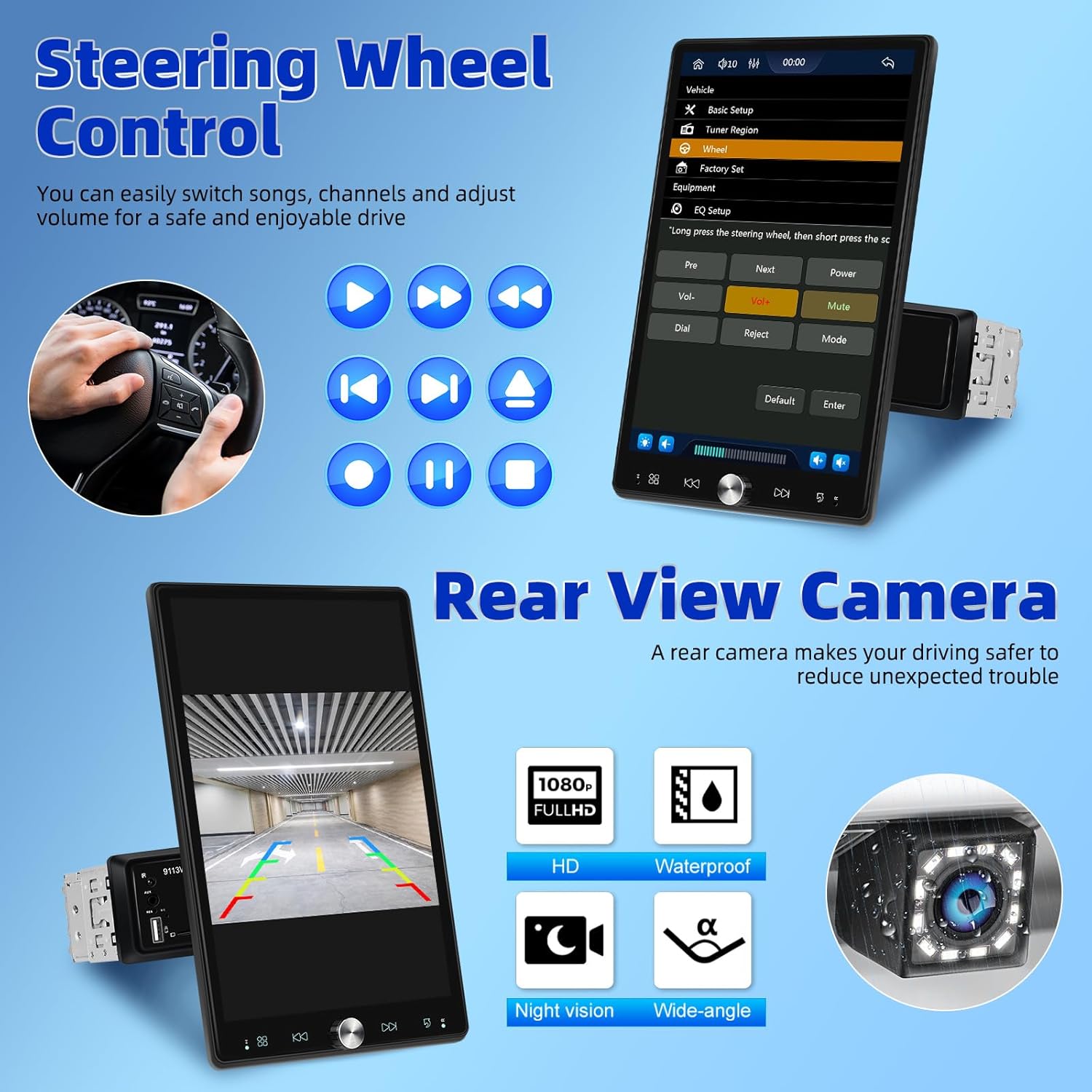
Figure 4.5: Illustration of steering wheel control functionality and the display of the rear view transmisja z kamery.
4.7 Łącze lustrzane
The mirror link function allows you to display your smartphone's screen directly onto the car stereo's display.
5. Konserwacja
Aby zapewnić długą żywotność i optymalną pracę radia samochodowego, należy przestrzegać poniższych wskazówek dotyczących konserwacji:
- Czyszczenie: Do czyszczenia ekranu i obudowy użyj miękkiej, suchej ściereczki. W przypadku uporczywych plam delikatnie przetrzyj.ampPrzetrzyj szmatkę wodą. Unikaj stosowania środków czyszczących o działaniu ściernym i rozpuszczalników.
- Temperatura: Nie wystawiaj urządzenia na działanie ekstremalnych temperatur, bezpośredniego światła słonecznego przez dłuższy czas ani wysokiej wilgotności.
- Wentylacja: Aby zapobiec przegrzaniu, upewnij się, że otwory wentylacyjne nie są zablokowane.
- Moc: Disconnect power before performing any cleaning or maintenance.
6. Rozwiązywanie Problemów
Jeśli masz problemy z radiem samochodowym, zapoznaj się z poniższymi typowymi problemami i ich rozwiązaniami:
| Problem | Możliwa przyczyna | Rozwiązanie |
|---|---|---|
| Brak zasilania | Luźne połączenie zasilania; przepalony bezpiecznik | Check power cables and connections; Inspect and replace fuse if necessary. |
| Brak dźwięku | Głośność jest zbyt niska; Wyciszenie włączone; Problem z okablowaniem głośników | Zwiększ głośność; Wyłącz wyciszenie; Sprawdź połączenia głośników. |
| Bluetooth nie łączy się | Bluetooth off on device/stereo; Pairing mode not active | Ensure Bluetooth is enabled on both devices; Put stereo into pairing mode; Delete previous pairings and re-pair. |
| CarPlay/Android Auto nie działa | Nieprawidłowy kabel USB; Błąd oprogramowania; Zgodność telefonu | Use original or certified USB cable; Restart phone and stereo; Check phone's compatibility with CarPlay/Android Auto. |
| Tylna kamera nie wyświetla obrazu | Incorrect wiring; Camera malfunction | Verify all camera wiring, especially the trigger wire; Test camera with another display if possible. |
If the problem persists after trying these solutions, please contact UNITOPSCI customer support.
7. Specyfikacje
| Funkcja | Specyfikacja |
|---|---|
| Wymiary produktu | 5.91 x 7.4 x 10 cala (15.0 x 18.8 x 25.4 cm) |
| Waga przedmiotu | 2.2 funta (1 kilogram) |
| Numer modelu | A4034A3 |
| Technologia łączności | Pomocniczy, Bluetooth, USB |
| Typ kontrolera | Sterowanie ręczne |
| Kompatybilne urządzenia | Smartfon, głośnik |
| Typ złącza | USB typu A |
| Tryb wyjścia audio | Mononukleoza |
| Moc wyjściowa | 180 watów |
| Rozmiar ekranu | 10.4 cali |
| Rozdzielczość ekranu | 1280*480P |
8. Gwarancja i wsparcie
UNITOPSCI is committed to providing high-quality products and satisfactory services. Your product comes with the following support:
- Replacement Available: Within 24 Months of purchase.
- Szybka odpowiedź: Customer support aims to respond within 16 hours.
- Lifetime After-Sales: Consult and Technical Support.
- Zasady zwrotu: 60-days No Worry to Return.
For online support, please contact us at: UNITOPSCI@126.com


Figure 8.1: Information regarding UNITOPSCI's customer support, warranty, and contact details.
Ask a question about this manual
Ask about setup, troubleshooting, compatibility, parts, safety, or missing instructions. Manuals+ will review the question and use this page’s manual context to help answer it.