
Wstęp
This manual provides essential information for the setup, operation, maintenance, and troubleshooting of your Onn 22 inch 1080P 100 Hz FHD LED Monitor. Please read this guide thoroughly before using the product to ensure optimal performance and safety.
The Onn 22 inch FHD LED Monitor is designed for a variety of applications, offering a vivid 1920x1080 resolution, a 100Hz refresh rate, and a 6.5ms response time for efficient performance. Its slim profile and T-shaped base are ideal for saving desk space.
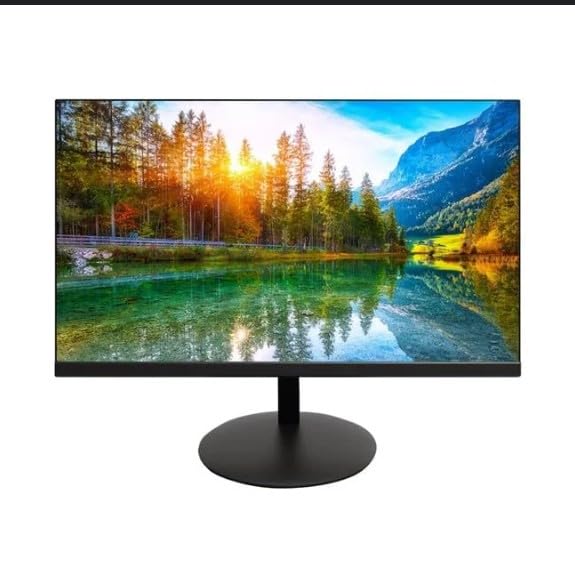
The image shows the Onn 22 inch FHD LED Monitor, highlighting its 100Hz refresh rate and 1080p resolution. The monitor features a slim design and a T-shaped base.
Instrukcje konfiguracji
- Rozpakowywanie: Carefully remove the monitor and all accessories from the packaging. Ensure all components are present: monitor, T-shaped base, HDMI cable, and power adapter.
- Montaż stojaka: Attach the T-shaped base to the monitor. The design is screw-less for easy assembly. Ensure it is securely fastened.
- Podłączanie do urządzenia:
The monitor supports both HDMI and VGA inputs. Connect the provided HDMI cable from your computer's HDMI output to the HDMI IN port on the monitor. Alternatively, use a VGA cable for VGA input.

This image displays the rear panel of the Onn monitor, illustrating the available input ports: HDMI IN, VGA IN, and the DC 12V power input. These ports are essential for connecting the monitor to a computer or other devices.
- Podłączenie zasilania: Connect the power adapter to the DC 12V input port on the monitor, then plug the adapter into a power outlet.
- Regulacja monitora: The monitor is capable of swivel, tilt, rotation, and height adjustment. Adjust the screen to your preferred viewkąt nachylenia zapewniający ergonomiczny komfort.
- Konfiguracja dwóch monitorów: This monitor is suitable for a fully functioning dual monitor setup. Connect a second monitor using the appropriate cables and configure your operating system's display settings.
Instrukcja obsługi
- Włączanie/wyłączanie: Press the power button, usually located on the bottom or back of the monitor, to turn it on or off.
- Wybór wejścia: If the monitor does not automatically detect the input source, use the On-Screen Display (OSD) menu buttons to manually select between HDMI and VGA inputs.
- Nawigacja w menu OSD: Use the physical buttons on the monitor (typically on the back or bottom edge) to navigate the OSD menu. This allows you to adjust settings such as brightness, contrast, color temperature, and input source.
- Rozdzielczość i częstotliwość odświeżania: The monitor supports a native resolution of 1920x1080 at a 100Hz refresh rate. Ensure your computer's display settings are configured to these specifications for the best visual experience.
- Synchronizacja adaptacyjna: The monitor features Adaptive Sync for gaming, which helps to reduce screen tearing and stuttering. Ensure this feature is enabled in your graphics card settings if supported.
Konserwacja
- Czyszczenie ekranu: Delikatnie przetrzyj ekran miękką, niepozostawiającą włókien ściereczką. W przypadku uporczywych zabrudzeń delikatnie przetrzyj.ampen the cloth with water or a non-abrasive, monitor-specific cleaning solution. Avoid spraying liquids directly onto the screen.
- Czyszczenie Casing: Do czyszczenia monitora należy używać miękkiej, suchej ściereczki.asing. Do not use strong detergents or solvents, as they may damage the finish.
- Wentylacja: Aby zapobiec przegrzaniu, upewnij się, że otwory wentylacyjne monitora nie są zablokowane.
- Składowanie: Jeśli monitor nie będzie używany przez dłuższy czas, należy przechowywać go w chłodnym i suchym miejscu, z dala od bezpośredniego światła słonecznego i ekstremalnych temperatur.
Rozwiązywanie problemów
- Brak zasilania:
- Sprawdź, czy kabel zasilający jest prawidłowo podłączony do monitora i gniazdka elektrycznego.
- Sprawdź, czy gniazdko elektryczne działa prawidłowo.
- Brak sygnału:
- Sprawdź, czy kabel wideo (HDMI lub VGA) jest dokładnie podłączony do monitora i komputera.
- Wybierz właściwe źródło sygnału wejściowego za pomocą menu OSD monitora.
- Sprawdź, czy komputer jest włączony i nie znajduje się w trybie uśpienia.
- Flickering Screen or Poor Image Quality:
- Sprawdź, czy kabel wideo nie jest uszkodzony lub czy połączenia nie są luźne.
- Adjust the resolution and refresh rate settings on your computer to match the monitor's specifications (1920x1080, 100Hz).
- Przywróć ustawienia fabryczne monitora za pomocą menu OSD.
- Przyciski nie odpowiadają:
- Unplug the monitor from the power outlet, wait for 30 seconds, and then plug it back in.
If problems persist, please refer to the support information provided in the "Support and Warranty" section.
Specyfikacje
| Marka | Onn |
| Numer modelu | 100140681 |
| Nazwa modelu | OTTO |
| Rozmiar ekranu | 21.5 cali |
| Typ wyświetlacza | LED, LCD |
| Rezolucja | 1920 x 1080 (FHD 1080p) |
| Częstotliwość odświeżania | 100 Hz |
| Czas reakcji | 6.5 milisekund |
| Interfejs sprzętowy | HDMI, VGA, |
| Cechy specjalne | Regulacja wysokości |
| Viewing kąt | 160 stopni |
| Proporcje obrazu | 16:9 |
| Wymiary produktu | 49.2 x 20 x 37.2 cm; waga 3.24 kg |
Wsparcie i gwarancja
For technical support, product inquiries, or warranty information, please visit the official Onn support webwitryny lub skontaktuj się z obsługą klienta.
- Oficjalne wsparcie Webstrona: onnsupport.ca
- Gwarancja: Specific warranty details may vary by region and purchase date. Please refer to the documentation included with your product or visit the support webna tej stronie znajdziesz najnowsze informacje dotyczące gwarancji.