
1. Wprowadzenie
This manual provides detailed instructions for the installation, operation, and maintenance of the TMEZON MZ-VDP-NE160 4-wire doorbell camera. This outdoor station is designed to work seamlessly with compatible TMEZON videophone monitors, such as the MZ-IP-V728TW, to provide secure and convenient visitor management for your property.
2. Informacje dotyczące bezpieczeństwa
Please read and understand all safety instructions before installing or operating this device. Failure to follow these instructions may result in electric shock, fire, or damage to the product.
- Bezpieczeństwo elektryczne: Installation should be performed by a qualified electrician or technician. Ensure power is disconnected before any wiring work.
- Narażenie na działanie wody: While designed for outdoor use, avoid direct high-pressure water jets. Ensure all connections are properly sealed.
- Temperatura: Nie wystawiaj urządzenia na działanie ekstremalnych temperatur wykraczających poza zakres jego działania.
- Czyszczenie: Do czyszczenia używaj miękkiej, suchej ściereczki. Nie używaj ściernych środków czyszczących ani rozpuszczalników.
3. Zawartość opakowania
Sprawdź, czy w opakowaniu znajdują się wszystkie komponenty:
- 1 x TMEZON MZ-VDP-NE160 Doorbell Camera Unit
- Śruby montażowe i kołki ścienne
- Złącza kablowe
- Instrukcja obsługi (ten dokument)
4. Koniec produktuview
The TMEZON MZ-VDP-NE160 is an outdoor doorbell camera unit. It features a camera for video surveillance, a microphone for audio input, a speaker for audio output, and a call button to initiate communication with the indoor monitor.
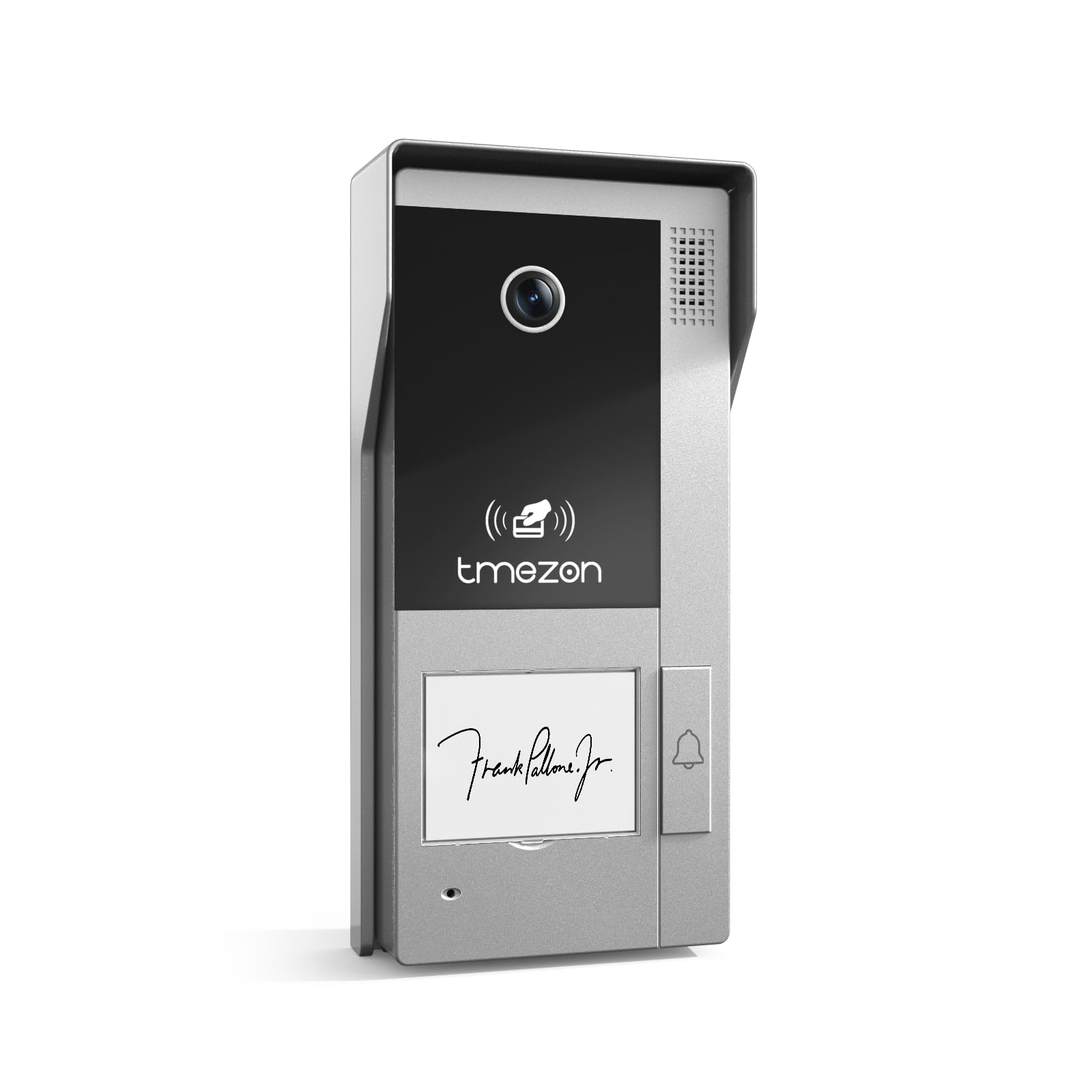
Rycina 1: Przód view of the TMEZON MZ-VDP-NE160 doorbell camera, showing the camera lens, call button, microphone, and speaker grille.
Kluczowe elementy obejmują:
- Obiektyw aparatu: Przechwytuje sygnał wideo.
- Przycisk dzwonienia: Activates the indoor monitor and initiates communication.
- Mikrofon: Nagrywa dźwięk od odwiedzających.
- Głośnik: Allows two-way audio communication.
- Wiring Terminal (Rear): For connecting the 4-wire cable to the indoor monitor and power supply.
5. Konfiguracja i instalacja
The MZ-VDP-NE160 is a 4-wire system. Proper wiring is crucial for correct operation. It is recommended to consult a professional for installation if you are unfamiliar with electrical wiring.
5.1 Miejsce montażu
- Choose a location near your entrance, typically at a height of 1.4 to 1.6 meters (4.6 to 5.2 feet) from the ground, ensuring a clear view odwiedzających.
- Avoid direct sunlight or strong light sources that could cause glare on the camera.
- Upewnij się, że powierzchnia montażu jest płaska i stabilna.
5.2 Schemat okablowania (ogólny)
The doorbell camera connects to the indoor monitor (e.g., MZ-IP-V728TW) using a 4-wire cable. The typical connections are:
- Przewód 1: Audio
- Przewód 2: Wideo
- Przewód 3: Uziemienie (GND)
- Przewód 4: Zasilanie (prąd stały 12 V)
Note: Refer to the specific wiring diagram provided with your indoor monitor for precise connection details. Ensure polarity is correct for power connections.
5.3 Kroki instalacji
- Odłącz zasilanie: Before starting, ensure all power to the existing doorbell system and the indoor monitor is turned off at the circuit breaker.
- Uchwyt montażowy: Secure the mounting bracket (if applicable, or the unit directly) to the wall using the provided screws and wall plugs.
- Połączenie przewodowe: Connect the 4-wire cable from the indoor monitor to the corresponding terminals on the rear of the MZ-VDP-NE160 doorbell camera. Ensure connections are secure.
- Bezpieczna jednostka: Attach the doorbell camera unit to the mounting bracket or directly to the wall, ensuring it is firmly in place.
- Przywróć zasilanie: Po wykonaniu i zabezpieczeniu wszystkich połączeń można przywrócić zasilanie systemu.
- System testowy: Test the doorbell functionality by pressing the call button and verifying communication with the indoor monitor.
6. Instrukcja obsługi
The TMEZON MZ-VDP-NE160 doorbell camera operates in conjunction with your TMEZON indoor monitor.
- Zadzwoń do gości: When a visitor presses the call button on the MZ-VDP-NE160, the indoor monitor will ring and display the video feed from the doorbell camera.
- Komunikacja dwukierunkowa: On the indoor monitor, you can answer the call to engage in two-way audio communication with the visitor.
- Otwieranie drzwi (jeśli jest podłączone): If an electronic door lock is connected to your indoor monitor system, you can typically unlock the door from the indoor monitor during a call.
- Monitorowanie: Some indoor monitors allow you to manually view the live video feed from the doorbell camera at any time, even without a visitor pressing the button.
7. Konserwacja
Regular maintenance helps ensure the longevity and optimal performance of your doorbell camera.
- Czyszczenie: Periodically wipe the camera lens and the front panel with a soft, slightly damp Do usuwania kurzu i brudu należy używać ściereczki. Nie należy używać silnych środków chemicznych ani materiałów ściernych.
- Sprawdź połączenia: Annually, inspect the wiring connections for any signs of corrosion or loosening. Ensure the unit is securely mounted.
- Aktualizacje oprogramowania: While this specific unit does not have user-updatable software, ensure your indoor monitor's firmware is up to date for best compatibility and features.
8. Rozwiązywanie Problemów
If you encounter issues with your MZ-VDP-NE160 doorbell camera, refer to the following common problems and solutions:
| Problem | Możliwa przyczyna | Rozwiązanie |
|---|---|---|
| No video/audio on indoor monitor |
|
|
| Przycisk połączenia nie odpowiada |
|
|
| Słaba jakość wideo |
|
|
If the problem persists after attempting these solutions, please contact TMEZON customer support.
9. Specyfikacje
| Funkcja | Szczegół |
|---|---|
| Model | MZ-VDP-NE160 |
| Marka | TMEZON |
| Wymiary produktu (dł. x szer. x wys.) | Wymiary 1 x 1 x 1 cm |
| Typ okablowania | System 4-przewodowy |
| Objętość operacyjnatage | 240 Volts (System dependent, typically 12V DC for the unit itself, 240V might refer to power supply input) |
| Pobór mocy | 5 watów |
| Kolor | Szary |
| Zawarte komponenty | Jednostka dzwonkowa |
10. Gwarancja i wsparcie
For warranty information and technical support, please refer to the documentation provided with your complete TMEZON videophone system or visit the official TMEZON webZachowaj paragon jako dowód zakupu na wypadek reklamacji.
For direct assistance, you may contact TMEZON customer service through their official channels.