
1. Wprowadzenie
Dziękujemy za zakupasing the HelloBaby HB6351Plus-2 Video Baby Monitor. This monitor is designed to provide a secure and reliable way to keep an eye on your baby, offering advanced features such as a large IPS screen, split-screen viewing, two-way audio, and night vision. This manual will guide you through the setup, operation, and maintenance of your new baby monitor.
Aby zapewnić optymalną wydajność i bezpieczeństwo, przed użyciem należy dokładnie przeczytać tę instrukcję i zachować ją do wykorzystania w przyszłości.
2. Ważne informacje dotyczące bezpieczeństwa
- Ryzyko uduszenia: Keep all cords out of reach of children. Never place the camera or cords within 3 feet (1 meter) of the crib or playpen.
- Ryzyko zadławienia: Ten produkt zawiera małe części. Trzymać poza zasięgiem dzieci.
- Ekspozycja na ciepło: Nie należy umieszczać monitora ani kamery w pobliżu źródeł ciepła, takich jak grzejniki, kratki wentylacyjne, piece i inne urządzenia wytwarzające ciepło.
- Woda i wilgoć: Nie wystawiać produktu na działanie deszczu ani wilgoci. Nie używać w pobliżu wody (np. wanny, umywalki).
- Źródło zasilania: Use only the AC power adapters provided. Using other adapters may damage the product.
- Wentylacja: Nie blokuj żadnych otworów wentylacyjnych. Zapewnij odpowiedni przepływ powietrza wokół urządzeń.
- Ingerencja: This product operates on 2.4GHz frequency. Keep away from other 2.4GHz devices (e.g., Wi-Fi routers, microwaves) to avoid interference.
3. Zawartość opakowania
Sprawdź zawartość paczki, aby upewnić się, że znajdują się w niej wszystkie elementy:
- Jednostka rodzicielska (monitor)
- Baby Units (Cameras) x 2
- Power Adapters x 3 (one for monitor, two for cameras)
- Instrukcja obsługi
4. Koniec produktuview
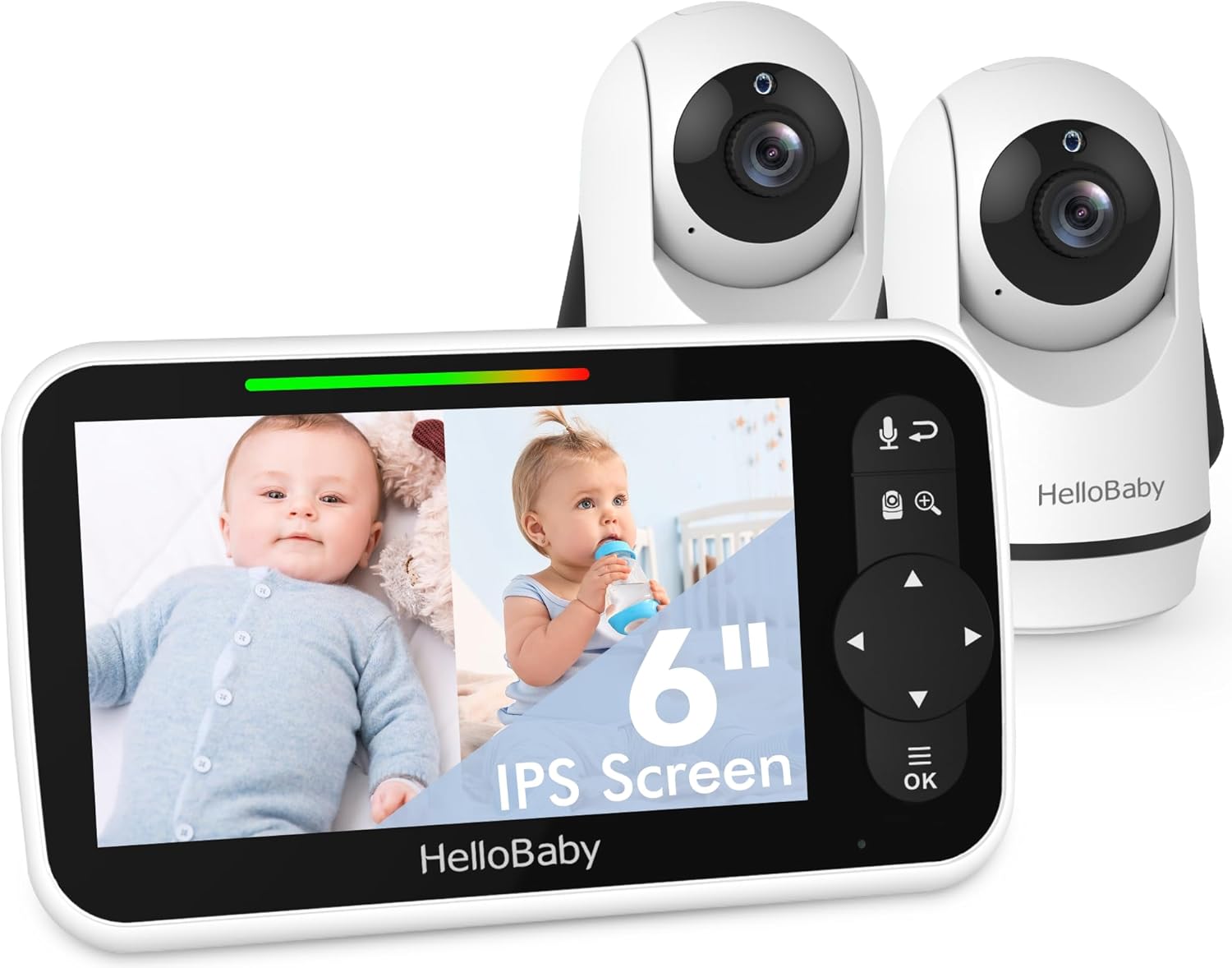
The HelloBaby HB6351Plus-2 Video Baby Monitor system, featuring the parent unit (monitor) and two baby units (cameras).
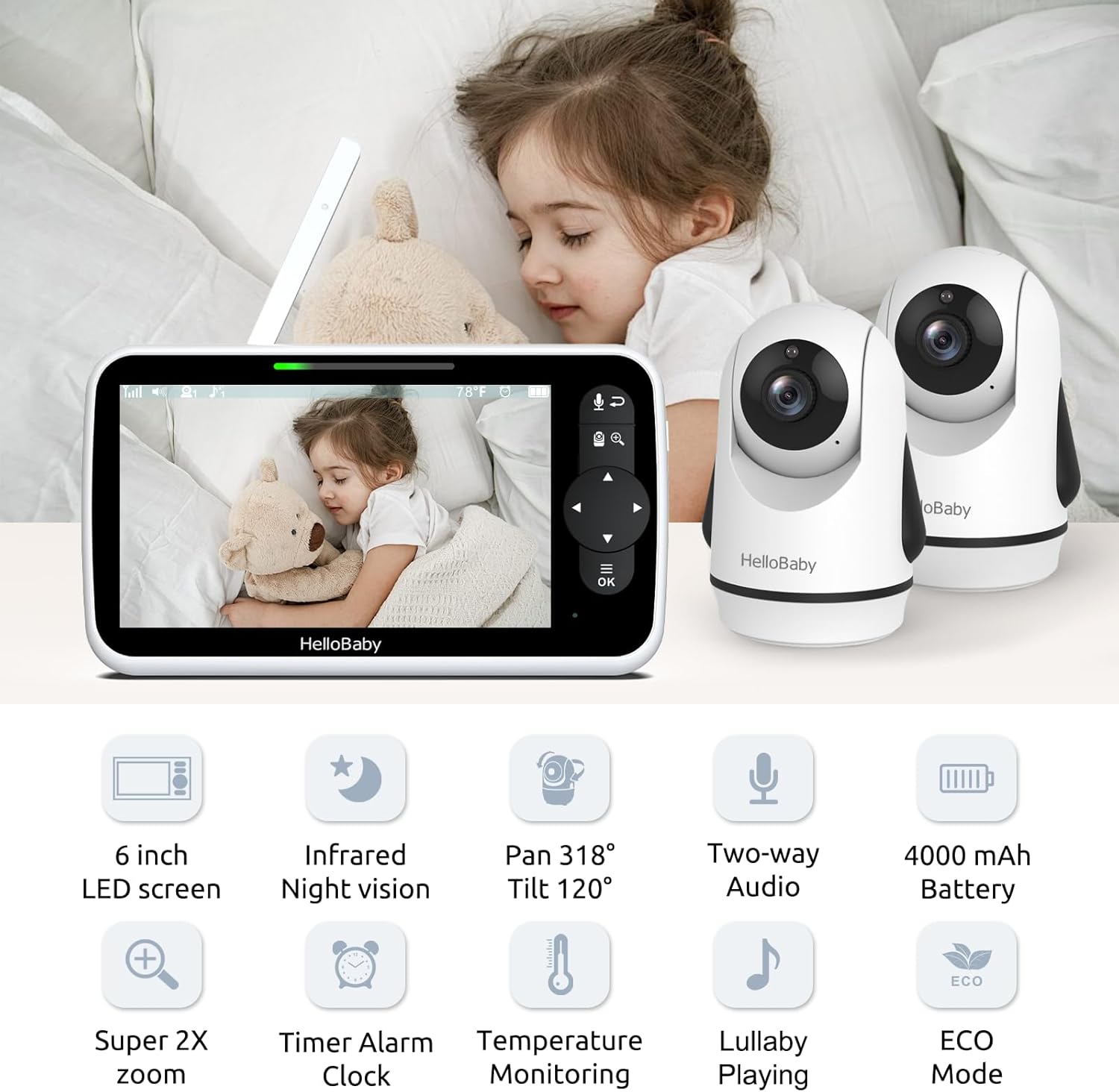
Nadview of the monitor and camera features, including the 6-inch IPS screen, infrared night vision, pan/tilt/zoom capabilities, two-way audio, and 4000mAh battery.
4.1 Jednostka rodzicielska (monitor)
- Ekran IPS 6 cala: Zapewnia wyraźny i szeroki viewkąt.
- Przyciski sterujące: For navigation, menu access, zoom, and two-way talk.
- Antena: Do odbioru sygnału bezprzewodowego.
- Mikrofon i głośnik: Do dwukierunkowej komunikacji audio.
- Wskaźnik baterii: Pokazuje aktualny poziom naładowania baterii.
4.2 Jednostka dziecka (kamera)
- Obiektyw aparatu: Przechwytuje sygnał wideo.
- Diody podczerwieni: Do funkcji widzenia w nocy.
- Mikrofon i głośnik: Do dwukierunkowej transmisji dźwięku i odtwarzania kołysanek.
- Czujnik temperatury: Monitoruje temperaturę w pomieszczeniu.
- Pan/Tilt Motor: Allows remote adjustment of camera angle.
5. Konfiguracja
5.1 Ładowanie jednostki głównej
Before first use, fully charge the parent unit for approximately 8 hours. Connect the small end of the power adapter to the parent unit's charging port and the other end to a power outlet. The battery indicator will show charging status.
5.2 Powering the Baby Units
Connect the small end of each camera's power adapter to the camera's power port and the other end to a power outlet. The camera will automatically power on.
5.3 Umiejscowienie kamery
Position the baby unit(s) in a location that provides the best view of your baby. Ensure the camera is at least 3 feet (1 meter) away from the crib to prevent cord entanglement. The cameras can be placed on a flat surface, mounted on a wall, or attached using a bracket.

Flexible camera placement options: on a wall, on a table, or using a bracket for optimal viewing.
5.4 Parowanie (wstępnie sparowane)
Your HelloBaby monitor and cameras are pre-paired at the factory. Simply power on both units, and they should connect automatically. If you need to re-pair or add additional cameras, refer to the 'Add Camera' section in the monitor's menu.
6. Instrukcja obsługi
6.1 Włączanie/wyłączanie zasilania
- Jednostka nadrzędna: Press and hold the Power button until the screen turns on/off.
- Jednostka dla dziecka: Kamera włącza się automatycznie po podłączeniu do zasilania. Aby ją wyłączyć, należy odłączyć ją od zasilania.
6.2 Funkcje ekranu

The 6-inch IPS large screen provides a spacious and clear view for monitoring your baby.
The 6-inch IPS screen offers a wide viewing angle and clear image quality. Navigate through menus and options using the directional pad and OK button on the parent unit.
6.3 Funkcja podzielonego ekranu
Dzięki dwóm kamerom możesz view both feeds simultaneously on the parent unit's screen. This feature is ideal for monitoring multiple children or different areas of a room.

The split screen function allows simultaneous viewing of two camera feeds on the monitor.
To activate split screen, access the menu and select the split screen option. You can also switch between cameras in single-view mode or use the loop mode to cycle through camera views.

Visual representation of split screen and loop modes for multi-camera monitoring.
6.4 Rozmowa dwukierunkowa
The two-way talk feature allows you to communicate with your baby remotely. Press and hold the microphone button on the parent unit to speak, and release it to listen.

Engage with your baby using the two-way talk feature, allowing for remote communication.
6.5 Widzenie nocne w podczerwieni
The camera automatically activates infrared night vision in low-light conditions, providing a clear black-and-white image of your baby, even in complete darkness.

Day and night vision capabilities ensure clear monitoring in all lighting conditions.
6.6 Zdalne sterowanie obrotem, pochyleniem i powiększeniem (PTZ)
Use the directional buttons on the parent unit to remotely pan (318° horizontally) and tilt (120° vertically) the camera lens. The zoom function allows you to get a closer look at your baby.

The camera offers an all-round field of view with 318° pan and 120° tilt functionality.
6.7 Monitorowanie temperatury
The baby unit includes a temperature sensor that displays the room temperature on the parent unit. You can set alerts for temperatures outside a desired range.

Monitor room temperature and play lullabies to soothe your baby.
6.8 kołysanki
Select from a variety of pre-programmed lullabies to soothe your baby to sleep. Access this feature through the parent unit's menu.
6.9 Timer Alarm Clock
Set reminders for feeding times, diaper changes, or naps using the built-in timer alarm clock feature.

The timer alarm clock helps you manage feeding and nap schedules.
6.10 Tryb ECO i żywotność baterii
The monitor features an ECO mode to conserve battery life. In ECO mode, the screen turns off and audio is muted when no sound is detected, reactivating when sound is picked up. The 4000mAh battery provides up to 18 hours in screen-on mode and 35 hours in ECO mode.

Energy-efficient design with 4000mAh battery, offering extended battery life in ECO mode.
7. Konserwacja
- Czyszczenie: Use a soft, dry cloth to clean the surfaces of the monitor and cameras. Do not use abrasive cleaners or solvents.
- Składowanie: If storing the product for an extended period, ensure both units are fully charged and then powered off. Store in a cool, dry place.
- Pielęgnacja baterii: Aby przedłużyć żywotność baterii, unikaj częstego całkowitego rozładowywania jednostki głównej. Regularnie ją ładuj.
8. Rozwiązywanie Problemów
| Problem | Możliwa przyczyna | Rozwiązanie |
|---|---|---|
| Brak obrazu/dźwięku na jednostce rodzicielskiej | Units are not powered on or connected. Out of range. Battery low. | Ensure both units are powered and connected to adapters. Move parent unit closer to baby unit. Charge parent unit. |
| Picture frozen or signal loss (shows 'X') | Out of range. Interference from other devices. | Move parent unit closer to baby unit. Relocate units away from other 2.4GHz devices (Wi-Fi routers, microwaves). Restart both units. |
| Brak dźwięku lub dźwięk przerywany | Volume too low. ECO mode active. Out of range. | Increase parent unit volume. Adjust ECO mode sensitivity or disable it. Move units closer. |
| Poor picture quality/Night vision unclear | Lens is dirty. Insufficient light for color mode. | Clean camera lens with a soft cloth. Ensure room is dark enough for night vision to activate properly. |
| Bateria jednostki rodzicielskiej szybko się rozładowuje | Constant screen-on use. Old battery. | Utilize ECO mode. Ensure full charge before use. If battery life significantly degrades, consider battery replacement. |
9. Specyfikacje
- Model: HB6351Plus-2
- Rozmiar ekranu: 6-calowy IPS
- Technologia komunikacji bezprzewodowej: FHSS 2.4 GHz
- Battery (Parent Unit): 4000mAh (P76 batteries included)
- Waga przedmiotu: 2.31 funta (1.05 kilograma)
- Wymiary opakowania: 9.61 x 5.31 x 4.37 cala
- Kolor: Biały
- Cechy szczególne: 2-Way Audio, Cry Detection, Night Vision, PTZ Technology, Portable
- Zastosowanie wewnątrz/na zewnątrz: Wewnątrz, Na zewnątrz
- Kod UPC: 190282014908
10. Gwarancja i wsparcie
HelloBaby products are designed and manufactured to the highest quality standards. For warranty information or technical support, please refer to the warranty card included with your product or visit the official HelloBaby webMożesz również skontaktować się z obsługą klienta za pośrednictwem sprzedawcy, u którego kupiłeś produkt.
Aby uzyskać dalszą pomoc, odwiedź stronę HelloBaby Store on Amazon.