
TOPBULL d13acba1-c391-48cc-ac30-5e435a6d4e56
Instrukcja obsługi falownika sinusoidalnego TOPBULL 3000W
Model: d13acba1-c391-48cc-ac30-5e435a6d4e56
1. Wprowadzenie
This user manual provides essential information for the safe and efficient operation of your TOPBULL 3000W Pure Sine Wave Power Inverter. This inverter is designed to convert 12V DC power from a battery source to 110V/120V AC power, suitable for various electronic devices and home appliances. It offers a continuous output of 3000W and a peak power of 6000W, making it ideal for vehicle, home, RV, truck, and off-grid solar system applications.

Figure 1: TOPBULL 3000W Pure Sine Wave Power Inverter and accessories.
The inverter utilizes advanced pure sine wave technology, ensuring a stable and clean power output comparable to utility power, which helps protect your sensitive electronics from damage. Its robust aircraft aluminum housing and intelligent cooling system contribute to its durability and efficient performance.
2. Instrukcje bezpieczeństwa
Always prioritize safety when installing and operating the power inverter. Failure to follow these instructions may result in serious injury or damage to the equipment.
- Prawidłowa wentylacja: Ensure the inverter is installed in a well-ventilated area to prevent overheating. Do not block the cooling fans or air passages.
- Prawidłowa polaryzacja: Always connect the battery cables with the correct polarity (positive to positive, negative to negative). Incorrect connections can cause severe damage to the inverter and battery.
- Rozmiary kabli: Use appropriately sized, high-quality pure copper cables for connecting the inverter to the battery. Undersized or poor-quality cables can overheat and pose a fire hazard, especially under heavy loads.
- Pre-charging Capacitors: Before making the final positive connection to the battery, briefly touch the positive cable to the battery terminal to pre-charge the inverter's capacitors. This prevents a large spark.
- Funkcje ochronne: The inverter includes built-in protections against overload, overvoltage, podobjtage, high temperature, short circuit, leakage, and reverse polarity. While these features enhance safety, proper installation and operation are still crucial.
- Środowisko suche: Install the inverter in a dry location, away from water, moisture, and flammable materials.
- Zarządzanie obciążeniem: Do not exceed the inverter's continuous power rating (3000W) or peak power rating (6000W). Overloading can trigger protection shutdowns or damage the unit.
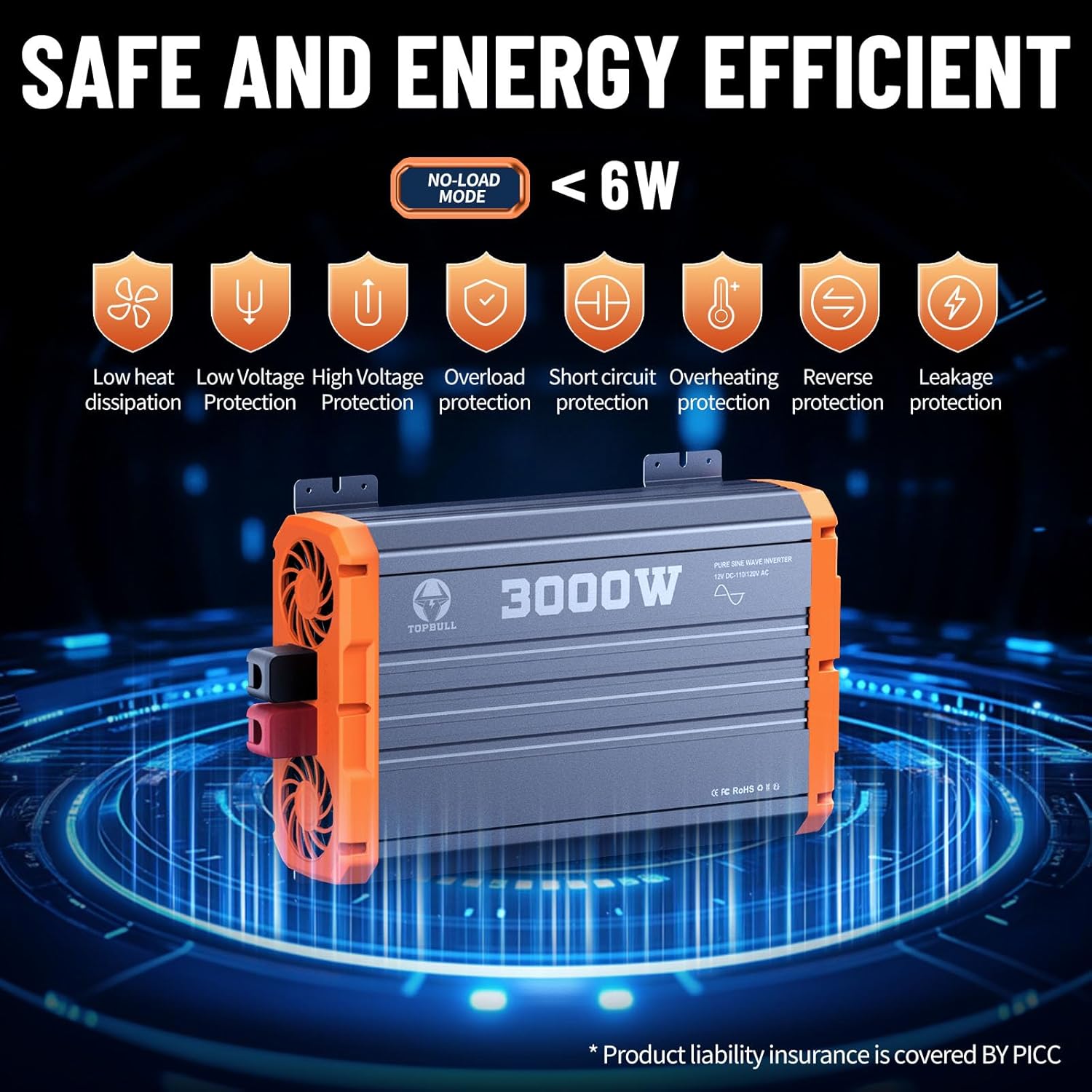
Figure 2: Inverter's comprehensive safety protection features.
3. Zawartość opakowania
Upon unpacking your TOPBULL 3000W Pure Sine Wave Power Inverter, please verify that all the following items are included and in good condition:
- 1 x TOPBULL 3000W Pure Sine Wave Power Inverter Unit
- 1 x Instrukcja obsługi
- 2 x Battery Cables (1 Red for Positive, 1 Black for Negative)
- 1 x Remote Controller with Display
- 1 x Remote Control Cable (16.5 feet)
- 12 x zapasowe bezpieczniki (30A)

Rysunek 3: Wszystkie elementy zawarte w opakowaniu produktu.
If any items are missing or damaged, please contact TOPBULL customer support immediately.
4. Koniec produktuview
Familiarize yourself with the various components and ports of your inverter for optimal use.

Figure 4: Labeled diagram of the inverter's features and ports.
Funkcje panelu przedniego:
- Gniazdka AC: Two U.S. standard AC outlets (110V/120V) for connecting your appliances.
- Port USB: Standard USB-A port for charging compatible devices.
- Port typu C: USB Type-C fast charging port for modern devices.
- Wyświetlacz LCD: Shows real-time operational status, including wattage, objętość wyjściowatage, pojemność bateriitage, temperature, and battery capacity. It also displays error codes.
- Przełącznik włącz / wyłącz: Główny wyłącznik zasilania falownika.
- Port zdalnego sterowania: Connects the wired remote controller for convenient operation from a distance.
Cechy panelu tylnego:
- Zaciski wejściowe prądu stałego: Large positive (red) and negative (black) terminals for connecting to your 12V DC battery bank.
- Wentylatory chłodzące: Dual intelligent temperature-controlled cooling fans to dissipate heat and maintain optimal operating temperature.

Figure 5: The wired remote controller for convenient operation.
5. Konfiguracja
Proper setup is critical for the safe and efficient performance of your inverter.
5.1. Podłączanie do baterii
- Przygotuj kable: Ensure you are using high-quality, appropriately sized pure copper cables for your battery connections. The included cables are suitable for initial testing, but for sustained high-power applications, consider upgrading to thicker gauge pure copper cables to minimize heat generation and maximize efficiency.
- Bezpieczne połączenia: Loosen the nuts on the inverter's DC input terminals. Connect the red battery cable to the positive (+) terminal of the inverter and the black battery cable to the negative (-) terminal. Tighten the nuts securely.
- Pre-charge Capacitors: Before connecting the positive cable to the battery, briefly touch the positive cable's terminal to the positive battery post. This will create a small spark as the inverter's internal capacitors pre-charge. This is a normal and necessary step to prevent a larger spark when making the final connection.
- Final Battery Connection: Connect the black battery cable to the negative (-) terminal of your 12V battery. Then, securely connect the red battery cable to the positive (+) terminal of your 12V battery.

Figure 6: Inverter connected to a 12V battery.
5.2. Montaż falownika
The inverter features integrated mounting brackets for secure installation. Choose a stable, dry, and well-ventilated location. Ensure there is sufficient clearance around the cooling fans for proper airflow.
6. Instrukcja obsługi
6.1. Włączanie/wyłączanie zasilania
- Wyłącznik główny: Flip the ON/OFF switch on the inverter's front panel to the "ON" position. The internal cooling fans will briefly activate upon startup and then turn off if no significant load is detected, or if the unit is cool.
- Pilot zdalnego sterowania: Connect the remote control cable to the dedicated port on the inverter. Ensure the main ON/OFF switch on the inverter is in the "OFF" position to enable remote control functionality. Press the button on the remote controller to power the inverter on or off.
6.2. Zrozumienie wyświetlacza LCD
The dual LCD displays (on the inverter and remote controller) provide real-time feedback on the inverter's status:
- Moc wyjściowatagmi (W): Wyświetla aktualne zużycie energii podłączonych urządzeń.
- Objętość wyjściatage (v): Pokazuje głośność wyjściową prądu przemiennegotage (e.g., 110V/120V).
- Pojemność bateriitage (v): Indicates the current DC voltage baterii.
- Temperatura (°C/°F): Monitoruje wewnętrzną temperaturę falownika.
- Wskaźnik pojemności baterii: Provides a visual representation of the remaining battery charge.
- Error Codes/Symbols: Flashing symbols or messages will appear to notify you of any issues (e.g., overload, low voltag(np. wysoka temperatura).
6.3 Podłączanie urządzeń
Once the inverter is powered on, you can connect your AC appliances to the two standard AC outlets. For charging smaller devices, use the USB-A or Type-C ports.

Rysunek 7: Examples of appliances that can be powered by the inverter.
The inverter is capable of powering a wide range of US electrical equipment up to 3000W, including electric drills, car washers, refrigerators, air conditioners, and various electronic devices. Always ensure the total wattage of your connected devices does not exceed the inverter's capacity.
7. Konserwacja
Regular maintenance ensures the longevity and reliable performance of your inverter.
- Zachowaj czystosc: Periodically clean the exterior of the inverter, especially the cooling fan vents, to prevent dust and debris buildup. Use a soft, dry cloth.
- Sprawdź kable: Regularly check the battery cables and connections for any signs of wear, corrosion, or loose connections. Tighten connections as needed.
- Wymiana bezpiecznika: If the inverter stops functioning due to an overload or short circuit, a fuse may have blown. Refer to the user manual for specific instructions on how to safely replace the internal fuses. Use only the specified 30A fuses.
- Składowanie: Jeśli falownik nie będzie używany przez dłuższy czas, należy go przechowywać w chłodnym i suchym miejscu. Odłączyć go od akumulatora.
8. Rozwiązywanie Problemów
If your inverter is not functioning as expected, refer to the LCD display for error indications and consult the following common troubleshooting steps:
| Problem | Możliwa przyczyna | Rozwiązanie |
|---|---|---|
| Falownik się nie włącza | Luźne połączenia akumulatora, niski poziom naładowania akumulatoratagnp. przepalony bezpiecznik. | Check and tighten all battery connections. Charge or replace battery. Check and replace fuses if necessary. |
| Ostrzeżenie o przeciążeniu na wyświetlaczu | Podłączone obciążenie przekracza wydajność falownika. | Zmniejsz całkowitą ilość watówtage of connected appliances. Disconnect some devices. |
| Ostrzeżenie o wysokiej temperaturze | Słaba wentylacja, nadmierne obciążenie, wysoka temperatura otoczenia. | Ensure proper airflow around the inverter. Reduce load. Move to a cooler environment. |
| Niska/wysoka objętośćtagostrzeżenie | Pojemność bateriitage jest poza dopuszczalnym zakresem. | Charge the battery if voltage is low. Check battery health if voltage is consistently high or unstable. |
| Brak wyjścia AC | Inverter is off, fault condition, or appliance issue. | Ensure inverter is on. Check for error codes. Test appliance with another power source. |
For persistent issues, contact TOPBULL technical support.
9. Specyfikacje
| Funkcja | Szczegół |
|---|---|
| Marka | TOPBULL |
| Nazwa modelu | New-3000W Pure Sine Wave |
| Numer modelu | d13acba1-c391-48cc-ac30-5e435a6d4e56 |
| Ciągła moc wyjściowa | 3000 watów |
| Moc szczytowa | 6000 watów |
| Wejście DC Voltage | 12V prądu stałego |
| Wyjście AC objtage | 110V/120V prąd zmienny |
| Przebieg wyjściowy | Czysta fala sinusoidalna |
| Źródło zasilania | Zasilany energią słoneczną i baterią |
| Wymiary produktu | 14.57 x 9.06 x 3.86 cala |
| Waga przedmiotu | 12.45 funta |
| Producent | TOPBULL |

Figure 8: Pure Sine Wave Technology ensures stable and clean power.

Figure 9: Inverter operates quietly and remains cool during use.
10. Gwarancja i wsparcie
TOPBULL is committed to providing high-quality products and excellent customer service.
- Wsparcie techniczne: TOPBULL offers 24/7 technical support to assist you with any questions or issues regarding your inverter.
- Odpowiedzialność za produkt: Product liability insurance is covered by PICC, ensuring an additional layer of protection.
- Informacje o gwarancji: For detailed warranty terms and conditions, please refer to the product packaging or visit the official TOPBULL webstrona.
Ask a question about this manual
Ask about setup, troubleshooting, compatibility, parts, safety, or missing instructions. Manuals+ will review the question and use this page’s manual context to help answer it.