
1. Wprowadzenie
This manual provides detailed instructions for the proper use and maintenance of your Tilta Khronos iPhone 16 Pro Max Case. Designed for mobile filmmakers and everyday users, this case offers robust protection and an expandable ecosystem for various accessories. Please read this manual thoroughly before using the product to ensure optimal performance and longevity.
2. Koniec produktuview
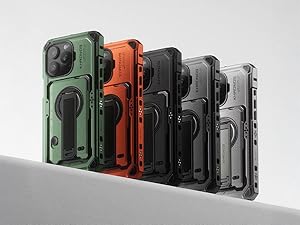
The Tilta Khronos iPhone 16 Pro Max Case is a precision-crafted accessory made from 6-series aluminum alloy, offering both durability and an elevated aesthetic. It features a fully integrated power network with built-in electronic contacts for seamless transitions between professional filming and daily use. The case is designed with a second-generation quick-release mechanism for fast installation and removal.
Rysunek 2.1: Eksplodowany view of the Tilta Khronos case and its compatible accessories.

Figure 2.2: The Tilta Khronos iPhone 16 Pro Max Case in Forest Green, showcasing jego solidna konstrukcja.
Główne cechy:
- Custom designed for the iPhone 16 Pro Max.
- Expandable design compatible with a wide range of accessories including focus side handles, cooling modules, filters, on-board lights, and USB-C hubs.
- Blokowanie clamp design for secure attachment of accessories and mounting to tripods.
- Passthrough power via integrated electronic contact points for powering accessories.
- Snap-in design for quick, tool-free installation and removal.
Wideo 2.1: Overview of the Tilta Khronos Ecosystem for iPhone 16 Pro, demonstrating the case's features and accessory compatibility.
3. Konfiguracja
3.1 Installing Your iPhone
- Ensure your iPhone 16 Pro Max is clean and free of debris.
- Open the quick-release latch on the side of the Khronos case.
- Carefully align your iPhone with the case, ensuring all ports and buttons are correctly positioned.
- Gently press your iPhone into the case until it seats securely.
- Close the quick-release latch to lock the iPhone firmly in place. The snap-in design ensures a tool-free and rapid installation.

Figure 3.1: The quick-release mechanism allows for fast and secure iPhone installation.
3.2 Mocowanie akcesoriów
The Khronos case features multiple mounting points and a locking clamp design for various accessories. Align the accessory with the desired mounting point and secure it using the integrated locking mechanism or screws, as appropriate for the accessory.
4. Instrukcja obsługi
4.1 Using the Capacitive Camera Control Button
The case includes a dedicated capacitive touch button on its exterior, providing access to native camera controls without needing to touch the iPhone screen directly. This allows for a more tactile and responsive shooting experience.

Figure 4.1: The capacitive camera control button for enhanced camera operation.
4.2 Passthrough Power
Integrated electronic contact points allow for passthrough power, enabling you to power compatible accessories directly through the case. Connect your power source to the case's USB-C port, and the power will be distributed to connected accessories.

Figure 4.2: The USB-C port for passthrough power and charging.
4.3 Using the Accessory Ecosystem
The Khronos case supports a diverse range of mobile filmmaking accessories. These include:
- Focus Side Handles: Attach for improved grip and control during filming.
- Cooling Modules: Essential for extended recording sessions to prevent overheating.
- Filtry: Mount directly to the case for creative control over your footage.
- On-Board Lights: Provide additional illumination for various shooting conditions.
- USB-C Hubs: Expand connectivity options for external devices.
Refer to the specific accessory's manual for detailed installation and operation instructions.

Figure 4.3: A selection of compatible accessories for the Tilta Khronos ecosystem.
5. Konserwacja
5.1 Czyszczenie
To clean the aluminum case, use a soft, dry, lint-free cloth. For stubborn dirt, lightly dampPrzetrzyj szmatkę wodą. Unikaj stosowania silnych środków chemicznych, ściernych środków czyszczących i rozpuszczalników, ponieważ mogą one uszkodzić wykończenie.
5.2 Przechowywanie
Store the case in a cool, dry place away from direct sunlight and extreme temperatures. If storing for extended periods, ensure the iPhone is removed from the case and both are clean.
6. Rozwiązywanie Problemów
6.1 Case Not Clamping Securely
- Ensure the iPhone is correctly seated within the case and not obstructed by any foreign objects.
- Verify that the quick-release latch is fully engaged.
- Inspect the latch mechanism for any visible damage or wear. If damaged, contact customer support.
6.2 MagSafe Accessories Not Functioning Properly
Due to the case's design and material, MagSafe accessory compatibility may be limited. The case's thickness can affect the magnetic connection. For reliable charging or accessory use, consider utilizing wired connections via the iPhone's USB-C port or the case's passthrough power feature.
6.3 Buttons Not Responsive
- Check that the iPhone is properly aligned within the case, ensuring the case's buttons make proper contact with the iPhone's buttons.
- Remove the iPhone and inspect the case's buttons for any obstructions or damage.
7. Specyfikacje
| Funkcja | Szczegół |
|---|---|
| Numer modelu | TK-IP16-PMFC-FG |
| Kompatybilne modele telefonów | iPhone 16 Pro Max |
| Kompatybilne urządzenia | iPhone 16 Pro / Pro Max |
| Tworzywo | Aluminium |
| Kolor | Leśna zieleń |
| Waga przedmiotu | 1.21 funta |
| Wymiary opakowania | 9.17 x 6.06 x 1.73 cala |
| Producent | Tilta |
| Data pierwszej dostępności | 7 stycznia 2025 r. |
8. Gwarancja i wsparcie
For warranty information, product support, or to inquire about additional accessories, please visit the official Tilta website or contact Tilta customer service directly. Keep your purchase receipt as proof of purchase for any warranty claims.
Więcej informacji i danych kontaktowych znajdziesz na stronie Sklep Tilta na Amazonie.