1. Wprowadzenie
Welcome to the ZORNHER ZH870 Wireless Mechanical Gaming Keyboard user manual. This document provides detailed instructions for setting up, operating, and maintaining your new keyboard. The ZH870 is designed for both gaming and productivity, featuring a compact 80% layout, triple connectivity options, customizable RGB lighting, and hot-swappable switches.

Figure 1: ZORNHER ZH870 Wireless Mechanical Gaming Keyboard.
2. Zawartość opakowania
Sprawdź, czy w przesyłce znajdują się wszystkie elementy:
- 1x W pełni zmontowana klawiatura
- 1x ściągacz klawiszy
- 1x Osłona przeciwpyłowa
- 3x Wymień przełączniki
- Odbiornik 1x2.4 GHz
- 1x kabel USB-C (nylonowy 1.8 m)
- 1x Instrukcja obsługi

Figure 2: Package contents for the ZH870 keyboard.
3. Koniec produktuview
The ZORNHER ZH870 is an 80% layout mechanical keyboard designed for optimal performance and user experience. Key features include:
- Dipped PBT Keycaps: High-purity PBT keycaps with clear, side-printed legends for durability and vibrant RGB diffusion.
- 80% Układ: Compact design retaining essential keys (F-row, arrows, navigation cluster) for efficiency.
- Kremowe przełączniki liniowe: Factory-lubed switches with gasket mount for soft keystrokes and audible feedback.
- 22 RGB Modes: Vivid RGB lighting with south-facing and side LEDs, offering 22 preset effects.
- Możliwość wymiany na gorąco: Compatible with 3-pin and 5-pin mechanical switches without soldering.
- Triple Connection: Seamless switching between 2.4GHz wireless, Bluetooth 5.0, and USB-C wired modes, supporting up to 5 devices.
- Bateria 4000mAh: High-capacity battery for extended wireless use.
- Ergonomiczna konstrukcja: OEM-profile keycaps and stable build for comfort and control.
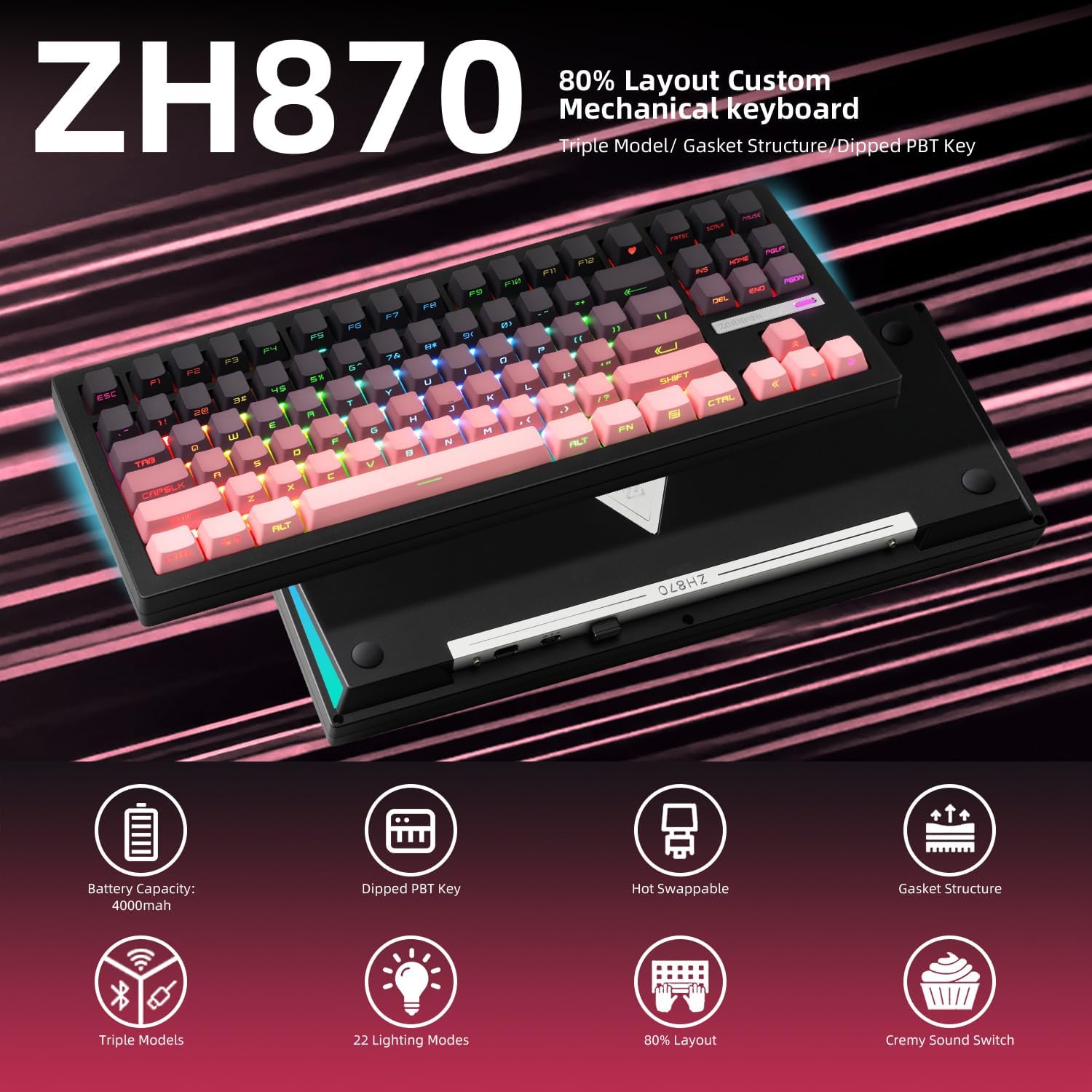
Figure 3: Key features of the ZORNHER ZH870 keyboard.
4. Konfiguracja
4.1. Tryby łączności
The ZH870 supports three connection methods: 2.4GHz wireless, Bluetooth 5.0, and USB-C wired. You can switch between these modes using the dedicated switch on the back of the keyboard.
- Łączność bezprzewodowa 2.4 GHz: Insert the 2.4GHz receiver into a USB port on your device. Select 2.4GHz mode on the keyboard.
- Bluetooth 5.0: Select Bluetooth mode on the keyboard. Pair with your device via Bluetooth settings. The keyboard can connect to up to 5 devices.
- USB-C przewodowy: Connect the provided USB-C cable from the keyboard to your device. Select wired mode on the keyboard.

Figure 4: Triple connection options for the ZH870.
4.2. Ładowanie
The keyboard is powered by a 4000mAh battery. Connect the USB-C cable to the keyboard and a power source (e.g., computer USB port, wall adapter) to charge. The battery status can be monitored via the keyboard's display or software.
4.3. Regulowane stopy
The keyboard features adjustable feet on the underside, allowing you to set the typing angle for ergonomic comfort. There are multiple height settings available.
5. Instrukcja obsługi
5.1. Tryby oświetlenia RGB
The ZH870 offers 22 preset RGB lighting effects, including side-glow and south-facing LEDs for clean and immersive illumination. Use the function keys (Fn) in combination with other keys to cycle through effects, adjust brightness, and change colors.
- Fn + MENU: Zmień efekt podświetlenia.
- Fn + SHIFT_R: Zmień kolor podświetlenia.
- Fn+F13: Switch side backlight effect.
- Fn + BACKSPACE: Toggle lights off/on.
- Fn + Strzałka w górę: Zwiększ jasność podświetlenia.
- Fn + Strzałka w dół: Zmniejsz jasność podświetlenia.
- Fn + Strzałka w lewo: Zmniejsz prędkość podświetlenia.
- Fn + Strzałka w prawo: Zwiększ prędkość podświetlenia.
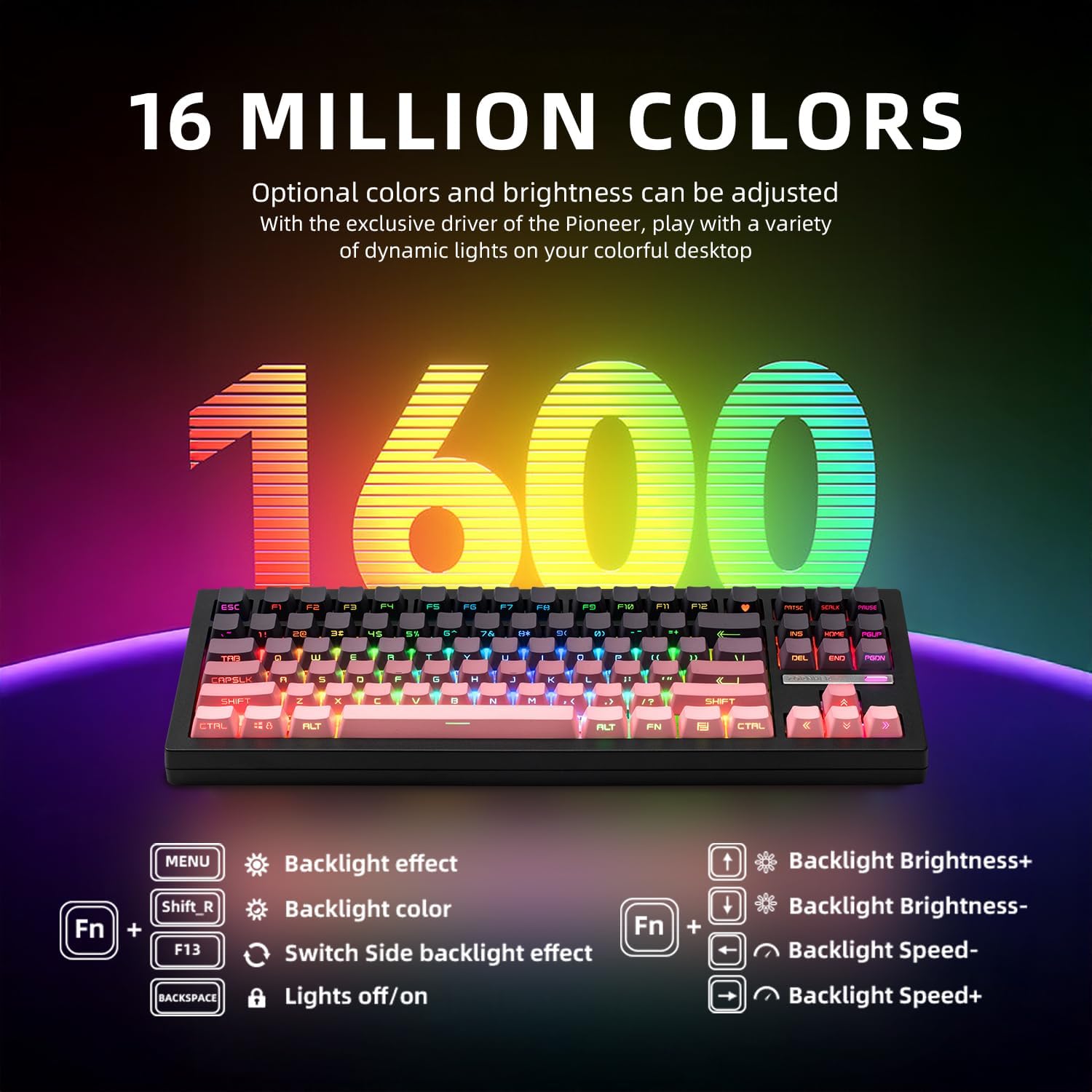
Figure 5: RGB lighting control functions.
5.2. Personalizacja
The keyboard is fully customizable:
- Przełączniki z możliwością wymiany na gorąco: The PCB supports both 3-pin and 5-pin mechanical switches, allowing for easy switch replacement without soldering.
- Wsparcie dla sterowników: Utilize the dedicated driver software to remap keys, set macros, and personalize lighting modes to suit your preferences.

Rysunek 6: Funkcjonalność przełącznika z możliwością wymiany na gorąco.

Figure 7: Software interface for advanced customization.
5.3. Połączenie wielourządzeniowe
The ZH870 can connect to up to 5 devices simultaneously via its triple connection modes, allowing for seamless switching between your computer, tablet, and other compatible devices.
6. Konserwacja
To ensure the longevity and optimal performance of your ZORNHER ZH870 keyboard, regular maintenance is recommended:
- Czyszczenie: Use the provided dust cover when not in use. For general cleaning, gently wipe the keycaps and keyboard surface with a soft, lint-free cloth. Use the included brush to remove dust and debris from between the keycaps.
- Demontaż klawiszy i przełączników: Use the keycap puller and switch puller (if applicable) to carefully remove keycaps and switches for deeper cleaning or replacement.
7. Rozwiązywanie Problemów
Jeśli masz problemy z klawiaturą ZORNHER ZH870, zapoznaj się z poniższymi typowymi rozwiązaniami:
- Problemy z łącznością: Ensure the keyboard is in the correct mode (2.4GHz, Bluetooth, or Wired) for your device. For wireless connections, check battery level and ensure the receiver is properly inserted or Bluetooth is paired. Try restarting the keyboard and your device.
- Klawisze nie reagują: Check if the keyboard is properly connected. If using wireless, ensure it's charged. If specific keys are not working, consider replacing the switch using the hot-swappable feature.
- Problemy z oświetleniem RGB: Verify that the lighting is not turned off (Fn + BACKSPACE). Adjust brightness and effects using the function key combinations. Ensure the driver software is up-to-date for advanced customization.
- Akumulator nie ładuje się: Ensure the USB-C cable is securely connected to both the keyboard and a working power source. Try a different USB-C cable or port.
For further assistance, please contact ZORNHER customer support.
8. Specyfikacje
| Funkcja | Szczegół |
|---|---|
| Wymiary produktu | 16.65 x 7.99 x 2.75 cala |
| Waga przedmiotu | 3.85 funta |
| Producent | ZORNHER |
| Baterie | Wymagane baterie CR5 (w zestawie) |
| Kompatybilne urządzenia | Gaming Console, Laptop, PC, Smart TV, Tablet |
| Technologia łączności | Bluetooth, USB-C, Wi-Fi (2.4 GHz) |
| Opis klawiatury | Mechaniczny |
| Zalecane zastosowania | Do użytku codziennego, do gier, do użytku osobistego |
| Cechy specjalne | 3 Mode, Backlit, Hot-Swappable, Rechargeable |
| Podświetlenie klawiatury | RGB |
9. Gwarancja i wsparcie
Bezprzewodowa mechaniczna klawiatura do gier ZORNHER ZH870 jest wyposażona w 2-letnia gwarancja for worry-free ownership. For any product-related inquiries, technical support, or warranty claims, please contact ZORNHER customer service through the official channels provided at the time of purchase.
10. Filmy produktowe
ZORNHER Mechanical Keyboard Overview
Ten film przedstawia krótki przeglądview of the Zornher mechanical keyboard, highlighting its design and features.
ZORNHER ZH870 Mechanical Keyboard Features
Krótki pokaz wideoasing the ZORNHER ZH870 mechanical keyboard, focusing on its key attributes and aesthetic.


